Can I Share Starlink With My Neighbor and Save Money
Yes, you can share Starlink with your neighbor, but there are important rules and risks to understand first. Sharing your Starlink connection can help both households save money on monthly bills while enjoying reliable satellite internet. This guide covers the legal aspects, practical setup methods, and everything you need to know about Starlink account sharing before you decide to split your connection.
Living in a rural area has its perks. Fresh air, open spaces, and peace and quiet. But when it comes to internet, things can get tough. Satellite internet used to be slow and unreliable. Then Starlink came along and changed the game. Now millions of people enjoy high-speed satellite internet from space. But here is the question many folks ask: can you share that connection with your neighbor? The idea of Starlink internet sharing is tempting. Splitting the cost means both households save money. But is it really that simple? Let us dive into everything you need to know about sharing Starlink with your neighbor and whether it is worth the effort.
Before we get into the details, let us set the stage. Can I Share Starlink With My Neighbor? The short answer is yes, you can. But the longer answer involves terms of service, setup methods, speed concerns, and legal risks. This article breaks it all down so you can make an informed decision. Whether you are looking to save a few bucks or help out a neighbor, you will find practical advice here.
Key Takeaways
- Sharing Starlink is possible: You can technically share your connection with a neighbor using various methods.
- Terms of service matter: Starlink’s user agreement restricts account sharing, so understand the risks first.
- Multiple methods exist: From mesh networks to Wi-Fi extenders, there are practical ways to share your connection.
- Costs add up: Consider whether sharing saves money or creates new expenses for both parties.
- Speed can be affected: Sharing your connection may reduce internet speeds for both households.
- Legal risks exist: Violating Starlink’s terms could result in service termination or account suspension.
📑 Table of Contents
- Understanding How Starlink Works
- Can You Share Starlink With Your Neighbor?
- Legal and Terms of Service Considerations
- Practical Ways to Share Starlink
- Pros and Cons of Sharing Starlink
- Cost Comparison: Sharing vs. Separate Plans
- Tips for Optimizing a Shared Starlink Setup
- Final Thoughts on Sharing Starlink With Your Neighbor
Understanding How Starlink Works
What Is Starlink and Why Is It So Popular?
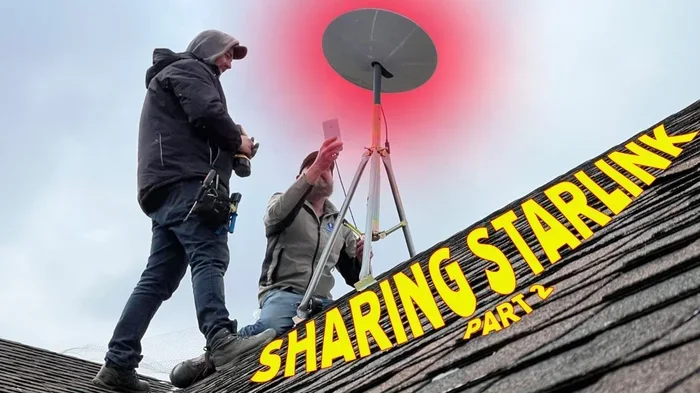
Starlink is a satellite internet service run by SpaceX. It uses a network of small satellites orbiting Earth to deliver high-speed internet. Unlike traditional satellite internet, Starlink offers low latency and fast speeds. Many rural areas lack reliable broadband options. Starlink fills that gap. The system includes a small dish, a router, and a monthly subscription. Starlink installation is straightforward. You set up the dish on your roof or pole, plug it in, and you are online.
The Starlink residential plan costs around $120 per month. The equipment fee is about $599 upfront. For many families, this is a game changer. But what happens when two households want access? That is where Starlink internet sharing comes into play.
How Does the Starlink System Work?
The Starlink dish connects to satellites overhead. It sends and receives data signals. The router then distributes the internet to your devices. You can connect via Wi-Fi or Ethernet cables. The Starlink router supports multiple devices, but there are limits. When too many devices connect, speeds can drop. This is important to understand if you plan to share your connection.
Starlink speed test results vary based on your location and network congestion. During peak hours, speeds may dip. If you add another household to your connection, expect some impact. Planning ahead helps you manage these changes.
Starlink Plans and Pricing
Starlink offers a few different plans. The residential plan is the most common. It provides speeds between 50 and 250 Mbps. The Starlink business plan costs more but offers higher priority data and faster speeds. There is also the Starlink Portable plan for roaming. Understanding these options helps you decide the best way to share your connection.
- Residential Plan: $120/month, standard speeds, best for home use.
- Business Plan: $250/month, higher priority data, faster speeds.
- Portable Plan: $150/month, includes roaming capabilities.
Quick Tips
- Check your Starlink coverage area before setting up sharing.
- Run a Starlink speed test before inviting a neighbor to share.
- Know your Starlink data limits to avoid surprises.
Can You Share Starlink With Your Neighbor?
The Short Answer
Technically, yes. You can share your Starlink connection with your neighbor. There are several ways to do it. But the real question is whether you should. Starlink terms of service have specific rules about account usage. Sharing your account may violate those rules. Let us look at the practical side first and then address the legal side.
When people ask, can I share Starlink with my neighbor, they usually mean one of two things. They either want to let a neighbor connect to their Wi-Fi. Or they want to split the cost of the entire Starlink subscription. Both approaches have different implications.
What Does Starlink Allow?
Starlink’s terms of service state that the account holder is responsible for all usage. The service is designed for a single household. Sharing your Wi-Fi password is different from sharing your Starlink account. When you share your Wi-Fi password, you are sharing your internet connection. This is generally tolerated but not explicitly addressed in Starlink’s terms.
However, splitting the monthly bill and sharing the account itself is a gray area. Starlink does not offer a multi-user or multi-household plan for residential customers. This means that Starlink account sharing outside your household is not officially supported.
Different Ways to Share Your Connection
There are several practical methods for sharing your Starlink connection. Each has pros and cons. Let us explore the most common approaches.
Method 1: Share Your Wi-Fi Password. This is the simplest approach. You give your neighbor your Wi-Fi password. They connect to your network when they need internet. This method does not violate any technical limits. But it does use your data allowance. Your neighbor’s usage affects your speeds.
Method 2: Set Up a Mesh Network. A mesh network extends your Wi-Fi coverage. You place mesh nodes between your home and your neighbor’s home. This creates a strong connection across properties. Mesh networks work well for properties that are close together. They require some technical setup but offer reliable results.
Method 3: Use a Wi-Fi Extender. A Wi-Fi extender boosts your signal to reach your neighbor’s property. These devices are affordable and easy to set up. The downside is that extenders can reduce overall speeds. They work best for light internet use like browsing and email.
Method 4: Run an Ethernet Cable. If your homes are close, you can run a long Ethernet cable between them. This provides a direct, wired connection. It is the most reliable method for sharing. But it requires physical cable runs and some effort.
Method 5: Use Starlink Roaming. Starlink’s portability feature allows you to move your dish. Some users set up a second dish at the neighbor’s property. This requires a separate Starlink account and subscription. It is not really sharing. It is more like each household having their own service.
Expert Insights
Network engineers recommend using a mesh network or Ethernet cable for the best sharing experience. Wi-Fi extenders work but may not provide consistent speeds. Always test your connection after setup to ensure both households get adequate performance.
Legal and Terms of Service Considerations
Starlink’s Acceptable Use Policy
Every Starlink user agrees to the Starlink terms of service during signup. These terms state that the account is for personal, non-commercial use. Sharing your account with a neighbor for free may fall into a gray area. But if your neighbor pays you for access, that could be considered commercial use. This is a clear violation of Starlink’s policy.
Starlink also prohibits reselling or redistributing their service. If you share your connection and your neighbor uses it heavily, Starlink may notice unusual activity. The company monitors data usage patterns. Excessive sharing could trigger an investigation.
Risks of Violating Terms
What happens if Starlink finds out you are sharing? The consequences can be serious. Starlink may suspend or terminate your account. You could lose your equipment deposit. In some cases, you may be banned from future Starlink services. These risks are real and should not be taken lightly.
Additionally, if your neighbor causes any issues on the network, you are legally responsible. Their activity shows up under your account. This includes any illegal activity or excessive bandwidth usage.
What Happens If You Get Caught?
Starlink uses automated systems to monitor network usage. Unusual data patterns can flag your account. If your neighbor is using a large portion of your bandwidth, it becomes noticeable. Starlink may reach out to you with a warning. Repeated violations can lead to service disconnection.
Common Mistakes
- Assuming sharing is okay because Wi-Fi is wireless. Your Wi-Fi password is not a free pass to share your Starlink account commercially.
- Ignoring the terms of service. Many users skim past the agreement. Reading it carefully can save you from service termination.
- Overlooking data caps. Sharing your connection eats into your data allowance faster than you think.
Practical Ways to Share Starlink
Using a Mesh Network for Extended Coverage
A mesh network is one of the best ways to share your Starlink connection. Mesh systems use multiple nodes to create a seamless network. You place the main node connected to your Starlink router. Then you add satellite nodes around your property. These nodes communicate with each other to extend coverage.
Popular mesh systems include brands like Google Nest WiFi, TP-Link Deco, and Netgear Orbi. These systems are easy to set up and manage through a mobile app. The Starlink app can help you monitor your network performance. You can check speeds, view connected devices, and manage settings.
For neighbors who live close by, a mesh node placed near the property line can extend coverage significantly. This method works best when homes are within 50 to 100 feet of each other. Walls, trees, and other obstacles can reduce signal strength.
Setting Up a Wi-Fi Extender
A Wi-Fi extender is a simpler and more affordable option. These devices pick up your existing Wi-Fi signal and rebroadcast it. They plug into a standard electrical outlet. Placement is key. You want the extender close enough to your router for a strong signal. But far enough to reach your neighbor’s property.
Wi-Fi extenders work well for basic internet use. Browsing, streaming light content, and sending emails are all possible. Heavy usage like video calls or large downloads may suffer. The extender halves the bandwidth in some cases because it uses the same radio to receive and transmit data.
Using Starlink Roaming and Portability Features
Starlink’s Starlink roaming feature allows you to use your service in different locations. This is part of the Portable plan. Some users wonder if they can set up a second dish at their neighbor’s home. While technically possible with a separate account, this is not really sharing. It is simply running two separate subscriptions.
The Starlink portability feature lets you pause and move your service. You can relocate your dish to a new address. But each address needs its own active subscription. This means your neighbor would need their own Starlink account to get service at their home.
Running Ethernet to the Neighbor’s Home
For a hardwired connection, running an Ethernet cable is the most reliable option. You connect one end to your Starlink router and the other end to your neighbor’s router or computer. This provides a direct, stable connection with minimal speed loss.
The challenge is the physical cable run. You need to protect the cable from weather and damage. Outdoor-rated Ethernet cables can handle exposure to elements. You may need to run the cable through a shared fence or along the side of a building. This method works best for neighbors who are comfortable with a bit of DIY setup.
Quick Tips for Sharing
- Place your Starlink dish in a central location for best coverage.
- Use a high-quality router to handle multiple connections.
- Set a strong Wi-Fi password to control who accesses your network.
- Monitor your Starlink data limits regularly when sharing.
- Discuss expectations with your neighbor before setting up sharing.
Pros and Cons of Sharing Starlink
Benefits of Sharing Your Connection
Sharing Starlink with your neighbor has some clear advantages. The biggest benefit is cost savings. Splitting the monthly bill means both households pay less for internet. In rural areas where options are limited, this can be a lifeline. Both households get access to reliable, high-speed internet without the full cost burden.
Another benefit is community building. Helping your neighbor stay connected strengthens your relationship. You both gain access to a service that might otherwise be unavailable. Satellite internet sharing can bring entire neighborhoods closer together.
Sharing also means better utilization of your equipment. If you have a Starlink dish and router sitting idle at times, sharing puts that hardware to good use. You get more value from your investment.
Drawbacks to Consider
On the flip side, sharing comes with real downsides. The first is speed reduction. More devices on the network means less bandwidth per user. Both households may experience slower speeds during peak usage times. Streaming, gaming, and video calls can suffer.
Data limits are another concern. Starlink’s residential plan includes a set amount of data. When two households share that data, it runs out faster. Once you exceed the data cap, speeds drop significantly. This can be frustrating for both users.
Legal and contractual risks are also significant. Violating Starlink’s terms of service can lead to account termination. You could lose your investment in equipment. The stress of managing a shared connection can also strain neighborly relationships if usage expectations are not clear.
Cost Comparison: Sharing vs. Separate Plans
Let us break down the numbers. When you share Starlink with your neighbor, how much do you really save? And how does that compare to each household getting their own service?
| Option | Monthly Cost Per Household | Upfront Cost Per Household | Data Allowance Per Household |
|---|---|---|---|
| Separate Plans | $120 each | $599 each | Full allowance each |
| Shared Plan (Wi-Fi Password) | $60 each | $599 (one household) | Shared allowance |
| Shared Plan (Mesh Network) | $60 each | $599 + $100-$300 for mesh | Shared allowance |
| Shared Plan (Ethernet Cable) | $60 each | $599 + cost of cable | Shared allowance |
As you can see, sharing can cut monthly costs in half. But the upfront costs vary depending on the method. A simple Wi-Fi password share costs nothing extra. A mesh network or Ethernet cable requires additional investment. Over time, the savings can add up. But you must weigh those savings against the risks and potential speed issues.
Expert Insight on Costs
Financial advisors suggest calculating the total cost of sharing over 12 months. Factor in equipment costs, potential speed reductions, and the value of your time managing the setup. Sometimes paying for separate plans is worth the peace of mind.
Tips for Optimizing a Shared Starlink Setup
Optimizing Your Starlink Dish Placement
The placement of your Starlink dish affects everything. A clear view of the sky ensures the best signal. Obstructions like trees, buildings, and hills can weaken your connection. When sharing your connection, you want the strongest possible signal. This gives both households the best experience.
Consider using the Starlink app to find the optimal dish location. The app uses your phone’s camera to show sky visibility. It helps you identify the best spot on your property. A well-placed dish makes a huge difference in speed and reliability.
Managing Data Usage Effectively
When two households share one connection, data management becomes critical. Both users should be mindful of their usage. Heavy activities like 4K streaming, large downloads, and online gaming consume a lot of data. Setting usage expectations with your neighbor helps prevent conflicts.
You can also use the Starlink app to monitor real-time data usage. The app shows how much data each household is consuming. This transparency helps both parties stay within reasonable limits. Consider setting up usage schedules. For example, one household uses heavy data in the morning while the other uses it in the evening.
Keeping Both Users Happy
Communication is the key to a successful shared setup. Talk openly with your neighbor about expectations. Discuss usage habits, peak times, and data limits. Setting ground rules early prevents misunderstandings later.
Consider creating a simple sharing agreement. This does not need to be a legal document. A casual conversation about expectations works just as well. Both parties should agree on fair usage and respect each other’s needs.
Common Mistakes to Avoid
- Not discussing data limits upfront. Both households should know the data cap and agree on fair usage.
- Using cheap equipment. A low-quality router or extender can ruin the experience for both users.
- Ignoring speed drops. If speeds become unusable, it is time to reassess the sharing arrangement.
- Forgetting about security. Sharing your Wi-Fi means sharing your network. Use strong passwords and enable network encryption.
Final Thoughts on Sharing Starlink With Your Neighbor
So, can I share Starlink with my neighbor? The answer is yes, you can. But it comes with caveats. The practical methods are straightforward. A Wi-Fi password, mesh network, Wi-Fi extender, or Ethernet cable can all work. The real challenge lies in the legal and terms of service side.
Sharing Starlink can save both households money. It can also strengthen your community. But it requires trust, communication, and a clear understanding of the risks. Before you decide, read Starlink’s terms of service carefully. Consider the potential speed reductions and data limitations. Talk openly with your neighbor about expectations.
If both households are willing to navigate the challenges, sharing Starlink can be a rewarding experience. The key is to set clear boundaries and monitor performance regularly. With the right setup and honest communication, sharing your Starlink connection can work well for everyone involved.
Remember, the goal is to improve internet access for both households. Do it responsibly. Do it legally. And most importantly, do it with a neighbor you trust. Happy sharing!
Frequently Asked Questions
Is it legal to share Starlink with my neighbor?
Sharing your Wi-Fi password is a gray area. Starlink’s terms of service are designed for single-household use. Commercial sharing or splitting the bill could violate their policies. Always review the terms carefully before sharing your connection.
Will sharing Starlink slow down my internet speed?
Yes, sharing your connection can reduce speeds for both households. More devices mean less bandwidth per user. During peak hours, the slowdown can be noticeable. Using a mesh network or Ethernet cable can help minimize speed loss.
Can my neighbor use my Starlink account?
Technically, yes, if they connect to your Wi-Fi. But sharing the Starlink account itself is not officially supported. Each Starlink account is meant for a single household. Using one account for multiple properties could lead to service termination.
How much data does Starlink use per month?
The Starlink residential plan does not have a hard data cap like some providers. However, Starlink does have a “best efforts” data policy. During congestion, users who use more data may experience slower speeds. Sharing your connection means both households share the same data pool.
What is the best way to share Starlink with a neighbor?
The best method depends on your setup. A mesh network offers the most reliable extended coverage. An Ethernet cable provides the fastest and most stable connection. Sharing your Wi-Fi password is the simplest option but offers the least control.
Can I get in trouble for sharing Starlink with my neighbor?
Starlink monitors network usage. Excessive sharing or commercial use could trigger a review of your account. If found in violation of terms, your service could be suspended or terminated. It is best to understand the risks before sharing your connection.
=== CONCLUSION ===
Can I Share Starlink With My Neighbor and Save Money? Absolutely. But success depends on understanding the risks, choosing the right sharing method, and communicating openly with your neighbor. Whether you use a mesh network, Wi-Fi extender, or simple password sharing, each approach has trade-offs. The most important steps are to review Starlink’s terms, monitor your data usage, and set clear expectations. With the right preparation, sharing your Starlink connection can be a smart way to reduce costs and bring your neighborhood closer together.