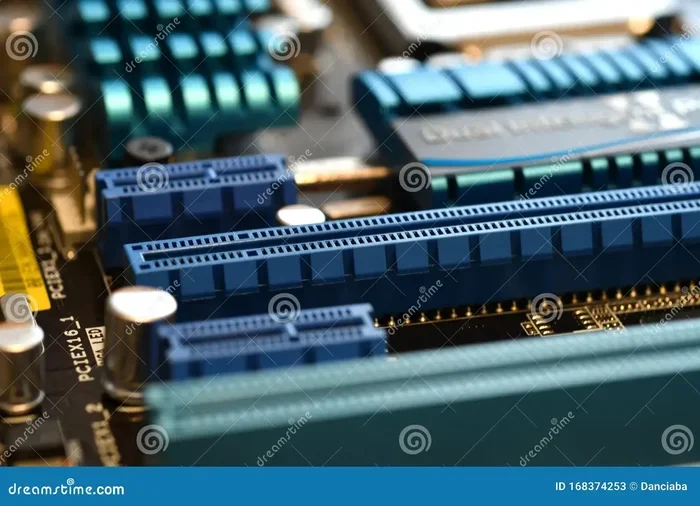
Difference Between Pci Express X1 And X16 Explained
The PCI Express x1 vs x16 debate matters for anyone building or upgrading a PC. The x1 slot is compact and perfect for smaller expansion cards, while the x16 slot delivers the massive bandwidth your graphics card needs. Understanding these slots helps you get the best performance from your hardware.
If you have ever looked at a motherboard, you have probably noticed those long and short slots along the bottom edge. They are called PCI Express slots, and they come in different sizes. The two most common are the PCI Express x1 and the PCI Express x16. Understanding the difference between them can save you a lot of headaches when building or upgrading a PC.
Whether you are a casual user, a gamer, or someone who works with video editing, knowing which slot to use and why makes a big difference. In this guide, we will break down everything you need to know about the PCI Express x1 vs x16 comparison. We will cover what each slot does, how they differ, and how to choose the right one for your setup.
Key Takeaways
- PCI Express x1 is a single-lane slot ideal for low-bandwidth devices like sound cards and network adapters.
- PCI Express x16 is a 16-lane slot designed for high-performance graphics cards and GPUs.
- Bandwidth increases with lane count, meaning x16 transfers data much faster than x1.
- You can use a x1 card in a x16 slot and vice versa, but performance may vary.
- Physical size differs greatly between x1 and x16 slots on a motherboard.
- Choosing the right slot depends on your device’s bandwidth needs and your motherboard layout.
📑 Table of Contents
- What Is PCI Express?
- PCI Express x1 Slot Explained
- PCI Express x16 Slot Explained
- PCI Express x1 vs x16: Head-to-Head Comparison
- Can You Use a x1 Card in a x16 Slot?
- Can You Use a x16 Card in a x1 Slot?
- Common Mistakes When Choosing PCIe Slots
- Expert Tips for Maximizing PCIe Performance
- The Bottom Line
What Is PCI Express?
PCI Express, often shortened to PCIe, is the standard way components connect to your motherboard. Think of it as a highway system inside your computer. Data travels between your CPU, GPU, storage drives, and other devices through these lanes. The more lanes a connection has, the more data can move at once.
The PCIe interface has been around since 2004 and has gone through several generations. Each new generation offers faster speeds. Today, most modern motherboards support PCIe 3.0 and PCIe 4.0, with PCIe 5.0 starting to appear in newer systems. The slot size tells you how many lanes are available, and that directly affects how fast data moves through the connection.
How PCIe Lanes Work
Every PCIe connection uses something called lanes. A lane is a pair of point-to-point connections that send and receive data. The x1 slot has one lane. The x16 slot has sixteen lanes. More lanes mean more bandwidth, which means faster data transfer. This is the core reason why the PCI Express x1 vs x16 comparison matters so much.
When you plug a device into a slot, the number of lanes available determines how much data the device can handle at any given moment. A sound card does not need much bandwidth, so it works fine on a single lane. A graphics card, on the other hand, needs a lot of bandwidth to render games and videos smoothly. That is why GPUs use the x16 slot.
PCIe Generations at a Glance
Each PCIe generation doubles the bandwidth per lane compared to the previous one. Here is a quick look at the generations:
- PCIe 1.0 — The earliest widely used version. Each lane offers about 250 MB/s of bandwidth.
- PCIe 2.0 — Doubled the speed to roughly 500 MB/s per lane.
- PCIe 3.0 — Current mainstream standard with about 985 MB/s per lane.
- PCIe 4.0 — Newer standard with nearly 2 GB/s per lane.
- PCIe 5.0 — The latest generation, offering around 4 GB/s per lane.
So when you compare a PCIe 4.0 x16 slot to a PCIe 3.0 x1 slot, the difference in bandwidth is enormous. But even within the same generation, the lane count makes a huge impact. This is why the PCI Express x1 vs x16 comparison is not just about slot size — it is about real-world performance.
PCI Express x1 Slot Explained
The x1 slot is the smallest PCIe slot you will find on a motherboard. It has just one lane and is perfect for devices that do not need a lot of data bandwidth. Despite its small size, the x1 slot plays an important role in any PC build.
The physical length of a x1 slot is quite short — just about 25 millimeters. This makes it easy to spot on any motherboard. Even if a motherboard has a x16 slot available, a x1 card will only use that one small slot.
What You Can Plug Into a x1 Slot
Many common expansion cards use the x1 slot. Here are some examples of devices that work perfectly with a single lane:
- Sound cards — For better audio quality in music production or gaming.
- Network cards — Extra Ethernet ports or Wi-Fi adapters.
- USB expansion cards — Add more USB ports to your system.
- Capture cards — For streaming or recording gameplay.
- RAID controllers — For managing multiple hard drives.
- TV tuner cards — To watch or record television on your PC.
None of these devices need the massive bandwidth that a graphics card requires. So the x1 slot handles them with ease. If you are wondering whether you can use a x1 card in a bigger slot, the answer is yes — more on that later.
Real-World x1 Use Cases
Let us look at a practical example. Say you are a music producer who needs a quality audio interface. Your motherboard already has a built-in sound chip, but it does not deliver the clarity you need. You buy a dedicated external sound card that connects via PCIe. A x1 slot is all you need. The card sends audio data back and forth quickly enough without any bottleneck.
Another example is a home server. You might add a network card to get faster Ethernet speeds or a RAID controller to manage multiple hard drives. Both of these devices work great in a x1 slot because their data demands are modest. The PCI Express x1 vs x16 difference really shows here — you do not waste a large slot on a small device.
PCI Express x16 Slot Explained
The x16 slot is the big one. It is the longest slot on your motherboard and provides the most bandwidth. When most people talk about PCIe slots, they are thinking about the x16 slot because that is where the graphics card goes.
A x16 slot is about 89 millimeters long, making it hard to miss. It has sixteen lanes, which gives it the highest data transfer rate of any standard PCIe slot. This is essential for devices that handle massive amounts of data in real time, like video cards and GPUs.
Why x16 Matters for Graphics Cards
Modern graphics cards are data hungry. When you are playing a demanding game at high resolution, your GPU is constantly pulling textures, shaders, and frame data. It also needs to send rendered frames back to your monitor quickly. All of this requires a lot of bandwidth.
A x16 slot provides enough bandwidth to keep up with even the most powerful GPUs on the market. If you tried to run a high-end graphics card in a x1 slot, the limited bandwidth would create a serious bottleneck. Your game performance would drop, and you might experience stuttering or low frame rates.
This is the single biggest reason the PCI Express x1 vs x16 comparison is so important for gamers and creative professionals. The x16 slot is built for performance-heavy devices, and it delivers.
x16 Bandwidth Explained
Let us look at the numbers to understand the bandwidth difference. On PCIe 3.0, a x1 slot provides about 985 MB/s of bandwidth. A x16 slot on PCIe 3.0 provides roughly 15.75 GB/s. That is about sixteen times more bandwidth.
On PCIe 4.0, the numbers jump significantly. A x1 slot gives you about 1.97 GB/s, while a x16 slot gives you around 31.5 GB/s. The gap is massive, and it directly affects how well your devices perform. For tasks like 4K video editing, 3D rendering, or running the latest AAA games, that x16 bandwidth is essential.
Keep in mind that not all x16 slots are created equal. Some motherboards have x16 slots that actually run at x8 or even x4 electrically, even though they look like full x16 slots. Always check your motherboard manual to confirm the true lane configuration.
PCI Express x1 vs x16: Head-to-Head Comparison
Now that we have covered each slot individually, let us put them side by side. This comparison will help you quickly see where each slot shines and where it falls short.
| Feature | PCI Express x1 | PCI Express x16 |
|---|---|---|
| Number of Lanes | 1 | 16 |
| Physical Length | ~25 mm | ~89 mm |
| PCIe 3.0 Bandwidth | ~985 MB/s | ~15.75 GB/s |
| PCIe 4.0 Bandwidth | ~1.97 GB/s | ~31.5 GB/s |
| Common Devices | Sound cards, NICs, USB cards | Graphics cards, GPUs |
| Best For | Low-bandwidth expansion | High-performance devices |
| Slot Size on Motherboard | Smallest | Largest |
| Power Draw | Very low | Higher (depends on device) |
The table makes it clear why you cannot swap these slots around casually. A graphics card needs the x16 bandwidth to perform well. A sound card does not need that much bandwidth and works perfectly in a x1 slot. Choosing the wrong slot can lead to poor performance or even prevent a device from working at all.
One thing to keep in mind is backward compatibility. PCIe is designed to be backward compatible across generations. A PCIe 3.0 card will work in a PCIe 4.0 slot and vice versa. The connection will simply run at the speed of the slower component. This is an important detail when you are comparing the PCI Express x1 vs x16 options across different PCIe generations.
Can You Use a x1 Card in a x16 Slot?
Yes, you absolutely can. The x1 card will physically fit into a x16 slot without any issues. The card will only use the one lane it needs, and the rest of the lanes in the x16 slot will remain unused.
This is actually a very common setup. Many people install a sound card or a network card into a x16 slot because that is the only slot available on their motherboard. The device will work perfectly fine. You will not gain any performance benefit from using the x16 slot for a x1 device, but you also will not lose anything.
The key takeaway here is flexibility. PCIe slots are designed to be versatile. A x16 slot can accept smaller cards, and a x1 slot can only accept x1 cards (or smaller). This makes it easy to plan your motherboard layout when building a PC.
Can You Use a x16 Card in a x1 Slot?
This is where things get tricky. A x16 graphics card physically will not fit into a x1 slot. The card is way too long for the small slot. However, there is a workaround that some people use.
A riser cable or riser adapter can extend the x16 card and allow it to connect to a x1 slot electrically. This is commonly seen in cryptocurrency mining rigs, where people install multiple GPUs in a single system. The riser cable changes the physical connection but does not increase the available bandwidth.
Here is the important part: when you use a x16 card in a x1 slot through a riser, you are limited to the bandwidth of a x1 connection. That means your graphics card will not perform anywhere near its full potential. For gaming or professional work, this is not a good idea. But for mining, where the workload is different, it can work.
So if you are ever wondering about the PCI Express x1 vs x16 question in terms of compatibility, remember this — physical fit and electrical bandwidth are two different things. A card may physically fit, but it will only perform as well as the lanes allow.
Common Mistakes When Choosing PCIe Slots
Many people make avoidable mistakes when selecting PCIe slots for their devices. Here are some of the most common ones:
- Putting a GPU in a x1 slot. This will not work physically for most graphics cards. Even if it does with a riser, the bandwidth is far too low for good performance.
- Ignoring the motherboard manual. Some x16 slots run at fewer lanes than expected. Always check how many lanes each slot actually provides.
- Using a x16 slot for a simple device. There is nothing wrong with this, but you might block nearby slots and limit your expansion options.
- Overlooking PCIe generation. A x16 slot on PCIe 2.0 has half the bandwidth of a x16 slot on PCIe 3.0. Generation matters as much as lane count.
- Assuming all slots are equal. Slots closest to the CPU usually have the most direct connection and the best performance.
Avoiding these mistakes will help you get the most out of your motherboard and all the devices you connect to it. The PCI Express x1 vs x16 comparison is not just academic — it has real consequences for your daily computing experience.
Expert Tips for Maximizing PCIe Performance
Want to get the best performance from your PCIe slots? Here are some practical tips from experienced builders and technicians:
- Always install your GPU in the top x16 slot. This slot usually has the direct CPU connection and the most lanes available.
- Check your CPU lane allocation. Some CPUs provide fewer PCIe lanes than others. A high-end CPU might offer 20 or more lanes, while a budget CPU might only offer 16.
- Do not ignore M.2 slots. Many modern motherboards use PCIe lanes for M.2 NVMe SSDs. Each M.2 slot takes lanes away from your PCIe slots.
- Use a x1 slot for low-bandwidth devices. Keep your x16 slot free for the graphics card or the most demanding device.
- Consider a riser only when necessary. Riser cables can introduce instability or reduce performance. Use them only when your layout truly requires it.
- Update your motherboard BIOS. Newer BIOS versions sometimes improve PCIe lane routing and compatibility.
These tips will help you plan your build more effectively and avoid the common pitfalls that slow down your system. When you understand the PCI Express x1 vs x16 difference, you can make smarter decisions about where each device goes.
The Bottom Line
The difference between PCI Express x1 and x16 comes down to lanes, bandwidth, and intended use. The x1 slot is compact and perfect for low-bandwidth devices like sound cards, network adapters, and USB expansion cards. The x16 slot is the workhorse of your motherboard, designed to handle the heavy data demands of graphics cards and other high-performance devices.
Both slots are essential in their own way. A modern PC needs both types to function at its best. Understanding the PCI Express x1 vs x16 comparison empowers you to build smarter, troubleshoot faster, and get the most value out of your hardware.
So the next time you look at your motherboard, you will know exactly what those different slots are for. Take a moment to plan your layout, check your motherboard manual, and make sure every device is in the right place. Your system will thank you with better performance and fewer headaches.
Frequently Asked Questions
Can I put a sound card in a x16 slot?
Yes, you can. A sound card will fit and work perfectly in a x16 slot. It will only use one lane, and the rest will remain unused. There is no performance penalty for using a larger slot for a smaller device.
Does a x16 slot always run at x16 speed?
Not always. Some motherboards have x16 slots that run at x8 or x4 speed depending on the CPU and chipset. Always check your motherboard manual to confirm the true electrical configuration of each slot.
What happens if I use a GPU in a x1 slot?
A standard GPU will not physically fit in a x1 slot. With a riser cable, it might fit electrically, but the limited bandwidth will severely reduce performance. Gaming and rendering will suffer badly in a x1 slot.
Are PCIe slots backward compatible?
Yes, PCIe is fully backward compatible. A PCIe 3.0 card will work in a PCIe 4.0 slot, and a PCIe 2.0 card will work in a PCIe 3.0 slot. The connection will run at the speed of the slower component.
How many PCIe lanes does a typical CPU provide?
Most consumer CPUs provide 16 to 20 PCIe lanes. High-end desktop CPUs can offer more. These lanes are shared between the GPU, M.2 SSDs, and other PCIe devices on your motherboard.
Can I use a PCIe x1 card in any slot?
A x1 card can fit into a x1, x4, x8, or x16 slot. It will only use the one lane it needs. Just make sure the slot is on the same PCIe generation for the best performance.
=== CONCLUSION ===
The PCI Express x1 vs x16 comparison is one of the most important things to understand when building or upgrading a PC. The x1 slot serves low-bandwidth devices with ease, while the x16 slot delivers the raw data throughput that modern graphics cards demand. Both slots have their place, and knowing when to use each one makes all the difference.
Remember to check your motherboard manual, plan your slot layout, and always match your device to the right slot type. With the knowledge you have gained from this guide, you are now equipped to make confident decisions about your PCIe setup. Apply these tips to your next build, and you will enjoy a faster, more efficient PC.