Can You Pair 2 Monster Speakers Together for Better Sound
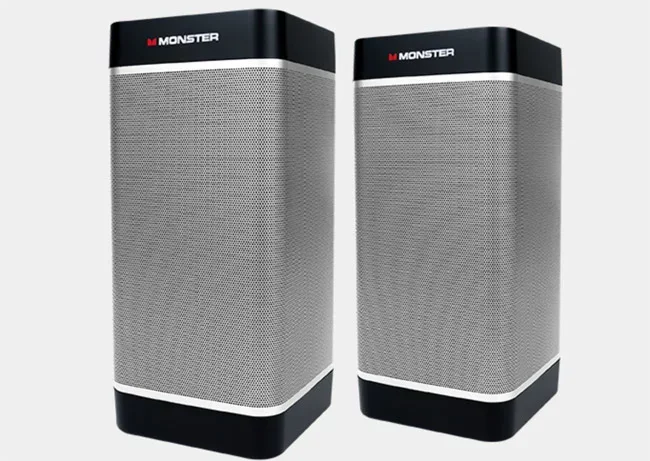
Yes, you can pair 2 Monster speakers together to create a richer, more powerful sound experience. Whether you want stereo separation or louder volume at a party, pairing Monster speakers is straightforward and works with most Bluetooth-enabled models. This guide walks you through every method, common issues, and pro tips for the best results.
Music hits different when it fills the room. A single speaker can only do so much. But what if you could double the power? That is exactly why people ask whether they can pair 2 Monster speakers together.
The short answer is yes. Most Monster speakers made in recent years support pairing. You get louder volume, better stereo separation, and a richer listening experience. But the process is not always obvious. Different models use different methods. Some connect wirelessly. Others need a cable. And a few require a companion app.
In this guide, I will walk you through every way to pair two Monster speakers. I will cover Bluetooth pairing, wired setups, stereo mode, and common problems you might run into. By the end, you will know exactly what to do with your specific model.
Pairing speakers is not just about plugging them in. It is about understanding how the signals work. When two speakers communicate, one acts as the master and the other as the slave. The master receives the audio source signal and sends it to the slave. This happens in milliseconds. You barely notice any delay.
Monster is a well-known brand in the audio world. They make speakers that range from portable Bluetooth units to large home theater systems. Their speakers are popular because they deliver strong bass and clear highs. But pairing two of them together requires a bit of know-how. Let me break it all down for you.
Key Takeaways
- Monster speakers support pairing: Most modern Monster Bluetooth speakers can be connected wirelessly or via cable for a dual-speaker setup.
- Multiple pairing methods exist: You can use Bluetooth pairing, wired connections, or a dedicated app depending on your model.
- Stereo mode splits audio channels: Pairing two speakers lets one handle left audio and the other handle right audio for a true surround feel.
- Common issues are easy to fix: Most pairing problems stem from distance, outdated firmware, or interference from other devices.
- Not all models pair the same way: Always check your specific Monster speaker manual before attempting a connection.
- Pairing enhances your audio experience: Dual speakers deliver deeper bass, wider soundstage, and higher volume than a single unit.
📑 Table of Contents
Why Pair Two Monster Speakers?
You might wonder why anyone would want to pair two speakers. The answer is simple. A single speaker has limits. Even the best Monster portable speaker cannot fill a large room evenly. Pairing two speakers solves that problem in several ways.
First, you get stereo sound. One speaker handles the left channel. The other handles the right. This creates a wide soundstage that makes music feel alive. Instruments seem to come from different directions. Vocals sit right in the middle. It is a completely different experience from mono sound.
Second, you get more volume. Two speakers working together produce significantly louder output than one. This matters for outdoor parties, backyard gatherings, or even just a big living room. You do not have to crank the volume on a single speaker and risk distortion.
Third, dual speakers give you better bass response. Low frequencies need power to sound full. When two speakers share that load, the bass sounds deeper and cleaner. It does not distort at high volumes the way a single speaker might.
Finally, pairing speakers future-proofs your setup. You can expand later. Add a third speaker if your Monster model supports it. Some people even daisy-chain speakers for events and outdoor concerts. The possibilities grow once you understand the basics.
How to Pair 2 Monster Speakers Together
Now let us get into the actual steps. There are three main ways to pair Monster speakers. Your model determines which method works best. Let me walk you through each one.
Method 1: Bluetooth Wireless Pairing
Most modern Monster speakers use Bluetooth. This is the easiest and most popular method. Here is how to do it step by step.
First, turn on both speakers. Make sure they are fully charged or plugged in. Bluetooth pairing drains battery faster, so keep that in mind.
Next, put both speakers into pairing mode. On most Monster models, you hold down the Bluetooth button for three to five seconds. A flashing LED light usually indicates the speaker is ready to pair. Check your manual if you are unsure about the exact steps for your model.
Now, on your phone or tablet, open the Bluetooth settings. Look for the first speaker in the list of available devices. Tap on it to connect. Once the first speaker connects, go back to the speaker controls and put the second speaker into pairing mode.
Some Monster speakers have a dedicated “pair” or “link” button. Press this on the first speaker, then press it on the second. The speakers will search for each other automatically. You will hear a confirmation tone when they connect.
Once both speakers are linked, play music from your phone. The audio should stream to both speakers simultaneously. If one speaker is louder than the other, check the balance settings on your device.
Quick tip: If your Monster speaker supports it, you can also pair it with speakers from other brands. But compatibility is not guaranteed. Stick to the same brand when possible for the best results. If you are curious about pairing speakers from other brands, check out can you pair 2 Doss speakers together for a similar process.
Method 2: Wired Connection Using an Audio Cable
Not all Monster speakers support Bluetooth pairing. Older models and some budget units rely on wired connections. This method works well and often produces a more stable connection.
You will need a 3.5mm auxiliary cable or an RCA cable, depending on your speaker inputs. Most Monster speakers have a standard 3.5mm AUX input. Some larger models use RCA ports.
Start by connecting one end of the cable to the audio output of your source device. This could be your phone, laptop, or music player. Plug the other end into the input of the first speaker.
Then use a second cable to connect the output of the first speaker to the input of the second speaker. Some Monster speakers have a “line out” or “aux out” port designed for this purpose. If your speaker does not have this port, the wired method may not work.
This daisy-chain setup sends the same audio signal to both speakers. You do not get true stereo separation with this method unless your source device supports dual audio output. But you do get louder volume and fuller sound.
Quick tip: Keep your cables as short as possible. Long cables can cause signal loss and reduce audio quality. If you need a longer run, consider using a high-quality cable with shielding to prevent interference.
Method 3: Using the Monster Speaker App
Some newer Monster speakers connect through a dedicated app. The app gives you more control over the pairing process and audio settings.
Download the Monster app from the App Store or Google Play Store. Open the app and turn on your speakers. The app should detect both speakers automatically.
Follow the on-screen prompts to pair the speakers. The app will walk you through selecting stereo mode, adjusting volume balance, and setting up EQ presets. This method gives you the most control over your sound.
The app also lets you update speaker firmware. Firmware updates often fix Bluetooth connectivity issues and improve pairing stability. Always check for updates before troubleshooting pairing problems.
Understanding Stereo Mode vs. Party Mode
When you pair two Monster speakers, you usually have two modes to choose from. Understanding the difference helps you get the best sound for any situation.
Stereo Mode
In stereo mode, one speaker plays the left audio channel and the other plays the right channel. This creates a wide, immersive sound field. Music sounds spacious and natural. It is ideal for listening in a room where you can place the speakers a few feet apart.
To enable stereo mode, check your speaker manual or app. Some Monster speakers automatically enter stereo mode when two units are paired. Others require you to press a specific button combination.
Stereo mode works best when both speakers are the same model. Mixing different brands or models can cause imbalances in volume and frequency response. The left and right channels may not match perfectly.
Party Mode (Mono Mode)
Party mode sends the same audio to both speakers. This is also called mono mode. Both speakers play identical audio, which doubles the volume. It is perfect for large gatherings and outdoor events where you need sheer loudness.
Party mode does not give you stereo separation. The sound comes from both speakers equally, so you lose the sense of direction in music. But for dancing and background music at a party, it works great.
Some Monster speakers call this “dual mode” or “twin mode.” The naming varies by model, but the concept is the same. Check your speaker’s manual or the companion app to switch between modes.
Common Problems When Pairing Monster Speakers
Pairing speakers is not always smooth sailing. Here are the most common issues people face and how to fix them.
Speakers Will Not Connect
This is the most frequent complaint. The first thing to check is distance. Bluetooth has a range of about 30 feet in open space. Walls, furniture, and other obstacles reduce that range. Move both speakers closer together and try again.
Next, make sure both speakers are in pairing mode. A steady light usually means connected. A flashing light means ready to pair. If the light is off, the speaker may not be powered on or may be connected to another device.
Sometimes, a speaker is still paired to a previous device. Go to your phone’s Bluetooth settings and forget the speaker. Then try pairing again from scratch. This clears any old connections that might be causing conflicts.
Audio Delay or Lag
A slight delay between the two speakers can be annoying. One speaker plays a split second after the other. This usually happens with wireless connections.
To reduce delay, keep both speakers close to each other and to your audio source. Interference from Wi-Fi routers, microwaves, and other Bluetooth devices can cause lag. Move away from these devices and try again.
If you are using a wired connection, the delay is usually minimal. Wired connections are more reliable for synchronized audio. This is why many professional DJs prefer wired setups. If you want to learn more about speaker setups for events, check out can you use any speaker for DJ.
One Speaker Is Louder Than the Other
This usually happens when the speakers are different models or have different firmware versions. Even two speakers of the same model can have slight volume differences out of the box.
Check the balance settings on your audio source. You can adjust the left and right volume balance in your phone or computer settings. Most audio players have a balance slider in the settings or preferences menu.
If the problem persists, try resetting both speakers. Refer to the manual for the reset procedure. Usually, it involves holding down a power or reset button for 10 to 15 seconds. After resetting, try pairing again.
Bluetooth Keeps Disconnecting
Intermittent connections are frustrating. The most common cause is distance. Stay within 15 to 20 feet of both speakers for the most stable connection.
Other devices can also interfere. If your Wi-Fi router is nearby, it might be causing conflicts. Bluetooth and Wi-Fi both use the 2.4GHz frequency band. Switching your router to the 5GHz band can help. Similarly, blocking Wi-Fi in a room is a different topic but shows how frequency interference can affect wireless devices.
Firmware updates also fix disconnection issues. Open the Monster app and check for updates. Keeping your speakers up to date ensures the best performance.
Tips for the Best Pairing Experience
A few simple tips can make a huge difference in your paired speaker setup. Here is what I recommend based on experience.
- Use matching speaker models: Two identical Monster speakers give the best results. Different models may have varying volume levels and frequency responses.
- Keep speakers close together: Place them within 10 feet of each other for the strongest wireless connection. Too much distance weakens the signal.
- Charge both speakers fully: Low battery can cause pairing failures and audio dropouts. Always start with a full charge.
- Minimize interference: Keep your speakers away from Wi-Fi routers, microwaves, and other Bluetooth devices. Clean airspace gives the best connection.
- Update firmware regularly: Monster releases updates that fix bugs and improve connectivity. Check the app monthly.
- Reset before troubleshooting: A factory reset solves most pairing issues. Do this before trying complicated fixes.
- Experiment with placement: Try placing speakers at different angles and distances. Small changes can improve stereo imaging and bass response.
Pairing two Monster speakers opens up a whole new world of sound. You get louder volume, true stereo separation, and richer audio. It is one of the easiest ways to upgrade your listening experience without buying new equipment.
The process is straightforward for most models. Bluetooth pairing takes just a few minutes. Wired connections take a bit more setup but offer reliable performance. And the companion app gives you fine-tuned control over every aspect of the sound.
Remember that not every pairing attempt will go perfectly. Interference, outdated firmware, and mismatched models can all cause issues. But the troubleshooting steps in this guide cover most problems you will encounter. A quick reset or firmware update usually solves everything.
If you are new to the world of wireless audio, pairing speakers is a great place to start. It teaches you the basics of Bluetooth connectivity and audio synchronization. Once you get the hang of it, you can explore more advanced setups. Some people even connect three or four speakers for massive sound coverage.
Monster speakers are built to last. They are durable, powerful, and designed for real-world use. Pairing two of them together brings out the best in both units. Whether you are hosting a party, enjoying a quiet evening, or just want better sound in your workspace, dual Monster speakers deliver.
So go ahead. Grab your second Monster speaker. Follow the steps in this guide. And get ready to hear your music the way it was meant to sound. Pairing 2 Monster speakers together is one of the simplest upgrades you can make to your audio setup. The difference in sound quality is immediate and noticeable.
Frequently Asked Questions
Can I pair two different Monster speaker models together?
It depends on the models. Some newer Monster speakers can pair with other models from the same brand. However, matching models always give the best results. Different models may have different volume levels and frequency responses, which can cause imbalances. Check your speaker manual or the Monster app for compatibility details.
How far apart should I place my paired Monster speakers?
For the best stereo effect, place the speakers 6 to 10 feet apart. This creates a wide soundstage without losing connection strength. If you are using Bluetooth, keep both speakers within 30 feet of your audio source. For wired connections, shorter cables give better signal quality.
Why won’t my Monster speakers pair via Bluetooth?
The most common reasons are distance, interference, or an old firmware version. Make sure both speakers are in pairing mode and within 15 feet of each other. Turn off other Bluetooth devices nearby. Also, check for firmware updates in the Monster app. A factory reset on both speakers often fixes stubborn pairing issues.
Can I pair more than two Monster speakers together?
Some Monster models support connecting three or more speakers. Check your specific model’s manual or the Monster app for multi-speaker support. Not all speakers can be daisy-chained or grouped. Using speakers from the same product line gives the most reliable results for multi-speaker setups.
Does pairing two speakers reduce battery life?
Yes, pairing two speakers uses more battery than using one. Bluetooth connections and audio processing both draw power. To maximize battery life, keep your speakers charged and reduce volume when possible. For long events, keep both speakers plugged into a power source.
What is the difference between stereo mode and party mode when pairing speakers?
Stereo mode sends different audio to each speaker, creating a wide sound field with left and right channels. Party mode sends the same audio to both speakers for louder volume. Stereo mode is best for music listening. Party mode is ideal for gatherings and events where you need maximum volume and coverage.