The Complete Definition of Macromedia Flash Explained
Macromedia Flash was a powerful multimedia platform used to create web animations, interactive content, and rich Internet applications. Originally developed by Macromedia, it transformed how people experienced interactive media on the web. The software relied on the Flash Player browser plugin and used vector graphics to deliver smooth, lightweight animations. Though it has been discontinued, Macromedia Flash left a lasting impact on digital design and web development.
If you grew up in the early days of the internet, you probably remember Macromedia Flash. It was everywhere. Flash games, animated websites, and quirky video players all relied on this one platform. But what exactly was Macromedia Flash, and why did it matter so much?
Macromedia Flash was a multimedia software platform used to add animation, interactivity, and rich media to web pages. It powered countless Flash animations, interactive websites, and browser-based games throughout the 2000s. Today, it is no longer in use, but its legacy lives on in modern web technologies. In this article, we will break down the complete definition of Macromedia Flash, explore how it worked, and explain why it eventually faded away.
Whether you are a curious learner, a web developer looking back at history, or someone who misses those old Flash games, this guide covers everything you need to know. Let us dive into the world of Macromedia Flash and understand what made it so special.
Key Takeaways
- Macromedia Flash was a multimedia platform for creating animations and interactive web content.
- It used vector graphics and the Flash Player plugin to deliver rich experiences in browsers.
- ActionScript was the programming language that powered interactive Flash content.
- The platform dominated web design in the 2000s before declining due to mobile compatibility issues.
- Adobe acquired Macromedia in 2005 and eventually discontinued Flash in 2020.
- Understanding Macromedia Flash helps appreciate modern web technologies that replaced it.
- Flash animation and Flash movies remain nostalgic memories for many internet users.
📑 Table of Contents
- What Exactly Is Macromedia Flash?
- How Macromedia Flash Worked
- The Rise and Fall of Macromedia Flash
- Macromedia Flash vs Modern Alternatives
- Why Understanding Macromedia Flash Still Matters
- Common Mistakes People Make When Learning About Macromedia Flash
- Quick Tips for Exploring Macromedia Flash Legacy Content
- Conclusion
What Exactly Is Macromedia Flash?
Macromedia Flash was a software platform and authoring environment for creating multimedia content for the web. It allowed designers and developers to build vector-based animations, interactive buttons, video players, and full rich Internet applications. Before HTML5 and modern CSS took over, Macromedia Flash was the go-to tool for making websites feel alive.
The platform was originally called FutureSplash Animator. In 1996, Macromedia acquired it and rebranded it as Macromedia Flash. Later, Adobe Systems bought Macromedia in 2005, and the product became known as Adobe Flash. However, most people still refer to it by its original name, Macromedia Flash, especially when talking about its golden era.
The Origin Story
The story of Macromedia Flash begins with FutureWave Software. A small company created FutureSplash Animator in 1996. It was a simple tool for making web animations that worked inside browsers. Microsoft and Disney both used early versions of the software. Macromedia saw its potential and bought it shortly after.
Once Macromedia took over, they renamed it Macromedia Flash and expanded its capabilities. The new name reflected the speed and energy of the platform. Flash files were small, fast, and visually impressive. This made Macromedia Flash a favorite among web designers who wanted to create stunning interactive media without slow load times.
What Was Macromedia Flash Used For?
Macromedia Flash had a wide range of uses. Here are some of the most common applications:
- Flash animation — Creating short animated clips and cartoon series for the web.
- Interactive websites — Building sites with clickable menus, animated headers, and engaging navigation.
- Browser games — Developing casual games that ran directly in the browser.
- Video players — Powering embedded video on sites like YouTube before HTML5 video existed.
- Rich Internet Applications — Building desktop-like experiences inside a web browser.
- E-learning content — Creating interactive tutorials, quizzes, and training modules.
- Banner ads — Designing animated advertisements for websites.
In short, Macromedia Flash was a Swiss Army knife for multimedia content creators. If you wanted something animated or interactive on the web, Flash was often the answer.
How Macromedia Flash Worked
Understanding how Macromedia Flash functioned helps you appreciate its design. The system had two main parts: the authoring tool and the Flash Player. Together, they created a complete multimedia platform for the web.
The Flash Player and SWF Files
When a designer created content in Macromedia Flash, they exported it as an SWF file (Shockwave Flash). This file was small and compressed, which made it perfect for web animation. Users did not need to install anything special to view the content — they just needed the Flash Player browser plugin.
The Flash Player was a free browser plugin. Once installed, it could render SWF files directly in the browser. This meant that anyone with a modern browser could see Flash movies, play Flash games, and interact with Flash content without downloading anything. At its peak, the Flash Player plugin was installed on over 90% of desktop computers worldwide.
The SWF file format supported several types of media:
- Vector graphics for sharp, scalable images.
- Raster images like JPEG and PNG.
- Audio files in MP3 and other formats.
- Video clips encoded within the SWF container.
- Interactive elements driven by code.
ActionScript: The Language Behind the Magic
Macromedia Flash was not just a visual tool. It also had a programming language called ActionScript. This language allowed developers to add logic, interactivity, and dynamic behavior to their Flash content. With ActionScript, creators could build complex rich Internet applications that responded to user input.
ActionScript evolved over the years. Early versions were simple, similar to JavaScript. Later versions, especially ActionScript 3.0, became a powerful, object-oriented language. Developers used it to create games, calculators, chat applications, and even full interactive websites inside the browser.
The combination of visual design tools and ActionScript programming made Macromedia Flash uniquely powerful. A single person could design, animate, and code a complete project without switching between different software programs.
Vector Graphics and Animation
One of the biggest strengths of Macromedia Flash was its use of vector graphics. Unlike raster images, which pixelate when enlarged, vector graphics stay sharp at any size. This made Flash animation incredibly efficient. A small SWF file could contain smooth, scalable animations that looked great on any screen resolution.
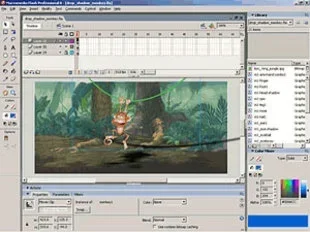
The animation workflow in Macromedia Flash was based on a timeline. Designers placed elements on the stage and created keyframes at different points in time. The software then interpolated the frames between keyframes, creating smooth motion. This timeline-based animation approach was intuitive and required no coding knowledge.
Timeline-Based Design
The timeline was the heart of the Macromedia Flash authoring environment. It looked a lot like a traditional film editing timeline. Each layer on the timeline represented a different element — a character, a background, a sound effect, and so on.
Designers could control the timing, speed, and sequence of every element. They could add tweens, which are automatic transitions between keyframes. They could also add shape tweens for morphing one shape into another. This made Macromedia Flash accessible to artists who had no programming background.
Multimedia Integration
Macromedia Flash supported a wide range of multimedia formats. You could embed audio directly into a Flash movie and sync it with animations. Video could be imported and played back using the Flash Video format. This made Macromedia Flash a complete multimedia platform for creating rich, engaging experiences.
The ability to combine graphics, sound, video, and interactivity in one file was revolutionary at the time. Before Macromedia Flash, most websites were static and text-heavy. Flash changed that by making the web a more visual and engaging place.
The Rise and Fall of Macromedia Flash
Macromedia Flash had an incredible run. For over a decade, it was the dominant force in web animation and interactive media. But eventually, the platform faced serious challenges that led to its decline. Understanding this rise and fall helps us appreciate the full story of Macromedia Flash.
From Dominance to Decline
In the early 2000s, Macromedia Flash was everywhere. Almost every popular website used it in some way. YouTube launched as a Flash-based video platform. Countless browser games were built with Flash animation tools. Flash websites with full-screen animations and custom navigation became a design trend.
Adobe acquired Macromedia in 2005 and continued developing the platform as Adobe Flash. The Flash Player plugin remained the standard for multimedia content on the web. But cracks were beginning to show.
Why Flash Faded Away
Several factors led to the decline of Macromedia Flash:
- Mobile compatibility issues — Apple famously refused to support the Flash Player plugin on iPhones and iPads. This was a huge blow.
- Security vulnerabilities — The Flash Player became a frequent target for hackers. Adobe released frequent patches, but the problems persisted.
- Performance problems — Flash content was resource-heavy and drained laptop batteries quickly.
- Rise of HTML5 — Modern web standards like HTML5, CSS3, and JavaScript offered native alternatives without plugins.
- SEO challenges — Search engines could not easily read Flash content, hurting website visibility.
- Open web standards — The web community moved toward open, plugin-free technologies that worked on all devices.
By 2020, Adobe officially discontinued Flash. All Flash Player support ended on December 31, 2020. Websites were blocked from running Flash content, and the era of Macromedia Flash came to a close.
Macromedia Flash vs Modern Alternatives
Today, the web looks very different from the Flash era. Modern technologies have replaced Macromedia Flash for nearly every use case. Let us compare Macromedia Flash with the tools that came after it.
What Replaced Flash?
Several technologies now handle the roles that Macromedia Flash once filled:
- HTML5 Canvas — Allows developers to draw animations and graphics directly in the browser without plugins.
- CSS3 Animations — Enables smooth web animation using pure CSS, with better performance.
- JavaScript Libraries — Tools like GreenSock and Three.js provide powerful animation and 3D capabilities.
- WebGL — A browser API for rendering interactive 3D graphics without any plugins.
- SVG Animation — Uses scalable vector graphics with built-in animation support.
All of these alternatives work natively in modern browsers. They do not require any plugins or downloads. They are faster, more secure, and work on both desktop and mobile devices.
Is Macromedia Flash Still Used Today?
In short, no. The Flash Player plugin has been completely removed from all major browsers. Websites that still use Flash content will not display it properly. However, some legacy Flash games and Flash movies are preserved through archival projects and Flash emulators.
Many designers and developers look back on Macromedia Flash with nostalgia. The platform gave rise to an entire generation of Flash developers and Flash animators. Some of the best interactive websites and browser games ever created were built with Macromedia Flash.
Why Understanding Macromedia Flash Still Matters
You might wonder why we should care about a discontinued platform. The truth is, Macromedia Flash shaped the modern web in important ways. Understanding its history and impact gives us valuable context for today’s web development landscape.
Legacy and Influence on Modern Web Tech
The concepts pioneered by Macromedia Flash live on in modern web technologies. The idea of rich, interactive, multimedia-driven web experiences was popularized by Flash. Today, we take for granted that websites can be animated, video-rich, and highly interactive. Macromedia Flash helped make that possible.
Many Flash developers transitioned their skills to modern web technologies. The ActionScript programming language shares similarities with JavaScript. The timeline-based thinking behind Flash animation influenced modern animation libraries and frameworks.
Lessons from the Flash Era
The story of Macromedia Flash teaches us important lessons about technology:
- Plugin-dependent technologies are fragile. When browsers moved away from plugins, Flash became obsolete overnight.
- Open standards win long-term. HTML5 and CSS3 succeeded because they were open and universally supported.
- Security matters. The constant security issues with the Flash Player plugin eroded trust in the platform.
- Mobile-first matters. The failure to support mobile devices accelerated Flash’s decline dramatically.
- Nostalgia preserves legacy. Even though Macromedia Flash is gone, its cultural impact endures through preserved Flash games and Flash animations.
The Flash era reminds us that no technology lasts forever. But the creativity and innovation that Macromedia Flash inspired continue to influence the web today.
Common Mistakes People Make When Learning About Macromedia Flash
If you are new to the topic of Macromedia Flash, you might run into some common misconceptions. Here are mistakes to avoid:
- Confusing Macromedia Flash with Adobe Flash — They are the same product, but Macromedia created it. Adobe only took over after the acquisition.
- Thinking Flash is still usable — The Flash Player plugin has been completely discontinued. Do not try to install it.
- Ignoring the security history — Understanding why Flash was discontinued is key to appreciating modern web standards.
- Overlooking the cultural impact — Macromedia Flash was not just a tool. It was a creative movement that shaped early internet culture.
- Assuming all Flash content is lost — Many Flash games and animations have been preserved through open-source emulators and archives.
Quick Tips for Exploring Macromedia Flash Legacy Content
Want to experience Macromedia Flash content today? Here are some tips:
- Use Flash emulators like Ruffle to safely run old SWF files in modern browsers.
- Visit archival sites that preserve classic Flash games and Flash movies.
- Explore Flash development forums to learn from the community of former Flash developers.
- Study Flash animation techniques to understand the principles behind modern web animation.
- Check out Adobe Animate, which is the spiritual successor to Macromedia Flash for creating HTML5 multimedia content.
Conclusion
Macromedia Flash was a groundbreaking multimedia platform that transformed the early internet. It gave designers and developers the tools to create web animations, interactive websites, Flash games, and rich Internet applications that captivated millions of users. From its origins as FutureSplash Animator to its dominance in the 2000s and eventual discontinuation in 2020, Macromedia Flash left an indelible mark on digital culture.
The Flash Player plugin, SWF files, ActionScript, and vector graphics were all innovations that pushed the web forward. While Macromedia Flash is no longer in active use, its influence is everywhere. Modern web technologies like HTML5, CSS3, and JavaScript owe a debt to the foundation that Macromedia Flash built.
If you ever come across an old Flash game or a nostalgic Flash animation, take a moment to appreciate the creativity and effort behind it. Macromedia Flash was more than just software. It was a platform that brought joy, entertainment, and innovation to the early digital world. Understanding its complete definition helps us better understand the web we use today.
So the next time someone mentions Macromedia Flash, you will know exactly what they are talking about. You will understand the platform, its impact, and why it still matters in the history of the internet.
Frequently Asked Questions
What is the definition of Macromedia Flash?
Macromedia Flash was a multimedia software platform used to create animations, interactive content, and rich Internet applications for the web. It relied on the Flash Player browser plugin to display SWF files containing vector graphics, audio, video, and interactive elements.
Who created Macromedia Flash?
Macromedia Flash was originally created by FutureWave Software as FutureSplash Animator. Macromedia acquired the software in 1996 and rebranded it as Macromedia Flash. Adobe later acquired Macromedia in 2005 and continued development as Adobe Flash.
Why was Macromedia Flash discontinued?
Macromedia Flash was discontinued due to mobile compatibility issues, security vulnerabilities, performance problems, and the rise of open web standards like HTML5. Apple’s refusal to support the Flash Player plugin on iOS devices was a major turning point. Adobe officially ended all support on December 31, 2020.
What is an SWF file?
An SWF file (Small Web Format or Shockwave Flash) is the file format used to deliver Flash content to browsers. It contains compiled Flash animations, games, and applications that run inside the Flash Player plugin. SWF files were designed to be small and fast-loading for smooth web animation.
Can you still play Macromedia Flash games today?
Direct playback through the Flash Player plugin is no longer possible since it has been completely removed from all browsers. However, you can still play many Flash games using open-source Flash emulators like Ruffle or by visiting archival websites that preserve classic Flash content.
What replaced Macromedia Flash?
Modern web technologies replaced Macromedia Flash for nearly every use case. HTML5 Canvas, CSS3 animations, JavaScript libraries, and WebGL now handle web animation, interactive media, and multimedia content without requiring any browser plugins. Adobe Animate is the official successor tool for creating Flash-style content in modern formats.
=== META TITLE ===
The Complete Definition of Macromedia Flash Explained
=== URL SLUG ===
/definition-of-macromedia-flash
=== SEO TITLE ===
The Complete Definition of Macromedia Flash Explained