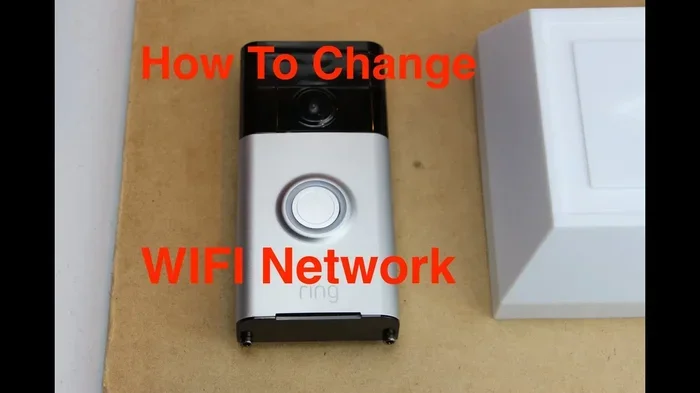
Does Ring Use Wifi Or Bluetooth To Connect Your Home
Does Ring use WiFi or Bluetooth? The answer is both, but WiFi plays the bigger role. Ring devices rely primarily on wireless WiFi connectivity to stream video, send alerts, and communicate with the cloud. Bluetooth serves a smaller but useful purpose, especially during initial device setup and short-range connections. Understanding how these two wireless protocols work together helps you get the most out of your Ring doorbell and Ring camera system.
Ring has become one of the most popular names in home security. Millions of people rely on Ring doorbells, Ring cameras, and Ring alarm systems to keep their homes safe. But there is one question that comes up again and again: does Ring use WiFi or Bluetooth to stay connected?
The short answer is that Ring devices depend mostly on WiFi. Bluetooth plays a smaller but still important role, especially when you are setting things up for the first time. In this guide, we will walk through exactly how each wireless connection works with your Ring devices. You will learn what WiFi does, what Bluetooth does, and how to get the best performance from your system.
Whether you have a Ring Video Doorbell, a Ring Spotlight Cam, or a Ring Alarm kit, understanding your wireless connections makes a big difference. A strong WiFi signal keeps your video flowing and your alerts coming. And knowing when Bluetooth kicks in helps you troubleshoot problems faster. Let us dive into the details.
Key Takeaways
- Ring devices primarily use WiFi: Most Ring products need a stable WiFi connection to function fully, including live streaming and motion alerts.
- Bluetooth has a supporting role: Bluetooth helps with initial setup, pairing the Ring app to your device, and short-range controls.
- Both protocols matter for setup: You need WiFi for ongoing operation and Bluetooth for the initial pairing process.
- Weak WiFi causes problems: A poor WiFi signal leads to lag, failed alerts, and dropped live feeds on your Ring doorbell.
- Range extension helps: Using a mesh network or WiFi extender can improve connectivity for Ring devices placed far from your router.
- Smart home integration works best with WiFi: Ring devices connect to Alexa, Google Home, and other smart hubs through your wireless network.
📑 Table of Contents
What Is Ring and How Does It Connect?
Ring is a brand owned by Amazon that focuses on smart home security. Their products include video doorbells, outdoor and indoor cameras, alarm systems, and smart lights. All of these devices need a way to talk to your phone, the Ring app, and the cloud servers where your video clips get stored.
Ring devices use two main wireless technologies to communicate: WiFi and Bluetooth. Each one serves a different purpose. WiFi handles the heavy lifting, like streaming high-quality video and sending real-time alerts. Bluetooth takes care of lighter tasks, like helping your phone find the device during setup.
Why Wireless Connection Matters for Ring Devices
Your Ring devices are wireless by design. They do not need a physical cable to send data to your phone or to the Ring cloud. This makes installation easy and flexible. You can place a Ring doorbell at your front door or a Ring camera in your backyard without worrying about running cables.
But this also means your wireless connection is the lifeline of your system. If your WiFi goes down, your Ring doorbell may still record to a local microSD card, but you will lose live streaming and instant alerts. If Bluetooth is weak, you might struggle to pair a new device with the Ring app. Both connections matter, but they do different jobs.
Many people also wonder whether their Ring device can connect to other smart home gadgets. For example, you might ask, can I use Alexa as a Bluetooth speaker while your Ring camera streams through the same network? The answer is yes, but each device uses its own connection type to do its job.
How WiFi Powers Your Ring Devices
WiFi is the backbone of every Ring device. When you set up a Ring doorbell or camera, the first thing the setup guide asks for is your WiFi password. This is because WiFi gives your Ring device the bandwidth it needs to send and receive video, audio, and alerts.
What WiFi Does for Ring Devices
Here is what a strong WiFi connection enables for your Ring devices:
- Live video streaming: When you open the Ring app and tap on your camera, the live video travels through your WiFi network to your phone.
- Motion alerts: Ring devices detect motion and send instant notifications through WiFi to your phone.
- Cloud video storage: Recorded clips upload to the Ring cloud over WiFi, so you can review them later.
- Two-way audio: When you speak through your Ring doorbell, your voice travels over WiFi to the person on the other end.
- Smart home integration: Ring devices talk to Alexa, Google Home, and other smart hubs through your WiFi network.
WiFi Frequency Bands: 2.4 GHz vs 5 GHz
Most Ring devices work on the 2.4 GHz WiFi band. This band has a longer range and works better through walls, which is great for outdoor devices like a Ring doorbell. Some newer Ring products also support the 5 GHz band, which offers faster speeds but a shorter range.
If your router broadcasts both bands, it helps to know which one your Ring device connects to. A weak 2.4 GHz signal can cause lag in live video. If your Ring camera is far from your router, you might want to consider a WiFi extender or a mesh network to boost the signal.
The Role of Bluetooth in Ring Products
Bluetooth is the quieter partner in the Ring ecosystem. It does not handle video streaming or cloud uploads. Instead, it focuses on short-range tasks that make setup and basic controls easier.
What Bluetooth Does for Ring Devices
Bluetooth plays a few specific roles in the Ring system:
- Initial device pairing: When you first set up a Ring device, Bluetooth helps your phone discover and connect to the product. This is why the Ring app asks for Bluetooth permission during setup.
- Quick access controls: Some Ring devices allow Bluetooth-based controls when you are nearby, without needing to open the full app.
- Device location: Bluetooth helps your phone locate a Ring device during the setup process, especially in crowded WiFi environments.
Bluetooth vs WiFi for Ring: Key Differences
It helps to understand how these two wireless technologies compare. WiFi covers longer distances and handles more data. Bluetooth works over shorter ranges and uses less power. Here is a quick comparison:
- Range: WiFi can reach across your entire home and yard. Bluetooth typically works within about 30 feet.
- Speed: WiFi is much faster, which is why it handles video streaming. Bluetooth is slower and better for small data packets.
- Purpose: WiFi keeps your Ring device connected to the internet. Bluetooth helps your phone find and set up the device.
- Power use: Bluetooth uses very little power, which is good for battery-powered Ring devices.
Think of it this way. WiFi is the highway that carries all the traffic, and Bluetooth is the side road that helps you get started. You need both, but WiFi does the heavy lifting every single day.
Some people wonder if they can use a Bluetooth connection for other smart devices alongside their Ring system. For instance, if you enjoy using a wireless controller on your phone for gaming, that Bluetooth connection works independently of your Ring devices. Each Bluetooth device pairs with its own app and does not interfere with Ring.
Ring Device Setup: WiFi vs Bluetooth
Setting up a Ring device is a straightforward process, but it requires both WiFi and Bluetooth to work properly. Understanding the setup flow helps you avoid common problems.
Step-by-Step Setup Process
Here is how the setup process typically works for a Ring doorbell or camera:
- Download the Ring app: Install the Ring app on your phone and create an account.
- Enable Bluetooth: The app asks you to turn on Bluetooth so it can find your new Ring device.
- Power on the device: Follow the instructions to power up your Ring doorbell or camera.
- Pair via Bluetooth: The app uses Bluetooth to detect the device and guide you through pairing.
- Connect to WiFi: Once paired, the app asks for your WiFi credentials so the device can join your network.
- Test the connection: Check the live feed and motion alerts to make sure everything works.
Without Bluetooth, you cannot complete the initial pairing. Without WiFi, the device cannot send video or alerts to your phone. Both steps are essential, but they happen at different stages of the setup process.
Common Setup Mistakes to Avoid
Here are a few mistakes that trip up many Ring users during setup:
- Ignoring the 2.4 GHz requirement: Some routers combine 2.4 GHz and 5 GHz into one network name. Ring devices sometimes struggle with this. Try splitting the bands or manually connecting to 2.4 GHz.
- Placing the device too far from the router: If your WiFi signal is weak at the doorbell location, you will get poor video quality and delayed alerts.
- Skipping Bluetooth permissions: If you deny Bluetooth access to the Ring app, the setup will fail at the pairing step.
- Using a weak WiFi password: A complicated password with special characters can sometimes cause connection errors during setup.
Troubleshooting Ring Connectivity Issues
Even with a good setup, connectivity problems can happen. Knowing how to troubleshoot saves you time and frustration.
WiFi Problems and Fixes
If your Ring device keeps going offline or the live feed is choppy, the problem is usually WiFi. Here are some fixes:
- Move your router closer: If possible, place your router in a central location in your home.
- Use a WiFi extender: A range extender boosts the signal to areas where WiFi is weak, like a back door or driveway.
- Restart your router: A simple reboot can clear up temporary connection issues.
- Check for interference: Microwaves, baby monitors, and other wireless devices can interfere with the 2.4 GHz band.
Bluetooth Problems and Fixes
If you cannot pair your Ring device during setup, try these Bluetooth troubleshooting steps:
- Turn Bluetooth off and on again: This simple step refreshes the Bluetooth connection on your phone.
- Move closer to the device: Bluetooth range is short. Stand within 10 to 15 feet of the Ring device during setup.
- Check for other Bluetooth devices: Too many active Bluetooth devices can cause interference. Turn off nearby Bluetooth speakers or headphones temporarily.
- Restart the Ring app: Close the app completely and reopen it to refresh the Bluetooth search.
It is also worth noting that Bluetooth does not need to stay on after setup. Once your Ring device is connected to WiFi, Bluetooth is no longer needed for daily operation. The device runs entirely on WiFi for everything from live streaming to motion alerts.
Tips for Keeping Your Ring Devices Connected
Keeping your Ring devices online and running smoothly comes down to a few smart habits. Here are some tips that make a real difference.
Optimize Your WiFi Network
A strong WiFi network is the foundation of a reliable Ring system. Consider these tips:
- Upgrade to a mesh WiFi system: Mesh networks spread coverage throughout your home and yard, eliminating dead zones.
- Use a dedicated IoT network: Many modern routers let you create a separate network for smart home devices. This keeps your Ring devices from competing with your phones and laptops for bandwidth.
- Update your router firmware: Regular updates improve performance and security for all connected devices.
Maintain Your Ring Devices
Your Ring hardware also needs regular attention:
- Keep the firmware updated: Ring releases updates that improve connectivity and fix bugs. Check for updates in the Ring app regularly.
- Check battery levels: Low battery can cause a Ring doorbell to lose connection. Keep an eye on the battery indicator in the app.
- Clean the camera lens: A dirty lens does not affect connectivity, but it does affect video quality, which can feel like a connection problem.
Expand Your Smart Home Ecosystem
Ring devices work best when they are part of a broader smart home setup. You can connect your Ring system to smart speakers, smart locks, and other devices. For example, linking your Ring doorbell to a smart speaker lets you see visitors on a screen and speak with them using voice commands.
If you enjoy using smart speakers, you might also wonder about using them in other settings. For instance, many people ask whether they can use a smart speaker in their car for navigation and music. The concept is similar: smart speakers rely on wireless connections to deliver their features, whether at home or on the road.
Does Ring Use Wifi Or Bluetooth: Final Thoughts
So, does Ring use WiFi or Bluetooth? The answer is clear. WiFi is the primary connection that keeps your Ring devices running. It handles video streaming, motion alerts, cloud storage, and smart home integration. Bluetooth plays a supporting role, mainly during the initial setup and pairing process.
Understanding this distinction helps you troubleshoot problems, optimize your setup, and get the most from your Ring devices. A strong WiFi connection is everything. Make sure your router covers the areas where your Ring devices are installed, and use extenders or mesh systems if needed.
Bluetooth is there when you need it, but it is not the connection you rely on every day. Once your Ring device is set up and connected to WiFi, Bluetooth steps back and lets the wireless network do the work.
Take a few minutes today to check your WiFi signal strength at each Ring device location. A small improvement in your wireless setup can make a big difference in video quality, alert speed, and overall reliability. Your home security system is only as good as its connection, so invest the time to get it right.
Frequently Asked Questions
Can Ring devices work without WiFi?
Ring devices need WiFi to send alerts, stream live video, and upload recordings to the cloud. Without WiFi, a Ring doorbell can still record to a local microSD card if one is installed, but you will lose most smart features. WiFi is essential for the full Ring experience.
Does Bluetooth drain the battery on Ring devices?
Bluetooth uses very little power and does not significantly affect battery life. Ring devices are designed to keep Bluetooth active only during setup. Once the device is paired and connected to WiFi, Bluetooth usage drops to almost zero.
Can I use my Ring device with a WiFi extender?
Yes, a WiFi extender can improve connectivity for Ring devices placed far from your router. This is especially helpful for backyard cameras or front door doorbells where the WiFi signal is weak. A mesh network is an even better option for larger homes.
Why does my Ring doorbell keep going offline?
The most common reason is a weak WiFi signal. Other causes include router issues, firmware bugs, or low battery. Try moving closer to the router, restarting your router, or checking for a Ring app update. If the problem continues, a WiFi extender can help stabilize the connection.
Is Bluetooth needed after setting up a Ring device?
No. Bluetooth is only needed during the initial setup to pair the device with the Ring app. After pairing, the device connects to WiFi and operates entirely over the wireless network. You can turn off Bluetooth on your phone without affecting Ring performance.
Can I connect Ring devices to a smart home hub?
Yes. Ring devices integrate with Alexa, Google Home, and other smart home platforms through your WiFi network. This lets you control Ring cameras and doorbells with voice commands and automate routines based on motion alerts or doorbell rings.
=== CONCLUSION ===
Does Ring use WiFi or Bluetooth to connect your home? WiFi is the main connection, and Bluetooth is the helper. WiFi powers every core feature of your Ring devices, from live video to motion alerts. Bluetooth makes setup easy and quick. Together, they create a reliable wireless security system that keeps your home protected.
Now that you understand how both connections work, you can set up your Ring devices with confidence. Focus on getting a strong WiFi signal where your devices are installed, and do not worry about Bluetooth once the setup is complete. A well-connected Ring system gives you peace of mind and keeps your home safe around the clock.