Can You Buy New Laptop Keys Here Is What You Need to Know
Yes, you can buy new laptop keys, and it is easier than most people think. Whether your key cap cracked, fell off, or stopped working, replacement keys are widely available online and in stores. Laptop key replacement is a simple fix that can save you hundreds of dollars compared to replacing the entire keyboard or buying a new laptop.
This is a comprehensive guide about Can You Buy New Laptop Keys.
Key Takeaways
- Replacement keys are easy to find: You can buy individual laptop keys from online retailers, manufacturers, and specialty stores.
- Costs are very affordable: Most individual replacement keys cost between $1 and $10, depending on your laptop model.
- DIY replacement is simple: You can replace most laptop keys at home with basic tools and a little patience.
- Know your laptop model: Always check your specific laptop brand and model number before purchasing replacement keys.
- Warranty matters: If your laptop is still under warranty, key replacement may be free through the manufacturer.
- Key replacement kits save time: Full keyboard replacement kits include everything you need for a complete fix.
[FEATURED_IMAGE_PLACEHOLDER]
Have you ever been typing away on your laptop and suddenly heard a loud snap? Or maybe you looked down and found a tiny plastic key cap sitting on your desk, completely separated from its partner. It is a frustrating moment, but the good news is that you can absolutely buy new laptop keys. The question is not really whether you can. It is where to find them, how much they cost, and whether you can do the replacement yourself.
This guide covers everything you need to know about buying replacement keys for your laptop. We will walk through where to find them, how to pick the right ones, and whether you should try a DIY fix or seek professional help. By the end, you will feel confident tackling that missing or broken key on your own.
Why Do Laptop Keys Break or Go Missing?
Before you rush out to buy a replacement, it helps to understand why keys fail in the first place. Laptops are portable devices that get moved around, opened, closed, and bumped daily. That daily wear and tear takes a toll on the keyboard. Here are the most common reasons laptop keys stop working properly.
Normal Wear and Tear
Over time, the plastic clips that hold key caps in place become brittle. They weaken from repeated pressing and releasing. Eventually, a key may pop off during normal use. This is especially common with frequently used keys like the spacebar, Enter key, and Shift keys.
Spills and Liquid Damage
Spilling coffee, water, or any liquid on your keyboard can cause keys to stick or stop working entirely. The liquid can corrode the rubber dome underneath the key cap, which is the part that registers the keystroke. In many cases, replacing just the key cap fixes the cosmetic damage. But if the internal mechanism is affected, you may need a deeper repair.
Physical Damage
Dropping your laptop or pressing too hard on the keyboard can crack or snap key caps. Kids and pets are also common culprits. A playful cat batting at the keys or a child pressing too hard can easily pop a key off or break it beyond repair.
Manufacturing Defects
Some laptop models are known for having weak key designs. Certain brands have had widespread issues with specific keys breaking after just a few months of use. If your laptop falls into this category, you are not alone, and replacement keys are easy to find.
Where Can You Buy New Laptop Keys?
The short answer is almost everywhere. Replacement laptop keys are widely available from many different sources. The key is knowing where to look and what to look for. Here are the best places to buy new laptop keys.
Online Retailers
Websites like Amazon, eBay, and Walmart carry a massive selection of individual laptop keys and key replacement kits. You can search by your laptop brand and model number to find the exact match. Most listings include photos, compatibility details, and customer reviews to help you make the right choice.
One of the biggest advantages of shopping online is the sheer variety. You can compare prices across multiple sellers, read real user experiences, and often find keys for older or discontinued laptop models that are hard to find elsewhere.
Laptop Manufacturer Websites
Brands like Dell, HP, Lenovo, Apple, and ASUS sell OEM replacement keys directly through their official websites and support pages. OEM stands for Original Equipment Manufacturer, which means these are the exact same keys that came with your laptop. Buying from the manufacturer guarantees a perfect fit and match.
The downside is that manufacturer-direct keys can sometimes be more expensive. You may also need to provide your laptop serial number or model number to find the right part. But for peace of mind, going direct to the source is a solid choice.
Specialty Keyboard Parts Stores
There are online stores that specialize in keyboard parts and laptop keyboard components. These shops often carry keys for a wider range of brands and models than general retailers. Some even sell the full keyboard assembly if you need to replace more than just a single key.
These specialty stores can be especially helpful if you have an older laptop or a less common brand. They often have detailed compatibility charts and knowledgeable staff who can help you find the right part.
Local Electronics Repair Shops
Many local computer repair shops carry a stock of replacement laptop keys and keyboard parts. Walking into a shop lets you see and compare the keys in person. It also gives you the option to ask the technician to install the key for you if you are not comfortable doing it yourself.
Local shops may charge a small premium for parts, but you gain the benefit of expert installation and immediate availability. If you need a key replaced today, this can be your fastest option.
How Much Does It Cost to Replace a Laptop Key?
One of the best things about replacing a single laptop key is how affordable it is. You do not need to spend hundreds of dollars on a new keyboard or a whole new laptop. The cost depends on where you buy and what type of key you need.
Individual key caps typically cost between $1 and $5 each. If the key also needs the rubber dome or the scissor mechanism, the price goes up slightly. A full replacement key kit, which includes the key cap, rubber dome, and hinge clips, usually runs between $5 and $15.
For a full keyboard replacement, expect to pay anywhere from $30 to $100 for parts, plus labor if you hire someone to do the work. Compare that to the cost of a new laptop, which can range from $400 to $2,000 or more, and the savings are obvious.
Here is a quick cost breakdown to give you a better picture.
| Part Type | Price Range | Best For |
|---|---|---|
| Individual Key Cap | $1 – $5 | Cosmetic damage, cracked or missing key cap |
| Replacement Key Kit | $5 – $15 | Key cap plus internal mechanism |
| Full Keyboard Assembly | $30 – $100 | Multiple broken keys or widespread damage |
| Professional Repair Service | $50 – $150 | Hands-off fix with warranty on labor |
As you can see, the cheapest option is almost always to buy the parts yourself and do the replacement. Even if you pay a little extra for a key replacement kit, you still save a significant amount compared to professional repair.
How to Replace a Laptop Key Yourself
Replacing a laptop key at home is simpler than most people expect. You do not need to be a tech expert or have special tools. With a little patience and the right parts, you can have your keyboard looking and working like new in under 15 minutes.
What You Will Need
- Replacement key or key replacement kit
- A small flathead screwdriver or key removal tool
- A clean, well-lit workspace
- A soft surface to work on (like a microfiber cloth)
Step-by-Step Replacement Guide
Follow these steps carefully, and your laptop key replacement will go smoothly.
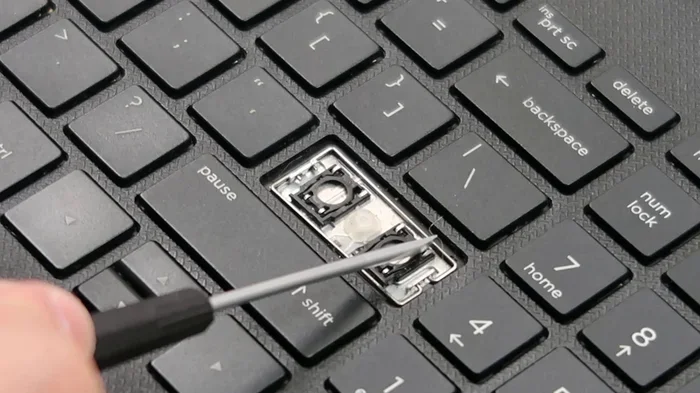
- Remove the broken key: Use the flathead screwdriver or key removal tool to gently pry up the broken key cap. Work from one side to the other to avoid damaging the surrounding keys. The key cap should pop off with little resistance.
- Remove the old mechanism: Underneath the key cap, you will find a rubber dome and a plastic hinge or scissor mechanism. Gently lift these out with the screwdriver. Be careful not to damage the small clips that hold them in place.
- Clean the area: Use a dry cloth or a can of compressed air to clean out any dust or debris from the key socket. This ensures the new key sits properly and registers keystrokes accurately.
- Install the new mechanism: Place the new rubber dome and hinge into the key socket. Make sure the clips align properly and the mechanism sits flat and secure.
- Snap on the new key cap: Align the new key cap with the mechanism and press down firmly until it clicks into place. You should feel it snap in securely.
- Test the key: Press the new key several times to make sure it registers properly and feels firm. If it feels loose or does not register, check that the mechanism is seated correctly.
Quick tip: If you have trouble finding the exact replacement key, search for your laptop model number along with the phrase replacement key cap. Many sellers list keys by model number, so you can find a perfect match even for older laptops.
Should You Buy Individual Keys or a Full Keyboard?
This is a common question, and the answer depends on the extent of the damage. If only one or two keys are affected, buying individual replacement laptop keys makes the most sense. It is cheaper, faster, and less complicated.
However, if multiple keys are broken, the keyboard is discolored from spills, or the keys are sticking and not responding properly, a full keyboard replacement might be the better option. Replacing the entire keyboard ensures consistency across all keys and fixes any underlying issues with the keyboard connector or ribbon cable.
Consider the age of your laptop as well. If your laptop is several years old and has other issues besides the keyboard, it might be worth investing in a new laptop instead. But if the rest of the laptop is in good shape, replacing the keyboard or individual keys is a smart move.
When Individual Keys Are Enough
- One or two keys are cracked, missing, or popped off
- The keyboard otherwise works perfectly
- The damage is cosmetic and does not affect functionality
- You are on a tight budget
When a Full Keyboard Replacement Makes Sense
- Three or more keys are damaged or not working
- Multiple keys are sticking or unresponsive
- The keyboard has been exposed to liquid damage
- The keyboard connector or ribbon cable is faulty
Common Mistakes to Avoid When Replacing Laptop Keys
Replacing a laptop key is straightforward, but there are a few mistakes that can cause problems. Avoiding these pitfalls will save you time and frustration.
Buying the Wrong Key
Not all keys are the same, even if they look similar. Keys vary in size, shape, and mechanism depending on the laptop model. Always double-check your laptop model number before purchasing a replacement. Buying the wrong key means wasted money and wasted time.
Forcing the Key Cap Into Place
If the key cap does not fit easily, do not force it. Check that you have the correct key for your model and that the mechanism is properly seated. Forcing the key can crack the cap or damage the hinge, making the problem worse.
Losing the Small Clips and Hinges
The tiny plastic clips and hinges that hold keys in place are easy to lose. When you remove a broken key, keep all the small parts in a safe place. A small bowl or magnetic tray works great for this. Losing these parts means you will need to buy an entire replacement kit instead of just the key cap.
Skipping the Cleaning Step
It is tempting to rush through the replacement and snap the new key right on. But skipping the cleaning step can lead to keys that stick or do not register properly. Taking 30 seconds to clean the socket makes a big difference in how the new key performs.
Ignoring the Warranty
If your laptop is still under warranty, check with the manufacturer before replacing keys yourself. Some warranties cover keyboard repairs at no cost. Opening the laptop or replacing parts on your own could void the warranty in some cases, so always check first.
Expert Tips for Extending Your Laptop Keyboard Life
Once you have replaced your broken key, you will want to keep the rest of your keyboard in great shape. Here are some expert-backed tips to prevent future key damage and extend the life of your laptop keyboard.
- Keep food and drinks away from your laptop. Spills are the number one cause of keyboard damage. If you must eat or drink near your laptop, use a spill-proof container and keep it away from the keyboard.
- Clean your keyboard regularly. Use compressed air to blow out dust and debris from between the keys. A soft brush can also help remove particles that accumulate over time.
- Do not press too hard on the keys. Laptop keys are designed for light, quick presses. Pressing too hard can wear out the mechanisms and even crack the key caps.
- Use a keyboard cover. A thin silicone keyboard cover protects against dust, spills, and everyday wear. It is a small investment that can add years to your keyboard life.
- Close your laptop gently. Slamming the laptop shut can pop keys off and damage the hinges over time. Always close the lid carefully and make sure nothing is resting on the keyboard.
Key Takeaways
- Replacement keys are widely available: You can buy individual laptop keys from online retailers, manufacturers, and local repair shops with ease.
- Costs are very low: Most replacement keys cost between $1 and $15, making it one of the cheapest laptop repairs you can do.
- DIY replacement is simple: With a replacement key kit and basic tools, you can replace a broken key at home in minutes.
- Know your model number: Always check your laptop brand and model before purchasing to ensure compatibility.
- Check your warranty first: If your laptop is still under warranty, the manufacturer may cover the replacement at no cost to you.
- Prevention goes a long way: Simple habits like keeping drinks away and cleaning regularly can prevent most keyboard issues.
Can You Buy New Laptop Keys for Any Brand?
Yes, you can buy replacement keys for virtually all major laptop brands including Dell, HP, Lenovo, ASUS, Acer, Apple, and Microsoft. The key is to know your exact laptop model number so you can find the right match. Most online retailers and manufacturer websites let you search by model, making it easy to find keys for any brand.
Is It Hard to Replace a Laptop Key at Home?
No, replacing a laptop key at home is straightforward and does not require technical expertise. All you need is the replacement key or key kit, a small screwdriver, and about 10 to 15 minutes. Most people find the process simple and satisfying, especially when they see the new key working perfectly right away.
Can I Use a Universal Key Replacement Kit?
Universal key replacement kits are available, but they are not always the best option. These kits include a variety of key caps and mechanisms that may not match your laptop exactly. For the best fit and feel, it is recommended to buy keys that are specifically designed for your laptop model.
What Should I Do If the Key Still Does Not Work After Replacement?
If the new key does not work after replacement, check that the rubber dome and hinge mechanism are properly seated. Sometimes the issue is not with the key cap itself but with the internal mechanism. If the problem persists, it could be a deeper issue with the keyboard connector or the laptop motherboard, which may require professional diagnosis.
Are OEM Replacement Keys Better Than Aftermarket Keys?
OEM keys are made by the original manufacturer and offer the best match in terms of fit, feel, and appearance. Aftermarket keys are more affordable and widely available, but quality can vary. For most users, high-quality aftermarket keys work perfectly fine. If you want the closest match to your original keyboard, OEM is the way to go.
How Long Does a Replacement Laptop Key Last?
A properly installed replacement key can last for many years with normal use. The lifespan depends on how well you care for the keyboard, how often you use the key, and the quality of the replacement part. With good habits and a quality replacement, your new key should serve you just as long as the original.
Final Thoughts
So, can you buy new laptop keys? Absolutely. Whether your key cracked, fell off, or stopped working after a spill, replacement keys are affordable, easy to find, and simple to install. You do not need to be a computer expert or spend a fortune to fix the problem.
Buying replacement laptop keys is one of the smartest things you can do to extend the life of your laptop. Instead of spending hundreds on a new keyboard or a whole new machine, a small investment in a replacement key solves the problem quickly and effectively.
Start by identifying your laptop model number, finding the right replacement key, and following the simple installation steps outlined in this guide. With a little care and the right parts, your keyboard will be back to working perfectly in no time. Do not let a single broken key slow you down. Take action today and get your laptop typing smoothly again.
Frequently Asked Questions
What is Can You Buy New Laptop Keys?
Can You Buy New Laptop Keys is an important topic with many practical applications.