Can You Use Xlr Mic With Usb For Streaming And Recording
Yes, you can use an XLR mic with USB, but you need the right equipment. Whether you are streaming, podcasting, or recording music, connecting an XLR microphone through a USB pathway is totally doable. You will need an audio interface or an XLR to USB adapter to make it work. This guide walks you through every method, setup, and tip so you can start recording with professional audio quality right away.
This is a comprehensive guide about Can You Use Xlr Mic With Usb.
Key Takeaways
- XLR mics can connect via USB: You need an audio interface or XLR-to-USB adapter to bridge the connection.
- Audio interfaces offer better quality: They provide phantom power, preamps, and lower latency than basic adapters.
- XLR-to-USB adapters are budget-friendly: They work great for beginners but have fewer features.
- Not all XLR mics are USB-ready: Some mics need external power and signal conversion to work with a computer.
- Setup matters for streaming and recording: Proper configuration reduces noise, latency, and audio issues.
- Both dynamic and condenser mics work: But condenser mics require phantom power from your interface.
- Your computer needs the right drivers: Installing correct drivers ensures your mic is recognized properly.
[FEATURED_IMAGE_PLACEHOLDER]
If you have an XLR microphone sitting around and want to use it with your computer for streaming or recording, you might be wondering about one thing: can you use XLR mic with USB? The short answer is yes. The longer answer is that it takes a little bit of extra gear, but the result is worth it.
Many content creators, podcasters, and musicians start with USB microphones because they are simple. You plug them in and they work. But XLR mics offer something USB mics often cannot match. They deliver richer sound, more flexibility, and a professional feel that makes your recordings stand out.
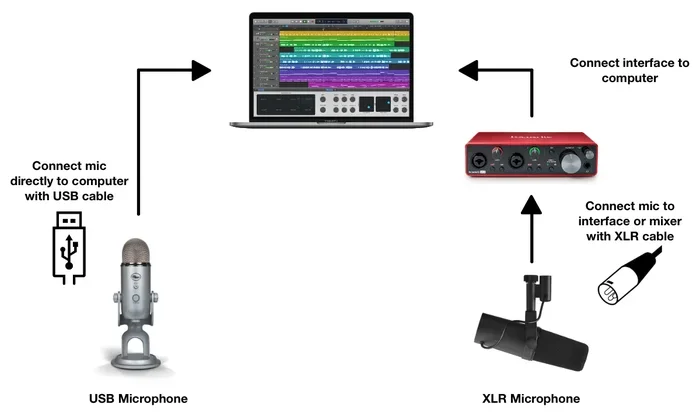
The challenge is that XLR microphones do not plug directly into a USB port. They use a different type of connector and carry a different type of signal. Your computer does not understand XLR on its own. So you need a bridge between the two worlds. That bridge comes in the form of an audio interface or an XLR-to-USB adapter.
This article covers everything you need to know. We will look at how XLR and USB differ, what equipment you need, how to set things up, and common mistakes to avoid. By the end, you will have a clear path to connect your XLR mic to your computer and start creating great content.
Understanding XLR and USB Connections
Before you buy any gear, it helps to understand the basics. XLR and USB are two completely different ways to carry audio signals. Knowing how they work makes the rest of the process much easier.
What Is an XLR Connection?
An XLR connection is a professional audio standard. It uses a three-pin connector that carries a balanced audio signal. This means the signal travels through three pins and noise gets canceled out along the way. The result is clean, interference-free audio even over long cable runs.
XLR microphones are the go-to choice for studios, live venues, and professional broadcasters. They are built to last and deliver excellent sound quality. Most XLR mics also need something called phantom power, which comes from a mixer or audio interface.
What Is a USB Connection?
USB connections are designed for simplicity. A USB microphone has a built-in audio converter inside it. This converter turns the audio signal into digital data your computer can read. You just plug it in, and it works. No extra gear needed.
The downside is that USB mics have limited features. You cannot adjust preamp gain externally, and you do not get phantom power options in most cases. The audio conversion happens inside the mic, and you have little control over the process.
Why XLR Mics Sound Better
XLR microphones generally sound better because the audio conversion happens outside the mic. A dedicated audio interface handles the conversion with higher-quality components. You also get more control over gain staging, signal processing, and routing.
For streaming and recording, this extra control matters. You can shape your sound exactly how you want it. That is why many professionals prefer XLR setups even though they require more equipment.
Can You Use Xlr Mic With Usb Directly
Here is the truth. You cannot plug an XLR mic directly into a USB port on your computer. The connector does not fit, and the signal type is different. XLR carries an analog signal, while USB sends digital data. So you need a conversion device in between.
The Role of an Audio Interface
An audio interface is the most common way to connect an XLR mic to a computer via USB. It acts as a translator. The XLR mic sends an analog signal into the interface. The interface converts that signal to digital and sends it to your computer through a USB cable.
Most audio interfaces have XLR inputs with built-in preamps. They also provide phantom power for condenser microphones. Some popular options include the Focusrite Scarlett Solo, the PreSonus AudioBox, and the Behringer UMC22. These devices are affordable and work great for beginners.
The Role of an XLR-to-USB Adapter
An XLR-to-USB adapter is a simpler and cheaper option. It plugs directly into your XLR microphone and converts the signal to USB on the fly. Examples include the Behringer UM2 and the Cable Matters XLR to USB adapter.
These adapters are great for quick setups. They are compact and portable. However, they usually lack advanced features like multiple inputs, high-quality preamps, or phantom power. They work fine for basic recording and streaming but may not satisfy demanding audio needs.
Which Option Should You Choose
Here is a quick comparison to help you decide.
| Feature | Audio Interface | XLR-to-USB Adapter |
|---|---|---|
| Price Range | $100 – $300+ | $20 – $80 |
| Phantom Power | Yes (most models) | Rarely |
| Preamp Quality | High | Basic |
| Multiple Inputs | Yes (2 to 8+) | Usually one |
| Latency | Low to moderate | Moderate |
| Best For | Serious recording and streaming | Beginners and casual use |
For streaming and recording, an audio interface is the better long-term investment. It gives you room to grow and upgrade your setup over time.
Setting Up Your XLR Mic With USB
Once you have the right equipment, setting things up is straightforward. Follow these steps to get your XLR microphone working through USB.
Step-by-Step Setup Process
- Connect your XLR cable to the microphone. Plug one end into the mic and the other into the audio interface or adapter.
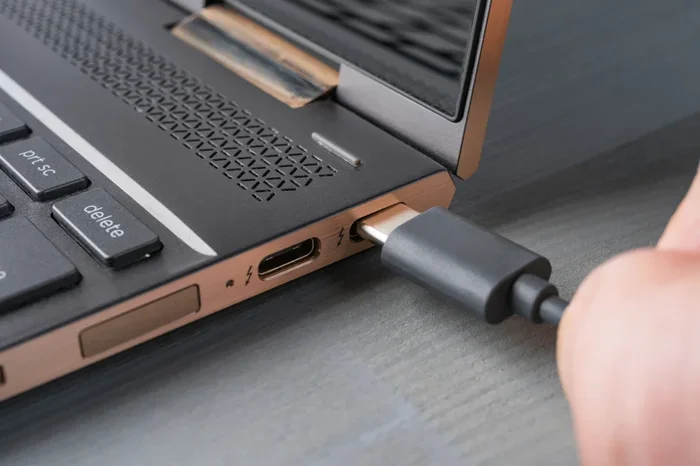
- Plug the audio interface into your computer using a USB cable. Make sure you use a reliable USB port.
- Install any drivers that come with your interface. Most modern interfaces use class-compliant drivers, which means no installation is needed. But some older models require manual driver setup.
- Turn on phantom power if you are using a condenser microphone. Look for the 48V button on your interface and press it.
- Adjust the gain on your interface. Start with the knob in the middle and speak into the mic. Watch the levels on your computer and adjust until the signal is strong but not clipping.
- Select the interface as your input device in your recording or streaming software. In OBS Studio, go to Settings, then Audio, and choose your interface as the mic source.
Testing Your Setup
After you finish the setup, do a quick test. Record a few seconds of audio and play it back. Listen for any noise, hum, or distortion. If you hear a buzzing sound, try using a different USB port or a powered USB hub. Ground loop issues are common and easy to fix.
You should also check your audio levels in your streaming software. Make sure the input volume is balanced and that your voice sounds clear and natural.
Quick Tips for Better Audio
- Use a short XLR cable to reduce signal loss and interference.
- Place your mic on a shock mount or boom arm to minimize handling noise.
- Record in a quiet room with soft surfaces to reduce echo.
- Use a pop filter to tame plosive sounds like “p” and “b”.
- Keep your gain levels below the red zone to avoid distortion.
Best XLR Microphones for USB Streaming And Recording
Not all XLR microphones are created equal. Some shine for streaming, while others are built for studio recording. Here are a few excellent options that work well when connected through USB via an interface.
Dynamic Microphones
Dynamic mics are tough and versatile. They handle loud sounds well and reject background noise. This makes them ideal for streaming in noisy environments.
The Shure SM7B is a legendary choice for streamers and podcasters. It delivers warm, rich audio and works beautifully with an audio interface. The Audio-Technica Dynamic 2020 is another solid option that offers great value for the price.
Condenser Microphones
Condenser mics capture more detail and nuance. They are sensitive and bright, making them perfect for studio recording and voiceover work.
The Audio-Technica AT2020 is a popular budget condenser that pairs well with any USB interface. The Rode NT1-A is a premium option that delivers stunningly clear audio with very low self-noise.
Which One Should You Pick
If you stream in a home with background noise, go with a dynamic mic. If you record in a quiet, treated space, a condenser mic will capture your voice beautifully. Both types work perfectly with USB through an interface.
Common Mistakes When Connecting XLR Mics To USB
Even with the right gear, people make mistakes that hurt their audio quality. Here are some common pitfalls and how to avoid them.
Skipping Phantom Power for Condenser Mics
This is the number one mistake. Condenser microphones need phantom power to operate. If you forget to turn on the 48V switch on your interface, your mic will not produce any sound. Always check that phantom power is enabled when using a condenser mic.
Using a Cheap Cable
A poor-quality XLR cable can introduce noise and signal loss. Invest in a well-shielded cable from a reputable brand. Your audio chain is only as strong as its weakest link.
Setting Gain Too High
New creators often crank the gain all the way up. This causes distortion and clipping, which ruins your recordings. Start low and gradually increase until your levels are healthy. Aim for peaks around negative six decibels on your meter.
Ignoring Driver Installation
Some audio interfaces need specific drivers to work correctly. If your computer does not recognize the interface, check the manufacturer website for the latest drivers. Installing them often solves recognition issues immediately.
Not Monitoring Your Audio
Always use headphones when recording or streaming. Monitoring in real time helps you catch problems like background noise, hum, or dropouts before they ruin your content.
Expert Insights On Xlr To USB setups
We asked a few audio engineers and streaming professionals for their advice on using XLR microphones with USB connections. Here is what they had to say.
Focus on your audio interface first. A quality interface makes a bigger difference than the microphone itself. It handles the signal conversion, provides clean gain, and gives you control over your sound. Investing in a solid interface pays off for years.
Do not skip acoustic treatment. Even the best XLR mic will sound bad in a room with lots of echo. Add soft furnishings, foam panels, or blankets to your recording space. The difference in sound quality is dramatic.
Keep your setup simple at first. You do not need ten pieces of gear on day one. A microphone, an interface, a cable, and a pair of headphones are all you need to get started. Add more equipment as your skills and needs grow.
Frequently Asked Questions
Can I plug an XLR mic straight into my computer’s USB port?
No, you cannot plug an XLR microphone directly into a USB port. XLR microphones use an analog signal and a different connector type. You need an audio interface or an XLR-to-USB adapter to convert the signal for your computer.
Do I need an audio interface if I already have an XLR-to-USB adapter?
It depends on your needs. An XLR-to-USB adapter works for basic recording and streaming. But if you want better sound quality, phantom power for condenser mics, or multiple inputs, an audio interface is the better choice.
Will using an XLR mic with USB improve my stream quality?
Yes, it can. XLR microphones generally offer better sound quality, more control, and professional features. When paired with a good audio interface, your stream audio will sound cleaner and more polished compared to a basic USB mic.
Can I use a condenser XLR mic with USB without phantom power?
No, condenser microphones require phantom power to operate. Without it, the mic will not produce any signal. Make sure your audio interface provides 48V phantom power and that it is turned on.
What is the best budget option for connecting an XLR mic to USB?
The most affordable option is an XLR-to-USB adapter like the Behringer UM2. It costs around $30 and provides a simple way to get your XLR mic connected to your computer. For slightly more money, an entry-level audio interface like the Focusrite Scarlett Solo offers much better sound quality.
Does using XLR with USB cause latency issues?
Latency can occur but is usually minimal with modern audio interfaces. Choose an interface with a good driver and adjust your buffer size in your software. A lower buffer size reduces latency but uses more computer processing power.
Final Thoughts
So, can you use XLR mic with USB for streaming and recording? Absolutely. The process is simple once you understand what equipment you need. Whether you choose an audio interface or an XLR-to-USB adapter, you can unlock professional-quality sound from your XLR microphone.
The key is to start with the right gear, set things up carefully, and avoid the common mistakes we covered. Take your time with the setup, test your audio levels, and invest in a quiet recording space. These small steps make a huge difference in the quality of your content.
An XLR microphone connected through USB gives you the best of both worlds. You get the sound quality and flexibility of a professional mic with the convenience of a USB connection to your computer. Whether you are streaming on Twitch, recording a podcast, or producing music at home, this setup will serve you well.
Now that you know how it all works, it is time to take action. Plug in your XLR mic, fire up your recording software, and start creating. Your audio quality is about to level up, and your audience will notice the difference right away.
Frequently Asked Questions
What is Can You Use Xlr Mic With Usb?
Can You Use Xlr Mic With Usb is an important topic with many practical applications.