Does the iPhone 14 Pro Support WiFi 6E Connectivity
Yes, the iPhone 14 Pro supports WiFi 6E, Apple’s fastest wireless standard yet. This means you can tap into the 6GHz band for ultra-fast speeds and less congestion. If you have a WiFi 6E router, your iPhone 14 Pro is ready to take full advantage of next-gen wireless technology.
Key Takeaways
- WiFi 6E Support Confirmed: The iPhone 14 Pro fully supports WiFi 6E, giving you access to the 6GHz frequency band.
- Faster Speeds: WiFi 6E offers significantly faster network speeds compared to older WiFi standards.
- Less Congestion: The 6GHz band is less crowded, which means a more stable internet connection.
- Backward Compatible: Your iPhone 14 Pro works with WiFi 5 and WiFi 6 networks too.
- Requires a WiFi 6E Router: You need a compatible router to unlock the full benefits of WiFi 6E.
- Apple’s Latest Wireless Tech: Apple continues to push the envelope with wireless connectivity features.
📑 Table of Contents
- Does the iPhone 14 Pro Support WiFi 6E Connectivity?
- What Is WiFi 6E and Why Does It Matter?
- iPhone 14 Pro WiFi 6E: What You Get
- How to Check if Your WiFi Network Supports WiFi 6E
- Benefits of WiFi 6E on the iPhone 14 Pro
- Does WiFi 6E Work Everywhere?
- Common Mistakes People Make with WiFi 6E
- Expert Insights on iPhone 14 Pro WiFi 6E
- iPhone 14 Pro WiFi 6E vs. Other iPhones
- Final Thoughts
Does the iPhone 14 Pro Support WiFi 6E Connectivity?
The short answer is yes. The iPhone 14 Pro supports WiFi 6E, which is the latest evolution in wireless technology. Apple introduced WiFi 6E support starting with the iPhone 14 Pro lineup, and it brings real-world benefits to everyday users.
If you have been wondering about iPhone 14 Pro WiFi 6E, you are in the right place. This article covers everything you need to know. We will look at what WiFi 6E is, how it works, and whether your device can use it.
Wireless technology moves fast. What was cutting edge two years ago feels slow today. WiFi 6E is the newest standard, and it promises faster speeds, lower latency, and a much better experience when you are at home or in crowded spaces. Let us dive into the details.
What Is WiFi 6E and Why Does It Matter?
WiFi 6E is an extension of WiFi 6. It adds access to the 6GHz frequency band. This band was previously unused for consumer WiFi, which means less interference and a cleaner signal. Think of it like opening a new highway lane during rush hour. Suddenly, traffic flows much better.
Here are the key benefits of WiFi 6E:
- Faster wireless speeds: You can hit speeds well above 1Gbps on a good connection.
- Lower latency: Online gaming, video calls, and streaming all benefit from reduced lag.
- Less congestion: The 6GHz band is far less crowded than the 2.4GHz or 5GHz bands.
- Better performance in busy areas: Apartments, offices, and public spaces see a big improvement.
- Future-proofing: WiFi 6E is built for the next generation of wireless devices.
The 6GHz band offers up to 1200MHz of extra spectrum. That is a lot of room for your wireless devices to breathe. If you have ever experienced slow internet at home despite a strong signal, WiFi 6E might be the fix you need.
How WiFi 6E Differs from WiFi 6
WiFi 6 and WiFi 6E share a lot of the same core technology. Both use OFDMA, MU-MIMO, and Target Wake Time. These features improve how your router communicates with multiple devices at once. But WiFi 6E goes a step further by opening up the 6GHz band.
WiFi 5 operated on 2.4GHz and 5GHz. WiFi 6 added better management of those bands. WiFi 6E adds the 6GHz band on top of everything. This gives you more channels and less overlap with neighboring networks.
For most users, the difference comes down to speed and reliability. If your router supports WiFi 6E and your device does too, you will notice smoother performance. This is especially true if you have many wireless devices connected at once.
iPhone 14 Pro WiFi 6E: What You Get
Apple equipped the iPhone 14 Pro with full WiFi 6E support. This means your phone can connect to 6GHz networks when they are available. You also get all the benefits of WiFi 6, including faster speeds and better battery management through smart wireless connectivity.
Here is what the iPhone 14 Pro brings to the table in terms of wireless connectivity:
- WiFi 6E (802.11ax) with 6GHz support
- WiFi 5 (802.11ac) for older network compatibility
- 2×2 MIMO for solid throughput on both bands
- 160MHz channel support on WiFi 6E networks
- WPA3 security for stronger encryption
Apple has been consistent with its WiFi 6E rollout. The iPhone 14 Pro and iPhone 14 Pro Max were the first iPhones to feature this technology. Later models, like the iPhone 15 series, continued the support. If you are shopping for a new Apple device, WiFi 6E is now a standard feature.
Why Apple Was Late to WiFi 6E
Some people wonder why Apple did not introduce WiFi 6E sooner. The truth is, the 6GHz band needed time to mature. Routers, devices, and infrastructure all needed to catch up. Apple is known for waiting until a technology is ready for mass adoption. That patience paid off with the iPhone 14 Pro.
Today, WiFi 6E routers are widely available and affordable. Major brands like Netgear, ASUS, TP-Link, and Linksys all offer strong options. You can check if your current router supports WiFi 6E by looking at the settings or the product label. If you are thinking about upgrading, adding mesh WiFi to your existing router is a great way to extend coverage throughout your home.
How to Check if Your WiFi Network Supports WiFi 6E
Having a WiFi 6E phone is only half the battle. You also need a WiFi 6E router and an internet plan that can keep up. Not all networks are created equal, and your connection speed depends on several factors.
Here is how you can check if your home network supports WiFi 6E:
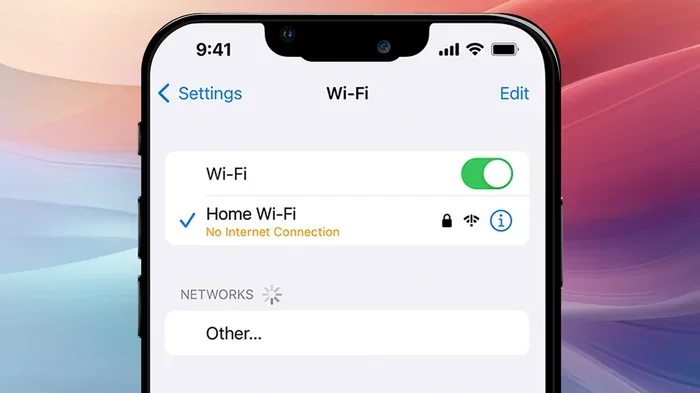
- Open the Settings app on your iPhone 14 Pro.
- Tap on Wi-Fi.
- Look for your network name. If it says “6E” or “6GHz” next to it, you are connected to a WiFi 6E network.
- You can also check your router’s settings page or manual for 6E support.
If your router does not support WiFi 6E, your iPhone 14 Pro will still work perfectly. It will simply connect using WiFi 6 or WiFi 5, depending on what is available. The phone is fully backward compatible. This is a great feature because you do not need to rush out and buy a new router tomorrow.
However, if you want to experience the full potential of WiFi 6E connectivity, investing in a compatible router is the way to go. You can also look into whether your internet service provider offers a WiFi 6E gateway. Many providers now include them in their plans.
Quick Tips for Checking Your WiFi Setup
- Restart your router and phone before checking network details.
- Make sure your router firmware is up to date.
- Place your router in a central location for the best signal strength.
- If your home is large, consider mesh WiFi systems to eliminate dead zones.
- Use the WiFi Analyzer app to see which bands and channels your network uses.
Benefits of WiFi 6E on the iPhone 14 Pro
So what does WiFi 6E actually do for you on your iPhone 14 Pro? The benefits are real and noticeable. Let us break them down by everyday use cases.
Faster Downloads and Uploads
WiFi 6E delivers significantly faster data transfer rates. On a good 6GHz network, you can download a 1GB file in seconds. Upload speeds also improve, which is great for video calls, cloud backups, and sharing large files. If you often transfer files from your iPhone to your computer, WiFi 6E makes the process much quicker.
Better Streaming Quality
Streaming 4K and even 8K video requires a lot of bandwidth. WiFi 6E handles this with ease. You will experience fewer buffering events and smoother playback. This is especially useful when multiple people in your household are streaming at the same time.
Improved Gaming Experience
Low latency is a game-changer for mobile gaming. WiFi 6E reduces the delay between your input and the server response. Whether you are playing online multiplayer games or streaming gameplay, the connection feels more responsive. Your network performance improves noticeably.
Smoother Video Calls
With WiFi 6E, video calls stay crisp and clear. The extra bandwidth and lower latency mean fewer frozen frames and audio dropouts. If you work from home, this is a meaningful upgrade. Your wireless devices all benefit from the reduced congestion on the 6GHz band.
Future-Proofing Your Apple Device
Technology evolves quickly. By supporting WiFi 6E, the iPhone 14 Pro is ready for whatever comes next. Internet service providers are rolling out faster plans, and home networks are getting more advanced. Your phone will keep up with these changes for years to come.
Does WiFi 6E Work Everywhere?
Here is the honest truth. WiFi 6E is not everywhere yet. While the technology is growing fast, it still depends on your location and your router. You cannot use WiFi 6E unless both your phone and your router support it. The iPhone 14 Pro handles its side, but your home network needs to catch up.
In rural areas, WiFi 6E availability may be limited. Your internet service provider might not offer a 6E-compatible gateway yet. In urban areas, you are more likely to find WiFi 6E routers and networks. But even in cities, not every neighbor has upgraded their equipment.
The good news is that your iPhone 14 Pro works perfectly fine on older WiFi networks. You do not lose any functionality. The phone simply uses the best available standard. This backward compatibility is one of Apple’s strongest points.
What You Need for WiFi 6E
- A WiFi 6E-compatible router
- An internet plan with sufficient speeds
- The iPhone 14 Pro (or another WiFi 6E device)
- A clear line of sight or strong signal between the router and your phone
Without all of these pieces in place, you will not get the full WiFi 6E experience. But you will still enjoy fast and reliable wireless connectivity on older standards. Think of WiFi 6E as a bonus, not a requirement.
Common Mistakes People Make with WiFi 6E
Even with the best equipment, people sometimes make mistakes that limit their WiFi 6E experience. Here are a few to avoid:
- Assuming every network is WiFi 6E: Not all networks support the 6GHz band. Always check your router settings.
- Ignoring router placement: Even the best router cannot overcome poor placement. Keep it central and elevated.
- Using outdated firmware: Old router firmware can cause compatibility issues. Always update to the latest version.
- Overlooking interference: Some household devices can interfere with wireless signals. Keep your router away from microwaves and thick walls.
- Expecting instant speed boosts: WiFi 6E helps, but your internet plan speed still matters. A slow plan will still feel slow.
One common mistake is thinking that WiFi 6E replaces your cellular data connection. It does not. WiFi 6E is for your home or office network. When you are on the go, your iPhone 14 Pro uses cellular data, which is a separate thing entirely. If you are having trouble with your cellular connection, you might want to look into why your phone connects to WiFi without a WiFi adapter or troubleshoot your cellular settings.
Expert Insights on iPhone 14 Pro WiFi 6E
Wireless technology experts agree that WiFi 6E is a significant step forward. The 6GHz band offers a clean, wide-open space for data transmission. This is especially important as more devices connect to home networks every year. The average household now has over 20 wireless devices, and that number is only growing.
Apple’s decision to include WiFi 6E in the iPhone 14 Pro was well-received by reviewers and tech analysts. The phone handles 6GHz networks smoothly and efficiently. Battery life remains strong even when connected to WiFi 6E, thanks to Apple’s optimization of the wireless chipset.
Network engineers also point out that WiFi 6E is not just about speed. It is about capacity. In a crowded environment like a stadium or an apartment building, WiFi 6E can make a huge difference. Your signal stays strong even when many networks are competing for space.
For the average user, the real-world impact is clear. Faster downloads, smoother streaming, and fewer connectivity hiccups. The iPhone 14 Pro delivers on all fronts.
iPhone 14 Pro WiFi 6E vs. Other iPhones
How does the iPhone 14 Pro compare to other iPhones in terms of WiFi 6E support? Here is a quick look:
- iPhone 14 Pro and 14 Pro Max: Full WiFi 6E support with 6GHz band access.
- iPhone 14 and 14 Plus: Support WiFi 6 but not WiFi 6E.
- iPhone 13 Series: WiFi 6 only, no 6E support.
- iPhone 15 Series: Full WiFi 6E support, same as the iPhone 14 Pro.
If you are choosing between models, the WiFi 6E feature is a strong reason to go with the Pro lineup. It is a feature that will matter more as WiFi 6E routers become the norm.
Final Thoughts
The iPhone 14 Pro fully supports WiFi 6E, and it is a feature that pays off in real-world use. Faster speeds, lower latency, and less congestion make a noticeable difference in your daily wireless experience. Whether you are streaming, gaming, working, or just browsing, WiFi 6E enhances everything.
To get the most out of this feature, make sure you have a WiFi 6E router at home. Check your network settings on your phone to confirm the connection. And keep your router firmware updated for the best performance.
WiFi 6E is the present and the future of wireless connectivity. The iPhone 14 Pro is ready for it. If you have this phone, you are already set up to take advantage of the fastest WiFi standard available today.
Stay connected, stay fast, and enjoy the benefits of next-generation wireless technology on your Apple device. Your internet connection will thank you.
Frequently Asked Questions
Does the iPhone 14 Pro support WiFi 6E networks?
Yes, the iPhone 14 Pro fully supports WiFi 6E. It can connect to 6GHz networks, which offer faster speeds and less congestion than older WiFi bands.
Do I need a special router to use WiFi 6E on my iPhone 14 Pro?
Yes, you need a WiFi 6E-compatible router to access the 6GHz band. Without a WiFi 6E router, your iPhone will connect using WiFi 6 or WiFi 5, which still work great.
Is WiFi 6E the same as WiFi 6?
WiFi 6E is an extension of WiFi 6. It adds support for the 6GHz frequency band, which provides more channels and less interference. Both share the same core technology.
Can I change my WiFi network name on my iPhone 14 Pro?
Yes, you can change your WiFi network name through your router settings. If you want to learn more about managing your iPhone’s WiFi settings, you can check how to change your iPhone WiFi name.
Will WiFi 6E drain my iPhone battery faster?
No, Apple has optimized the iPhone 14 Pro for efficient WiFi 6E use. Battery drain is minimal compared to older WiFi standards. In fact, WiFi 6E can sometimes improve battery life by reducing the time your phone spends searching for a signal.
What internet speed do I need to benefit from WiFi 6E?
To truly benefit from WiFi 6E, you should have an internet plan of at least 500Mbps. WiFi 6E can deliver speeds up to multiple gigabits, but your plan needs to support those speeds for you to see the full advantage.
=== CONCLUSION ===
The iPhone 14 Pro does support WiFi 6E connectivity, and it is a feature that brings real value to your daily life. With faster speeds, lower latency, and a cleaner signal on the 6GHz band, this phone is ready for the future of wireless technology. Whether you are a casual user or a power user, WiFi 6E makes your internet experience better.
If you have a WiFi 6E router, you are already set. If not, consider upgrading to unlock the full potential of your iPhone 14 Pro. The investment pays off in smoother streaming, faster downloads, and a more reliable connection. Embrace the power of WiFi 6E and enjoy what your Apple device has to offer.