Can You Get HD TV Through a Coax Cable in Your Home
Yes, you can get HD TV through a coax cable in many home setups. A coaxial connection can carry high-definition signals when paired with the right cable type and a digital tuner. This guide covers everything from cable types and signal quality to setup steps and common problems you may face.
Have you ever plugged a coax cable into your TV and wondered if it can really deliver HD picture quality? The short answer is yes. But the full story is a bit more detailed than that. Whether you are setting up a new television, switching from an old antenna, or just trying to get the best picture from your cable provider, understanding how coax cables handle HD signals is essential.
This guide breaks down everything you need to know about getting HD TV through a coax cable. We will cover how coaxial cables work, which types support high definition, what equipment you need, and how to troubleshoot common problems. By the end, you will have a clear picture of whether your coax setup can deliver the HD experience you want.
Many homes still rely on coaxial wiring for their television signals. Cable companies, satellite providers, and even over-the-air antenna setups often use coax as the main connection method. The good news is that modern coax technology handles HD signals very well. But there are a few things you need to check to make sure everything works as it should.
Key Takeaways
- Coax cables can carry HD TV signals: Modern coaxial cables like RG-6 support digital HD transmissions from your cable provider or antenna.
- You need a digital tuner: Most newer TVs have a built-in digital tuner that decodes HD signals over coax. Older sets may need a set-top box.
- Cable type matters: RG-6 is the best choice for HD TV over coax. RG-59 is older and may not deliver the best signal quality for high definition.
- Signal loss is a common issue: Long cable runs, bad connectors, and unshielded cables can weaken your HD signal and cause pixelation.
- Coax is not the only option: HDMI delivers the best HD picture quality, but coax is still widely used in cable TV setups and antenna connections.
📑 Table of Contents
- What Is a Coaxial Cable and How Does It Work?
- Can You Really Get HD TV Through a Coax Cable?
- Types of Coaxial Cables for HD TV
- Setting Up HD TV with a Coax Cable
- Common Problems When Getting HD Through Coax
- Coax Cable vs. Other HD TV Connections
- Expert Tips for the Best HD Picture on Coax
- The Future of Coax and HD TV
- Conclusion
What Is a Coaxial Cable and How Does It Work?
A coaxial cable is a type of electrical cable that carries signals from one point to another. It has a central copper conductor surrounded by insulation, a metallic shield, and an outer jacket. This design helps protect the signal from interference and loss. Coax has been used for decades in cable TV, internet, and radio applications.
The Basics of Coaxial Wiring
The structure of a coax cable is what makes it special. The central copper core carries the signal. Around it is a dielectric insulator that keeps the core separated from the shield. The metallic braid or foil shield blocks outside interference. Finally, the outer plastic jacket protects everything inside.
Because of this layered design, coax cables can carry signals over long distances with minimal loss. This is why cable companies have used them for years. When it comes to HD TV through coax cable, the same design principles apply. The cable needs to be in good condition and properly connected to deliver a clean HD signal.
How Coax Carries TV Signals
Coax cables carry television signals using radio frequency (RF) transmission. In the old days, analog TV signals traveled through coax as continuous waves. Today, digital TV signals are encoded into discrete data packets that travel through the same cable. This digital transmission is what makes HD possible over coax.
Your cable provider or antenna sends a digital HD signal through the coax cable. Your TV or a set-top box decodes that signal into the picture you see on screen. The key is that the cable and the equipment on both ends must support the digital HD format. If any part of the chain is outdated, your picture quality may suffer.
Can You Really Get HD TV Through a Coax Cable?
The answer depends on a few factors. The type of coax cable you use, the quality of your connections, and whether your TV has a digital tuner all play a role. In most modern setups, yes, you can get excellent HD picture quality through a coax cable.
Understanding HD Signal Transmission Over Coax
When a cable provider sends an HD channel, it compresses the high-definition video and audio into a digital signal. This signal travels through the coax cable to your home. The cable carries the signal with very little loss, especially if you are using a high-quality cable like RG-6.
Once the signal reaches your TV, the digital tuner decodes it. If your TV has a built-in digital tuner, you can watch HD channels directly through the coax connection. If not, you will need a cable box or a digital converter to decode the signal.
The signal strength also matters. A strong signal gives you a clear, crisp HD picture. A weak signal can cause pixelation, freezing, or a drop in resolution. This is why the quality of your coax cable and the condition of your connections are so important.
Digital vs. Analog Signals on Coax
It is important to understand the difference between analog and digital signals when using coax for HD TV. Analog signals were used for standard definition TV. They are continuous waves that degrade over distance. Digital signals are ones and zeros. They stay clean until the signal drops below a certain threshold, at which point the picture may go completely blank.
Most cable providers have switched to digital transmission. This means your HD channels are sent as digital signals over coax. Your TV or set-top box receives and decodes these digital signals to produce the high-definition picture. If you are still using equipment that only handles analog signals, you will not get HD through coax.
Types of Coaxial Cables for HD TV
Not all coax cables are the same. The type of cable you use can make a big difference in the HD picture quality you receive. Let us look at the most common types and which ones work best for HD TV.
RG-6 vs. RG-59 Cables
RG-6 and RG-59 are the two most common types of coaxial cables found in homes. They look similar on the outside, but they are very different on the inside.
RG-6 cables have a thicker copper core and a denser shield. This allows them to carry higher frequency signals with less loss. RG-6 is the standard for digital TV and HD transmissions. If you want the best HD TV through a coax cable experience, RG-6 is what you should use.
RG-59 cables are thinner and have a less robust shield. They were designed for analog TV signals and shorter runs. RG-59 can still carry digital signals, but it may introduce more signal loss, especially over longer distances. For HD TV, RG-59 is not the best choice.
Which Coax Cable Should You Use?
For most home setups, RG-6 is the clear winner. It supports the full range of frequencies needed for HD and digital TV signals. Here is a quick comparison:
- RG-6: Best for HD and digital TV. Supports frequencies up to 3 GHz. Thicker core and better shielding.
- RG-59: Designed for analog signals. Supports frequencies up to 500 MHz. May work for short HD runs but not ideal.
- RG-11: Thicker and used for very long runs. Overkill for most home setups but excellent for signal preservation.
If you are running a coax cable from your wall outlet to your TV, RG-6 is all you need. Make sure the connectors are tight and the cable is not kinked or damaged.
Setting Up HD TV with a Coax Cable
Setting up HD TV through a coax cable is straightforward. But there are a few steps you should follow to make sure you get the best possible picture quality.
Equipment You Need
Before you start, gather the following items:
- A coaxial cable (RG-6 recommended)
- A TV with a built-in digital tuner (most TVs made after 2007 have one)
- A coax wall outlet or antenna connection
- A cable box or set-top box (if your provider requires one)
- Coax connectors or adapters if needed
If your TV does not have a digital tuner, you will need a set-top box from your cable provider or a digital converter. This box decodes the digital HD signal and sends it to your TV. Some people also use a signal splitter to run coax to multiple TVs in the house.
Step-by-Step Setup
Follow these steps to set up your HD TV with a coax cable:
- Check your wall outlet. Make sure the coax outlet is active and connected to your cable provider or antenna.
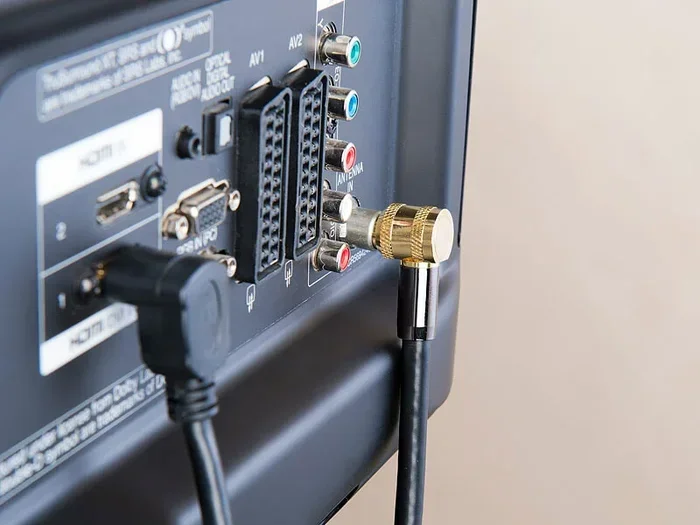
- Connect the coax cable. Plug one end into the wall outlet and the other into the coax input on your TV or set-top box.
- Turn on your TV. Go to the input or source menu and select the coax or antenna input.
- Run a channel scan. Most TVs have a channel scan or auto-tune feature. This searches for all available HD channels on your coax connection.
- Check the picture quality. Tune into an HD channel and look for a clear, sharp picture. If the picture is blurry or pixelated, check your connections and cable quality.
Once the channel scan is complete, you should see all available HD channels in your area. If you are using a cable provider, the HD channels will be part of your subscription package.
Common Problems When Getting HD Through Coax
Even with the right equipment, you may run into issues when trying to get HD TV through a coax cable. Here are the most common problems and how to fix them.
Signal Loss and Interference
Signal loss is the number one enemy of HD TV over coax. The longer the cable run, the more signal you lose. If your coax cable runs through walls, attics, or across long distances, you may notice a drop in picture quality.
Interference is another common issue. Electrical devices, fluorescent lights, and even nearby power cables can cause interference in your coax line. This can show up as ghosting, color distortion, or intermittent signal drops.
To reduce signal loss, use the shortest coax cable possible. Avoid running the cable through tight bends or kinks. Use high-quality RG-6 cable with gold-plated connectors for the best results.
How to Fix Coax Connection Issues
If you are experiencing HD picture problems, try these troubleshooting steps:
- Check all connections. Make sure every coax connector is tight and secure. A loose connection is one of the most common causes of poor picture quality.
- Inspect the cable. Look for kinks, cuts, or damage to the outer jacket. Any damage to the cable can weaken the signal.
- Replace old splitters. Signal splitters can reduce signal strength. If you use a splitter to run coax to multiple TVs, try a higher-quality splitter or remove it temporarily to test.
- Update your equipment. Old set-top boxes or TVs without digital tuners may not support HD over coax. Check with your cable provider for equipment upgrades.
- Use a signal amplifier. If you have a long coax run, a signal amplifier can boost the HD signal and improve picture quality.
Keeping your coax connections clean and tight makes a huge difference. Even a small amount of corrosion on a connector can degrade your HD signal significantly.
Coax Cable vs. Other HD TV Connections
While coax is a reliable way to deliver HD TV, it is not the only option. Let us compare coax to other common HD connections so you can understand where it stands.
HDMI vs. Coax for HD TV
HDMI is widely considered the gold standard for HD and 4K TV connections. It carries both video and audio through a single cable and supports the highest resolutions. Coax, on the other hand, carries only the video signal over the coax line. Audio may need a separate connection depending on your setup.
However, coax has some advantages. It is more widely available in homes. Many cable providers use coax as their primary connection method. And coax cables are less prone to certain types of interference that can affect HDMI cables over long runs.
Which Connection Is Best for You?
The best connection depends on your setup and needs:
- Use coax if: Your cable provider delivers HD channels through coax, you have a long cable run, or you are using an antenna for over-the-air HD channels.
- Use HDMI if: You want the highest possible picture quality, you are connecting a streaming device or Blu-ray player, or you need to carry both audio and video through one cable.
- Use both if: You have a cable box that outputs HDMI but your home wiring uses coax. You can use coax from the wall to the cable box, then HDMI from the box to the TV.
In many cases, the best setup uses a combination of both. Coax brings the signal into your home, and HDMI delivers the final picture to your TV. This hybrid approach gives you the best of both worlds.
Some homeowners find that keeping their setup organized can be a challenge, especially when managing multiple cables and devices. It can feel like trying to manage a complex spreadsheet where a line won’t delete in Microsoft Excel — frustrating but absolutely solvable with the right approach.
Expert Tips for the Best HD Picture on Coax
Want to get the most out of your coax connection for HD TV? Here are some expert tips that make a real difference.
- Use gold-plated connectors. They resist corrosion and provide a more secure connection than standard nickel-plated connectors.
- Keep coax cables away from power lines. Running coax parallel to electrical wiring can introduce interference. Cross them at 90-degree angles when possible.
- Label your cables. If you have multiple coax runs in your home, label each one at both ends. This makes troubleshooting much faster.
- Check your cable provider’s HD lineup. Not all channels on your coax connection are broadcast in HD. Check your provider’s channel guide to see which ones are high definition.
- Replace old splitters. Every splitter you add to your coax line reduces signal strength. Use the fewest splitters possible and choose high-quality ones.
- Consider a whole-home coax distribution system. If you want HD TV in every room, a distribution system sends the signal from one point to multiple TVs without significant loss.
These small changes can dramatically improve your HD viewing experience over coax. You do not need expensive equipment to get great results. Just good cables, solid connections, and a little attention to detail.
The Future of Coax and HD TV
Coax cable technology continues to evolve. Newer versions of coax, such as RG-6 quad-shield, offer even better protection against interference and signal loss. Some modern cable systems also use DOCSIS technology over coax to deliver internet and TV signals simultaneously at high speeds.
While fiber-optic connections are becoming more common, coax remains a staple in most homes. Cable companies continue to invest in coax infrastructure because it is reliable, widely available, and capable of delivering HD and even 4K content. For the foreseeable future, coax will remain a practical and effective way to bring HD TV into your home.
The key takeaway is simple. If you have a good coax cable, a digital tuner, and solid connections, you can absolutely enjoy HD TV through your coax setup. It is a proven technology that works well when set up correctly.
Conclusion
So, can you get HD TV through a coax cable? The answer is a clear yes. With the right type of coax cable, a digital tuner, and proper setup, you can enjoy high-definition television through your coaxial connection. Whether you get your signal from a cable provider or an over-the-air antenna, coax is a reliable and effective way to deliver HD content to your TV.
Remember to use RG-6 cable for the best results. Keep your connections clean and tight. Troubleshoot signal issues promptly. And do not be afraid to upgrade old equipment if it is holding you back from the HD picture quality you deserve.
A coax cable is not the flashiest piece of technology in your home entertainment setup. But it is one of the most important. Get the right coax cable, set it up properly, and you will be enjoying sharp, clear HD TV for years to come.
Frequently Asked Questions
Can I get HD channels through a coax cable without a cable box?
Yes, if your TV has a built-in digital tuner and your cable provider broadcasts HD channels in the clear. Some providers encrypt their HD channels, which requires a cable box to decode. Check with your provider to see if you can watch HD channels directly through coax without additional equipment.
What is the best coax cable for HD TV?
RG-6 coaxial cable is the best choice for HD TV. It has a thicker copper core and better shielding than RG-59, which means less signal loss and a cleaner HD picture. For the best results, choose an RG-6 cable with gold-plated connectors and a quad-shield design.
Why is my HD picture blurry when using a coax cable?
A blurry HD picture over coax is usually caused by a loose connection, a damaged cable, or signal loss from a long cable run. Check that all connectors are tight and the cable is not kinked or cut. If the problem persists, try a shorter or higher-quality RG-6 cable, or add a signal amplifier to boost the strength.
Can I split a coax cable to watch HD TV in multiple rooms?
Yes, you can use a coax signal splitter to send HD channels to multiple TVs. However, each splitter reduces the signal strength. Use a high-quality splitter and keep the total cable run as short as possible. For longer runs or many TVs, consider adding a signal amplifier to maintain HD picture quality.
Does coax cable support 4K TV?
Standard coax cables like RG-6 can carry some 4K signals, but this depends on your cable provider and the specific setup. Most coax systems are designed for HD resolution up to 1080p. For the best 4K experience, HDMI is the recommended connection. However, newer coax-based systems using DOCSIS 3.1 can support higher bandwidth and may handle 4K streaming.
How do I know if my TV has a digital tuner for coax HD channels?
Check your TV’s specifications or user manual. Look for terms like “built-in digital tuner,” “ATSC tuner,” or “digital cable ready.” Most TVs manufactured after 2007 include a digital tuner. If your TV does not have one, you will need a set-top box or digital converter to watch HD channels through coax.