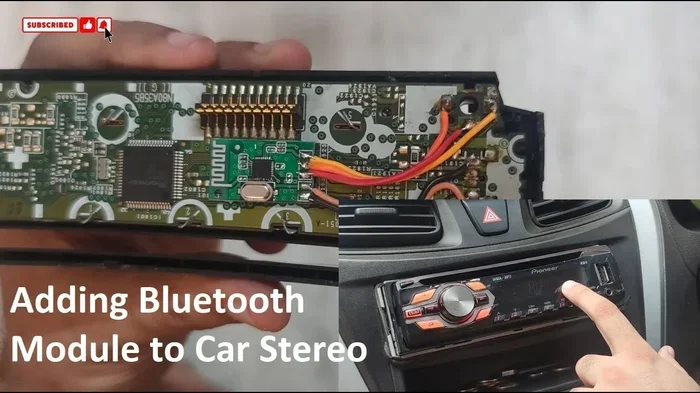
Can You Add Bluetooth to a Car Stereo Yes Heres How
Yes, you can absolutely add Bluetooth to a car stereo, and it is easier than most people think. Whether you use a Bluetooth adapter, an FM transmitter, or upgrade your head unit, wireless streaming is within reach. This guide walks you through every method, step by step, so you can enjoy hands-free calling and music on the road. We also cover common problems, costs, and expert tips to help you choose the best option for your setup.
Key Takeaways
- Bluetooth adapters are the simplest and most affordable way to add wireless capability to any car stereo.
- FM transmitters work well for older cars without aux inputs or USB ports.
- Upgrading your head unit gives you the most features and the cleanest installation.
- Hands-free calling and wireless music streaming are the two biggest benefits of adding Bluetooth.
- Installation is doable yourself in most cases, but a professional can help if you prefer.
- Compatibility matters — check your stereo type before buying any Bluetooth device.
- Wireless car audio is now standard in most modern vehicles, but older cars can catch up easily.
📑 Table of Contents
- Can You Add Bluetooth to a Car Stereo Yes Heres How
- Why Add Bluetooth to Your Car Stereo
- Methods to Add Bluetooth to a Car Stereo
- Step-by-Step Guide to Installing a Bluetooth Adapter
- Benefits of Adding Bluetooth to Your Car
- Common Problems and How to Fix Them
- How Much Does It Cost to Add Bluetooth
- Quick Tips for the Best Bluetooth Car Audio Experience
- Is It Worth Adding Bluetooth to an Older Car
- Expert Insights on Car Bluetooth Upgrades
- Final Thoughts on Adding Bluetooth to Your Car Stereo
Can You Add Bluetooth to a Car Stereo Yes Heres How
Have you ever been stuck driving an older car and wished you could stream music wirelessly? Maybe your stereo still works great, but it lacks Bluetooth. The good news is that adding Bluetooth to a car stereo is absolutely possible. You do not need to buy a whole new system either. There are several simple ways to bring wireless audio into your vehicle today.
Whether you drive a classic sedan or a trusty older SUV, Bluetooth technology can transform your driving experience. You get to stream music from your phone, take calls hands-free, and enjoy better sound quality. In this guide, we will walk you through every option. We will cover costs, installation steps, and tips to get the best results. By the end, you will know exactly which method works best for your car.
Wireless car audio has become the norm in newer vehicles. But that does not mean older cars are left behind. With the right tools, any car stereo can gain Bluetooth capability. Let us dive into the details and explore your options.
Why Add Bluetooth to Your Car Stereo
Before we get into the how, let us talk about the why. There are many reasons drivers choose to add Bluetooth to their car stereos. Understanding these benefits can help you decide which method fits your needs best.
Wireless Music Streaming
This is the number one reason people add Bluetooth. Instead of plugging in a cable or fiddling with CDs, you simply stream music from your phone. Apps like Spotify, Apple Music, and YouTube Music all work wirelessly. You get access to millions of songs without any wires cluttering your dashboard.
Hands-Free Calling
Safety matters on the road. Bluetooth lets you answer calls without taking your hands off the wheel. Your car stereo picks up the call audio, and the built-in microphone transmits your voice back. This makes driving much safer and keeps you focused on the road.
Convenience and Compatibility
Most people carry their entire music library in their pocket. Bluetooth lets you access that library instantly in your car. You also get the convenience of voice commands on many phones. You can change songs or adjust volume without touching your device.
For families who travel often, having wireless audio in the car makes long trips much more enjoyable. If you are looking for more travel-friendly tech ideas, you might also enjoy these 10 gadgets to make moms life easier that work great for road trips too.
Methods to Add Bluetooth to a Car Stereo
There are four main ways to add Bluetooth to your car stereo. Each method has its pros and cons. Let us break them down so you can choose the right one.
Method 1: Bluetooth Adapter
A Bluetooth adapter is the most popular and affordable option. It plugs directly into your stereos AUX input or USB port. Once paired with your phone, it streams audio wirelessly. These adapters are small, easy to install, and work with almost any stereo system.
Most Bluetooth adapters cost between 20 and 80 dollars. They are a great choice if your current stereo is in good shape and you just want wireless capability. Look for adapters with good battery life and clear audio quality.
Method 2: FM Transmitter
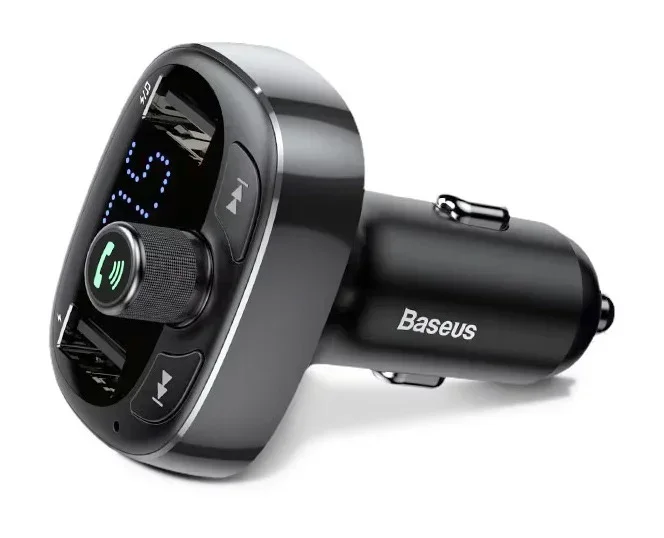
An FM transmitter broadcasts audio from your phone to your car stereo over an open FM frequency. You plug the transmitter into your cars cigarette lighter or USB port. Then you tune your stereo to a blank FM frequency. The transmitter sends your phones audio through the air to your radio.
FM transmitters work well for older cars that do not have AUX or USB inputs. They are also portable, so you can use them in multiple vehicles. The downside is that sound quality can vary depending on signal strength and local radio interference.
Method 3: Upgrade Your Head Unit
If your stereo is old or damaged, upgrading the entire head unit might be the best choice. Modern head units come with built-in Bluetooth, touchscreen displays, and smartphone integration. You get features like Apple CarPlay and Android Auto as well.
This option costs more, typically between 150 and 400 dollars for the unit alone. Installation is also more involved. But the result is a completely modern car audio experience. If you want the cleanest look and best performance, a head unit upgrade is the way to go.
Method 4: Bluetooth Receiver with AUX Cable
This method combines a small Bluetooth receiver with an AUX cable. The receiver connects to your phone via Bluetooth. Then an AUX cable runs from the receiver to your stereos AUX input. It is a simple setup that delivers solid sound quality.
Many people prefer this method because it keeps the setup neat. The receiver can hide under your dashboard or seat. You get wireless streaming without a bulky adapter hanging from your stereo panel.
Step-by-Step Guide to Installing a Bluetooth Adapter
The Bluetooth adapter is the easiest method to install. Here is a simple walkthrough to help you get started.
Step 1: Find Your AUX Input — Look for the AUX port on your stereo. It is usually a 3.5mm jack on the front panel or somewhere on the dashboard. If your car does not have an AUX input, check for a USB port instead.
Step 2: Plug in the Adapter — Connect the Bluetooth adapter to the AUX or USB port. If it uses USB for power, plug it into a USB port or a cigarette lighter adapter.
Step 3: Pair Your Phone — Turn on Bluetooth on your phone. Put the adapter into pairing mode. Select the adapter from your phones Bluetooth menu. You should hear a confirmation tone once paired.
Step 4: Test the Connection — Play music on your phone and check if it comes through your car speakers. Adjust the volume on both your phone and your stereo to get the best balance.
Once you have the adapter working, you may want to organize your phone contacts so they display properly on your car system. If you need help with that, here is a guide on adding prefixes to numbers on iPhone that can help with contact formatting.
Benefits of Adding Bluetooth to Your Car
Adding Bluetooth brings several real-world benefits that make every drive better. Here are the top advantages you will notice right away.
- Wire-free convenience — No more tangled cables or searching for the right aux cord.
- Improved safety — Hands-free calling keeps your eyes on the road and hands on the wheel.
- Better sound quality — Modern Bluetooth versions support high-quality audio codecs for clearer music.
- Easy switching between devices — You can connect multiple phones to one adapter and switch between them.
- Increased resale value — A car with Bluetooth capability is more appealing to buyers.
- Access to voice assistants — Siri, Google Assistant, and Alexa work through Bluetooth connections.
These benefits apply whether you drive a brand new car or a vehicle that is over 20 years old. Bluetooth technology has become incredibly affordable, making it accessible for every budget.
Common Problems and How to Fix Them
While adding Bluetooth is usually straightforward, you may run into a few issues. Here are the most common problems and their solutions.
Bluetooth Pairing Fails
If your phone will not connect to the adapter, try turning Bluetooth off and back on. Also, make sure the adapter is in pairing mode. Sometimes deleting old Bluetooth connections from your phone helps too. Restarting both devices can also resolve pairing issues.
Poor Audio Quality
Static or crackling sound often comes from a weak signal or interference. Move your phone closer to the adapter. If you are using an FM transmitter, try a different frequency. Also, check that your AUX cable is not damaged or loosely connected.
Connection Drops Frequently
Intermittent connections can be frustrating. This usually happens when your phone is too far from the adapter. Keep your phone within a few feet of the stereo. Also, make sure your adapter firmware is up to date if it supports updates.
Sometimes troubleshooting car audio issues can feel like untangling a messy spreadsheet — it helps to go step by step and not get overwhelmed. Much like organizing data when a line wont delete in Microsoft Excel, patience and a systematic approach always win.
Phone Does Not Show the Adapter
If your phone cannot find the adapter, try resetting the adapter to factory settings. Then attempt pairing again. Also, check that your phone is not already connected to another Bluetooth device nearby.
How Much Does It Cost to Add Bluetooth
Cost is a big factor when deciding how to add Bluetooth. Here is a quick breakdown of what you can expect to pay.
| Method | Cost Range | Installation Difficulty |
|---|---|---|
| Bluetooth Adapter | 20 – 80 dollars | Very Easy |
| FM Transmitter | 15 – 50 dollars | Very Easy |
| Bluetooth Receiver + AUX Cable | 25 – 70 dollars | Easy |
| Head Unit Upgrade | 150 – 400+ dollars | Moderate to Hard |
The Bluetooth adapter and FM transmitter options are the most budget-friendly. They require no professional help and take minutes to set up. A head unit upgrade costs more but delivers the best overall experience.
If you are on a tight budget, start with an FM transmitter or basic Bluetooth adapter. You can always upgrade to a new head unit later when you have more room in your car audio budget.
Quick Tips for the Best Bluetooth Car Audio Experience
Follow these tips to get the most out of your Bluetooth car stereo setup:
- Keep your adapter firmware updated — Manufacturers release updates that improve performance and fix bugs.
- Use a high-quality AUX cable if your setup uses one — cheap cables can introduce static and signal loss.
- Turn off unused Bluetooth devices on your phone — this prevents connection conflicts.
- Place the adapter near the center of your car — this improves signal strength and reduces interference.
- Charge your adapter regularly if it is battery-powered — a dead battery means no Bluetooth connection.
- Use a Bluetooth version 4.0 or higher — newer versions offer better range and audio quality.
- Test your setup before long drives — make sure everything works smoothly on shorter trips first.
Is It Worth Adding Bluetooth to an Older Car
The short answer is yes. Adding Bluetooth to an older car stereo is one of the best upgrades you can make. It costs very little, takes minimal time, and dramatically improves your daily driving experience. You get modern wireless streaming and hands-free calling in a car that might be decades old.
Older cars often have great sound systems that still sound fantastic today. Adding Bluetooth lets you enjoy your personal music library through those quality speakers. It is a win-win situation that every car owner should consider.
Even if you drive a newer car, Bluetooth may not be built into the stereo. Many older model cars from the mid-2000s to early 2010s lack this feature. A simple adapter solves the problem instantly without any permanent changes to your vehicle.
Expert Insights on Car Bluetooth Upgrades
Car audio professionals agree that Bluetooth adapters are the best entry point for most drivers. They are affordable, reversible, and deliver great results. If you want a more permanent solution, a head unit upgrade is the gold standard.
Experts also recommend choosing adapters that support the latest Bluetooth versions. Bluetooth 5.0 and above offer significantly better range and audio quality than older versions. Look for adapters that support codecs like aptX or AAC for the best sound experience.
When choosing an FM transmitter, pick one that charges your phone while in use. This is a small feature that makes a big difference, especially on long road trips. A dual-purpose transmitter saves you from needing a separate charger.
Final Thoughts on Adding Bluetooth to Your Car Stereo
Adding Bluetooth to a car stereo is simple, affordable, and incredibly rewarding. Whether you choose a Bluetooth adapter, an FM transmitter, or a full head unit upgrade, you are making your daily drive more enjoyable. Wireless music streaming and hands-free calling are no longer luxuries — they are expectations for modern drivers.
Start with the method that fits your budget and your cars current setup. A Bluetooth adapter is the easiest first step. If you want more features, consider upgrading your head unit. Whatever route you choose, you will wonder how you ever drove without it.
Take the time to set up your Bluetooth connection properly. Follow the pairing steps carefully and test everything before your next trip. Once it is working, you will enjoy seamless wireless audio every time you turn the key. Your car stereo does not have to be outdated — a simple upgrade brings it into the modern age.
So go ahead and make the change. Adding Bluetooth to your car stereo is one of the easiest and most satisfying upgrades you can do. Your ears — and your safety — will thank you on every drive.