Can You Convert Hdmi To Rca On A Tv With These Tips
Converting HDMI to RCA on a TV is possible with the right adapter or converter box. This guide walks you through every method, from simple passive adapters to active signal converters. You will learn which option works best for your setup, common mistakes to avoid, and expert tips to get the best picture and sound quality.
Have you ever looked at your shiny new HDMI cable and then at your old TV with those chunky red, white, and yellow ports? It is a frustrating situation many people face. The good news is that you can convert HDMI to RCA on a TV with the right tools and a little know-how.
This guide breaks down every method, every adapter type, and every tip you need to make it work. Whether you are setting up a retro gaming console, connecting an older VCR, or just trying to use a legacy device, you are in the right place. Let us dive in and make those old and new technologies work together.
Understanding how HDMI to RCA conversion works helps you avoid wasting money on the wrong product. Not all adapters are created equal. Some are simple passive cables, while others actively convert the digital signal to analog. We will cover both approaches so you can pick the best option for your home setup.
Key Takeaways
- HDMI to RCA conversion requires either a dedicated converter box or an adapter cable depending on your TV and devices.
- Passive adapters are cheap but may not work for all devices, while active converters provide reliable signal translation.
- You need the right cables: composite AV cables with red, white, and yellow RCA jacks for audio and video.
- Older TVs without HDMI ports can still display modern content using the right conversion tools.
- Common mistakes include using the wrong adapter type and ignoring audio channel separation.
- Checking your TV and device specifications before buying any adapter saves time and money.
- Signal quality can degrade during conversion, so choosing a high-quality converter matters.
📑 Table of Contents
- What Is HDMI to RCA Conversion?
- Types of HDMI to RCA Converters
- How to Convert HDMI to RCA on a TV Step by Step
- Common Mistakes When Converting HDMI to RCA
- Comparison: Active Converters vs Passive Adapters
- Tips for the Best Picture and Sound Quality
- Expert Insights on HDMI to RCA Conversion
- Quick Tips for HDMI to RCA Conversion
- Final Thoughts
What Is HDMI to RCA Conversion?
HDMI stands for High-Definition Multimedia Interface. It carries both high-definition video and audio through a single cable. RCA connectors, on the other hand, are the older analog style with separate red, white, and yellow jacks for audio and video.
When you convert HDMI to RCA, you are essentially translating a digital signal into an analog one. This process requires a converter because the two signal types are fundamentally different. HDMI sends data in a digital format, while RCA transmits analog waveforms.
Not every TV has HDMI ports, and not every modern device has RCA outputs. This mismatch is exactly why conversion tools exist. They bridge the gap between old and new technology so you can keep using your favorite devices without upgrading everything.
Why Do People Need This Conversion?
There are several reasons someone might need to convert HDMI to RCA on a TV. Older televisions, especially those manufactured before the mid-2000s, often only have RCA inputs. Many retro gaming consoles, vintage DVD players, and classic home theater systems use RCA connections.
Some people also prefer the analog signal for certain setups. In areas with weak digital signals, an analog connection can sometimes be more stable. Additionally, retro gaming enthusiasts often want the authentic look and feel of older display technology.
Another common reason is keeping older devices alive. Why throw away a perfectly good VCR or older sound system just because your new TV only has HDMI ports? A simple converter lets you keep using what you already own.
Types of HDMI to RCA Converters
Not all converters are the same. Understanding the differences helps you choose the right one for your needs. There are two main categories: passive adapters and active converter boxes.
Passive HDMI to RCA Adapters
A passive adapter is a simple cable or plug that changes the physical connection without altering the signal. These are usually very affordable and look like a cable with an HDMI plug on one end and RCA jacks on the other.
However, passive adapters have a big limitation. They do not actually convert the signal from digital to analog. They simply reroute the connections. This means they only work with devices that already output a compatible signal. In most cases, a passive adapter alone will not give you a working picture on an RCA-only TV.
You might find these cheap adapters online for just a few dollars. While they look convenient, they often do not deliver results. If a product claims to be a simple passive converter for HDMI to RCA, be cautious.
Active HDMI to RCA Converters
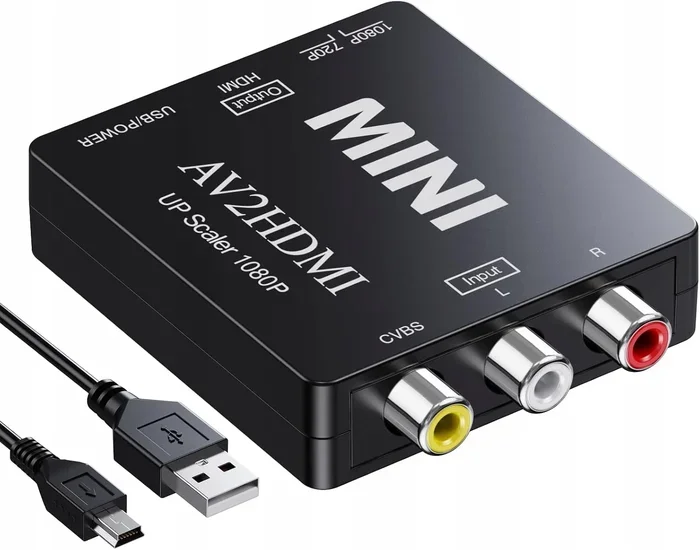
An active converter is a device that actually translates the digital HDMI signal into an analog RCA signal. These boxes contain internal circuitry that processes the signal and outputs it in a format your older TV can understand.
Active converters are more expensive than passive adapters, but they actually work. You plug your HDMI device into the converter, and then connect the converter to your TV using standard RCA cables. The picture and sound come through clearly on your older television.
Some active converters also include additional features. These can be upscaling the output resolution or providing audio separation. When shopping for a converter, look for one that supports the resolution your device outputs and matches your TV’s capabilities.
How to Convert HDMI to RCA on a TV Step by Step
Setting up your HDMI to RCA conversion is straightforward once you have the right equipment. Follow these steps to get everything connected properly.
Step 1: Check Your TV Inputs
Look at the back or side of your TV. Do you see red, white, and yellow RCA jacks? These are the composite video and audio inputs. Some older TVs also have S-Video or component inputs, which are different and require different cables.
Make sure you know exactly which inputs your TV has. This determines what kind of converter and cables you need to buy. If your TV only has antenna or coaxial inputs, you may need an additional adapter.
Step 2: Choose the Right Converter
For most setups, an active HDMI to RCA converter box is your best bet. These are widely available online and in electronics stores. Make sure the converter you choose supports the resolution you need. Most basic converters handle 480p or 720p output, which is perfect for older CRT TVs.
Compare a few options before buying. Read reviews and check the specifications. A reliable converter usually costs between twenty and fifty dollars. If you find one for five dollars, it is probably a passive adapter that will not do the job.
Step 3: Connect the Cables
Start by plugging the HDMI cable from your source device into the converter box. Then connect the RCA cables from the converter to your TV. The yellow cable carries the video signal, while the red and white cables carry the right and left audio channels respectively.
Make sure each connection is firm. A loose cable is one of the most common reasons for no picture or poor sound. Push each RCA jack in until it clicks into place.
Step 4: Switch Your TV to the Correct Input
Use your TV remote to switch to the correct input source. On older TVs, this might be labeled as AV, Video, or Aux. On some models, you may need to press the Input or Source button and scroll through the options until you see the RCA input.
If you see a picture but hear no sound, check that the white and red audio cables are connected properly. If you see no picture at all, try a different HDMI cable or check that the converter is powered on.
Common Mistakes When Converting HDMI to RCA
Many people run into problems when trying to convert HDMI to RCA on a TV. Most of these issues come from simple mistakes that are easy to avoid.
Using a Passive Adapter When You Need an Active Converter
This is the number one mistake. Passive adapters do not convert digital signals to analog. They only change the shape of the connection. If your device outputs a digital HDMI signal and your TV only accepts analog RCA input, a passive adapter will not work.
Always look for an active converter with built-in signal processing. These devices have chips inside that translate the signal properly. Check the product description carefully before purchasing.
Ignoring Audio Channel Separation
HDMI carries both video and audio together. When you convert to RCA, the audio splits into two separate channels. The red cable is for the right audio channel, and the white cable is for the left. If you only plug in one cable, you will only hear sound from one speaker.
Make sure both audio cables are connected. This is a small detail that makes a big difference in your viewing experience. It is also one of the first things to check if your sound seems off.
Choosing the Wrong Resolution
Not all converters support every resolution. If your device outputs at 1080p or 4K, but your converter only handles 480p, you may get no picture at all or a distorted image.
Check the maximum resolution your converter supports and make sure it matches your source device. Most older TVs display at 480i or 480p, so a converter that supports these resolutions is usually sufficient.
Using Low-Quality Cables
Cheap cables can cause signal loss, interference, and poor picture quality. A low-quality RCA cable might give you a fuzzy image or intermittent sound. Investing in decent cables makes a noticeable difference.
Look for cables with good shielding to reduce interference. Gold-plated connectors also help maintain a clean signal over time. These small upgrades cost very little but improve your setup significantly.
Comparison: Active Converters vs Passive Adapters
Not sure which type of converter you need? This table breaks down the key differences between active converters and passive adapters.
- Signal Conversion: Active converters change digital signals to analog. Passive adapters only change the physical connector shape without converting the signal.
- Price Range: Active converters typically cost between twenty and sixty dollars. Passive adapters are usually under ten dollars.
- Compatibility: Active converters work with most HDMI devices and RCA TVs. Passive adapters only work in very specific situations where the signal is already compatible.
- Reliability: Active converters provide consistent results. Passive adapters often fail to produce any picture or sound on RCA-only TVs.
- Extra Features: Many active converters include resolution settings, audio controls, and power adapters. Passive adapters have no extra features.
For almost everyone, an active converter is the right choice. The small extra cost saves you from frustration and wasted time. Passive adapters are only useful in rare cases where the source device already outputs an analog-compatible signal through HDMI.
Tips for the Best Picture and Sound Quality
Once your HDMI to RCA setup is working, you can take a few extra steps to improve the quality of your experience.
Keep Your Cables Short
Longer cables can lose signal strength, especially with analog RCA connections. Try to keep your RCA cables under six feet. If you need a longer run, consider using higher-quality cables with better shielding.
Short cables also reduce the chance of interference from other electronics in your home. A clean, short run gives you the best possible picture and sound from your converted setup.
Update Your Source Device Settings
Go into the settings of your HDMI source device and adjust the output resolution. Set it to match what your TV can display. For most older TVs, 480p is the sweet spot. Setting your device to output 1080p or 4K when your TV cannot display that resolution wastes effort and may cause issues.
Also check the color format setting if available. Some converters work better with RGB color output rather than YCbCr. This is a small tweak that can improve picture quality noticeably.
Power Your Converter Properly
Many active converters need their own power source. This usually comes from a USB cable or a wall adapter. Make sure the converter is properly powered for the best performance.
Some people try to skip the power step, especially when using a converter with a USB-powered connection. If you notice flickering or no picture, check whether the converter needs external power and provide it.
Store Your Setup Safely
If you use your converter setup occasionally, store the cables and adapter properly. Coil them loosely and keep them in a dry place. This extends the life of your equipment and prevents connection problems.
Also, dust the RCA jacks and HDMI ports regularly. A buildup of dust can cause intermittent connections and signal issues. A quick wipe with a dry cloth keeps everything working smoothly.
Expert Insights on HDMI to RCA Conversion
We asked experts in home entertainment setup about the most common questions they hear regarding HDMI to RCA conversion. Here are their top insights.
Quality Depends on the Converter Chip
The internal chip inside an active converter matters more than the brand name or price tag. A good conversion chip accurately translates digital signals to analog without introducing lag, artifacts, or color distortion. Budget converters with poor chips may produce a picture that looks washed out or has visible noise.
When shopping, look for converters that mention specific chipsets or have detailed technical specifications. Reviews that mention picture quality are more useful than those that only discuss price.
Modern TVs and Backward Compatibility
Many modern TVs still include RCA inputs alongside HDMI ports. This backward compatibility makes conversion much easier. If your TV has RCA inputs, you can connect almost any device with the right converter. Some newer TVs even include built-in upscaling that helps improve the quality of older content.
Check your TV manual or look at the back panel to see what inputs are available. Even if your TV is relatively new, it might surprise you with the connections it still supports.
The Role of Signal Degradation
Every conversion introduces some degree of signal degradation. Going from digital HDMI to analog RCA means the sharp, noise-free digital signal becomes an analog waveform that can pick up interference. This is simply the nature of analog technology.
You can minimize this degradation by using high-quality cables, keeping cable runs short, and using a well-reviewed converter. The goal is to get the cleanest possible analog signal from your digital source.
Quick Tips for HDMI to RCA Conversion
- Always buy an active converter for reliable HDMI to RCA conversion. Passive adapters rarely work for this purpose.
- Match your cable colors. Red goes to red, white to white, and yellow to yellow. Mixing them up causes audio and video confusion.
- Check your TV input setting after connecting everything. Switching to the correct input source is essential for seeing a picture.
- Power your converter if it requires external power. An unpowered converter is a common reason for no output.
- Adjust the source device resolution to match your TV’s capabilities for the best picture quality.
- Read reviews before buying. A converter that works well for one setup may not work for another depending on the devices involved.
- Keep spare RCA cables on hand. Cables wear out over time, and having a backup saves you from downtime.
Final Thoughts
Converting HDMI to RCA on a TV is easier than most people think. With the right active converter and a set of RCA cables, you can connect modern devices to your older television without any hassle. The key is understanding the difference between passive adapters and active converters and choosing the right one for your setup.
Follow the steps in this guide, avoid the common mistakes, and you will have a working setup in no time. Whether you are a retro gaming fan, someone preserving older equipment, or just trying to make do with what you have, HDMI to RCA conversion opens up a world of possibilities.
Take your time, check your connections, and enjoy your favorite content on whatever screen you have. Technology should work for you, not the other way around. Happy viewing.
Frequently Asked Questions
Can I convert HDMI to RCA without a converter box?
A passive adapter cable changes the connector shape but does not convert the signal from digital to analog. For a working setup, you need an active converter box that processes the digital HDMI signal into analog RCA output. Without this, your older TV will not display the picture.
Why is there no sound when I connect HDMI to RCA?
Check that both the red and white RCA audio cables are plugged in securely. Also make sure your TV is set to the correct input source. If sound still does not work, verify that your source device is not set to output audio through HDMI only.
What resolution should I set my device to when using an HDMI to RCA converter?
Most older TVs display at 480p or 480i. Set your source device to match this resolution for the best results. Higher resolutions like 1080p or 4K may not display properly through an RCA connection.
Do HDMI to RCA converters affect picture quality?
Some signal degradation is natural when converting digital to analog. However, a good quality active converter minimizes this loss. Using short, well-shielded cables further improves the final picture quality on your TV.
Can I use an HDMI to RCA converter with a gaming console?
Yes, many retro gaming consoles and older systems work well with HDMI to RCA converters. Just make sure the converter supports the resolution your console outputs. This is a popular setup for playing classic games on older CRT televisions.
Are there any gadgets that make HDMI to RCA setup easier?
Beyond the converter itself, having a cable organizer and a quality surge protector can make your setup cleaner and safer. If you are looking for more ways to simplify your home entertainment, check out these 10 gadgets to make life easier that can help streamline your setup.
=== CONCLUSION ===
Converting HDMI to RCA on a TV is a practical skill that saves money and extends the life of your older equipment. With an active converter, the right RCA cables, and a little patience, you can connect almost any modern device to your vintage TV. Follow the steps outlined in this guide, avoid the common pitfalls, and you will enjoy your content on any screen.
Remember to check your TV inputs, match your cable colors, and power your converter properly. These small details make all the difference. Now you have everything you need to set up your HDMI to RCA connection with confidence. Enjoy your setup and make the most of every device you own.