Can I Plug Usb C Into Pd and Fast Charge My Devices
Yes, you can plug USB C into PD and enjoy fast charging for most modern devices. USB-C Power Delivery is a universal charging standard that adjusts voltage and current to match your device’s needs. This guide explains everything you need to know about USB-C PD fast charging, compatibility, and choosing the right charger.
You have a USB-C cable in your hand and a PD port on your wall charger. You plug them together. But wait. Will it fast charge your device? The short answer is yes. But the full story is a bit more interesting. Understanding how USB-C Power Delivery works can save you money, time, and a lot of frustration. This guide breaks it all down in simple terms. You will learn what PD is, how it works, which devices support it, and how to pick the right gear. Let us dive in.
Charging technology has come a long way in just a few years. Old USB-A ports charged devices slowly. They were fine for phones from a decade ago. But today’s devices need more power. They need fast charging. That is where USB-C PD comes in. It is a charging protocol that lets your device and charger talk to each other. They agree on the right amount of power. This happens in milliseconds. The result is faster, safer charging for your phone, laptop, tablet, and more.
Key Takeaways
- USB-C and PD work together: Plugging a USB-C cable into a PD port enables fast charging for compatible devices.
- Not all USB-C cables are equal: Only USB-C cables that support Power Delivery can handle higher wattages and fast charge speeds.
- PD chargers are smart: They negotiate the right voltage and amperage with your device to deliver safe, optimal charging.
- Wide device compatibility: Laptops, phones, tablets, and even some headphones now support USB-C PD charging.
- GaN chargers are the future: Gallium Nitride chargers are smaller, cooler, and more efficient than traditional silicon-based chargers.
- Check your cable and port: Using a non-PD USB-C cable or a non-PD port will limit your charging speed significantly.
- Safety matters: Always use certified USB-C PD chargers and cables to protect your devices from damage.
📑 Table of Contents
What Is USB-C Power Delivery?
USB-C Power Delivery, often called USB-C PD, is a charging standard. It was developed by the USB Implementers Forum, or USB-IF. This group sets the rules for USB technology. PD allows USB-C cables to carry much more power than older USB standards. It can deliver up to 240 watts of power in the latest version. That is enough to charge a laptop, a monitor, or even some power tools.
The key idea behind PD is negotiation. When you plug a device into a PD charger, they have a quick conversation. The charger asks the device, “How much power do you need?” The device replies with its requirements. The charger then delivers exactly that amount. This is called PD negotiation. It prevents overcharging and overheating. It also makes sure your device charges as fast as it safely can.
How PD Negotiation Works
The negotiation process is fascinating. It happens almost instantly. Here is a simple breakdown of the steps:
- The device detects a PD-capable charger is connected.
- The device sends a request for a specific voltage level.
- The charger confirms the request and adjusts its output.
- Power flows at the agreed-upon rate.
- If the device’s battery gets full, the charger reduces power to a trickle.
This whole process is automatic. You do not need to do anything. Just plug in the cable and let the technology work. The beauty of USB-C PD is that it works across brands. An Apple charger can charge a Samsung phone. A Google charger can charge a Dell laptop. As long as both sides support PD, they will figure it out.
Can You Plug USB-C Into PD Ports?
This is the question at the heart of this guide. The answer is yes, but with some important details. Not every USB-C port supports PD. Not every USB-C cable can handle PD power levels. Let us look at the different scenarios so you understand exactly what happens when you plug USB-C into PD.
When It Works Perfectly
When both your cable and charger support USB-C Power Delivery, you get the best results. Your device charges quickly and safely. For example, if you plug a USB-C PD cable into a 65-watt GaN charger, your laptop will charge in record time. The same goes for phones that support PD fast charging. The iPhone 15 and iPhone 16 models use USB-C and support PD. Plug them into a PD charger, and you will see a noticeable speed boost.
When It Works but Slower
Sometimes you plug USB-C into a PD charger, but the charging speed is not what you expect. This usually happens because of the cable. A basic USB-C cable that does not support PD will limit the power. It might only carry 60 watts or less. Even if the charger can deliver more, the cable becomes the bottleneck. Always check that your cable is rated for USB-C PD if you want maximum speed.
When It Does Not Work for Fast Charging
There are situations where plugging USB-C into PD will not give you fast charging at all. If your device does not support PD, it will charge at a standard rate. Some older devices only support basic USB charging profiles. They do not have the PD negotiation chip inside. In these cases, the PD charger will still work. It will just charge at a slower, default power level. Your device will be safe. It just will not fast charge.
How Fast Charging Works with USB-C PD
Understanding USB-C PD fast charging helps you make smart buying decisions. The speed depends on three main factors. The charger’s wattage, the cable’s rating, and your device’s capabilities. Let us explore each one.
Wattage and Power Levels
Wattage is the measure of power. Higher wattage means faster charging, up to a point. USB-C PD supports several power levels:
- Basic PD: 10 to 18 watts. Good for phones and earbuds.
- Mid-range PD: 20 to 30 watts. Great for most smartphones and tablets.
- High PD: 45 to 65 watts. Ideal for laptops and larger tablets.
- Extended PD: 100 to 240 watts. For gaming laptops, monitors, and other high-power devices.
Your device will only draw the power it needs. You can plug a 100-watt charger into a phone that only supports 20 watts. The phone will charge at 20 watts. It will not overcharge or get damaged. The PD protocol keeps everything safe.
Voltage and Amperage Explained
USB-C PD uses variable voltage and amperage. This is different from older USB standards that used fixed 5 volts. PD can adjust voltage in steps like 5V, 9V, 15V, and 20V. The charger and device agree on the best voltage. Higher voltage with lower current means less heat and faster charging. This is why PD is so efficient compared to older charging methods.
Why PD Is Faster Than Standard USB Charging
Standard USB charging uses a fixed 5-volt output. It typically delivers 2.5 to 5 watts of power. That is very slow by today’s standards. USB-C PD can deliver 10 times more power or more. The negotiation feature ensures the charger never wastes energy. It only sends the exact power the device needs. This makes PD both faster and more efficient.
Devices That Support USB-C PD Fast Charging
One of the best things about USB-C PD is how many devices support it. The list grows every year. Here are the most common device categories that work with USB-C PD charging.
Smartphones
Most flagship smartphones now support USB-C PD. Apple iPhones from the 15 series onward use USB-C and PD. Samsung Galaxy S23, S24, and newer models support PD. Google Pixel phones, OnePlus devices, and many others also use PD fast charging. If you have a modern phone with a USB-C port, there is a good chance it supports PD.
Laptops
Laptops were early adopters of USB-C PD. Apple MacBook models use USB-C PD as their primary charging method. Many Dell, HP, Lenovo, and Microsoft Surface laptops also support PD. A single USB-C PD charger can power and charge your laptop while you work. This is a huge convenience for travel and daily use.
Tablets and Accessories
iPads with USB-C support PD fast charging. Samsung Galaxy Tab models also benefit from PD chargers. Even some accessories like portable battery packs, monitors, and e-readers now support USB-C Power Delivery. The more devices you have, the more you benefit from a single PD charger setup.
Choosing the Right USB-C PD Charger
Not all PD chargers are created equal. Picking the right one depends on what devices you need to charge. Here are the key factors to consider.
Wattage Matters
Think about the most power-hungry device you will charge. If you have a laptop, look for at least a 65-watt charger. For phones and tablets alone, a 20 to 30-watt charger is plenty. If you want to charge multiple devices at once, consider a multi-port PD charger with higher total wattage.
GaN Chargers: The New Standard
Gallium Nitride, or GaN, chargers are a game-changer. They use newer semiconductor technology. This means they can be much smaller than traditional chargers. A 65-watt GaN charger can be as small as a phone charger. They also run cooler and are more energy efficient. If you are buying a new PD charger, GaN is the way to go.
Number of Ports
Do you need to charge more than one device at a time? Many USB-C PD chargers now come with multiple ports. You might find a charger with two USB-C ports and one USB-A port. Make sure the total wattage is shared properly across ports. Some chargers can deliver full power from a single port while others split it.
Cable Quality Is Important Too
Do not overlook the USB-C cable. A cheap or damaged cable can ruin your fast charging experience. Look for cables that are rated for PD and support at least 60 watts. E-Marked cables are a good sign. They have a small chip inside that communicates with the charger. This ensures the cable can handle the power it is asked to carry.
Common Mistakes and Quick Tips
Even with the best gear, mistakes can slow down your charging. Here are the most common pitfalls and how to avoid them.
Common Mistakes to Avoid
- Using a non-PD USB-C cable: This is the number one mistake. A basic USB-C cable will not support fast charging speeds.
- Ignoring cable length: Longer cables can reduce power delivery. Keep cables under six feet for best results.
- Using old chargers with new devices: Older chargers without PD support will charge your device slowly.
- Assuming all USB-C ports are the same: A USB-C port on your laptop might only support data, not charging. Check your device specs.
- Buying the cheapest option: Cheap, uncertified chargers can damage your devices or even pose safety risks.
Quick Tips for Best Results
- Always use a USB-C cable that supports Power Delivery.
- Check your device’s charging specs before buying a charger.
- Look for USB-IF certification on cables and chargers.
- Unplug your device once it reaches 80 to 90 percent for better battery health.
- Store cables properly to avoid internal damage.
Is USB-C PD Safe for Your Devices?
Safety is a top concern for many people. The good news is that USB-C Power Delivery is very safe. The protocol includes multiple layers of protection. The charger and device communicate constantly during charging. If something goes wrong, they stop power flow immediately. There is no risk of overcharging or overheating when you use certified gear.
Always look for chargers and cables from reputable brands. Anker, Belkin, Apple, Samsung, and Google all make excellent USB-C PD products. Avoid no-name brands that do not list safety certifications. A certified PD charger will have UL, CE, or FCC marks on the packaging.
Key Takeaways
- USB-C and PD are a perfect match: Plugging USB-C into a PD port enables fast, efficient charging for most modern devices.
- Cable quality matters: Only USB-C cables rated for Power Delivery will give you the fastest speeds.
- PD chargers are smart and safe: They automatically negotiate the right power level with your device.
- Wide compatibility: Smartphones, laptops, tablets, and accessories all benefit from USB-C PD.
- GaN chargers are compact and efficient: They offer high wattage in a small, portable form factor.
- Avoid common mistakes: Using the wrong cable or an old non-PD charger will limit your charging speed.
- Certification matters: Always choose USB-IF certified gear for safety and reliability.
Conclusion
So, can you plug USB-C into PD and fast charge your devices? Absolutely. USB-C Power Delivery has transformed the way we charge our gadgets. It is fast, smart, and safe. The key is making sure your cable, charger, and device all support PD. Once you have the right gear, you will notice a big difference in charging speed. Your devices will power up in minutes instead of hours.
The best part is that USB-C PD is becoming the universal standard. It works across brands and device types. One charger can handle your phone, tablet, and laptop. This simplifies your life and reduces cable clutter. Investing in a good PD charger and a quality USB-C cable is one of the best tech decisions you can make today.
Take a moment to check your current setup. Are you using a PD-compatible cable? Is your charger up to the task? Small upgrades can make a big difference. Fast charging is here to stay. Embrace it and enjoy the convenience every day.
Frequently Asked Questions
What happens if I plug USB-C into a non-PD charger?
Your device will still charge, but it will charge at a slower speed. Non-PD chargers typically deliver 5 to 10 watts of power. This is much slower than what USB-C PD can provide. Your device is safe, but you will miss out on fast charging benefits.
Can any USB-C cable be used for PD fast charging?
No, not all USB-C cables support Power Delivery. Only cables rated for PD can handle higher wattages and fast charge speeds. Look for cables that are E-Marked or specifically labeled as USB-C PD cables. Using the wrong cable will limit your charging speed.
Is USB-C PD the same as Thunderbolt?
No, they are related but different. Thunderbolt 3 and 4 use the USB-C connector and support PD charging. However, Thunderbolt also carries data at much higher speeds. All Thunderbolt cables support PD, but not all USB-C PD cables support Thunderbolt data transfer.
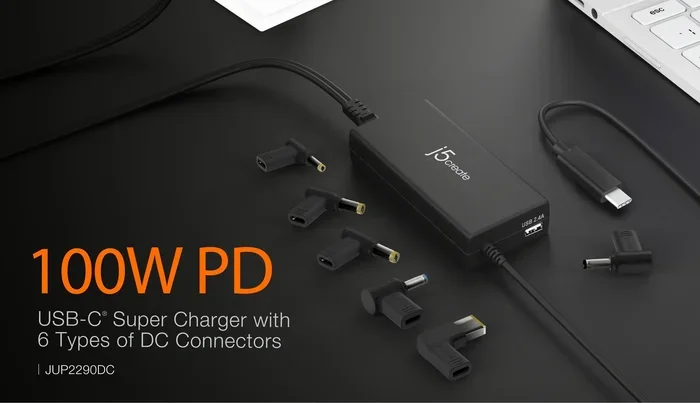
Can I use a 100W PD charger with my phone?
Yes, you can. USB-C PD chargers negotiate the right power level with your device. A 100-watt charger will only deliver the power your phone can handle. Your phone will charge at its maximum supported speed and will not be damaged. The PD protocol keeps everything safe and efficient.
Do all laptops support USB-C PD charging?
Most modern laptops support USB-C PD, but not all. Apple MacBooks, many Dell XPS models, and most Microsoft Surface devices support PD. Some budget laptops may only support basic USB-C charging. Always check your laptop’s specifications to confirm PD support before relying on it for charging.
Why is my USB-C PD charger getting warm?
It is normal for PD chargers to get slightly warm during use. This happens because energy is being converted from AC to DC power. GaN chargers tend to run cooler than traditional silicon chargers. If your charger is too hot to touch or smells burnt, unplug it immediately and replace it with a certified charger.