Can I Use Usb For Audio Output Instead of Aux Cables
Yes, you can use USB for audio output instead of aux cables in many situations. USB audio delivers digital sound directly from your device, often providing better quality than a standard aux connection. Whether you are connecting a laptop, smartphone, or audio interface, USB audio output is a reliable and increasingly popular alternative to the traditional aux cable.
Have you ever plugged in an aux cable only to find it does not work with your new device? Maybe your laptop lacks a headphone jack, or your car stereo does not recognize the cable. You are not alone. Many people today face the same problem and ask a simple question: can I use USB for audio output instead of aux cables?
The short answer is yes. USB audio output has become a standard feature on most modern devices. It offers digital sound, better reliability, and in many cases, superior audio quality compared to traditional aux connections. In this guide, we will walk you through everything you need to know about switching to USB audio. We will cover how it works, when to use it, setup steps, common problems, and much more.
Whether you are a music lover, a podcaster, a gamer, or someone who just wants better sound from your computer, this article has you covered. We will break down the technical stuff into simple terms so anyone can understand it. Let us dive in.
Key Takeaways
- USB audio output works on most modern devices: Laptops, desktops, smartphones, and tablets often support USB audio without extra drivers.
- USB provides digital sound quality: Unlike aux cables that carry analog signals, USB sends digital audio for cleaner playback.
- You may need an adapter: Some devices require a USB-to-aux adapter or a USB DAC to work with existing speakers or headphones.
- USB audio is not universal: Some older devices and car stereos still rely on aux cables or Bluetooth for audio output.
- Setup is simple: Changing your audio output to USB takes just a few clicks in your device settings.
- USB offers more than just audio: Some USB audio devices also carry power or support additional features like microphone input.
📑 Table of Contents
- What Is USB Audio Output?
- USB vs Aux Cables: Key Differences
- When Should You Use USB for Audio Output?
- How to Set Up USB Audio Output
- Common Problems with USB Audio Output
- Do You Need a USB DAC or Audio Interface?
- USB Audio Output on Car Stereos
- Is USB Audio Output Better Than Bluetooth?
- Key Takeaways
- Conclusion
What Is USB Audio Output?
USB audio output means sending sound through a USB connection instead of an aux cable. A standard aux cable carries an analog audio signal. That means the sound wave is translated into electrical pulses and sent through the wire. USB audio, on the other hand, sends digital audio data directly from your device to your speaker or headphone.
How Does USB Audio Work?
When you plug in a USB cable for audio, your device communicates with the connected equipment using digital data packets. The audio file stays in digital form until it reaches a device called a DAC, or digital-to-analog converter. The DAC can be built into your device or housed in an external adapter. The DAC converts the digital signal into analog sound that your headphones or speakers can play.
This process matters because it affects sound quality. With an aux cable, the DAC is usually inside your phone or computer. A cheap built-in DAC can introduce noise or distortion. External USB audio devices often have better DACs, which means cleaner and more detailed sound.
Types of USB Connectors for Audio
Not all USB connections are the same. Here are the most common types you will encounter:
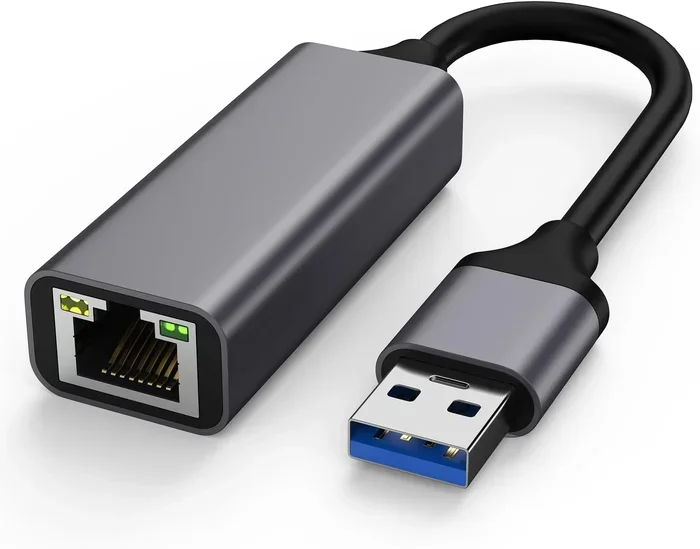
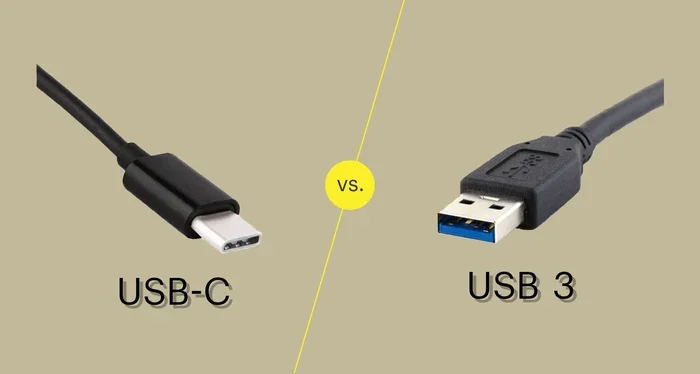
- USB Type-A: The classic rectangular plug found on computers and wall chargers.
- USB Type-C: The smaller, reversible plug used on modern smartphones and laptops.
- USB Type-B: A square-shaped plug often found on printers and some audio interfaces.
- Mini USB and Micro USB: Older connector types found on legacy devices.
Each type can carry audio, but USB Type-C is now the most common for audio on phones and tablets. If your device has a USB-C port, you can often use it for audio output directly.
USB vs Aux Cables: Key Differences
Not sure whether to stick with aux or switch to USB? Let us compare the two side by side.
| Feature | USB Audio Output | Aux Cable (3.5mm) |
|---|---|---|
| Signal Type | Digital | Analog |
| Sound Quality | Generally better | Good, but can degrade |
| Device Compatibility | Most modern devices | Widely compatible |
| Cable Length Limits | Up to 5 meters without signal loss | Signal degrades past 3 meters |
| Power Delivery | Can power devices | No power delivery |
| Setup Complexity | Simple on most devices | Plug and play |
| Cost | Adapters may cost extra | Very affordable |
As you can see, USB audio output has several advantages. The digital signal stays clean over longer distances, and you do not have to worry about the static or interference that sometimes affects aux cables. However, aux cables still win on universal compatibility. Almost every device with a headphone jack works with a standard aux cable.
When Should You Use USB for Audio Output?
There are specific situations where USB audio output makes the most sense. Here are the most common scenarios:
1. Your Device Has No Headphone Jack
Many newer smartphones and laptops have dropped the 3.5mm headphone jack. If your phone only has a USB-C port, you will need to use USB for audio output. You can plug USB-C headphones directly in, or use a USB-C to aux adapter if your existing headphones use a standard 3.5mm plug.
2. You Want Better Sound Quality
If you are an audiophile or a music producer, USB audio is the way to go. External USB DACs and audio interfaces offer much better sound than the tiny DAC inside your phone. The difference is especially noticeable with high-resolution audio files and studio monitoring headphones.
3. You Are Connecting to a Desktop Computer
Desktop computers often have both USB and aux ports. USB audio output can be more reliable because it bypasses the computer’s internal sound card, which is sometimes the source of buzzing or interference. Many people prefer USB audio for their desktop setup, especially for gaming or music production.
4. You Need to Use an Audio Interface
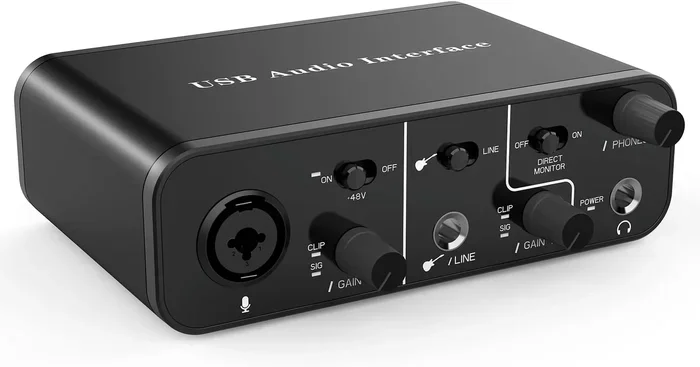
If you record music, podcast, or voiceovers, an audio interface connects to your computer via USB. These devices handle both audio input and output with high-quality DACs. An audio interface is essential for anyone serious about recording or producing sound.
Sometimes, you might also want to explore apps or services that help you find audio solutions on the go. Just as technology has simplified many areas of daily life, finding the right audio tools has become easier through various platforms. For instance, if you are traveling and need to locate nearby tech support or mobile services, apps that connect you to local providers can be very useful. You can read more about how technology connects us to local services in articles like 4 Apps That Are Like Uber For Finding Dog Walkers, which shows how app-based platforms simplify finding nearby help.
5. You Want to Power Your Audio Device
Some USB audio devices, like portable speakers or DACs, draw power through the USB connection. This means you do not need batteries or a separate power outlet. It is a convenient all-in-one solution for portable audio setups.
How to Set Up USB Audio Output
Setting up USB audio output is straightforward on most devices. Here is a step-by-step guide for the most common platforms.
On Windows
- Plug your USB audio device into an available USB port.
- Right-click the speaker icon in your taskbar.
- Select “Open Sound settings.”
- Under “Output,” choose your USB device from the dropdown menu.
- Test the audio by playing a song or video.
If your device does not appear, try unplugging it and plugging it back in. You may also need to install drivers from the manufacturer’s website. Most modern USB audio devices work on Windows 10 and 11 without extra software.
On macOS
- Connect your USB audio device to your Mac.
- Click the Apple menu and select “System Settings.”
- Go to “Sound” and then the “Output” tab.
- Select your USB device from the list.
- Adjust the volume and test the output.
macOS handles most USB audio devices automatically. You rarely need to install additional drivers.
On Android
- Connect your USB-C audio device to your phone.
- Go to “Settings” and then “Connected Devices” or “Bluetooth & Device Connection.”
- Look for the USB audio device under connected accessories.
- Select it as your audio output.
Some Android phones may require you to enable USB audio in the developer options. Check your phone manufacturer’s support page if you run into issues.
On iPhone and iPad
Apple devices with a USB-C port (iPad Pro and newer) support USB audio natively. Simply plug in your device and it should appear as an audio output option. For Lightning-connected iPhones, you may need a Lightning-to-USB adapter to use USB audio gear.
Common Problems with USB Audio Output
USB audio output is great, but it is not without its quirks. Here are the most common issues and how to fix them.
No Sound After Connecting
This is the most common problem. First, check that your device is selected as the default audio output in your system settings. If it is and you still hear nothing, try a different USB port. Some ports on your computer may not support audio.
Static or Buzzing Noise
Static noise often comes from electrical interference. Try using a shorter USB cable or plugging into a different port. If you are using a USB hub, connect the audio device directly to your computer instead. Ground loops can also cause buzzing, especially on desktop computers.
Device Not Recognized
If your computer does not detect the USB audio device, update your USB drivers. On Windows, go to Device Manager, find “Sound, video and game controllers,” and update the driver for your USB device. On Mac, restart your computer and try again.
Low Volume or Distorted Sound
Check the volume settings on both your device and the connected audio equipment. Some USB audio devices have their own volume controls. Also, make sure your audio files are not low quality or compressed, which can cause distortion regardless of the output method.
Quick Tips for Better USB Audio
- Always use the cable that came with your device or a high-quality replacement.
- Avoid USB extensions longer than 3 meters to prevent signal loss.
- Keep USB audio devices away from power cables to reduce interference.
- Update your audio drivers regularly for the best performance.
- Use a USB-C to USB-C cable for the fastest and most reliable connection.
Do You Need a USB DAC or Audio Interface?
A USB DAC (Digital-to-Analog Converter) is a small device that converts digital audio to analog sound. You plug it into your computer via USB and connect your headphones or speakers to the DAC. Many people wonder if they really need one.
The answer depends on your needs. If you are happy with the sound from your laptop or phone speakers, a DAC might not be necessary. But if you listen to music at high volumes, use studio headphones, or care about audio fidelity, a USB DAC can make a noticeable difference.
Audio interfaces are similar but more advanced. They include multiple inputs and outputs for microphones, instruments, and speakers. Podcasters, musicians, and content creators benefit the most from audio interfaces. For casual listening, a simple USB DAC is usually enough.
Popular USB DAC options include the Fiio K3, Sabrent USB External Sound Card, and AudioQuest DragonFly. These devices are affordable and easy to set up. Prices range from $15 to $100 depending on features and sound quality.
USB Audio Output on Car Stereos
Can you use USB for audio output in your car? It depends on your car stereo. Many modern car stereos have a USB port that supports both charging and audio playback. When you plug in your phone via USB, the stereo reads the digital audio files and plays them through the car speakers.
However, not all car USB ports support audio. Some ports are charging-only. If your car stereo has a USB port but no sound comes through, try an aux cable or a Bluetooth connection instead. You can also check your car manual to confirm whether the USB port supports audio output.
For older cars without USB or aux inputs, you can use a Bluetooth FM transmitter. This plugs into your car’s cigarette lighter and broadcasts audio over an FM frequency to your car stereo. It is not as clean as a direct USB or aux connection, but it works well in a pinch.
Is USB Audio Output Better Than Bluetooth?
Both USB and Bluetooth have their place. USB audio output delivers a wired, lossless connection. Bluetooth compresses audio data to transmit wirelessly, which can slightly reduce sound quality. However, modern Bluetooth codecs like aptX and LDAC have narrowed this gap significantly.
USB audio wins on sound quality and reliability. Bluetooth wins on convenience and freedom of movement. Your choice depends on what matters most to you. If you want the best possible sound, go with USB. If you want to move around without being tethered, Bluetooth is the better option.
Some people use both. They connect their phone to a USB DAC at home for high-quality listening and switch to Bluetooth when they move around the house. This hybrid approach gives you the best of both worlds.
Key Takeaways
- USB audio output is a viable alternative to aux cables: It works on most modern devices and offers digital sound quality.
- USB provides cleaner audio: The digital signal avoids the interference and degradation common with analog aux cables.
- Setup is simple across all platforms: Windows, Mac, Android, and iOS all support USB audio with minimal configuration.
- You may need a DAC or adapter: Not all devices and speakers support USB natively, so an adapter or external DAC may be required.
- Common issues are easy to fix: No sound, static noise, and device recognition problems usually have simple solutions.
- USB audio is ideal for car stereos, studios, and desktops: Any situation where quality and reliability matter benefits from USB audio output.
- Bluetooth and USB each have strengths: Choose USB for quality and Bluetooth for convenience.
Conclusion
Can I use USB for audio output instead of aux cables? Absolutely. USB audio output is a reliable, high-quality alternative that works on most modern devices. Whether you are connecting headphones, speakers, or an audio interface, USB offers a clean digital signal that often sounds better than a traditional aux connection.
The setup process is simple, and the benefits are clear. Better sound quality, longer cable runs without signal loss, and the ability to power your audio devices are just a few advantages. If your device supports it, switching to USB audio is one of the easiest upgrades you can make to your listening experience.
Try it today. Plug in a USB audio device, change your output settings, and listen to the difference. Once you experience the clarity and reliability of USB audio, you may never go back to aux cables again.
Frequently Asked Questions
Can I use a USB cable to connect headphones directly to my phone?
Yes, if your phone has a USB-C port and your headphones support USB audio. Many modern USB-C headphones work without any adapter. For older phones with a Lightning port, you will need a Lightning-to-USB adapter to use USB headphones.
Does USB audio sound better than aux?
In most cases, yes. USB audio carries a digital signal that stays clean until it reaches a DAC. Aux cables carry an analog signal that can pick up interference and degrade over distance. The difference is most noticeable with good headphones or speakers and high-resolution audio files.
Do I need special drivers for USB audio?
Most modern operating systems recognize USB audio devices automatically. Windows, macOS, Android, and iOS all support plug-and-play USB audio. However, some advanced audio interfaces may require you to download drivers from the manufacturer’s website for full functionality.
Can I use USB audio output on a smart TV?
Many smart TVs have USB ports that support audio output. Check your TV manual to confirm. If supported, you can connect USB headphones or speakers directly to the TV. Some TVs may require you to change the audio output setting in the menu to USB.
What is the difference between a USB DAC and a USB audio adapter?
A USB DAC converts digital audio to analog sound and often improves audio quality. A USB audio adapter simply adds audio capability to a device that lacks a headphone jack. Some adapters include basic DACs, but they typically do not match the sound quality of a dedicated external DAC.
Can USB audio output carry both input and output simultaneously?
Yes, many USB audio devices support both input and output at the same time. This is common with USB audio interfaces used for recording and playback. You can monitor your input through your headphones while recording, for example. This feature depends on the specific device and its driver support.