Can I Use Any Micro Usb For Ps4 And What You Need To Know
Not every Micro USB cable works with your PS4. The right cable affects charging speed, data transfer, and overall performance. Using the wrong one can cause slow charging, connection drops, or even damage over time. This guide walks you through exactly which Micro USB cables are compatible, what features matter, and how to avoid common mistakes.
You plug in your PS4 controller and nothing happens. Or maybe it takes forever to charge. You start wondering if the cable you are using is even the right one. Sound familiar? You are not alone. Many gamers run into this problem every day. The truth is, you cannot just grab any Micro USB cable and expect it to work perfectly with your PlayStation 4.
There is a big difference between a cheap $3 cable from a gas station and a quality charging cable from a trusted brand. Some cables only carry power. Others handle both power and data. Your PS4 needs cables that do both jobs well. In this article, we will break down everything you need to know about using Micro USB cables with your PS4. You will learn what works, what does not, and how to pick the right one every single time.
While you are at it, did you know there are also apps that can help you manage your gaming accessories better? For example, if you ever need help finding local services, you might want to check out 4 Apps That Are Like Uber For Finding Dog Walkers as a fun example of how apps simplify everyday tasks. But let us get back to your PS4 cables.
Key Takeaways
- Not all Micro USB cables are equal: Your PS4 needs cables that support data transfer and sufficient power output.
- USB 2.0 is the standard for PS4: USB 3.0 cables work but aren’t necessary for basic controller charging.
- Cable quality matters a lot: Cheap, low-quality cables can cause slow charging and connectivity issues.
- Length affects performance: Longer cables may reduce charging speed and data transfer rates.
- Always check the connector type: Make sure you have the right end (Type-A and Micro-B) for your PS4 setup.
- Stick with trusted brands: Official Sony cables or reputable third-party options are your safest bet.
- Replace worn cables promptly: Frayed or damaged cables can lead to charging failures and potential console damage.
📑 Table of Contents
- What Is a Micro USB Cable and Why Does It Matter for PS4?
- Not All Micro USB Cables Are the Same
- How to Choose the Right Micro USB Cable for Your PS4
- Common Problems When Using the Wrong Micro USB Cable
- Quick Tips for Keeping Your PS4 Cables in Great Shape
- Comparison: Recommended Micro USB Cables for PS4
- Can You Use a USB-C Cable Instead?
- Final Thoughts on Using Micro USB with Your PS4
What Is a Micro USB Cable and Why Does It Matter for PS4?
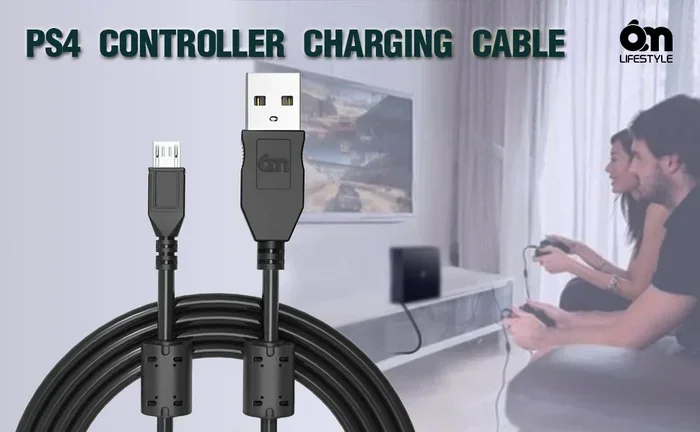
A Micro USB cable is a common type of charging and data cable. It has a small rectangular plug on one end and a standard USB plug on the other. You have probably seen these cables on phones, controllers, and other devices for years. The PS4 uses a Micro USB connection for its DualShock 4 controller and other accessories.
So why does it matter which cable you use? Not all Micro USB cables are built the same way. Some only transmit power. These are called charge-only cables. They cannot transfer data. Your PS4 needs a cable that can do both charging and data transfer. Without data support, your controller might not connect to the console properly. You might also face issues during firmware updates or when pairing a new controller.
Here is what you should look for in a Micro USB cable for PS4:
- Data transfer capability: The cable must support both power and data.
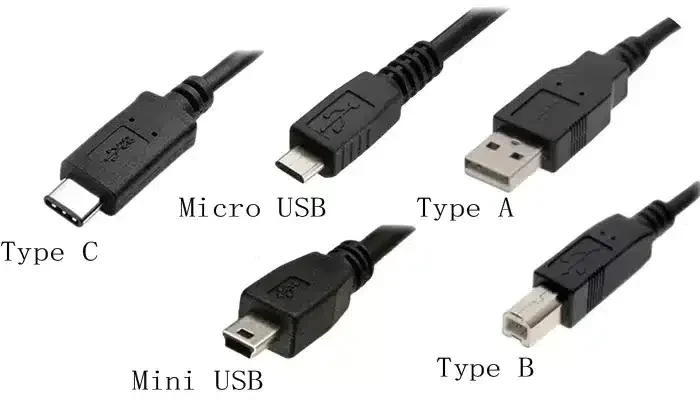
- Proper connector types: One end should be USB Type-A and the other should be Micro USB Type-B.
- Adequate power rating: Look for cables rated at least 2 amps for faster charging.
- Durable build quality: Braided or reinforced cables last much longer than basic rubber ones.
- Correct cable length: Standard lengths of 3 to 6 feet work best for most setups.
Using the wrong cable might seem harmless at first. But over time, it can cause real problems. Slow charging is the most common issue. You might also experience intermittent connections. In worst cases, a poor-quality cable can even harm your controller’s battery or USB port on the console.
Not All Micro USB Cables Are the Same
This is the part that trips up most people. They think a Micro USB cable is a Micro USB cable. But that is far from the truth. There are different types, different quality levels, and different purposes for these cables. Let us break it down so you never get confused again.
Charge-Only vs. Data Cables
Charge-only cables are the simplest type. They have wires for power only. No data pins inside. These cables are fine for plugging in a lamp or a simple charger. But they will not work for your PS4 controller. The DualShock 4 needs data transfer to communicate with the console. If you use a charge-only cable, your controller will either not connect or will keep disconnecting.
Data cables have all the necessary pins inside. They carry both electricity and information. This is what your PS4 needs. When shopping, look for cables labeled as “data and charging” or “sync and charge.” These are the ones you want.
USB 2.0 vs. USB 3.0 Micro USB Cables
You might see USB 2.0 and USB 3.0 labels on Micro USB cables. What is the difference? USB 2.0 is older but perfectly fine for PS4 controller charging. It transfers data at up to 480 Mbps. USB 3.0 is faster, with speeds up to 5 Gbps. However, your PS4 controller does not need USB 3.0 speeds. A USB 2.0 cable handles everything your controller requires.
USB 3.0 Micro USB cables have an extra row of pins inside the connector. They are backward compatible, meaning they work with USB 2.0 devices. So using a USB 3.0 cable with your PS4 is perfectly fine. But buying one specifically for your PS4 is not necessary. Save your money and stick with a good USB 2.0 cable.
Cable Build Quality and Materials
The material of a cable matters more than most people think. Here are the common types:
- Rubber cables: Flexible and affordable. They wear out faster but work well for short-term use.
- Braided nylon cables: Much more durable. They resist tangling and last significantly longer.
- Fabric cables: Soft and flexible. A good middle-ground option for everyday use.
- Reinforced cables with strain relief: The best option. These have extra protection at the connector joints.
A high-quality cable might cost a bit more. But it will save you money in the long run. You will not need to replace it every few months. Good cables also maintain consistent charging speeds over time.
How to Choose the Right Micro USB Cable for Your PS4
Now that you know what makes a good Micro USB cable, let us talk about how to pick the right one. Shopping for cables can be confusing. There are so many options on Amazon, in stores, and online. Here is a simple guide to help you choose wisely.
Check the Cable Specifications
Before buying any cable, check the product description. Look for these key specs:
- Data transfer support: Make sure the cable supports data, not just charging.
- Power output: A 2A (2000mA) rating is ideal for PS4 controller charging.
- Connector type: Confirm it has USB Type-A on one end and Micro USB Type-B on the other.
- Cable length: 3 to 6 feet gives you plenty of reach without signal loss.
If a product listing does not mention data transfer, be cautious. Many cheap cables omit this detail because they are charge-only. Always read reviews before purchasing.
Stick With Trusted Brands
Brand matters more than you might think. Official Sony cables are always a safe choice. They are designed specifically for PlayStation devices. But you do not have to buy official cables. Many third-party brands make excellent Micro USB cables too. Look for brands like Anker, Belkin, Cable Matters, or Amazon Basics. These companies test their cables for quality and safety.
Avoid no-name brands with suspiciously low prices. A $1 cable from an unknown seller is a gamble. It might work today and fail tomorrow. Spending a little more on a reputable brand is always worth it.
Consider Your Gaming Setup
Think about how you use your PS4. Do you game far from your console? A longer cable might help. Do you charge multiple controllers at once? Consider getting two or three good cables. Do you use your controller for PC gaming too? Make sure the cable works across both platforms.
Having spare cables is also a smart move. Cables wear out over time. Having a backup means you are never stuck with an uncharged controller in the middle of a gaming session.
Common Problems When Using the Wrong Micro USB Cable
Using an incompatible or low-quality cable can cause several frustrating issues. Let us look at the most common problems and what causes them.
Slow Charging
If your PS4 controller takes forever to charge, the cable might be the culprit. Charge-only cables or cables with thin wiring often cannot deliver enough current. Your controller charges slowly or barely charges at all. This is one of the most common complaints among PS4 users.
Intermittent Connection
Does your controller keep disconnecting during gameplay? A faulty cable could be to blame. Poor contact inside the connector causes intermittent signals. You might notice your controller vibrates or responds oddly right before it disconnects. This is a clear sign of a bad cable.
Controller Not Recognized by PS4
Plug in your controller and nothing happens. The PS4 does not recognize it. This often happens with charge-only cables. Without data transfer capability, the console cannot communicate with the controller. Try a different cable first before assuming something is wrong with your controller.
Battery Drain or Overheating
Low-quality cables can cause inconsistent power delivery. This might lead to battery drain instead of charging. In rare cases, it can even cause the controller or cable to overheat. If your cable or controller feels unusually hot, stop using it immediately. Replace it with a quality cable from a reputable brand.
Also, while you are troubleshooting your setup, it can be helpful to explore tools that simplify managing your digital life. For instance, there are 4 Apps That Are Like Uber For Finding Dog Walkers that show how the right app can solve everyday problems. The same principle applies to choosing the right cable for your PS4.
Quick Tips for Keeping Your PS4 Cables in Great Shape
A good cable deserves good care. Here are some simple tips to extend the life of your Micro USB cables:
- Do not yank the cable from the plug: Always pull from the connector head, not the cord itself.
- Avoid tight bends: Sharp bends near the connector can damage internal wires over time.
- Store cables properly: Use a cable organizer or loose coil. Never wrap cables tightly around objects.
- Keep cables away from heat: Do not place cables near radiators, heaters, or direct sunlight.
- Inspect cables regularly: Look for fraying, exposed wires, or bent connectors. Replace damaged cables immediately.
- Clean connectors gently: Use a dry cloth or compressed air to remove dust from USB ports and cable ends.
These small habits make a big difference. A well-maintained cable can last years instead of months. Your PS4 controller will charge faster and connect more reliably too.
Comparison: Recommended Micro USB Cables for PS4
Still not sure which cable to buy? Here is a quick comparison of popular options:
| Cable | Type | Length | Data Support | Best For |
|---|---|---|---|---|
| Sony Official Micro USB | USB 2.0 | 3 ft | Yes | PS4 controller charging and data |
| Anker PowerLine Micro USB | USB 2.0 | 3 ft / 6 ft | Yes | Durability and fast charging |
| Cable Matters Braided Micro USB | USB 2.0 | 6 ft | Yes | Longer reach and heavy use |
| AmazonBasics Micro USB | USB 2.0 | 3 ft | Yes | Budget-friendly everyday use |
| Generic No-Name Micro USB | Unknown | Varies | Sometimes | Not recommended for PS4 |
As you can see, the official Sony cable and Anker PowerLine are top picks. They offer reliable data transfer and solid build quality. The generic no-name cable is a gamble. It might work, or it might cause all the problems we discussed earlier. Always go with a trusted option.
Can You Use a USB-C Cable Instead?
Some people wonder if they can use a USB-C cable for their PS4. The short answer is no. The PS4 controller uses a Micro USB port. USB-C is a different connector shape and size. You would need an adapter, and even then, compatibility is not guaranteed. Stick with Micro USB cables for your PS4 setup. If you are looking for a modern console with USB-C support, consider the PS5, which uses USB-C for its DualSense controller.
For more on gaming accessories and how to choose the right ones, you might find it interesting to explore resources about 4 Apps That Are Like Uber For Finding Dog Walkers as an example of how technology helps simplify various parts of daily life.
Final Thoughts on Using Micro USB with Your PS4
The answer to “Can I use any Micro USB for PS4” is not a simple yes or no. The right cable makes all the difference. Your PS4 needs a Micro USB cable that supports both charging and data transfer. Quality matters just as much as compatibility. A cheap, unreliable cable will cause frustration and might even damage your gear.
Choose cables from trusted brands. Check the specifications before buying. Take care of your cables and they will serve you well for a long time. Your gaming experience depends on the small details. A good Micro USB cable is one of those details that is easy to overlook but hard to ignore when it goes wrong.
Now that you know exactly what to look for, you can shop with confidence. Pick the right cable, charge your controller properly, and get back to gaming without any interruptions. Your PS4 deserves the best accessories, and now you know how to give it exactly that.
Frequently Asked Questions
Can I use any Micro USB cable to charge my PS4 controller?
Not really. You need a Micro USB cable that supports both charging and data transfer. Charge-only cables will not work properly with the DualShock 4 controller. Always look for cables that specify data and sync capabilities.
What happens if I use a cheap Micro USB cable with my PS4?
Cheap cables often have thin wiring and poor build quality. They can cause slow charging, intermittent connections, and even damage your controller over time. Spending a little more on a quality cable saves you from these headaches.
Is USB 3.0 Micro USB better than USB 2.0 for PS4?
USB 3.0 cables work with PS4 but offer no real benefit. The PS4 controller does not need the faster data speeds of USB 3.0. A good USB 2.0 cable is perfectly sufficient for all PS4 controller needs.
How long should my Micro USB cable be for PS4 gaming?
A 3 to 6 foot cable works best for most setups. Shorter cables reduce clutter. Longer cables give you more flexibility. Avoid cables longer than 6 feet as they may reduce charging speed.
Can I use a Micro USB cable from my phone with my PS4 controller?
Yes, as long as the cable supports data transfer and has the correct connectors. Most phone charging cables work fine. Just make sure it is not a charge-only cable. Test it by plugging in your controller and checking if the PS4 recognizes it.
How often should I replace my Micro USB cable for PS4?
There is no set schedule. Replace your cable when you notice fraying, slow charging, or connection issues. A well-maintained cable can last 1 to 2 years or more. Keeping spare cables on hand is always a good idea.
=== CONCLUSION ===
Using the right Micro USB cable for your PS4 is more important than most gamers realize. It affects charging speed, connection stability, and the lifespan of your controller. Now you know exactly what to look for and what to avoid. Stick with quality cables from trusted brands, take care of them properly, and your PS4 setup will run smoothly for years to come. Do not let a bad cable ruin your gaming experience. Make the smart choice today and enjoy uninterrupted gameplay every time you pick up your controller.