Are There Different Types Of HDMI Cables And Connectors
Yes, there are several different types of HDMI cables and connectors, each designed for specific devices and performance needs. Understanding the HDMI cable types and HDMI connector types ensures you get the best picture and sound from your setup. This guide breaks down every HDMI version, cable category, and connector style so you can choose with confidence.
When you look at the back of your TV or home theater setup, you probably see an HDMI port. But have you ever stopped to think about whether all HDMI cables are the same? The short answer is no. There are different types of HDMI cables and connectors, and picking the wrong one can mean poor picture quality, missing features, or even a connection that simply does not work.
Whether you are setting up a new gaming console, connecting a laptop to a projector, or building a full home theater, knowing your HDMI options makes a big difference. This guide covers everything you need to know about HDMI cable types, HDMI connector types, and the different HDMI versions on the market today. By the end, you will feel confident choosing the right cable for any situation.
Let us start with the basics and work our way up to the latest technology.
Key Takeaways
- Multiple HDMI cable types exist: Standard, High Speed, Premium High Speed, and Ultra High Speed cables serve different resolution and bandwidth needs.
- HDMI connectors come in several shapes: Standard, Mini, Micro, and Automotive connectors fit different devices from TVs to cameras.
- HDMI versions matter for performance: HDMI 2.0 and HDMI 2.1 support 4K and 8K resolutions with higher refresh rates.
- Features like ARC and Ethernet add value: HDMI ARC simplifies audio setups, and HDMI Ethernet enables network sharing through a single cable.
- Choosing the right cable is simple: Match the cable type to your device’s resolution and bandwidth requirements for the best experience.
📑 Table of Contents
What Is HDMI and Why Does It Matter?
HDMI stands for High-Definition Multimedia Interface. It is the most common cable standard for sending both video and audio through a single cable. Before HDMI, you needed separate cables for video and audio, which meant more clutter and more confusion on your entertainment center.
Today, HDMI is everywhere. Your TV, streaming box, game console, Blu-ray player, and even some laptops use HDMI connections. The standard has evolved a lot over the years, and that is why there are now so many different types of HDMI cables and connectors on the market.
Understanding the basics helps you avoid buying the wrong cable. A cable that works fine for a basic cable box might not support the bandwidth needed for 4K gaming. And a standard connector might not fit a smaller device like a camera. Let us break this down into clear categories so it is easy to follow.
Different Types of HDMI Cables
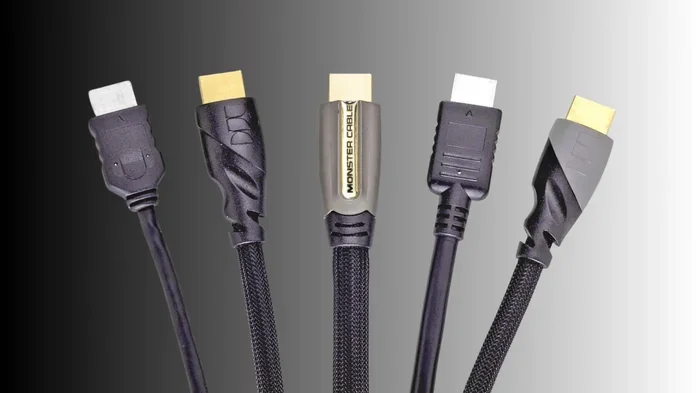
Not all HDMI cables are created equal. Manufacturers categorize them by speed, bandwidth, and the features they support. Here is a look at the main cable types you will encounter when shopping for a 4K HDMI cable or any other setup.
Standard HDMI Cable
The Standard HDMI cable is the most basic type. It supports resolutions up to 1080p, which is full HD. This cable works well for older devices and simple setups like connecting a DVD player to a TV. It carries video and audio but does not support higher resolutions or advanced features like HDR.
If you have an older entertainment system or just need a basic connection for a cable box, a Standard HDMI cable gets the job done. These cables are affordable and widely available at any electronics store or online retailer. They are a solid choice for non-critical applications where you do not need top-tier picture quality.
High Speed HDMI Cable
A High Speed HDMI cable supports resolutions up to 4K at 30Hz. This means it can handle most modern TVs and streaming devices without any issues. It also supports deeper color depths and wider color gamuts, which makes your picture look richer and more vibrant on screen.
Most people buying an HDMI cable today should look for a High Speed option. It covers the vast majority of use cases, from watching Netflix in 4K to connecting a Blu-ray player or streaming stick. This is the sweet spot between performance and price for everyday home entertainment.
Premium High Speed HDMI Cable
The Premium High Speed cable goes a step further. It supports 4K at 60Hz and even 8K at 30Hz. It also supports HDR (High Dynamic Range), which gives you better contrast and more vivid colors. If you have a 4K TV and want the best picture quality possible, this is the cable to choose.
Premium cables are certified to handle the full bandwidth of HDMI 2.0. They often come with better shielding to reduce signal interference, which matters in longer cable runs. If you want reliable performance and future-proofing, Premium High Speed is a smart investment.
Ultra High Speed HDMI Cable
Ultra High Speed is the latest and most capable HDMI cable type. It supports 8K at 60Hz and even 4K at 120Hz and 240Hz. This cable is built for HDMI 2.1, which is the newest HDMI standard. Gamers and home theater enthusiasts will love the performance gains this cable delivers.
If you have an Xbox Series X, PlayStation 5, or a high-end PC setup, an Ultra High Speed cable unlocks the full potential of your hardware. You get smoother gameplay, higher frame rates, and stunning picture quality. This is the cable to buy if you want the absolute best HDMI resolution support available today.
Quick Comparison of HDMI Cable Types
Here is a simple breakdown to help you compare the main cable categories at a glance.
- Standard: 1080p, 4.95 Gbps, best for older devices and basic setups.
- High Speed: 4K at 30Hz, 10.2 Gbps, ideal for most modern TVs and streaming.
- Premium High Speed: 4K at 60Hz / 8K at 30Hz, 18 Gbps, great for 4K HDR setups.
- Ultra High Speed: 8K at 60Hz / 4K at 240Hz, 48 Gbps, built for gaming and home theater.
HDMI Connector Types
HDMI connectors come in different shapes and sizes. The type of connector you need depends on the device you are using. Here are the main HDMI connector types you will see in the wild.
Type A (Standard HDMI)
The Type A connector is the one you see on almost every TV, monitor, and streaming device. It is the full-size HDMI plug and has 19 pins. This is the most common connector type, and you will use it for the majority of your home entertainment gear.
When you buy a generic HDMI cable, it almost always comes with Type A connectors on both ends. If you are connecting a cable box, soundbar, or game console to a TV, Type A is what you need. It is the universal standard that everyone recognizes.
Type B (Dual Link HDMI)
Type B connectors are rare. They were designed for higher-resolution displays but were never widely adopted by the industry. You are very unlikely to encounter a Type B connector in everyday use. Most manufacturers skipped this type and moved on to other solutions that proved more practical.
Type C (Mini HDMI)
Mini HDMI, or Type C, is a smaller version of the standard connector. You will find it on some tablets, action cameras, and older laptops. It has the same 19 pins as Type A but in a more compact design that fits smaller devices.
If you have a device with a Mini HDMI port, you need a cable with a Type C connector on one end. Many manufacturers include a Mini-to-Standard adapter in the box, but it is always good to have your own spare cable on hand. These cables are especially handy for travel and mobile setups.
Type D (Micro HDMI)
Micro HDMI, or Type D, is even smaller than Mini HDMI. It is found on some smartphones, action cameras, and portable media players. Like Type C, it has 19 pins packed into a tiny form factor that fits in the slimmest devices.
Micro HDMI cables are less common than Mini HDMI, but they are still available online and at electronics stores. If your device uses Micro HDMI, make sure to buy the right cable or an adapter so you do not end up with a connector that does not fit.
Type E (Automotive HDMI)
Type E connectors are designed for use in vehicles. They have a locking mechanism that prevents the cable from coming loose due to vibration on the road. You will find these in car infotainment systems and some dash cameras.
This connector type is niche, but it serves an important purpose. If you are installing a rear-seat entertainment system or a dash cam with HDMI output, Type E is the connector to look for. The locking tab keeps the connection secure even on bumpy rides.
HDMI Versions and What They Mean
The HDMI standard has evolved significantly over the years. Each new version brought higher bandwidth, better resolution support, and new features that changed how we connect devices. Here is a breakdown of the major HDMI versions you should know about.
HDMI 1.4
HDMI 1.4 introduced several important features that are still relevant today. It added support for 4K resolution at 30Hz, 3D video, and the HDMI Ethernet Channel. This version was a big step forward and is still found in many devices in homes around the world.
One of the most useful features of HDMI 1.4 is ARC, which stands for Audio Return Channel. HDMI ARC lets your TV send audio back to your soundbar or receiver through the same HDMI cable. This means you only need one cable for both video and audio, which simplifies your setup and reduces cable clutter.
HDMI 2.0
HDMI 2.0 brought a major upgrade to the standard. It supports 4K at 60Hz, which means smoother motion for sports and gaming. The bandwidth increased to 18 Gbps, and it added support for HDR content with up to 12-bit color depth for richer, more lifelike images.
Most 4K TVs and streaming devices made in the last few years use HDMI 2.0 or later. If you have a 4K TV, you want at least an HDMI 2.0 cable to take full advantage of its capabilities. This version struck a great balance between performance and widespread device support.
HDMI 2.1
HDMI 2.1 is the latest standard, and it is a game-changer for both gamers and movie lovers. It supports 8K at 60Hz and 4K at 120Hz and 240Hz. The bandwidth jumps to 48 Gbps, which is a massive increase over HDMI 2.0 and opens up possibilities that were not possible before.
HDMI 2.1 introduces features like Variable Refresh Rate (VRR), Auto Low Latency Mode (ALLM), and Enhanced Audio Return Channel (eARC). If you have a PS5, Xbox Series X, or a high-end PC, an HDMI 2.1 cable and compatible device will give you the best experience possible. The best HDMI cable for modern gaming is one that supports this latest standard.
Features That Make HDMI Cables Stand Out
Beyond cable types and versions, some HDMI cables offer extra features that add real value to your setup. Understanding these features helps you make a smarter buying decision.
HDMI ARC and eARC
ARC (Audio Return Channel) lets your TV send audio to a soundbar or AV receiver through the HDMI cable. This eliminates the need for a separate audio cable and keeps your setup clean. eARC (Enhanced Audio Return Channel) takes it further, supporting advanced audio formats like Dolby Atmos and DTS:X for a truly immersive sound experience.
If you are building a home theater, look for cables that support eARC. Not all HDMI cables carry eARC signals, so check the specifications before you buy. The difference in audio quality is noticeable, especially with premium sound systems.
HDMI Ethernet Channel
Some HDMI cables include an Ethernet channel, which lets connected devices share an internet connection without a separate Ethernet cable. This feature is handy if your devices are in a different room from your router and running a network cable is impractical.
Not all devices support HDMI Ethernet, but when both devices do, it saves you from running extra cables across the room. It is a small feature that can make a big difference in a cluttered entertainment setup. Think of it as a convenient bonus that comes with certain High Speed HDMI and higher cables.
Braided vs. Flat HDMI Cables
HDMI cables also come in different physical designs. Braided cables are more durable and resist tangling. They last longer and handle frequent plugging and unplugging better than their flat counterparts. Flat cables are thinner and easier to route behind furniture or along walls for a clean, hidden installation.
Your choice depends on your setup and preferences. If the cable will be in a high-traffic area or gets moved often, go with braided. If you need a clean, discreet look behind your TV stand, flat cables work well. Both types are available in all the speed categories we discussed earlier.
How to Choose the Right HDMI Cable
With so many options available, picking the right HDMI cable can feel overwhelming. Here are some practical tips to help you make the best choice for your setup.
Match the Cable to Your Device
The most important rule is to match the cable to your device’s capabilities. If you have a 4K TV, you need at least a High Speed or Premium High Speed cable. For 4K gaming at 120Hz, you need an Ultra High Speed cable that supports HDMI 2.1.
Check your device’s specifications before you buy. The manufacturer will list the minimum cable requirements. Buying a cable that exceeds those requirements gives you headroom for future upgrades. A little extra bandwidth never hurts and ensures compatibility as technology advances.
Consider Cable Length
Longer cables can lose signal quality, especially at higher resolutions and bandwidths. For runs under 10 feet, most cables work fine. For longer distances, look for cables with better shielding or consider an HDMI signal booster to maintain a strong connection.
If you need a cable longer than 25 feet, an active HDMI cable or an HDMI extender over fiber optic can help maintain signal quality. These solutions are more expensive but worth it for long runs. A good HDMI cable guide will always mention length as a key factor in signal integrity.
Buy from Reputable Brands
Cheap HDMI cables from unknown brands can be unreliable. They may not support the bandwidth they claim, and they might fail after a few months of use. Stick with well-known brands or look for cables that are certified by HDMI Licensing LLC to ensure you get what you pay for.
Premium cables do not have to cost a fortune. Many reputable brands offer excellent options at reasonable prices. Avoid the temptation to buy the cheapest option if you need reliable performance. A well-made cable lasts longer and delivers a better experience every single time.
Beyond cables, your smart home setup can benefit from other accessories too. For instance, if you are integrating security and access control into your home, the advantages and disadvantages of access control systems are worth considering as part of a broader connected home strategy. And for those who love tech gadgets for everyday life, you might also enjoy reading about apps that work like Uber for finding dog walkers as a fun look at how apps simplify daily tasks.
Common HDMI Cable Mistakes to Avoid
Even experienced users make mistakes with HDMI cables. Here are some common pitfalls that can cause frustration and poor performance.
- Buying the wrong cable type: Using a Standard cable for a 4K device will result in poor quality or no signal at all. Always check the resolution requirements first.
- Ignoring cable certification: Non-certified cables may not deliver the bandwidth they claim. Look for HDMI-certified products from trusted manufacturers.
- Using too long a cable without a booster: Signal degradation over long distances is real. Use an active cable or extender for runs over 15 feet.
- Bending cables sharply: Sharp bends can damage the internal wiring and cause intermittent signal loss. Let the cable curve gently at connection points.
- Assuming all ports are the same: Not all HDMI ports on your TV support the same features. Check your TV manual to see which ports support 4K, HDR, or eARC.
Avoiding these mistakes saves you frustration and ensures your setup performs at its best every time you turn on your devices. A little knowledge goes a long way when it comes to HDMI compatibility and getting the most out of your gear.
The Future of HDMI
HDMI technology continues to evolve at a fast pace. HDMI 2.1 is already making waves with support for 8K and high refresh rates that were unimaginable just a few years ago. As display technology advances, we can expect even more capable cables and connectors in the near future.
Manufacturers are also working on improvements like better shielding, thinner designs, and smarter cables that can auto-negotiate the best settings for your devices. The goal is always the same: deliver the best possible audio and video experience through a single, simple connection that just works.
For now, understanding the current HDMI landscape puts you ahead of the curve. Whether you are upgrading your setup today or planning for the future, knowing your options makes all the difference. A well-chosen HDMI cable is a small investment that pays off every time you watch a movie, play a game, or connect your devices.
Conclusion
The world of HDMI cables and connectors is more varied than most people realize. From Standard cables for older devices to Ultra High Speed cables for cutting-edge gaming, there is a perfect HDMI cable for every setup. The key is understanding your device’s needs and choosing a cable that matches or exceeds those requirements.
Remember the main HDMI cable types, the different HDMI connector types, and the features that matter most for your use case. With the right cable, you will enjoy crisp video, rich audio, and a reliable connection every time you turn on your device. Take a few minutes to review your current setup, check your devices, and upgrade your cables if necessary.
A small change can make a big difference in your entertainment experience. Happy connecting, and enjoy the best your devices have to offer.
Frequently Asked Questions
What is the difference between HDMI 2.0 and HDMI 2.1 cables?
HDMI 2.0 cables support 4K at 60Hz with 18 Gbps bandwidth, while HDMI 2.1 cables support 4K at 120Hz and 8K at 60Hz with 48 Gbps bandwidth. HDMI 2.1 also adds features like VRR and ALLM, which are great for gaming. If you have a modern gaming console or 8K TV, an HDMI 2.1 cable is the way to go.
Do I need an Ultra High Speed HDMI cable for 4K?
Not necessarily. A Premium High Speed cable handles 4K at 60Hz just fine. You only need Ultra High Speed if you want 4K at 120Hz or higher refresh rates for gaming. For most streaming and regular TV watching, Premium High Speed is sufficient and saves you money.
Can I use an HDMI splitter with any HDMI cable type?
You can use an HDMI splitter with most cable types, but the splitter must support the resolution and features of your devices. A splitter that only supports HDMI 1.4 will limit your setup to 4K at 30Hz. Make sure the splitter matches or exceeds your cable’s capabilities for the best results.
Are all HDMI connectors the same size?
No, HDMI connectors come in several sizes. Standard Type A is the most common, but Mini Type C and Micro Type D are used on smaller devices like tablets and smartphones. Type E is designed for automotive use with a locking mechanism to keep the connection secure.
Does HDMI cable length affect quality?
Yes, longer cables can experience signal degradation, especially at higher resolutions and bandwidths. For runs under 10 feet, most cables work perfectly. For longer distances, consider an active HDMI cable or a fiber optic HDMI extender to maintain strong signal quality throughout the run.
What is HDMI ARC and do I need it?
HDMI ARC (Audio Return Channel) lets your TV send audio back to a soundbar or AV receiver through the HDMI cable. You need it if you want a simpler setup with fewer cables running between your devices. eARC is an enhanced version that supports advanced audio formats like Dolby Atmos for a richer sound experience.
=== CONCLUSION ===
Understanding the different types of HDMI cables and connectors empowers you to build a better home entertainment setup. From choosing the right HDMI cable type to picking the correct HDMI connector type, every decision impacts your viewing and gaming experience. Use this guide as your reference whenever you need to buy or upgrade an HDMI cable.
With the right cable in hand, you are ready to enjoy stunning visuals and immersive sound from every device in your home. Take the time to review your setup, make informed choices, and enjoy the best performance your devices can deliver. Happy connecting.