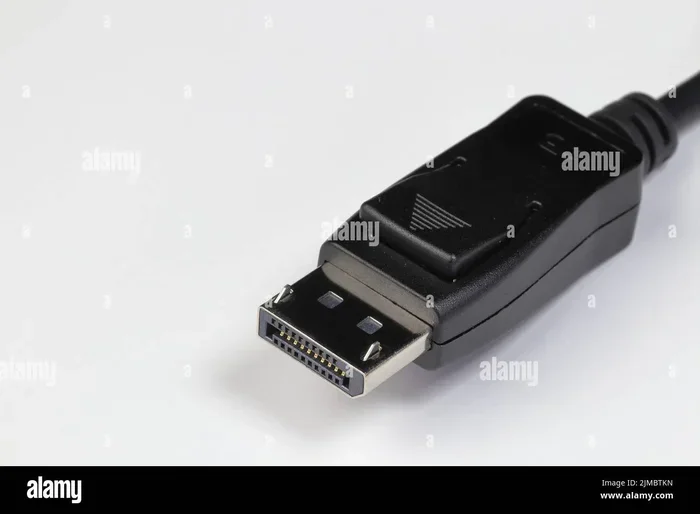
Are Display Ports Outdated or Still the Best Choice
DisplayPorts are far from outdated. They remain the top choice for gamers, professionals, and anyone who wants the best video quality. With the latest versions offering massive bandwidth upgrades, DisplayPort still leads in resolution support and refresh rates. If you are building or upgrading a setup, understanding DisplayPort technology is essential.
You might have heard some people saying that DisplayPorts are outdated. Maybe you have seen HDMI ports on every new TV and wondered if DisplayPort is fading away. The truth is, DisplayPort technology is alive, well, and actually getting better with each new version.
If you are shopping for a new monitor, building a gaming PC, or setting up a professional workstation, the video connection you choose matters a lot. A bad connection means blurry images, low refresh rates, and frustrating lag. DisplayPort continues to be the strongest option for PC monitors and high-performance displays. Let us break down why it still matters and what the future holds.
In this guide, we will cover everything you need to know about DisplayPort cables, how they compare to HDMI, who benefits most from them, and whether you should still choose DisplayPort for your next setup. We will also look at emerging alternatives and what display technology trends are shaping the industry.
Key Takeaways
- DisplayPort is not outdated: The latest versions (DP 2.1) offer bandwidth up to 80 Gbps, far surpassing older standards.
- DisplayPort vs HDMI: DisplayPort still wins for PC monitors and high refresh rate gaming, while HDMI leads in TV connections.
- Future-proof investment: DisplayPort 2.1 supports extreme resolutions and refresh rates that current monitors cannot even fully use yet.
- Daisy chaining works: DisplayPort allows you to connect multiple monitors in a chain, saving ports and cable clutter.
- USB-C and Thunderbolt use DisplayPort Alt Mode: Many modern laptops and docks rely on DisplayPort technology through USB-C connectors.
- Adaptive Sync is built in: FreeSync and G-Sync compatibility is native to DisplayPort, reducing screen tearing during gaming.
- Best for serious setups: Whether for work or play, DisplayPort remains the strongest video connection for performance-focused users.
📑 Table of Contents
- What Is a DisplayPort and Why Does It Matter
- Are Display Ports Outdated? The Truth About Current Standards
- DisplayPort vs HDMI: Which Should You Choose
- Who Still Benefits from DisplayPort in 2024
- The Future of DisplayPort and Emerging Alternatives
- Common Mistakes People Make with DisplayPort
- Final Verdict: Are Display Ports Still Worth It
What Is a DisplayPort and Why Does It Matter
A DisplayPort is a video connection standard developed by VESA, a group that sets display technology rules. It first appeared in 2006 and has gone through several major updates. Each new version brought faster speeds, better resolution support, and new features.
The latest version, DisplayPort 2.1, is a game-changer. It supports up to 80 Gbps of bandwidth. That is enough to push 16K resolution at 60Hz or 4K at 240Hz. No other consumer video connection comes close to that level of performance right now.
How DisplayPort Connectors Work
A standard DisplayPort connector has 20 pins inside. These pins carry video, audio, and data signals all at once. The full-size connector is common on desktop monitors and graphics cards. You will also find a smaller Mini DisplayPort, which Apple popularized but VESA actually designed.
There is also the USB-C version of DisplayPort. Many modern laptops use USB-C Alt Mode, which sends DisplayPort signals through a USB-C connector. This means you can plug a monitor into your laptop using a USB-C cable and still get full DisplayPort performance.
Key Features That Make DisplayPort Stand Out
- High bandwidth: DP 2.1 delivers up to 80 Gbps, supporting extreme resolutions and refresh rates.
- Daisy chaining: You can connect up to four monitors in a single chain from one port on your PC.
- Adaptive Sync: Built-in support for FreeSync and G-Sync reduces screen tearing and stuttering during gaming.
- No licensing fees: Unlike HDMI, DisplayPort does not require manufacturers to pay royalty fees, which keeps costs down.
- Multi-stream transport: A single cable can carry multiple independent display signals at once.
- Audio and video together: DisplayPort carries both audio and video over one cable, just like HDMI.
Are Display Ports Outdated? The Truth About Current Standards
The idea that DisplayPorts are outdated comes from a few places. HDMI is everywhere on TVs and home theater systems. USB-C and wireless display options are growing in popularity. But when you look at the actual performance numbers, DisplayPort technology is still leading the pack.
DisplayPort Versions and Their Capabilities
Here is a quick look at how DisplayPort has evolved over the years:
- DisplayPort 1.2 (2009): 17.28 Gbps bandwidth. Supports 4K at 60Hz. This was a big step forward at the time.
- DisplayPort 1.4 (2016): 25.92 Gbps. Added Display Stream Compression (DSC), which allows higher resolutions without losing quality.
- DisplayPort 2.0 (2019): 77.37 Gbps. A massive jump that opened the door for 8K and 16K support.
- DisplayPort 2.1 (2023): 80 Gbps. The current standard with improved power delivery and USB4 compatibility.
Each new version doubled or tripled the bandwidth of the previous one. That kind of progress does not happen with a dying technology. DisplayPort is evolving, not fading.
Why Some People Think DisplayPort Is Dying
There are a few reasons people spread the idea that DisplayPorts are outdated. First, HDMI is on almost every TV and home entertainment device. Second, wireless display options like Miracast and Chromecast are getting better. Third, USB-C is becoming the universal port on laptops and tablets.
But here is the thing. Wireless displays always have some lag and compression loss. They are great for casual streaming but not for serious gaming or color-accurate work. And USB-C itself often uses DisplayPort Alt Mode, which means DisplayPort technology is still doing the heavy lifting even when you do not see the name.
You might also check out apps that are like Uber for finding dog walkers if you are looking for smart solutions for other tech needs in your daily life. While that is a different topic, it shows how technology keeps evolving in every area.
DisplayPort vs HDMI: Which Should You Choose
This is the question most people ask when they are shopping for a new monitor or cable. Both DisplayPort and HDMI are solid standards. But they serve slightly different purposes, and knowing the difference helps you make the right choice.
Bandwidth Comparison
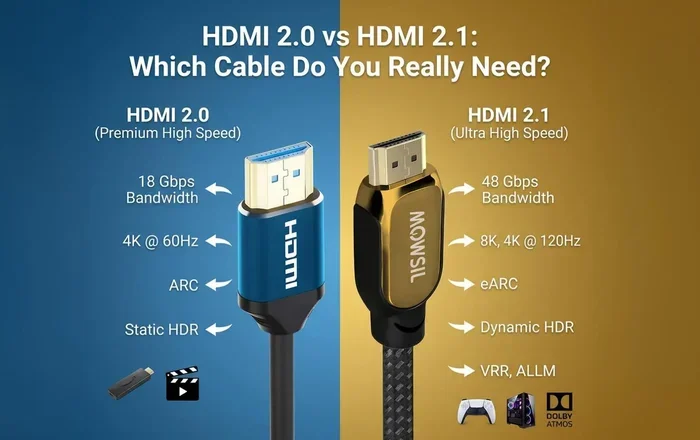
DisplayPort 2.1 offers 80 Gbps of bandwidth. The latest HDMI 2.1 offers 48 Gbps. That is a huge gap. More bandwidth means higher resolutions, faster refresh rates, and better color depth.
Feature Comparison Table
| Feature | DisplayPort 2.1 | HDMI 2.1 |
|---|---|---|
| Max Bandwidth | 80 Gbps | 48 Gbps |
| Max Resolution | 16K @ 60Hz | 10K @ 120Hz |
| Daisy Chaining | Yes | No |
| Adaptive Sync | Yes (FreeSync/G-Sync) | Yes (VRR) |
| Connector Type | Full-size, Mini, USB-C | Full-size, Mini, Micro |
| Licensing Fees | No | Yes |
| Best For | PC Monitors, Gaming | TVs, Home Theater |
When to Choose DisplayPort
Choose DisplayPort if you are building a gaming PC or using a high-refresh-rate monitor. If you need to daisy chain multiple monitors, DisplayPort is the only option. If you want the highest bandwidth for professional video editing or 3D rendering, DisplayPort delivers.
When to Choose HDMI
Choose HDMI if you are connecting a PC to a TV for home entertainment. HDMI is the standard for consoles like the PS5 and Xbox Series X. If you have limited DisplayPort ports on your graphics card but plenty of HDMI ports, HDMI is a perfectly fine choice for casual use.
Who Still Benefits from DisplayPort in 2024
Not everyone needs DisplayPort, but many people benefit from it more than they realize. Let us look at the groups who get the most out of DisplayPort technology today.
Gamers
Serious gamers need high refresh rates and low input lag. DisplayPort supports 360Hz refresh rates at 1080p and 240Hz at 4K. These numbers are essential for competitive gaming where every millisecond counts. The built-in adaptive sync also gives gaming display users a smoother experience without expensive hardware add-ons.
Content Creators and Video Editors
Video editors and graphic designers need accurate color and high resolution. DisplayPort supports 10-bit and 12-bit color depth, which means more accurate colors on screen. The high bandwidth also makes it possible to edit 4K and even 8K footage in real time without compression artifacts.
Professionals with Multi-Monitor Setups
If you use three or more monitors, DisplayPort daisy chaining is a lifesaver. Instead of running four separate cables from your PC, you can connect all your monitors in a single chain using one cable from the computer and one cable between each monitor. This keeps your desk clean and reduces cable clutter.
IT Managers and Enterprise Users
Businesses that manage large numbers of workstations benefit from DisplayPort’s lack of licensing fees. The display adapter options are also more affordable because manufacturers do not need to pay royalties. This makes large-scale monitor deployments more budget-friendly.
The Future of DisplayPort and Emerging Alternatives
Technology never stays still, and DisplayPort is no exception. Let us look at where this standard is heading and what alternatives are on the horizon.
What Comes After DisplayPort 2.1
VESA is already working on future versions of DisplayPort. The next generation will likely focus on even higher bandwidth and better integration with USB4 and Thunderbolt standards. As monitor resolutions grow and refresh rates increase, DisplayPort technology will need to keep up.
One exciting development is the growing overlap between USB-C and DisplayPort. USB4 uses the same transport protocol as DisplayPort 2.0. This means future devices will naturally support DisplayPort capabilities through USB-C connections without needing a dedicated DisplayPort port.
Are Wireless Display Technologies a Threat
Wireless display tech like WiGig and Miracast is improving, but it still cannot match the performance of a wired DisplayPort cable. Latency, compression, and bandwidth limitations make wireless options better suited for presentations and casual viewing than for gaming or professional work.
That said, wireless technology is getting better every year. For now, it is a complement to wired connections, not a replacement. If you want the best image quality and the lowest latency, a wired connection through DisplayPort or HDMI is still the way to go.
Thunderbolt and DisplayPort
Thunderbolt 4 and Thunderbolt 5 both use the USB-C connector but carry DisplayPort signals. This means that every Thunderbolt port is also a DisplayPort port. If you have a Thunderbolt dock or laptop, you are already using DisplayPort technology whether you know it or not.
This convergence is actually great news for users. You get the flexibility of USB-C with the video performance of DisplayPort. It is one of the reasons DisplayPort remains relevant even as connector types change.
Common Mistakes People Make with DisplayPort
Even though DisplayPort is a great standard, many users make mistakes that limit its performance. Here are a few things to watch out for.
- Using an old cable with a new port: A DisplayPort 1.2 cable cannot handle the speeds of DP 2.1. Always match your cable version to your port version for the best results.
- Forcing the wrong connector: Full-size DisplayPort and Mini DisplayPort look similar but are not interchangeable. Using the wrong one can damage your port.
- Ignoring DSC support: Display Stream Compression allows you to push higher resolutions than your cable bandwidth would normally allow. Make sure your monitor and GPU both support DSC.
- Not checking GPU compatibility: Not all graphics cards support the latest DisplayPort versions. Check your GPU specifications before buying a monitor that requires DP 2.0 or 2.1.
Quick Tips for Getting the Most from DisplayPort
- Always buy cables rated for the version you need. A DP 2.1 cable is backward compatible but only delivers full speed when connected to DP 2.1 ports.
- Use DisplayPort daisy chaining to simplify multi-monitor setups and reduce cable mess.
- Enable adaptive sync in your GPU settings to take advantage of FreeSync or G-Sync support.
- If your monitor supports it, use the DSC feature to push beyond standard bandwidth limits.
- Keep your GPU drivers updated to ensure full compatibility with the latest DisplayPort standards.
Final Verdict: Are Display Ports Still Worth It
The short answer is yes. DisplayPorts are not outdated. They are still the best choice for PC monitors, gaming setups, and professional displays. The latest DisplayPort 2.1 standard offers bandwidth and features that no other consumer video connection can match.
HDMI has its place, especially in home entertainment. USB-C and wireless options are growing in popularity. But when it comes to raw performance, flexibility, and future-proofing, DisplayPort technology is still the king of PC connections.
If you are buying a new monitor or building a PC, do not skip DisplayPort just because you have heard rumors about it being outdated. The numbers tell a different story. DisplayPort is evolving, improving, and ready for whatever the future of display technology brings.
Invest in DisplayPort cables and monitors that support the latest standards. Your eyes, your gaming experience, and your productivity will all thank you. The best time to embrace DisplayPort is right now.
Frequently Asked Questions
Is DisplayPort better than HDMI for gaming?
Yes, DisplayPort is generally better for gaming on PC. It offers higher bandwidth, supports higher refresh rates, and includes built-in adaptive sync. For competitive gaming, DisplayPort gives you the edge you need with lower latency and smoother frame delivery.
Can I use a DisplayPort 1.4 cable with a DisplayPort 2.1 monitor?
You can, but you will only get the performance of the older standard. A DP 1.4 cable maxes out at about 25.92 Gbps, while DP 2.1 can deliver up to 80 Gbps. For full performance, always use a cable that matches or exceeds your monitor and GPU capabilities.
Do all graphics cards support DisplayPort 2.1?
Not yet. Many modern GPUs from NVIDIA and AMD support DP 2.1, but older cards may only support DP 1.4. Always check your graphics card specifications to confirm which DisplayPort version it supports before purchasing a DisplayPort 2.1 monitor.
Is USB-C the same as DisplayPort?
USB-C and DisplayPort are not the same, but they work together. Many USB-C ports use DisplayPort Alt Mode, which sends DisplayPort signals through a USB-C connector. This means you can connect a DisplayPort monitor to a USB-C port and get full DisplayPort performance.
Will DisplayPort become obsolete in the future?
It is unlikely in the near future. DisplayPort continues to evolve with each new version, and its technology is deeply integrated into USB4 and Thunderbolt standards. Even as connectors change, the underlying DisplayPort technology will remain relevant for years to come.
How many monitors can I daisy chain with DisplayPort?
You can daisy chain up to four monitors using a single DisplayPort connection on your PC. Each monitor in the chain passes the signal to the next one. This feature is a major advantage of DisplayPort over HDMI and makes multi-monitor setups much simpler and cleaner.
=== CONCLUSION ===
DisplayPorts are not outdated. They remain the strongest and most capable video connection standard for PC users today. With DisplayPort 2.1 pushing the boundaries of bandwidth and resolution support, there is no sign of this technology slowing down.
Whether you are a gamer chasing high refresh rates, a video editor working with 4K footage, or a professional managing multiple monitors, DisplayPort delivers the performance and features you need. Invest in the right cables, choose monitors that support the latest standards, and you will be ready for whatever display technology comes next.