Can I Use 100w Charger For iPhone Heres What Happens
Yes, you can use a 100W charger for iPhone, but the results depend on your model and cable. Your iPhone will only draw the power it needs, so fast charging iPhone is safe and efficient. Heres exactly what happens when you plug in a 100W power adapter and how to get the best charging speed without risking your battery health.
Have you ever grabbed a 100W charger and wondered whether it was safe to use with your iPhone? Maybe you left your normal Apple charger at home, or you just bought a powerful power adapter for your laptop and thought, why not use it for your phone too?
The short answer is yes. You can use a 100W charger for iPhone without frying anything. But the full story is more interesting than that. Your iPhone is smarter than you think when it comes to managing power. It has built-in chips that control exactly how much electricity flows into the lithium-ion battery. So even if the charger can deliver 100 watts, your phone will only take what it needs.
In this guide, we will walk through everything you need to know. We will cover safety, charging speed, which iPhone models benefit the most, and the best way to set up your charging cable and wall adapter. By the end, you will feel totally confident about using any high-wattage charger with your iPhone.
Let us get into it.
Key Takeaways
- Safe to Use: iPhones have built-in chips that regulate power intake, so a 100W charger will not overcharge or damage your device.
- Fast Charging Works: With the right USB-C to Lightning cable, you can charge your iPhone from 0 to 50 percent in about 30 minutes.
- Model Matters: Newer iPhone models like the iPhone 15 and iPhone 14 support faster charging than older devices.
- Use Quality Accessories: Always choose a reputable third-party charger or the official Apple charger to ensure battery safety.
- No Need to Worry: Your iPhone will never pull more wattage than it can handle, even from a high-wattage wall adapter.
📑 Table of Contents
- What Happens When You Plug a 100W Charger Into Your iPhone
- Is a 100W Charger Safe for Your iPhone
- Which iPhones Can Use a 100W Charger
- How to Properly Use a 100W Charger for iPhone
- Benefits and Potential Risks of Using a 100W Charger
- Best 100W Chargers for iPhone Users
- Final Thoughts on Using a 100W Charger for iPhone
What Happens When You Plug a 100W Charger Into Your iPhone
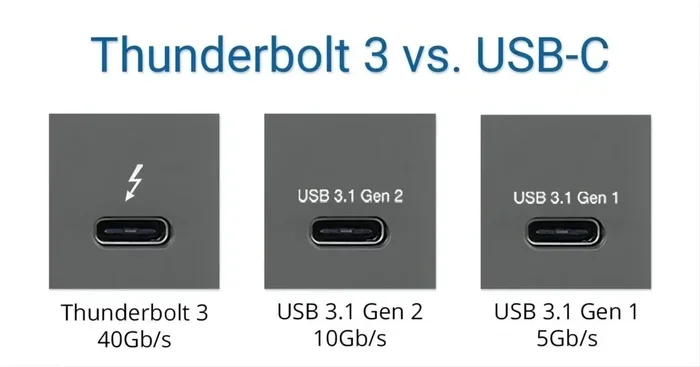
When you connect a 100W charger to your iPhone, something interesting happens right away. The phone and the charger communicate through the USB-C Power Delivery protocol. This is a smart system that lets both devices agree on the right amount of power to transfer.
How iPhone Charging Actually Works
Your iPhone does not just blindly accept whatever power a charger offers. It sends a signal to the charger and says, “I only need this much.” This process is called power negotiation. It happens in milliseconds. So even though the charger is capable of pushing 100 watts, your iPhone will cap the intake at its maximum supported level.
For most iPhones, that cap is around 20 to 27 watts. The iPhone 15 series can handle up to about 27W with a proper USB-C to Lightning cable or a USB-C to USB-C cable on newer models. Older phones like the iPhone 13 or iPhone 14 peak at around 20W. So the extra wattage from a 100W charger simply goes unused.
What the iPhone Thinks When It Sees a 100W Charger
Think of it like a water faucet. The 100W charger is a wide-open pipe. Your iPhone is the faucet valve. You can turn the valve to only let through the water you need. The pipe does not force extra water into your glass. It just sits there ready if you need it.
The same thing happens with electricity. The charger provides the potential, but your iPhone controls the flow. This means charging speed depends on what your phone supports, not on how powerful the charger is. You will not charge any faster with a 100W charger than you would with a 20W charger on the same iPhone model.
Is a 100W Charger Safe for Your iPhone
This is the question most people really want answered. And the answer is a reassuring yes. Using a 100W charger for iPhone is safe, provided you use a quality charger and a good cable.
Understanding USB-C Power Delivery
USB-C Power Delivery is the standard that makes all of this work safely. It is built into modern iPhones and chargers. The protocol includes multiple layers of protection:
- Over-voltage protection: Prevents too much electrical pressure from reaching your phone.
- Over-current protection: Stops excess current from flowing into the device.
- Temperature monitoring: If the phone or charger gets too hot, power delivery reduces automatically.
- Battery management system: Your iPhone’s internal chip controls the entire charging curve.
These safety features mean that even a third-party charger rated at 100W will not harm your iPhone. The phone simply will not accept more power than it is designed for.
Battery Health and Charging Safety
One concern people have is whether high-wattage chargers degrade the battery health over time. The truth is that your iPhone manages the charging curve regardless of the charger’s wattage. Once your phone reaches about 80 percent, it slows down the charging rate significantly. This is called Optimized Battery Charging, and it is designed to reduce long-term wear on the lithium-ion battery.
So whether you use a 5W charger or a 100W charger, the battery health outcomes are nearly identical. The phone controls the process, not the charger.
Which iPhones Can Use a 100W Charger
All iPhones that use a USB-C to Lightning cable or a fully USB-C design can benefit from a 100W charger. But the charging speed you get depends on the model.
iPhone Models That Support Fast Charging
Here is a quick look at how different iPhone models handle fast charging with a high-wattage charger:
- iPhone 15 Pro and 15 Pro Max: These can charge up to about 27W via USB-C. They are the fastest iPhone chargers available right now.
- iPhone 15 and 15 Plus: Also support up to 27W fast charging through USB-C.
- iPhone 14 Pro and 14 Pro Max: Charge at up to 27W with a USB-C to Lightning cable.
- iPhone 14 and 14 Plus: Support 20W fast charging.
- iPhone 13 and 13 Pro: Handle up to 20W fast charging.
- iPhone 12 and later: All support fast charging with the right power adapter and cable.
Older models like the iPhone 11 and earlier use Lightning connectors and charge more slowly. They still work with a 100W charger, but they will not take advantage of the higher wattage.
The Role of the Right Cable
The charging cable matters just as much as the charger. If you want the best charging speed, make sure you are using a USB-C to Lightning cable that supports USB-C Power Delivery. Cheap, uncertified cables may limit the power transfer or even pose safety risks. Always look for cables that are MFi certified, which means Apple has approved them for use with iPhones.
How to Properly Use a 100W Charger for iPhone
Using a 100W charger with your iPhone is simple. But there are a few steps you can take to make sure everything works smoothly and safely.
Step-by-Step Charging Setup
- Check your charger: Make sure it supports USB-C Power Delivery. Most modern 100W chargers do, but it is always worth confirming.
- Use the right cable: Grab a USB-C to Lightning cable for older iPhones or a USB-C to USB-C cable for iPhone 15 and newer.
- Plug it in: Connect the charger to a wall outlet and plug the cable into your iPhone.
- Watch for the lightning bolt: You should see the lightning bolt icon on the battery indicator. This means fast charging is active.
- Monitor the first charge: The first few times you use a new charger, keep an eye on the phone temperature. It should stay normal.
Quick Tips for Best Results
- Remove thick phone cases while charging to help with heat dissipation.
- Avoid using your iPhone heavily while it is fast charging.
- Use the charger in a cool, well-ventilated area.
- Enable Optimized Battery Charging in your iPhone settings to protect long-term battery health.
- If you want to learn more about managing your iPhone settings, check out our guide on adding prefixes to numbers on iPhone for useful phone number tips.
These small habits can make a big difference in how well your iPhone charges and how healthy your battery stays over time.
Benefits and Potential Risks of Using a 100W Charger
Like any accessory choice, there are pros and cons to using a high-wattage charger with your iPhone. Let us break them down.
The Advantages
Using a 100W charger comes with some real benefits:
- Versatility: One charger can power your iPhone, iPad, and even a laptop. This cuts down on clutter and the number of power adapters you need to carry.
- Future-proofing: If you upgrade to a newer iPhone model that supports higher wattage, your 100W charger is already ready.
- Speed for compatible devices: While your iPhone caps the intake, other devices like iPads or MacBooks will charge much faster with a 100W charger.
- Convenience: No need to carry multiple chargers when traveling. One 100W charger handles everything.
What to Watch Out For
There are a few things to keep in mind:
- Cheap chargers can be risky: Not all 100W chargers are created equal. Low-quality chargers from unknown brands may lack proper safety certifications. Always choose reputable brands.
- Heat generation: A 100W charger may run warmer than a standard 5W or 20W charger. This is normal, but if it becomes too hot to touch, unplug it and let it cool down.
- Cable quality matters: A poor-quality cable can limit charging speed or, worse, become a safety hazard. Invest in a good charging cable.
- No extra speed for older iPhones: If you have an iPhone 11 or older, a 100W charger will not charge it any faster than a 20W charger would.
For the most part, the benefits far outweigh the risks. As long as you use quality equipment, a 100W charger is a safe and practical choice for iPhone users.
And while we are talking about making the most of your iPhone experience, did you know your phone can help with everyday tasks too? For instance, if you need help finding reliable dog walkers in your area, there are apps designed just for that. Check out our list of 4 apps that are like Uber for finding dog walkers to see what is out there.
Best 100W Chargers for iPhone Users
If you are ready to buy a 100W charger, here are some things to look for and a few recommendations to consider.
What to Look for in a 100W Charger
- USB-C Power Delivery support: This is non-negotiable. Without PD, the charger will not communicate properly with your iPhone.
- GaN technology: Gallium Nitride chargers are smaller, cooler, and more efficient than traditional silicon chargers. They are the best choice for a 100W wall adapter.
- Multiple ports: Many 100W chargers come with two or three ports, so you can charge multiple devices at once.
- Certification: Look for UL, CE, or MFi certification to ensure the charger meets safety standards.
- Brand reputation: Stick with well-known brands like Anker, Belkin, Baseus, or the official Apple power adapter.
Quick Comparison of Popular Options
Here is a simple comparison to help you choose:
- Anker 735 Charger (100W): Compact GaN design with three ports. Great for travel and home use. Highly rated for battery safety.
- Belkin Boost Charge Pro (100W): Apple-certified, reliable, and sleek. A premium choice for iPhone users who want the best.
- Baseus 100W GaN Charger: Budget-friendly option that still delivers excellent charging speed and safety features.
- Apple 96W USB-C Power Adapter: The official Apple option. Not exactly 100W but close enough to deliver fast charging to all iPhones.
Any of these options will work great with your iPhone. The key is to pick one that fits your budget and needs.
Final Thoughts on Using a 100W Charger for iPhone
So, can you use a 100W charger for iPhone? Absolutely. Your iPhone is designed to handle high-wattage chargers safely. The built-in power negotiation and battery management systems ensure that your device only takes the power it needs. You get fast, efficient, and safe charging every time.
Just remember to use a quality charger, a good charging cable, and keep an eye on heat. If you do that, a 100W charger is one of the best accessories you can own for your iPhone and all your other devices too.
Stop worrying and start charging with confidence. Your iPhone was built to handle it.
Frequently Asked Questions
Will a 100W charger damage my iPhone battery?
No, it will not. Your iPhone has built-in protections that regulate how much power it accepts. The phone only draws the wattage it is designed for, so your battery health stays intact regardless of the charger’s wattage rating.
Can I use any 100W USB-C charger with my iPhone?
Yes, as long as the charger supports USB-C Power Delivery. Most modern 100W chargers use the PD protocol, which is fully compatible with iPhones. Just make sure the charger is from a reputable brand and is certified for safety.
Will my iPhone charge faster with a 100W charger than a 20W charger?
Not really. Your iPhone caps the power it accepts at its maximum supported level, usually around 20 to 27 watts. So a 100W charger will not charge your iPhone any faster than a 20W charger on the same model. The extra wattage goes unused.
Is it safe to use a 100W charger overnight?
Yes, it is safe. iPhones have built-in Optimized Battery Charging that slows down the charge once it reaches 80 percent. This prevents overcharging and helps maintain long-term battery safety. You can leave your phone charging overnight without worry.
Do I need a special cable to use a 100W charger with my iPhone?
You need a USB-C to Lightning cable for iPhones 14 and older, or a USB-C to USB-C cable for iPhone 15 and newer. The cable should support USB-C Power Delivery and ideally be MFi certified for the best results.
What is the difference between a 100W charger and a 20W charger for iPhone?
The difference is the maximum power the charger can deliver. Your iPhone will only pull what it needs, so the charging speed is the same. The main benefit of a 100W charger is that it can also power other devices like iPads and laptops much faster than a 20W charger can.
=== CONCLUSION ===
Using a 100W charger for iPhone is safe, practical, and convenient. Your iPhone’s smart power management ensures that you get the right amount of charging speed without any risk to your battery health. Whether you are at home, at the office, or traveling, a high-quality 100W charger is a great investment that works across all your devices.
Just remember to choose a certified charger, use a good charging cable, and let your iPhone do the work. It knows exactly how much power it needs. Trust the process, and enjoy the freedom of a versatile, fast-charging setup that keeps up with your busy life.