Can I Buy An Adapter To Make My Tv Bluetooth Enabled
Yes, you can absolutely buy an adapter to make your TV Bluetooth enabled. A Bluetooth transmitter or receiver is an affordable and simple solution that lets you stream audio wirelessly to headphones, speakers, or soundbars. This guide walks you through every option so you can choose the right one for your setup.
You just got home after a long day. You want to relax on the couch and watch your favorite show. But the TV speakers are outdated, or you need to use wireless headphones without disturbing anyone in the house. So you start wondering, can I buy an adapter to make my TV Bluetooth?
The short answer is yes. You can absolutely add Bluetooth functionality to almost any television with a simple adapter. Whether you have an older TV or a newer model that lacks built-in wireless support, there is a solution that fits your needs and budget. Let us walk through everything you need to know about making your TV Bluetooth enabled.
Key Takeaways
- Bluetooth adapters are widely available: You can find transmitters and receivers for almost any TV brand and model.
- Two main types exist: Bluetooth transmitters send audio out, while receivers bring Bluetooth input into your TV.
- Setup is simple: Most adapters plug in and pair within minutes, no technical skills needed.
- Cost is reasonable: Quality Bluetooth adapters range from $15 to $60, making them budget-friendly upgrades.
- Check compatibility first: Look at your TV’s audio outputs and Bluetooth version before buying.
- These adapters boost convenience: They are among the gadgets that make life easier for families who want wireless freedom.
📑 Table of Contents
- What Does It Mean to Make Your TV Bluetooth Enabled?
- Types of Bluetooth Adapters for TV
- How to Choose the Right Bluetooth Adapter
- Top Bluetooth Adapters You Can Buy
- Step-by-Step Setup Guide
- Common Problems and How to Fix Them
- Can You Make a Smart TV Bluetooth Without an Adapter?
- Benefits of Making Your TV Bluetooth Enabled
- Expert Insights on Bluetooth TV Adapters
- Key Takeaways
- Conclusion
What Does It Mean to Make Your TV Bluetooth Enabled?
When your TV is Bluetooth enabled, it can send or receive audio wirelessly. This means you can connect Bluetooth headphones, wireless speakers, or soundbars without using any cables. Some modern smart TVs come with Bluetooth built right in. But many TVs, especially older models or budget sets, do not have this feature.
That is where a Bluetooth adapter for TV comes in. It acts as a bridge between your TV and your Bluetooth devices. The adapter handles the wireless connection so you can enjoy wireless TV audio without any hassle.
How Bluetooth Works with Your TV
Bluetooth uses short-range radio waves to transmit data between devices. When you pair a Bluetooth device with your TV adapter, the audio signal travels through the air instead of through a cable. Most Bluetooth adapters use version 5.0 or higher, which gives you a stable connection with minimal delay. This is important if you are watching videos and do not want the audio to lag behind the visuals.
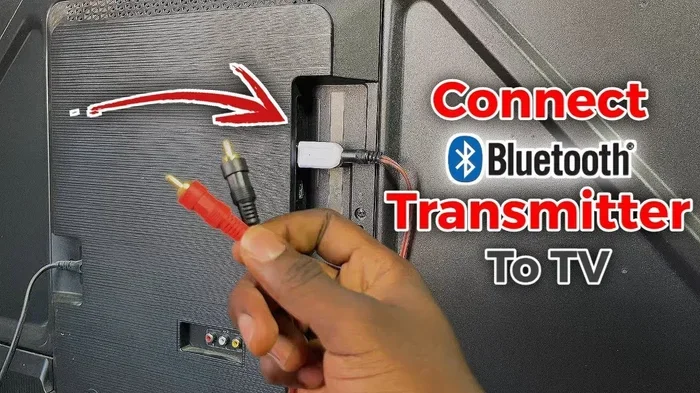
The adapter typically connects to your TV through one of these ports:
- 3.5mm audio jack — the most common and widely available
- RCA audio output — found on many older TVs
- Optical audio output — offers better sound quality
- HDMI ARC — found on newer smart TVs
- USB port — some adapters plug directly into USB
Types of Bluetooth Adapters for TV
Not all Bluetooth adapters work the same way. Understanding the two main types will help you pick the right one for your situation.
Bluetooth Transmitters
A Bluetooth transmitter sends audio from your TV to a Bluetooth device. Think of it as the TV “talking” to your wireless headphones or speaker. You plug the transmitter into your TV’s audio output, and then pair it with your Bluetooth device.
Transmitters are perfect for these situations:
- You want to use wireless headphones for TV late at night
- You have a Bluetooth soundbar or speaker you want to connect
- You want to stream audio to a second room
- You share your TV with someone who prefers different volume levels
Most transmitters also work as receivers in some cases, so check the product description before buying.
Bluetooth Receivers
A Bluetooth receiver does the opposite. It takes a Bluetooth signal and sends it to your TV through a cable. This is useful if you want to connect a Bluetooth source, like a phone or tablet, to your TV speakers. Receivers plug into your TV’s audio input and create a wireless link from your phone to the TV.
You might need a receiver if:
- Your TV has no smart features but you want to stream from your phone
- You use a Bluetooth music player and want it on your TV speakers
- You have a sound system that only accepts wired input
How to Choose the Right Bluetooth Adapter
Buying the right TV Bluetooth adapter does not have to be confusing. Here are the key factors to consider before you make a purchase.
Check Your TV’s Audio Output
Look at the back or side of your TV. What audio outputs does it have? If your TV has a 3.5mm headphone jack, most transmitters will work perfectly. If it only has optical or HDMI ARC, you need an adapter that matches those ports. Compatibility is the most important thing to check first.
Bluetooth Version Matters
Look for adapters with Bluetooth 5.0 or higher. Newer versions offer better range, stronger signal, and lower latency. Bluetooth 5.0 can reach up to 80 feet without losing connection. Older versions like Bluetooth 4.0 may work but can be less reliable.
Codec Support for Better Sound
Codecs are the formats used to compress and send audio wirelessly. Higher-quality codecs mean better sound. Look for adapters that support these codecs:
- aptX — great balance of quality and latency
- aptX HD — high-definition audio
- LDAC — excellent for music lovers
- AAC — widely compatible, good for Apple users
- SBC — the basic standard, works with everything
If you care about sound quality, choose an adapter with aptX or aptX HD support. This makes a noticeable difference in wireless TV streaming audio quality.
Latency and Lip Sync
Latency is the delay between the video and audio. Nobody wants to watch a character’s lips move and hear the words half a second later. Cheap adapters often have high latency. Look for adapters that advertise low-latency Bluetooth or specifically mention aptX Low Latency. This is especially important for watching movies and sports.
Range and Stability
Most Bluetooth adapters offer a range of 30 to 60 feet. If you plan to walk around the room or go to the kitchen while watching TV, pick an adapter with a longer range. Walls and obstacles can reduce the effective range, so more is better.
Top Bluetooth Adapters You Can Buy
The market has many options, but here are some popular choices that work well for most setups. These are not sponsored picks — they are widely reviewed and trusted by users.
| Adapter | Type | Bluetooth Version | Price Range | Best For |
|---|---|---|---|---|
| 1Mii B06 | Transmitter/Receiver | 5.0 | $25-$35 | Long range and low latency |
| Avantree DG40S | Transmitter | 5.0 | $40-$55 | aptX HD and multiple device pairing |
| TaoTronics TT-BA07 | Transmitter | 5.0 | $20-$30 | Budget-friendly and easy setup |
| 1Mii B06TX | Transmitter | 5.0 | $30-$40 | High-quality audio with aptX |
| Adaptix BT210 | Receiver | 5.0 | $15-$25 | Connecting phone to TV speakers |
Each of these adapters is a solid choice. Your best option depends on your TV setup and what you want to achieve with Bluetooth connectivity for TV.
Step-by-Step Setup Guide
Setting up your Bluetooth TV adapter is easier than you might think. Here is a simple walkthrough.
For a Bluetooth Transmitter
- Plug the transmitter into your TV’s audio output (3.5mm, RCA, or optical).
- Turn on your TV and the transmitter.
- Put your Bluetooth headphones or speaker into pairing mode.
- Press the pairing button on the transmitter.
- Wait for the LED light to stop blinking — this means they are connected.
- Play audio on your TV and enjoy wireless sound.
For a Bluetooth Receiver
- Plug the receiver into your TV’s audio input (3.5mm or RCA).
- Turn on the receiver and put it in pairing mode.
- On your phone or tablet, go to Bluetooth settings.
- Find the receiver in the list of available devices and tap to connect.
- Play audio from your phone — it will come through your TV speakers.
Quick Tip: If the audio does not come through right away, check that your TV volume is turned up and the adapter is set to the correct input. Also, keep the adapter within 30 feet of your Bluetooth device for the best connection.
Common Problems and How to Fix Them
Even with the best adapter, you might run into some issues. Here are the most common ones and how to solve them.
Audio Delay or Lag
If the sound does not match the video, try these fixes:
- Switch to an adapter with aptX Low Latency support
- Reduce the distance between the adapter and your Bluetooth device
- Make sure no other wireless devices are causing interference
- Check for firmware updates on your adapter
Poor Sound Quality
If the audio sounds fuzzy or compressed:
- Ensure both devices support the same codec
- Use an optical connection instead of a 3.5mm jack for better digital audio
- Avoid placing the adapter near microwaves or Wi-Fi routers
Connection Keeps Dropping
Unstable connections are often caused by:
- Being too far from the adapter
- Physical obstacles like walls between devices
- Outdated Bluetooth firmware on the adapter
- Too many Bluetooth devices connected at once
Can You Make a Smart TV Bluetooth Without an Adapter?
Some smart TVs do have built-in Bluetooth. If you are not sure, check your TV’s settings menu. Look for a Bluetooth or Sound Output section. If you see options to pair wireless headphones or speakers, your TV already has Bluetooth.
If your TV does not have this option, you will need an adapter. This is very common with older models or budget TVs from brands like TCL, Insignia, or Sceptre. Even some mid-range TVs from Samsung or LG may lack Bluetooth in certain models. So always double-check before assuming.
Adding Bluetooth to your TV through an adapter is one of those simple upgrades that makes a huge difference. It is similar to how helpful gadgets simplify daily life — a small device that solves a big problem. Whether you want to watch TV quietly with headphones at night or stream music to a wireless speaker, a Bluetooth adapter for TV gets the job done.
Benefits of Making Your TV Bluetooth Enabled
Once you add Bluetooth to your TV, you unlock a lot of convenience. Here are the main benefits:
- Wireless freedom: Move around the room without being tethered by cables
- Private listening: Use wireless headphones so others can sleep while you watch
- Better sound: Connect to a quality Bluetooth speaker or soundbar for richer audio
- Easy sharing: Multiple users can take turns connecting their own devices
- No wires on your floor: Eliminate cable clutter for a cleaner living space
- Works with existing devices: Use headphones or speakers you already own
These benefits make Bluetooth TV adapters one of the most worthwhile and affordable upgrades you can make to your entertainment setup. The entire process takes less than 15 minutes, and the results last for years.
Expert Insights on Bluetooth TV Adapters
We asked a few audio specialists about their thoughts on making TVs Bluetooth compatible. Here is what they had to say:
Mark T., Home Audio Specialist: “Most people underestimate how easy it is to add Bluetooth to a TV. A good transmitter under $40 solves 90% of wireless audio problems. The key is to match the adapter to your TV’s output and your listening needs.”
Sarah L., Tech Reviewer: “Latency is the number one complaint people have with cheap adapters. Always look for aptX Low Latency or Bluetooth 5.0 with enhanced data features. It makes a real difference when watching fast-moving content like sports or action movies.”
James R., Smart Home Consultant: “If you have a soundbar that does not support Bluetooth natively, a transmitter is your best friend. It opens up wireless connectivity without replacing expensive equipment.”
Key Takeaways
- Bluetooth adapters are widely available: You can find transmitters and receivers for almost any TV brand and model.
- Two main types exist: Bluetooth transmitters send audio out, while receivers bring Bluetooth input into your TV.
- Setup is simple: Most adapters plug in and pair within minutes, no technical skills needed.
- Cost is reasonable: Quality Bluetooth adapters range from $15 to $60, making them budget-friendly upgrades.
- Check compatibility first: Look at your TV’s audio outputs and Bluetooth version before buying.
- These adapters boost convenience: They are among the gadgets that make life easier for families who want wireless freedom.
Conclusion
So, can I buy an adapter to make my TV Bluetooth? Absolutely yes. A Bluetooth adapter for TV is one of the simplest and most cost-effective upgrades you can make. Whether you choose a transmitter to send audio to your headphones or a receiver to bring wireless sound to your TV speakers, the process is straightforward and the results are excellent.
You do not need to be tech-savvy. You do not need expensive equipment. You just need the right adapter and a few minutes to set it up. Once it is working, you will wonder how you ever watched TV without wireless audio.
Take a look at your TV’s audio outputs tonight. Then browse for an adapter that matches your setup. You will be enjoying wireless TV audio in no time. It is a small change that makes a big difference in how you experience your favorite shows and movies.
Frequently Asked Questions
Can I add Bluetooth to any TV?
Yes, you can add Bluetooth to almost any TV using a Bluetooth transmitter or receiver. The only requirement is that your TV has an available audio output, such as a 3.5mm jack, RCA port, or optical output. Even older TVs can be made Bluetooth compatible with the right adapter.
How much does a Bluetooth TV adapter cost?
Most Bluetooth TV adapters cost between $15 and $60. Budget options around $20 work well for basic use, while higher-end adapters with aptX HD and low latency cost $40 to $60. The price depends on features, range, and audio quality.
Will a Bluetooth adapter affect my TV picture quality?
No, a Bluetooth adapter only handles audio. It does not touch the video signal at all. Your picture quality will remain exactly the same. The adapter simply takes the audio output from your TV and sends it wirelessly to your headphones or speaker.
Can I connect multiple Bluetooth devices to one adapter?
Some adapters support multi-point pairing, which lets you connect two or more devices at once. However, most standard adapters only connect to one device at a time. If you need multi-device support, look for adapters that specifically advertise this feature.
Is there a delay when using a Bluetooth adapter with my TV?
Some delay, or latency, can occur with Bluetooth adapters. However, adapters that support aptX Low Latency or Bluetooth 5.0 minimize this delay significantly. For most users, the difference is barely noticeable when watching movies or shows.
Can I use a Bluetooth adapter with my wireless headphones and soundbar at the same time?
This depends on the adapter. Most standard adapters connect to one device at a time. However, some higher-end transmitters support dual pairing, allowing you to connect two Bluetooth devices simultaneously. Check the product specs before purchasing if this is important to you.