Can I Connect 2 Bluetooth Speakers At The Same Time
Yes, you can connect 2 Bluetooth speakers at the same time — and it is easier than most people think. Whether you want louder sound, stereo separation, or a party-ready setup, pairing two wireless speakers opens up a world of audio possibilities. This guide walks you through every method, compatible devices, and pro tips to get the best results. You will learn how to sync your speakers, avoid common mistakes, and enjoy amplified sound in minutes.
Have you ever been in a room and thought, “This sound is just not big enough”? Maybe you are hosting a backyard barbecue, setting up a home movie night, or just want your music to fill every corner. The idea of connecting two Bluetooth speakers at the same time sounds like a great fix. But can you actually do it? The short answer is yes. The longer answer is that it depends on your devices, your speakers, and the method you use.
Connecting two Bluetooth speakers opens up a whole new world of audio. You get louder sound, better coverage, and in many cases, a true stereo experience. Some people call it dual speaker pairing, others refer to it as speaker sync or party mode. Whatever name you know it by, the goal is the same — better audio without the hassle of wires. In this guide, we will walk you through everything you need to know. We will cover how it works, which devices support it, step-by-step instructions, and plenty of tips to make your setup shine.
Key Takeaways
- Dual Bluetooth speaker pairing is supported on most modern smartphones, tablets, and laptops.
- Stereo mode splits audio between two speakers for a richer, more immersive sound experience.
- Party mode plays the same track on both speakers at full volume for bigger gatherings.
- Not all speakers are compatible — check your device manual or manufacturer app before buying.
- Quick tips like keeping speakers close and updating firmware can fix most connection issues.
- Common mistakes include pairing both speakers to the phone instead of using built-in dual-link features.
- Expert insight: using speakers from the same brand often gives the smoothest experience.
📑 Table of Contents
- Can I Connect 2 Bluetooth Speakers At The Same Time?
- How Dual Bluetooth Speaker Pairing Works
- Which Devices Support Connecting Two Speakers?
- How to Connect 2 Bluetooth Speakers: Step-by-Step
- Benefits of Using Two Bluetooth Speakers Together
- Common Problems and How to Fix Them
- Expert Tips for the Best Audio Experience
- Conclusion
Can I Connect 2 Bluetooth Speakers At The Same Time?
The short answer is absolutely yes. Can I connect 2 Bluetooth speakers at the same time? — this is one of the most common questions people ask when they want to upgrade their audio setup. The good news is that most modern devices and speakers support some form of dual Bluetooth speaker connection. But how you do it depends on your phone, your speakers, and the technology they use.
There are generally three ways to connect two wireless speakers simultaneously. The first is through a built-in feature from the speaker manufacturer. Brands like JBL, Sony, Bose, and Ultimate Ears all offer their own proprietary pairing methods. The second way is through your phone or tablet’s native Bluetooth settings. Some Android and iOS devices allow you to connect to two audio output devices at once. The third method uses a Bluetooth transmitter or audio splitter. This works with almost any pair of speakers, even older models.
Before you start, it helps to understand what you want from your dual setup. Do you want each speaker to play a different channel — left and right? That is called stereo mode and it gives you a wider soundstage. Or do you want both speakers to play the same music at the same time, louder? That is called party mode or dual mode. Both are valid and both are easy to set up once you know the steps.
What Is Bluetooth Speaker Pairing?
Bluetooth speaker pairing is the process of linking two or more wireless speakers together so they work as a single audio system. Bluetooth connectivity uses short-range radio waves to send audio from your phone or tablet to your speakers. When you pair two speakers, you are essentially telling them to receive and play the same audio signal — either together or split across channels.
The technology behind this has improved a lot over the years. Older Bluetooth versions like 4.0 had limitations. They could only connect to one speaker at a time reliably. But modern Bluetooth technology versions like 5.0 and 5.3 handle multiple connections much better. They offer stronger signals, less latency, and better sound quality across both speakers. If your phone and speakers support the latest Bluetooth versions, you will have a much smoother experience.
Stereo Mode vs Party Mode
Understanding the difference between stereo mode and party mode is key. In stereo mode, one speaker handles the left audio channel and the other handles the right channel. This creates a sense of space and direction in the music. It is perfect for listening in a living room or bedroom where you want a rich, detailed sound.
In party mode, both speakers play the exact same audio. This doubles the volume and spreads the music across a larger area. It is ideal for outdoor gatherings, pool parties, or any situation where you need amplified sound to reach everyone. Some brands call this “dual mode,” “multi-room mode,” or “TWS mode” — which stands for True Wireless Stereo.
How Dual Bluetooth Speaker Pairing Works
Now that you know the basics, let us dig into how the actual speaker pairing process works. When you connect two portable speakers wirelessly, your device sends one audio stream. The technology then splits that stream — either by channel for stereo or by duplication for party mode. The way this splitting happens depends on the method you use.
Some speakers use a master-slave setup. The first speaker you connect becomes the master. It receives the audio signal from your phone and then relays a copy to the second speaker, which acts as the slave. This is common in True Wireless Stereo systems. Other speakers use a more advanced mesh network where both speakers communicate directly with each other and with your device. This reduces delay and keeps both speakers in perfect sync.
One thing to watch out for is latency. Latency is the tiny delay between when the audio signal is sent and when you actually hear the sound. In a dual setup, if one speaker has slightly more latency than the other, you might notice the sound is slightly out of sync. Modern Bluetooth 5.0+ devices handle this much better, but it is still worth being aware of, especially if you are watching videos.
The Role of Bluetooth Protocols
Different Bluetooth protocols handle dual connections in different ways. The most common protocol for dual speaker setups is A2DP, which stands for Advanced Audio Distribution Profile. This is the standard that allows your phone to stream high-quality audio to Bluetooth speakers and headphones. Most dual-speaker features build on top of A2DP to manage two output devices.
Some manufacturers use custom protocols on top of A2DP. For example, JBL uses “Connect+” and Sony uses “Extra Bass” pairing modes. These custom protocols optimize the connection specifically for their speakers. They often provide better sync and lower latency than generic methods. When shopping for wireless speakers, look for models that explicitly advertise dual-pairing or TWS support.
Which Devices Support Connecting Two Speakers?
Not every phone, tablet, or laptop can connect to two Bluetooth speakers at once. Device compatibility is one of the most important things to check before you try. Here is a breakdown of what works and what does not.
Most modern Android phones running Android 10 or later support dual Bluetooth audio output. Samsung phones have a feature called “Dual Audio” that lets you connect to two speakers or headphones simultaneously. Google Pixel phones and other stock Android devices also support this through their Bluetooth settings. On the iPhone side, Apple introduced a feature called “Share Audio” in iOS 13. This lets you pair your iPhone with two pairs of AirPods or Beats, and in some cases, two Bluetooth speakers.
Windows laptops with Bluetooth 5.0 or later can also connect to dual speakers. Mac computers running macOS Big Sur or newer support “Share Audio” as well. Tablets are generally the easiest devices for this because they have powerful Bluetooth chips and larger batteries to sustain two connections.
Speaker Compatibility Matters Too
Your phone or tablet is only half the equation. The speakers themselves also need to support dual pairing. Most major brands do, but the method varies. JBL speakers with Connect+ can pair with any other JBL Connect+ speaker. Bose speakers use SimpleSync to pair with other Bose products or even with Bose soundbars. Sony speakers support Wireless Party Chain for linking multiple units together.
If you mix brands, the options are more limited. You may need to use a Bluetooth transmitter or rely on your phone’s native dual-audio feature. Always check the speaker compatibility list in the product manual or on the manufacturer’s website. Some budget speakers do not support dual pairing at all, no matter what device you use.
| Device Type | Dual Bluetooth Support | Best Method |
|---|---|---|
| Samsung Android Phone | Yes (Dual Audio) | Built-in Bluetooth settings |
| iPhone (iOS 13+) | Yes (Share Audio) | Control Center audio sharing |
| Windows Laptop (BT 5.0+) | Yes (with some limitations) | Bluetooth settings or transmitter |
| Mac (macOS Big Sur+) | Yes (Share Audio) | System Preferences Bluetooth |
| Older Android (pre-10) | Limited | Bluetooth transmitter required |
| Budget/Generic Speakers | Often No | Bluetooth transmitter or splitter |
How to Connect 2 Bluetooth Speakers: Step-by-Step
Now for the fun part — actually setting it up. Below, we walk you through the most common methods. Follow the steps that match your device and speakers.
Method 1: Using Your Phone’s Built-In Dual Audio
This is the easiest method if your phone supports it. On Samsung phones, go to Settings, then Connections, then Bluetooth. Tap the three dots in the top right corner and select “Dual Audio.” Turn it on. Now pair your first speaker as you normally would. Then pair the second speaker. Both will connect at the same time, and your audio will play through both.
On iPhone, open Control Center and long-press the music control card. Tap the “Share Audio” button. Then bring your second speaker close to your iPhone and follow the prompt. Both speakers will start playing your music together. You can adjust the volume of each speaker individually from the same menu.
Method 2: Using Manufacturer-Specific Pairing
If your speakers are from the same brand, check if they have a dedicated pairing mode. For JBL speakers, turn on both speakers and press the Connect+ button on one of them. The speakers will find each other and pair automatically. For Sony speakers, press the Wireless Party Chain button. For Bose, use the SimpleSync feature in the Bose Music app.
These manufacturer methods often give the best results because they are optimized for those specific speakers. The sync is tighter, the latency is lower, and the sound quality is usually better than with generic methods. The downside is that you are usually limited to speakers from the same brand and product line.
Method 3: Using a Bluetooth Transmitter
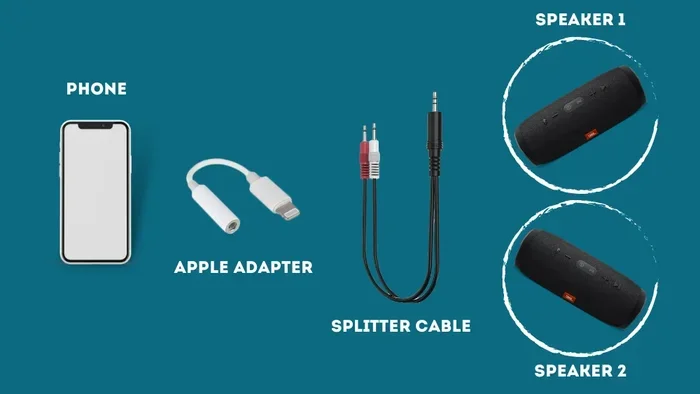
If your phone or speakers do not support dual pairing natively, a Bluetooth transmitter is your best friend. This small device plugs into your phone’s headphone jack or connects via a 3.5mm aux cable. It then broadcasts the audio to two Bluetooth speakers simultaneously. You can find reliable transmitters for under $20 online.
To use one, connect the transmitter to your phone. Put both speakers in pairing mode. Connect the transmitter to the first speaker, then the second. The transmitter handles the splitting of the audio signal. This method works with almost any combination of speakers and devices, making it the most versatile option.
Quick Tips for a Smooth Setup
- Keep both speakers within 10 feet of each other during the initial pairing process.
- Turn off any other Bluetooth devices nearby to avoid interference.
- Update your speaker firmware before attempting to pair.
- Place both speakers on a flat surface for the best speaker sync and stability.
- If one speaker disconnects, turn it off and back on, then re-pair it to the master speaker.
Benefits of Using Two Bluetooth Speakers Together
Why bother connecting two speakers? The benefits go way beyond just making things louder. Let us look at the real advantages of a dual speaker setup.
Louder volume is the most obvious benefit. A single portable speaker can only push so much air. When you add a second speaker, the volume increases significantly. This is perfect for outdoor events, dinner parties, or large rooms where one speaker simply cannot fill the space.
Better sound coverage is another big advantage. One speaker in the corner of a room leaves a lot of dead space. Two speakers placed on opposite sides create a more even distribution of audio output. Every seat in the room gets a clear, balanced sound.
Stereo separation makes a huge difference for music lovers. When one speaker handles the left channel and the other handles the right, instruments and vocals feel like they have a specific place in the room. This creates a much more engaging and immersive listening experience. It is one of the easiest ways to upgrade your sound quality without spending a fortune on new equipment.
Flexibility is often overlooked. With two speakers, you can place them wherever you want. Put one on the patio and one in the kitchen. Put one on each side of the pool. The wireless nature of Bluetooth means you are not tied to one spot. You can move the speakers around and rearrange your setup whenever you want.
Common Problems and How to Fix Them
Setting up two Bluetooth speakers is usually smooth, but sometimes things go wrong. Here are the most common issues and how to solve them.
Speakers Are Out of Sync
This is the number one complaint with dual speaker setups. You hear the music from one speaker slightly before the other. The fix is usually simple. Move the speakers closer together — ideally within 6 feet during initial pairing. Make sure both speakers are running the latest firmware. If the problem persists, try resetting both speakers and pairing them again from scratch.
Only One Speaker Connects
If your phone only connects to one speaker, check your Bluetooth settings. On Android, make sure Dual Audio is turned on. On iPhone, make sure Share Audio is enabled. Some phones default back to a single audio output after a call or notification. Simply disconnect and reconnect the second speaker from your Bluetooth menu to fix this.
Sound Quality Drops With Two Speakers
Sometimes the sound quality is not as good when two speakers are connected. This can happen if your phone’s Bluetooth version is outdated. It can also happen if the speakers are too far apart or if there are walls and obstacles between them. Try moving the speakers closer together and reducing the distance between your phone and the speakers.
Common Mistakes to Avoid
- Pairing both speakers directly to your phone instead of using the manufacturer’s dual-link feature. This often causes sync issues.
- Mixing brands without checking compatibility. Not all speakers play well together.
- Ignoring firmware updates. Manufacturers regularly fix Bluetooth bugs with updates.
- Placing speakers too far apart during the pairing process. Keep them close at first.
- Using low-quality Bluetooth transmitters. Cheap transmitters can introduce lag and poor audio quality.
Expert Tips for the Best Audio Experience
Want to get the most out of your dual speaker setup? Here are some insights from audio enthusiasts and tech experts.
Use speakers from the same brand and model whenever possible. This ensures the best compatibility, the tightest sync, and the most balanced sound. Even if two speakers are the same brand but different models, you may run into compatibility issues.
Placement matters more than you think. Do not just put both speakers in the same spot. For stereo mode, place them a few feet apart, each angled slightly toward the listening area. For party mode, spread them out to cover more of the room. The geometry of your setup has a big impact on the final sound.
Check your phone’s audio settings. Some Android phones have an “Absolute Volume” setting that, when disabled, can improve the volume balance between two speakers. On iPhone, make sure “Volume Limit” is not set too low in the Music settings.
Consider a Bluetooth 5.0+ transmitter if you are using older speakers. The improved range and stability of Bluetooth 5.0 can make a noticeable difference in sync and sound quality, even with older speaker models.
Quick Tips From the Pros
- Always fully charge both speakers before a long session. Running low on battery can cause audio dropouts.
- Use a hard, flat surface for your speakers. Soft surfaces like blankets can muffle the sound and absorb bass.
- Turn off the speakers when not in use to preserve battery life and avoid accidental connections.
- Name your speakers clearly in your Bluetooth settings so you can tell which is which.
- If you are using a transmitter, keep it close to your phone for the strongest signal.
Conclusion
Can I connect 2 Bluetooth speakers at the same time? The answer is a resounding yes. Whether you want to boost your sound quality, fill a large room with music, or create a true stereo experience, dual Bluetooth speaker pairing is a simple and affordable solution. Most modern phones and tablets support it natively, and major speaker brands offer their own seamless pairing methods. Even if your devices do not have built-in support, a Bluetooth transmitter can get the job done.
The key is to understand your options, check your compatibility, and follow the right steps for your specific setup. With the tips and methods in this guide, you will be up and running in no time. Start with the method that matches your devices, experiment with speaker placement, and enjoy the richer, fuller sound that only two speakers can deliver.
Do not let small audio setups hold you back. Connect your Bluetooth speakers, turn up the volume, and let the music fill every room. Once you experience audio the way it was meant to be heard, you will never go back to a single speaker again.
Frequently Asked Questions
Can I connect two Bluetooth speakers from different brands together?
Yes, in most cases you can, but the experience varies. Using your phone’s native dual audio feature (like Samsung’s Dual Audio or Apple’s Share Audio) works across brands. However, manufacturer-specific pairing methods like JBL Connect+ or Sony Wireless Party Chain usually only work with speakers from the same brand. For mixed-brand setups, a Bluetooth transmitter is the most reliable option.
Does connecting two Bluetooth speakers reduce sound quality?
Not necessarily. In fact, connecting two speakers often improves the perceived sound quality by making it louder and more immersive. However, if your phone’s Bluetooth version is old or the speakers are too far apart, you might notice slight sync issues or a minor drop in audio fidelity. Using Bluetooth 5.0 or newer devices helps maintain excellent quality.
Can I connect more than two Bluetooth speakers at once?
It depends on your device and speakers. Some systems, like Sony’s Wireless Party Chain, support linking up to 100 speakers together. Samsung’s Dual Audio only supports two devices at a time. For connecting more than two speakers, you typically need a dedicated Bluetooth transmitter with multi-speaker output or a speaker system that explicitly supports chaining.
Do I need special speakers to connect two at the same time?
You do not necessarily need special speakers, but they do need to support dual pairing. Most speakers from major brands made in the last 3-5 years support some form of dual connection. Budget or older speakers may not have this feature. Always check the product specifications or the manufacturer’s website before purchasing if dual pairing is important to you.
Can I use two Bluetooth speakers with an iPad?
Yes, iPads running iPadOS 13 or later support Share Audio, which works just like on the iPhone. You can connect two Bluetooth speakers wirelessly through the Control Center. Some older iPads may not support this feature, in which case a Bluetooth transmitter is a great workaround.
Is there a delay when using two Bluetooth speakers together?
A small delay, called latency, can sometimes occur, especially with older Bluetooth versions. This might cause the audio from one speaker to be slightly ahead of the other. Modern Bluetooth 5.0 and 5.3 devices have greatly reduced this issue. If you notice sync problems, keep the speakers close together, update their firmware, and avoid using them in environments with heavy Wi-Fi interference.