Can Dymo Labels Print In Color What You Need To Know
Can Dymo labels print in color? Yes, but only specific Dymo models support color output. Most Dymo printers use thermal technology and print in black and white. If you want color labels, you need a Dymo ColorLabel Printer or an alternative approach. This guide covers everything you need to know about Dymo color printing options.
Have you ever wondered if your Dymo label printer can produce color labels? Maybe you want to add a pop of color to your organization system. Or perhaps you need vibrant product labels for a small business. The answer is not as simple as yes or no. It depends on the specific Dymo model you own or plan to buy.
Can Dymo labels print in color? Some Dymo printers absolutely can. Others are limited to monochrome printing only. This guide breaks down everything you need to know. We will cover the different Dymo models, the technology behind them, and how you can get color label printing even if your current printer does not support it.
Whether you are a home user organizing your pantry or a business owner labeling products, this article has you covered. Let us dive in and explore the world of Dymo color labels together.
Key Takeaways
- Not all Dymo printers print in color: Most Dymo models use thermal printing and produce black-and-white labels only.
- Dymo does offer color options: The Dymo ColorLabel Printer and specific models support full-color label printing.
- Thermal transfer and direct thermal are the two main technologies: Understanding these helps you choose the right printer.
- Inkjet and laser printers can also print color labels: Third-party printable label sheets offer a budget-friendly alternative.
- Design software matters: Dymo’s proprietary software and other tools let you create professional-looking color labels.
- Label material affects color quality: Glossy, matte, and vinyl tapes all produce different results.
📑 Table of Contents
Understanding Dymo Label Printers
Dymo is one of the most trusted names in the label maker industry. For decades, they have helped people organize everything from filing cabinets to shipping boxes. But not all Dymo printers are created equal. Understanding the basics helps you make the right choice.
How Dymo Printers Work
Most Dymo printers use a technology called thermal printing. This means they use heat to create text and images on special label tape. There are two types of thermal printing:
- Direct Thermal: The heat reacts with a special coating on the label tape. This is the most common method for basic Dymo printers. It produces clean black text on white or colored tape.
- Thermal Transfer: A ribbon transfers ink onto the label through heat. This method allows for more durable labels and can sometimes produce limited color output.
Neither of these methods works like a traditional inkjet or laser printer. That is why most Dymo printers print in black and white only. The technology is designed for speed and simplicity, not full-color reproduction.
Popular Dymo Printer Models
Dymo offers a wide range of printers. Here are some of the most popular ones:
- Dymo LabelWriter 450: A classic desktop printer. It prints address labels, shipping labels, and organization labels. It prints in black and white only.
- Dymo LabelWriter Wireless: A wireless version of the LabelWriter. Same black-and-white output with added convenience.
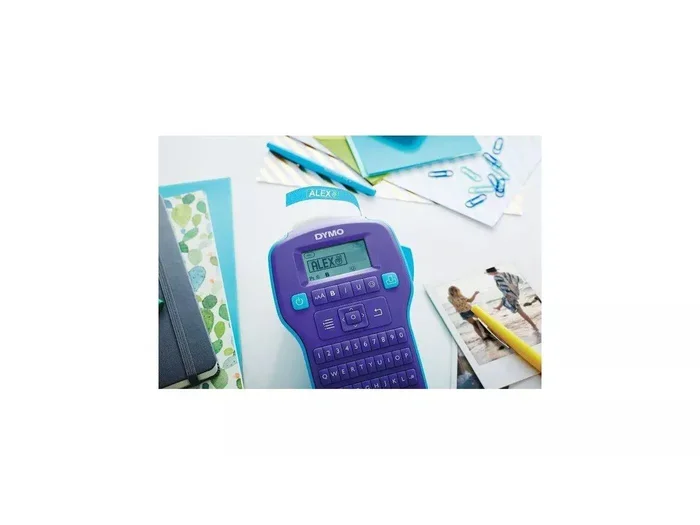
- Dymo LetraTag Plus: A handheld label maker. Great for home and light office use. Also limited to monochrome printing.
- Dymo ColorLabel Printer: This is the key model for color label printing. It is specifically designed to produce full-color labels.
If you want color labels from Dymo, the ColorLabel Printer is your go-to option. But let us look at this model more closely.
Can Dymo Labels Print in Color?
The short answer is yes, but with a big asterisk. Can Dymo labels print in color? Only certain models can. Most Dymo printers on the market today are designed for black-and-white output. They use thermal technology that simply does not support color ink or toner.
However, Dymo recognized the demand for color labels. That is why they introduced the Dymo ColorLabel Printer. This printer uses a different approach to deliver vibrant, full-color labels. It is not a traditional inkjet printer, but it does produce impressive color results.
Dymo Models That Support Color Printing
Here are the Dymo printers that can print in color:
- Dymo ColorLabel Printer: The flagship color model. It uses a specialized printing process to apply color to labels. It supports various label sizes and materials.
- Dymo ColorLabel Printer Wireless: The wireless version of the color printer. Same great color output with the convenience of Wi-Fi connectivity.
These printers are specifically built for users who need color label printing. They are perfect for product labeling, event name tags, and creative organization projects.
Dymo Models That Print in Black and White Only
Most Dymo printers fall into this category. If you own a Dymo LabelWriter or a LetraTag model, it likely prints in black and white only. Here are some examples:
- Dymo LabelWriter 450 and 450 Twin Turbo
- Dymo LabelWriter Wireless
- Dymo LabelWriter Duo
- Dymo LetraTag LT100H and LT200
- Dymo Rhino 4200 and 5000 (industrial handhelds)
These printers are excellent for their intended purposes. They are fast, reliable, and affordable. But they cannot produce color labels. If color is a must for you, you need a different approach or a different printer.
Color Label Printing Technology
Understanding how color label printing works helps you set realistic expectations. Not all color labels are created equal. The technology behind them makes a big difference in the final result.
Thermal Transfer vs. Direct Thermal
Let us break down the two main thermal technologies:
| Feature | Direct Thermal | Thermal Transfer |
|---|---|---|
| Uses a ribbon? | No | Yes |
| Prints in color? | Limited (some models) | Limited (some models) |
| Durability | Moderate | High |
| Cost per label | Low | Medium |
| Common Dymo models | LabelWriter series | Industrial handhelds |
Direct thermal is the most common in consumer Dymo printers. It is simple and cost-effective. But it does not support full-color printing in most models. Thermal transfer offers more durability and can sometimes produce limited color, but it is still not the same as an inkjet printer.
Inkjet and Laser Printers for Color Labels
Did you know you can print color labels using a regular inkjet or laser printer? This is a popular alternative to dedicated Dymo color printers. You simply buy printable label sheets and load them into your existing printer.
Here are the pros and cons of this approach:
- Pros: You likely already own the printer. You get true full-color output. Label sheets are widely available and affordable.
- Cons: The labels may not be as durable as Dymo thermal labels. Adhesive quality can vary. You need to buy pre-cut label sheets.
If you already have an inkjet printer at home, printable label sheets are a great way to get color labels without buying a new printer. Companies like Avery offer a wide range of printable label products that work with most printers.
Best Practices for Printing Color Labels
Whether you use a Dymo ColorLabel Printer or an inkjet printer with label sheets, following best practices ensures the best results. Here are some tips to help you get the most out of your color label printing.
Design Tips for Vibrant Labels
Good design makes a huge difference in how your labels look. Keep these tips in mind:
- Use high-resolution images. Low-quality images look blurry on labels.
- Choose bold, readable fonts. Fancy fonts can be hard to read on small labels.
- Keep the design simple. Cluttered labels are hard to read and look unprofessional.
- Use Dymo’s design software or free alternatives like Canva for creating your label layouts.
- Test print on plain paper first. This saves label tape and helps you catch mistakes.
If you are organizing data or spreadsheets for your labels, make sure your data is clean. Sometimes issues like a line that will not delete in a spreadsheet can mess up your label layout. For help with that, check out this guide on A Line Wont Delete In Microsoft Excel to keep your data tidy before printing.
Choosing the Right Label Material
The material you choose affects both the look and durability of your labels:
- Glossy Tape: Produces vibrant, shiny labels. Great for product labels and name tags.
- Matte Tape: Gives a professional, non-reflective finish. Best for office and filing labels.
- Vinyl Tape: Extremely durable. Ideal for outdoor use and industrial applications.
- Fabric Tape: Great for clothing labels and textile organization.
For the best color label printing results, glossy tape tends to produce the most vivid colors. Matte tape gives a more subtle, professional look. Choose based on your specific needs.
Common Mistakes to Avoid
Even experienced users make mistakes when printing color labels. Here are some common pitfalls to watch out for:
- Using the wrong label tape: Not all Dymo tapes work with color printers. Check compatibility before you buy.
- Ignoring printer settings: Print quality settings affect color output. Always use the highest quality setting for best results.
- Skipping calibration: Many Dymo printers need calibration for accurate printing. Follow the setup instructions carefully.
- Overloading your design: Too much color or too many elements make labels hard to read. Keep it clean and simple.
- Not testing your labels: Always test a few labels before committing to a large print run. This saves time and materials.
Avoiding these mistakes saves you time, money, and frustration. A little planning goes a long way in producing great-looking Dymo color labels.
Expert Insights and Tips
We asked labeling experts for their top tips on getting the best results with Dymo color label printing. Here is what they had to say:
Tip 1: Invest in the right tape. The quality of your label tape matters more than you might think. Premium tapes produce sharper colors and last longer. Do not cheap out on tape if you want professional results.
Tip 2: Keep your printer clean. Dust and debris can affect print quality. Wipe down your printer regularly and follow the manufacturer’s maintenance schedule.
Tip 3: Use Dymo’s official software. Dymo’s design software is optimized for their printers. Third-party software can work, but official software ensures the best compatibility and color accuracy.
Tip 4: Store labels properly. Heat and humidity can damage label tape. Store your supplies in a cool, dry place to maintain their quality.
Tip 5: Consider your use case. If you need labels for industrial environments, prioritize durability over color vibrancy. If you need labels for retail products, focus on visual appeal.
These expert tips come from years of experience in the labeling industry. Following them will help you get the most out of your Dymo label printer, whether it prints in color or black and white.
Comparing Dymo Color vs. Black-and-White Printers
Still deciding between a Dymo color printer and a standard black-and-white model? Here is a quick comparison:
| Feature | Dymo ColorLabel Printer | Dymo LabelWriter 450 |
|---|---|---|
| Color Printing | Yes, full color | No, black and white only |
| Print Technology | Specialized thermal color | Direct thermal |
| Price Range | Higher | Budget-friendly |
| Label Compatibility | Color-compatible tapes | Standard Dymo tapes |
| Best For | Product labels, creative projects | Organization, shipping, office use |
| Software | Dymo Label Software | Dymo Label Software |
| Connectivity | USB and wireless options | USB and wireless options |
Your choice depends on your needs. If you need color labels for products or creative projects, the Dymo ColorLabel Printer is the way to go. If you just need to organize files, addresses, or inventory, a standard Dymo LabelWriter works perfectly fine.
Final Thoughts
So, can Dymo labels print in color? The answer is yes, but only with the right model. The Dymo ColorLabel Printer is your best bet for full-color label printing. Most other Dymo printers produce black-and-white labels only, and that is perfectly fine for many uses.
If color is essential for your project, do your research before buying. Check compatibility, compare models, and consider whether an inkjet printer with printable label sheets might be a better fit for your needs. The world of Dymo label printing has options for everyone.
Start with your specific needs. Think about what you will use the labels for. Then choose the printer and materials that match those needs. With the right setup, you can create beautiful, professional color labels that make your organization or product line stand out.
Happy labeling! Whether you go with a Dymo color printer or stick with a trusty black-and-white model, the most important thing is that your labels get the job done.
Frequently Asked Questions
Can all Dymo printers print in color?
No, only specific Dymo models support color printing. The Dymo ColorLabel Printer is the primary model designed for full-color output. Most other Dymo printers, like the LabelWriter series, print in black and white only using thermal technology.
How much does a Dymo ColorLabel Printer cost?
The Dymo ColorLabel Printer typically costs more than standard Dymo printers. Prices vary depending on the model and where you purchase it. Expect to pay a premium compared to black-and-white Dymo models, but the color capability makes it worth it for users who need vibrant labels.
Can I use regular inkjet labels with a Dymo printer?
No, Dymo printers use specialized thermal label tapes and sheets. They are not compatible with standard inkjet or laser label sheets. Always use Dymo-branded or compatible thermal label materials for the best results.
Are Dymo color labels as durable as black-and-white labels?
Yes, Dymo color labels are designed to be durable. The printing process creates a permanent bond with the label material. However, durability also depends on the tape type you choose. Glossy, matte, and vinyl tapes each offer different levels of resistance to wear and weather.
What software do I need for Dymo color label printing?
Dymo provides its own label design software that works with all Dymo printers, including the ColorLabel Printer. You can also use third-party software like Canva or Adobe Spark to design labels. Just make sure your design file is compatible with your printer’s requirements.
Can I print color labels using my home inkjet printer instead?
Yes, you can use a home inkjet printer with printable label sheets to produce color labels. Brands like Avery offer printable label products that work with most inkjet printers. This is often a more affordable option if you already own a color printer at home.