Can A Usb C Charge A Power Bank And How Fast It Works
Yes, a USB-C can charge a power bank, and it is one of the fastest and most convenient ways to top up your portable charger. USB-C delivers higher wattage than older cables, meaning shorter charging times and more efficient power transfer. In this guide, we walk you through everything you need to know about USB-C power bank charging speeds, compatibility, and best practices.
Let us talk about something that has become a daily necessity for almost everyone. Your power bank is useless when it is dead. And the way you charge it matters more than most people think. Can A Usb C Charge A Power Bank? The short answer is yes. But the full story is much more interesting and useful to know.
USB-C has completely changed how we charge devices. It is reversible, faster, and more powerful than older cable types. If you have been using a USB-A cable to charge your power bank, you might be missing out on significant speed improvements. This guide covers everything from basic compatibility to charging speeds, cable choices, and common mistakes that slow you down.
Whether you carry a portable charger for travel, work, or emergencies, understanding USB-C charging will save you time and keep your devices ready when you need them most. Let us dive in.
Key Takeaways
- USB-C Can Charge Power Banks: USB-C is fully compatible with most modern power banks and offers faster charging than older cable types.
- Charging Speed Varies: USB Power Delivery can deliver up to 100W, making USB-C significantly faster than standard USB-A charging.
- Cable Quality Matters: Using a high-quality USB-C cable ensures optimal charging speed and safety.
- Bidirectional Charging Is Possible: Many power banks support USB-C input and output, allowing you to charge the bank and your devices with the same cable.
- Wattage and Protocol Matter: Matching your charger, cable, and power bank wattage ratings is essential for fast and safe charging.
- Common Issues Are Fixable: Most USB-C charging problems can be solved with simple troubleshooting steps.
📑 Table of Contents
- What Is USB-C and Why Does It Matter for Power Banks?
- Can A Usb C Charge A Power Bank?
- How Fast Can USB-C Charge a Power Bank?
- Factors That Affect USB-C Charging Speed
- Can You Use a Power Bank to Charge Other Devices via USB-C?
- Common Mistakes and Troubleshooting
- Expert Insights on USB-C Power Bank Charging
- Key Takeaways
What Is USB-C and Why Does It Matter for Power Banks?
USB-C is a connector standard that has become the norm for modern electronics. Unlike older USB-A ports, the USB-C connector is small, reversible, and capable of carrying much more power. This makes it ideal for power bank charging and device charging alike.
Understanding the USB-C Connector
The USB-C connector is tiny and oval-shaped. You can plug it in either way, which eliminates the frustration of flipping the cable multiple times. It supports USB Power Delivery, a protocol that allows devices to negotiate the right amount of power automatically.
Here are some key features of USB-C that make it great for power banks:
- Reversible design: No more flipping the cable to find the right orientation.
- Higher power limits: USB-C can handle up to 240W with the latest standards.
- Faster data transfer: USB 3.2 and Thunderbolt 4 cables also carry data, so one cable does more.
- Universal compatibility: Most new phones, laptops, tablets, and power banks use USB-C.
For battery bank users, this means one cable can charge your power bank, your phone, and your laptop. That is a huge convenience, especially when you travel light.
Can A Usb C Charge A Power Bank?
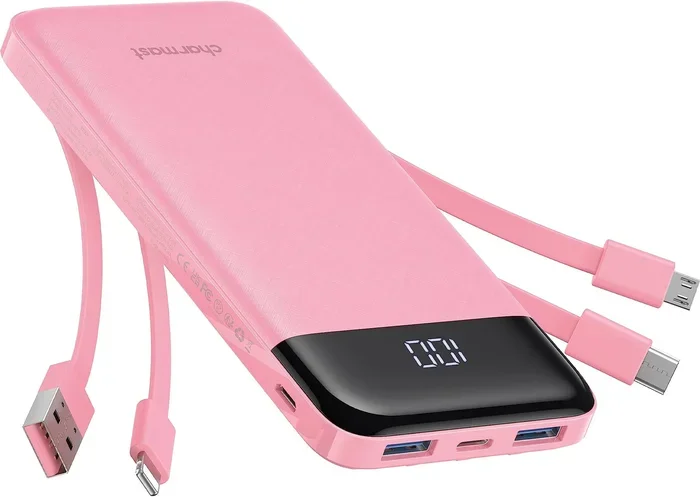
The direct answer is yes. Can A Usb C Charge A Power Bank is a question many people ask, and the answer is a clear yes. Almost all modern power banks come with a USB-C input port designed specifically for charging the bank itself. This input port receives power from a USB-C charger or a computer with a USB-C port.
How USB-C Charging Works with Power Banks
When you plug a USB-C cable into your power bank, the connection establishes a communication link between the charger and the bank. This process is called power negotiation. Both devices agree on the right voltage and current before power flows.
This negotiation happens in milliseconds. You plug in the cable, and the charging begins at the safest and fastest rate your setup can support. Here is what happens step by step:
- You connect the USB-C cable to the power bank and the charger.
- The power bank and charger exchange capability signals.
- They agree on a voltage and current level.
- Power begins flowing at the agreed rate.
- The power bank charges until it reaches full capacity.
This process makes USB-C charging smart and safe. The power bank will not draw more power than it can handle, and the charger will not push more than what the cable can carry.
How Fast Can USB-C Charge a Power Bank?
Speed is where USB-C really shines compared to older cable types. The charging speed depends on several factors, but USB-C is inherently faster than USB-A for power bank input.
USB Power Delivery and Wattage
USB Power Delivery, commonly known as USB PD, is the protocol that determines how much power flows through a USB-C cable. Standard USB-A cables typically deliver 7.5W to 15W. USB-C with USB PD can deliver 60W, 100W, or even up to 240W with the latest USB PD 3.1 standard.
For a typical power bank, this means:
- A 10,000mAh power bank might charge in 2 to 3 hours with a standard USB-C charger.
- The same bank could take 4 to 5 hours with an older USB-A charger.
- Higher-capacity banks (20,000mAh+) benefit even more from fast USB-C input.
The difference in charging time is significant. If you are constantly on the go, faster input charging means your power bank is ready to go sooner. This is why so many people now look for power banks with USB-C fast charging support.
Quick Tips for Maximizing USB-C Charging Speed
Want to get the most out of your USB-C charging setup? Follow these simple tips:
- Use a USB-C cable rated for the wattage you need.
- Choose a charger that supports USB Power Delivery.
- Check your power bank manual for its maximum input wattage.
- Avoid charging through a computer USB port if speed matters, as they usually output less power.
- Keep your power bank cool while charging, as heat slows down the process.
Factors That Affect USB-C Charging Speed
Not all USB-C setups are created equal. Several factors determine how fast your power bank charges through a USB-C connection. Understanding these factors helps you make better choices.
Cable Quality and Wattage Ratings
The USB-C cable you use plays a huge role in charging speed. A cheap or damaged cable can limit the power flow significantly, even if your charger and power bank support fast charging. Always look for cables that are rated for the wattage you need.
Here is a quick comparison of cable types:
- Basic USB-C cables: Support up to 60W. Fine for most phones and smaller power banks.
- USB-C cables with e-marker chips: Support up to 100W or more. Ideal for larger power banks and laptops.
- USB 3.2 or Thunderbolt cables: Support data and power, but may cost more.
Charger Compatibility
Your charger must support the same charging protocol as your power bank. If your power bank supports USB PD 3.0 and you use a charger that only supports 5V/2A, you will not get the fastest speeds. Always match your charger capabilities with your power bank input rating.
Power Bank Capacity and Input Rating
Every power bank has a maximum input rating listed on its label or in the manual. This is the fastest rate at which the bank can accept a charge. If your charger and cable can deliver more power than the bank supports, the bank will simply charge at its maximum rate. There is no harm in using a more powerful charger, but you will not get extra speed.
Can You Use a Power Bank to Charge Other Devices via USB-C?
Yes, absolutely. This is one of the best features of modern power banks. Many portable chargers now include USB-C output ports that can charge your phone, tablet, or even a laptop.
Bidirectional Charging Explained
Bidirectional charging means the USB-C port on a power bank can work as both an input and an output. You use the same port to charge the power bank from a wall adapter and to charge your devices from the power bank.
This is incredibly convenient. You only need one cable and one port for two different functions. Here is why it matters:
- Fewer cables to carry: One USB-C cable handles both input and output.
- Faster output: USB-C output can deliver up to 100W, enough for most laptops.
- Smart power management: The power bank detects what is connected and adjusts output accordingly.
When shopping for a power bank, look for models that list both USB-C input and USB-C output. This gives you the most flexibility and the fastest speeds in both directions.
What Devices Can a USB-C Power Bank Charge?
A USB-C power bank can charge a wide range of devices. Here are some common examples:
- Smartphones (including iPhones with USB-C models)
- Tablets and iPads
- Wireless earbuds and smartwatches
- Laptops (with sufficient wattage support)
- Gaming controllers
- Portable speakers
The key is matching the power bank output to your device’s charging requirements. Most phones need around 18W to 27W, while laptops may need 45W to 100W.
Common Mistakes and Troubleshooting
Even with the right equipment, USB-C charging issues can happen. Knowing what to look for saves time and frustration.
Why Your USB-C Connection Might Fail
Sometimes the cable looks fine but the connection does not work. Here are the most common reasons:
- Dirty or damaged connector: Dust or lint inside the USB-C port can block the connection. A gentle clean with a toothpick often fixes this.
- Incompatible cable: Not all USB-C cables are equal. Some only support data, not high-wattage charging.
- Wrong charger: A charger without USB Power Delivery support will limit your charging speed.
- Firmware or compatibility issues: Some older devices need firmware updates to work properly with USB-C PD.
Just like dealing with cable and connector issues in other tech setups, sometimes the simplest fix is to try a different cable or port. If you have ever dealt with persistent cable issues, you know how frustrating they can be. A reliable USB-C cable is worth the investment.
Quick Troubleshooting Checklist
- Try a different USB-C cable.
- Try a different USB-C charger.
- Clean the power bank USB-C port gently.
- Check if the power bank has a firmware update available.
- Make sure the cable is fully inserted into both devices.
Expert Insights on USB-C Power Bank Charging
Industry experts agree that USB-C is the future of portable charging. The reversible connector design alone has eliminated one of the biggest annoyances in tech. And the power delivery capabilities mean that a single cable can now handle everything from a small earbud case to a high-performance laptop.
When choosing a power bank, experts recommend focusing on three things: input speed, output speed, and capacity. A power bank with a 30W USB-C input will charge twice as fast as one with a 15W input. Similarly, a 65W USB-C output can charge most laptops in under two hours.
One thing that often gets overlooked is heat management. Fast USB-C charging generates more heat than slow charging. Quality power banks include thermal protection that slows charging if the temperature gets too high. This is a safety feature, not a defect.
Key Takeaways
- USB-C Is the Best Way to Charge a Power Bank: It is faster, more convenient, and more versatile than older cable types.
- Charging Speed Depends on Your Setup: The charger, cable, and power bank input rating all play a role in how fast your bank charges.
- Bidirectional USB-C Ports Offer Maximum Flexibility: One port handles both input and output, reducing cable clutter.
- Match Your Equipment: Use USB PD-compatible chargers and cables rated for your desired wattage.
- Troubleshooting Is Usually Simple: Most USB-C charging issues are solved by trying a different cable, cleaning the port, or checking the charger.
- Heat Is Normal but Should Be Monitored: Some warmth during fast charging is expected, but excessive heat means you should stop and check.
Frequently Asked Questions
Can A Usb C Charge A Power Bank From A Wall Adapter?
Yes, you can charge a power bank from a USB-C wall adapter. This is actually the fastest and most common way to charge a power bank via USB-C. Just make sure the wall adapter supports USB Power Delivery and matches the power bank’s input rating for the best results.
Is USB-C Faster Than USB-A for Charging Power Banks?
Absolutely. USB-C supports much higher wattage than USB-A, which means faster charging times. A USB-C connection can deliver 60W or more, while a standard USB-A port usually maxes out at 15W. The speed difference is very noticeable, especially with larger power banks.
Do All Power Banks Support USB-C Input?
No, not all power banks have USB-C input. Older models and budget options may only offer USB-A input. When buying a new power bank, always check the specs for a USB-C input port if fast charging matters to you.
Can I Use Any USB-C Cable to Charge My Power Bank?
Not all USB-C cables are the same. Some cables are designed only for data transfer and cannot handle high-wattage charging. Look for cables rated for the wattage your power bank supports, ideally ones with an e-marker chip for reliable high-power delivery.
How Long Does It Take to Charge a Power Bank via USB-C?
Charging time depends on the power bank capacity and the charger wattage. A 10,000mAh power bank with a 30W USB-C input typically charges in about 2 to 3 hours. Larger banks like 20,000mAh may take 4 to 6 hours depending on the input wattage.
Can a Power Bank Charge a Laptop Through USB-C?
Yes, many modern power banks can charge laptops through their USB-C output port. You need a power bank that supports at least 45W to 65W USB-C output and uses USB Power Delivery. Check the power bank specs before assuming it can charge a laptop.
=== CONCLUSION ===
Can A Usb C Charge A Power Bank is a question with a straightforward and positive answer. USB-C is the best, fastest, and most versatile way to charge your portable power bank. It offers higher wattage, smarter power negotiation, and the convenience of a reversible connector that works every time.
By choosing the right USB-C cable, matching your charger to your power bank, and understanding the factors that affect charging speed, you can get the most out of every charge cycle. Bidirectional USB-C ports add even more value, letting you use one cable for both input and output.
Take a moment to check your current setup. Are you using the fastest USB-C cable you can? Is your charger compatible with USB Power Delivery? Small upgrades can make a big difference in how quickly your power bank is ready to go. Invest in quality USB-C equipment, and your portable charging routine will be smoother and faster than ever before.