Does Wi Fi Direct Give You Internet Access Right Now
Wi Fi Direct does not give you internet access on its own. It is a wireless technology that lets devices connect directly to each other without a router or internet connection. You can use it for file transfers, screen mirroring, and printing, but it will not replace your home broadband. Think of Wi Fi Direct as a bridge between devices, not a gateway to the web.
Key Takeaways
- Wi Fi Direct does not provide internet access: It only creates a direct connection between two devices offline.
- You need a separate internet source: To get online, you still need a modem, router, or mobile hotspot.
- It works great for file sharing: Transfer photos, documents, and media between devices at high speeds.
- Many devices support it: Printers, phones, TVs, and cameras often have built-in Wi Fi Direct.
- It is not the same as a hotspot: A hotspot shares internet; Wi Fi Direct shares a connection between devices only.
- Range is limited: Wi Fi Direct works best within about 200 feet of each other.
- It is a useful offline tool: Great for situations where internet is unavailable but device-to-device sharing is needed.
📑 Table of Contents
- What Is Wi Fi Direct and How Does It Work?
- Does Wi Fi Direct Give You Internet Access?
- What Can You Do With Wi Fi Direct?
- How Wi Fi Direct Compares to Other Wireless Technologies
- Common Misconceptions About Wi Fi Direct
- When Should You Use Wi Fi Direct?
- How to Set Up Wi Fi Direct on Your Devices
- Quick Tips for Getting the Best Out of Wi Fi Direct
- Can You Get Internet Through Wi Fi Direct? The Final Word
- Frequently Asked Questions
What Is Wi Fi Direct and How Does It Work?
Wi Fi Direct is a wireless technology that lets two devices talk to each other without needing a router. Think of it as a direct phone line between your gadgets. Instead of sending data through a central hub like your home router, the devices connect peer to peer.
This technology has been around for a while now. You probably use it more than you think. Many printers, phones, cameras, and smart TVs support it. It is built into the Wi Fi chip of most modern devices.
When you use Wi Fi Direct, one device acts as the host. The other device connects to it, just like joining a regular network. But here is the key difference: there is no internet involved. The connection stays between the two devices only.
The process is pretty simple. You go into your device settings, find the Wi Fi Direct option, and select the other device. Once paired, they can share files, stream content, or even mirror screens. All of this happens without touching a router.
One of the best things about Wi Fi Direct is speed. It uses the same Wi Fi frequencies as your home network. That means you get fast data transfer rates. We are talking about speeds that can rival some wired connections.
But speed is not the same as internet access. Many people confuse the two. Let us clear that up right now.
How Wi Fi Direct Compares to Regular Wi Fi
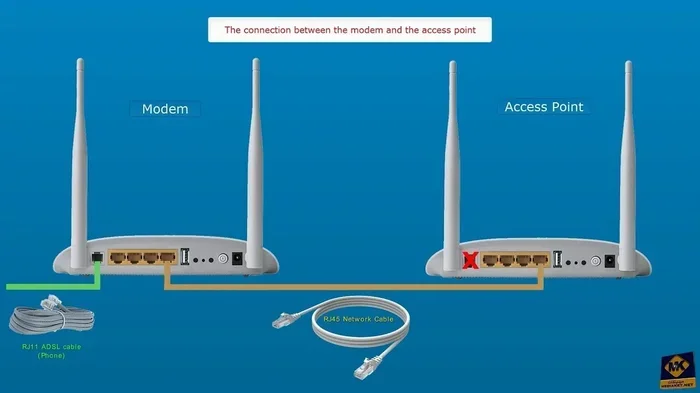
Regular Wi Fi connects your devices to the internet through a router. The router talks to your modem. Your modem talks to your internet service provider. That is how you get online.
Wi Fi Direct skips all of that. It creates a direct link between two devices. No router. No modem. No internet service provider. Just the two devices talking to each other.
Here is a quick way to think about it. Regular Wi Fi is like calling someone through a phone company. Wi Fi Direct is like using a walkie talkie. Both let you communicate. But only one of them connects you to the outside world.
So when you pair two devices using Wi Fi Direct, they form their own little network. This network exists only between them. It does not reach the internet unless one of the devices is already connected.
Does Wi Fi Direct Give You Internet Access?
The short answer is no. Wi Fi Direct does not give you internet access. It only creates a connection between two devices. That connection is offline. It does not pull data from the web.
Here is why this matters. If you try to browse the web through a Wi Fi Direct connection, it will not work. You will not load any websites. You will not stream any videos from the internet. The connection simply does not go beyond the two paired devices.
Some people get confused because their phone shows a Wi Fi icon when using Wi Fi Direct. That icon just means the device is connected to another device. It does not mean the device is connected to the internet.
Let us say you want to print a photo from your phone. You use Wi Fi Direct to connect to your printer. The photo goes from your phone to the printer. That is it. No internet is needed. The printer receives the file and prints it out.
But if you wanted to print a photo from a website, you would need internet access first. You would download the photo using your regular Wi Fi or mobile data. Then you could send it to the printer using Wi Fi Direct.
Why Wi Fi Direct Is Not a Replacement for Internet
Wi Fi Direct is a local connection tool. It is designed for device-to-device communication. It is not built to provide internet access to any device.
Think about it this way. If you and a friend are in a room with no windows, you can talk to each other just fine. But you cannot get news from outside. You cannot check the weather. You cannot order food. You are cut off from the outside world.
That is exactly what Wi Fi Direct does. It creates a closed loop between two devices. Data stays within that loop. It does not escape to the internet.
Some devices let you share their internet connection through Wi Fi Direct, but that is not the same thing. The internet comes from one device. Wi Fi Direct just passes it along. The connection itself still does not provide internet access.
What Can You Do With Wi Fi Direct?
Even though Wi Fi Direct does not give you internet, it is still incredibly useful. There are plenty of things you can do with it. Let us break them down.
File Transfer Between Devices
One of the most popular uses for Wi Fi Direct is file transfer. You can send photos, videos, documents, and music between devices. The transfer happens at Wi Fi speeds, so it is very fast.
For example, you can send a batch of vacation photos from your phone to your laptop. No cables needed. No cloud uploads. Just a direct Wi Fi Direct connection and you are done in seconds.
This is especially handy when you do not have internet access. Maybe you are in a cabin in the woods. Maybe you are on a plane. Wi Fi Direct lets you move files between your devices no matter where you are.
Wireless Printing
Many printers support Wi Fi Direct. This means you can print from your phone or laptop without connecting to the same network. You just pair with the printer directly and send your document.
This is great for people who have a printer but no home network. You can still print wirelessly. Just make sure your printer has Wi Fi Direct built in.
Screen Mirroring and Display
Some devices use Wi Fi Direct for screen mirroring. You can mirror your phone screen to a TV or monitor. This works without a Wi Fi network. The connection is direct between the two devices.
Many smart TVs and streaming devices support this. It is a quick way to show your phone content on a bigger screen. Just keep in mind that you will not be able to stream online content unless one device has internet access.
Connecting Peripherals
Wi Fi Direct also works with wireless peripherals. Some mice, keyboards, and controllers use it. These devices connect directly to your computer or console without needing a router.
This gives you a wireless experience without the lag that sometimes comes with Bluetooth. The speeds are faster and the connection is more stable for certain tasks.
Sharing Internet From One Device to Another
Here is where things get a little tricky. Some devices can share their existing internet connection through Wi Fi Direct. But this is not Wi Fi Direct providing internet. It is the device sharing what it already has.
For example, if your laptop has a Wi Fi connection to your router, it might be able to share that connection with another device through Wi Fi Direct. The second device gets online through the first device. But the original internet source is still the router.
If you want a more reliable way to share internet, you might want to look into getting a hotspot instead of Wi Fi. Hotspots are designed specifically for sharing internet connections with multiple devices.
How Wi Fi Direct Compares to Other Wireless Technologies
Wi Fi Direct is not the only way to connect devices wirelessly. Let us compare it to some other options so you can see where it shines and where it falls short.
Wi Fi Direct vs Bluetooth
Bluetooth is the most common alternative to Wi Fi Direct. Both let devices connect without a router. But there are big differences.
Bluetooth has a shorter range. It also has slower data transfer speeds. But it uses much less power. So for small devices like headphones and fitness trackers, Bluetooth is often the better choice.
Wi Fi Direct is faster and has a longer range. It is better for transferring large files or streaming media. But it uses more battery power on your devices.
For quick, low-power connections, Bluetooth wins. For fast, larger data transfers, Wi Fi Direct is the way to go.
Wi Fi Direct vs Mobile Hotspot
A mobile hotspot gives you actual internet access. It uses your phone’s cellular data connection and shares it with other devices. This is very different from Wi Fi Direct.
With a hotspot, your connected devices can browse the web, stream videos, and use apps. They get real internet access through your phone’s data plan.
With Wi Fi Direct, your connected device only talks to the other device. No internet. No web browsing. No streaming from the cloud.
If you need internet on the go, a hotspot is what you want. If you just need to share files between two devices, Wi Fi Direct works great.
Wi Fi Direct vs Regular Wi Fi
Regular Wi Fi connects you to the internet through a router. Wi Fi Direct connects two devices directly. They serve very different purposes.
Regular Wi Fi is for getting online. Wi Fi Direct is for device-to-device communication. You can use both at the same time if your device supports it.
Some devices even let you use Wi Fi Direct while connected to a regular Wi Fi network. This lets you stay online while also transferring files to another device directly.
Common Misconceptions About Wi Fi Direct
There are a lot of myths floating around about Wi Fi Direct. Let us clear up some of the most common ones.
Misconception 1: Wi Fi Direct Means You Are Online
Just because your phone shows a Wi Fi icon does not mean you are online. When you connect via Wi Fi Direct, that icon just shows a local connection. It does not mean you have internet access.
Many people assume they can browse the web when connected this way. They cannot. Always check if your device shows a signal icon with internet access before trying to go online.
Misconception 2: Wi Fi Direct Is the Same as Wi Fi Sharing
Some people think Wi Fi Direct lets you share your Wi Fi password or connection. That is not what it does. Wi Fi Direct creates a separate connection between two devices.
If you want to share your Wi Fi password, you might want to look into creating a QR code for your Wi Fi. That is a much easier way to let guests connect to your network.
Misconception 3: Wi Fi Direct Requires an Internet Plan
You do not need an internet plan to use Wi Fi Direct. It works completely offline. You just need two devices that support the technology.
This makes it great for situations where internet is not available. You can still share files, print documents, and mirror screens without any connection to the outside world.
Misconception 4: Wi Fi Direct Is Slow
This is simply not true. Wi Fi Direct uses the same frequencies and protocols as regular Wi Fi. It can be just as fast, if not faster, than Bluetooth. Transfer speeds depend on your devices and their Wi Fi standards.
When Should You Use Wi Fi Direct?
Wi Fi Direct is perfect for certain situations. Here are some times when it really comes in handy.
- You need to transfer files quickly: Between two devices with no internet needed.
- You want to print wirelessly: And your printer supports Wi Fi Direct.
- You are offline but need to share content: Like photos or presentations at a meeting.
- You want to mirror your screen: To a TV or monitor without a network.
- You are traveling: And want to connect peripherals without relying on hotel Wi Fi.
On the other hand, you should not use Wi Fi Direct when you need internet access. If you want to browse the web, stream content, or use online apps, you need a real internet connection.
For getting online at home, you might want to check out getting just Wi Fi at home options. These can help you set up a reliable internet connection without unnecessary extras.
Also, if your PC does not have built-in Wi Fi, you can add Wi Fi to your PC with a USB adapter or a new Wi Fi card. This gives you the flexibility to connect to both regular networks and use Wi Fi Direct when needed.
How to Set Up Wi Fi Direct on Your Devices
Setting up Wi Fi Direct is usually pretty straightforward. The exact steps vary by device, but the general process is similar across most gadgets.
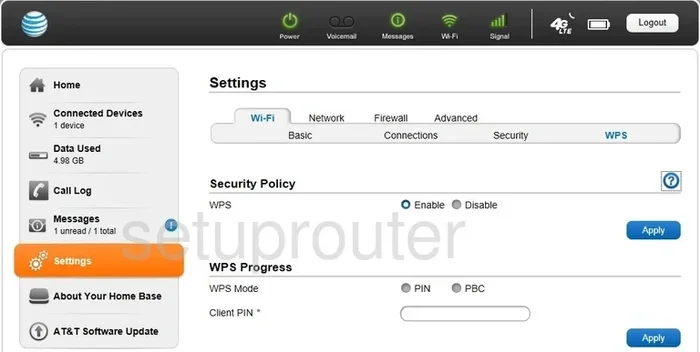
On most Android phones, you go to Settings, then Connections, then Wi Fi Direct. On Windows PCs, you click the Wi Fi icon in your taskbar and look for the Wi Fi Direct option. On printers, you usually find it in the wireless settings menu.
Once you find the option, your device starts searching for nearby devices that support Wi Fi Direct. You select the device you want to connect to. You may need to confirm the connection on both devices.
After pairing, the devices stay connected until you turn off Wi Fi Direct or move too far apart. The range is typically around 200 feet, but walls and obstacles can reduce that distance.
For more tips on connecting devices wirelessly, you can read about connecting your PC to Wi Fi without Ethernet. Many of the same principles apply when setting up wireless connections.
Quick Tips for Getting the Best Out of Wi Fi Direct
- Keep your devices close: Stay within 200 feet for the best connection.
- Turn off other Wi Fi connections: This helps your device focus on the Wi Fi Direct link.
- Update your device software: Newer firmware often improves Wi Fi Direct performance.
- Check compatibility: Not all devices support Wi Fi Direct. Check your device specs first.
- Use it for large files: Wi Fi Direct shines when transferring big files quickly.
- Do not expect internet: Remember that Wi Fi Direct is offline by design.
These simple tips can make a big difference in your experience. Most connection issues come from being too far apart or having outdated software.
Can You Get Internet Through Wi Fi Direct? The Final Word
Let us be absolutely clear. Wi Fi Direct does not give you internet access. It is a device-to-device connection technology. It is fast, convenient, and very useful for offline tasks.
But if you need to get online, you need something else. You need a modem, a router, a mobile hotspot, or some other internet source. Wi Fi Direct simply does not have the ability to pull data from the internet.
Think of Wi Fi Direct as a tool in your toolbox. It is great for certain jobs. But it is not a replacement for a proper internet connection. Use it for what it is designed for, and you will be very happy with the results.
If you are exploring wireless options and want to understand more about how different technologies work, check out our guide on getting Wi Fi without a password. It covers related topics that can help you make the most of your wireless setup.
Understanding the difference between Wi Fi Direct and internet access is important. It saves you from frustration. It helps you troubleshoot connection issues. And it makes you a smarter user of wireless technology.
So the next time someone asks you if Wi Fi Direct gives you internet, you can answer with confidence. The answer is no. But Wi Fi Direct still has plenty of value in the right situations. Use it wisely and it will serve you well.
Frequently Asked Questions
Can I browse the internet using Wi Fi Direct?
No, you cannot browse the internet using Wi Fi Direct. The connection is only between two devices and does not reach the internet. You need a router or hotspot for web browsing.
Is Wi Fi Direct the same as a mobile hotspot?
No, they are not the same. A mobile hotspot shares your cellular data connection with other devices. Wi Fi Direct only connects two devices directly without any internet involved.
Can I use Wi Fi Direct to connect to my printer without internet?
Yes, you can. Many printers support Wi Fi Direct and work completely offline. You pair your device with the printer and send print jobs without needing any internet connection.
How fast is Wi Fi Direct compared to regular Wi Fi?
Wi Fi Direct can be just as fast as regular Wi Fi. It uses the same wireless frequencies and standards. Actual speeds depend on your devices and their hardware capabilities.
Does Wi Fi Direct use a password?
Some devices require a PIN or passcode when pairing via Wi Fi Direct. Others allow you to connect without a password. Check your specific device settings for details.
Can I use Wi Fi Direct and regular Wi Fi at the same time?
Yes, many devices support both at the same time. You can stay connected to your regular Wi Fi network for internet access while using Wi Fi Direct to connect to another device.