Does Cox Charge For Panoramic Modem And Equipment Fees
Yes, Cox charges a monthly fee for the Panoramic modem, typically ranging from $12 to $15 per month as part of the equipment rental charge. This fee appears on your Cox bill and covers the use of the Panoramic WiFi gateway device. However, there are ways to reduce or eliminate this cost, including purchasing your own compatible modem or negotiating with Cox customer service. Understanding the full breakdown of Cox equipment fees helps you make smarter decisions about your internet setup.
Does Cox charge for the Panoramic modem? If you have ever looked closely at your Cox internet bill and spotted a mysterious equipment fee, you are not alone. Many Cox subscribers wonder exactly what they are paying for when it comes to the Panoramic WiFi gateway. The short answer is yes, Cox does charge a fee for the Panoramic modem, but the full story is more nuanced than a simple yes or no.
In this guide, we break down everything you need to know about Cox Panoramic modem charges. We will look at the monthly equipment fees, how they appear on your bill, and what options you have to reduce or eliminate them. Whether you are a new Cox customer or have been with them for years, understanding these fees puts you in a better position to save money.
The Cox Panoramic modem is a popular gateway device that combines a modem and a WiFi router into one unit. It delivers fast internet speeds and covers your home with wireless connectivity. But convenience comes at a cost, and that cost is baked into your monthly Cox bill. Let us dive deeper into what you are actually paying for.
Key Takeaways
- Cox charges a monthly equipment fee: The Panoramic modem rental costs around $12 to $15 per month on most Cox internet plans.
- You can buy your own modem: Purchasing a compatible device outright can save you hundreds of dollars over time.
- Fees vary by plan and location: Not all Cox customers pay the same equipment rate, so checking your specific bill matters.
- Promotional offers exist: Cox sometimes waives equipment fees during promotional periods or for new customers.
- Return policies protect you: You can return the Panoramic modem if you switch to your own device and avoid further charges.
- Bundling affects pricing: Your total Cox equipment fee may change depending on whether you bundle internet with TV or phone services.
📑 Table of Contents
- What Is The Cox Panoramic Modem?
- Does Cox Charge A Monthly Fee For The Panoramic Modem?
- How Much Does Cox Charge For Equipment?
- Can You Avoid Or Waive The Panoramic Modem Fee?
- Panoramic Modem Rental Vs Purchase: Which Is Better?
- Tips To Lower Your Cox Internet Bill
- Common Mistakes People Make With Cox Equipment Fees
- Expert Insights On Internet Equipment Fees
- Final Thoughts On Cox Panoramic Modem Charges
What Is The Cox Panoramic Modem?
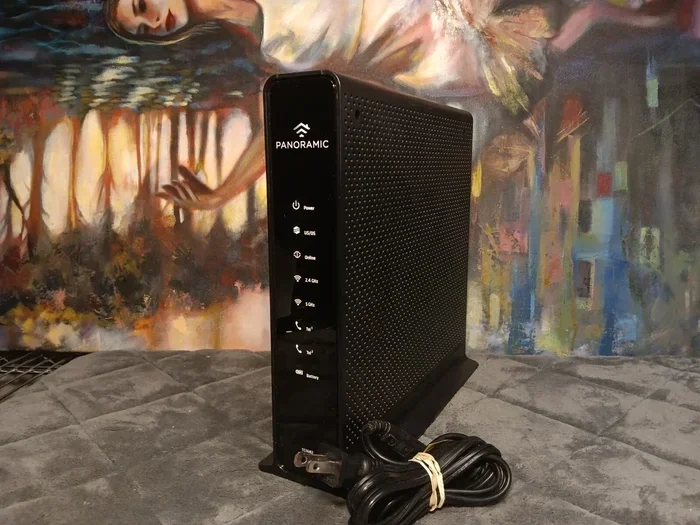
The Cox Panoramic modem, also known as the Panoramic WiFi gateway, is a device provided by Cox Communications to its internet subscribers. It acts as both a modem and a wireless router, which means it connects your home to the Cox network and broadcasts WiFi throughout your house.
This device is part of Cox’s Panoramic WiFi system. It uses mesh networking technology to extend coverage across larger homes. The Panoramic WiFi 6 gateway, for example, supports the latest WiFi standards and offers faster speeds than older models.
Most Cox internet plans include the Panoramic modem as part of the service. You do not need to buy one separately when you sign up. However, the device is not free. Cox leases it to you on a monthly basis, and that lease shows up as an equipment fee on your bill.
The Panoramic modem typically comes with two or three WiFi bands. This means it can handle multiple devices at once without slowing down. If you have a smart home setup with many connected devices, this gateway is designed to handle the load. But again, the convenience of having it provided comes with a recurring monthly cost.
Does Cox Charge A Monthly Fee For The Panoramic Modem?
Yes, Cox charges a monthly fee for the Panoramic modem. This fee is listed on your Cox bill under various names, such as “Equipment Rental Fee,” “Gateway Fee,” or “Modem Fee.” The exact amount depends on your specific plan and location.
On most Cox internet plans, the Panoramic modem rental fee ranges from $12 to $15 per month. Over a year, that adds up to $144 to $180. Over three years, you could pay $432 or more just to rent the device. These numbers make a strong case for understanding what you are paying for.
The fee is separate from your base internet plan cost. So if you pay $50 per month for your Cox internet plan, the equipment rental fee is added on top. Your total monthly bill might come to $62 or $65, depending on the exact charge.
Some Cox bills also include a one-time installation fee when you first set up service. This fee covers the initial setup of your Panoramic modem and WiFi network. It is typically charged during the first billing cycle and can range from $10 to $50, depending on your promotional offers.
How The Fee Appears On Your Cox Bill
When you receive your Cox bill each month, look for line items related to equipment. The Panoramic modem fee may appear as a single charge or split into multiple smaller charges. Common labels include:
- Equipment Rental Charge — the main monthly fee for the gateway device
- WiFi Service Fee — sometimes listed separately for the wireless functionality
- Panoramic WiFi Fee — specific to the Panoramic modem model
Not all Cox bills look the same. The exact wording and line items can vary based on your region and the specific services you have subscribed to. If you are unsure about a particular charge, calling Cox customer service can clarify things quickly.
How Much Does Cox Charge For Equipment?
The total equipment cost from Cox depends on several factors. Your internet plan, your location, and any ongoing promotions all play a role in determining the final amount. Let us look at the typical costs involved.
For most standard Cox internet plans, the equipment rental fee sits around $12 to $15 per month. However, if you have a higher-tier plan or a bundled package, the fee may differ slightly. Some customers report seeing charges closer to $10 per month during promotional periods.
Here is a general breakdown of what you might expect:
- Basic internet plans: Equipment fee around $12 to $13 per month
- Mid-tier internet plans: Equipment fee around $13 to $15 per month
- Bundle packages (internet + TV): Equipment fee may be included or reduced
- New customer promotions: Equipment fee sometimes waived for the first few months
Keep in mind that these are approximate figures. Cox updates its pricing periodically, and regional differences can affect the final number. Always check your most recent bill for the exact amount you are being charged.
Also worth noting: if you add a second Panoramic modem to your setup, you may be charged an additional equipment fee for the second device. This is common in larger homes where one gateway does not provide full coverage.
Comparing Cox Equipment Fees With Other Providers
To put things in perspective, let us compare Cox equipment fees with some other major internet providers. This comparison helps you understand whether Cox is charging more or less than the industry average.
Most internet providers charge a monthly equipment rental fee. The range typically falls between $10 and $15 per month. Cox sits squarely in the middle of this range. Some providers charge less, while others charge more for similar gateway devices.
If you are looking to reduce your internet costs, comparing provider equipment fees is a smart first step. Sometimes switching to a provider with lower equipment fees can save you significant money over time.
Can You Avoid Or Waive The Panoramic Modem Fee?
Good news: there are several ways to avoid or reduce the Cox Panoramic modem fee. You do not have to simply accept it as a permanent part of your bill. Let us explore your options.
Option 1: Purchase Your Own Compatible Modem
One of the most effective ways to eliminate the monthly equipment fee is to buy your own modem. Cox allows you to use a third-party modem as long as it is compatible with their network. You will need to check the Cox approved modem list before making a purchase.
Buying your own modem requires an upfront investment. A compatible modem typically costs between $80 and $200, depending on the model and features. But once you have paid for it, the monthly rental fee disappears. Over time, this can save you a substantial amount of money.
For example, if you buy a $120 modem and were previously paying $13 per month in rental fees, you break even after about 9 months. After that point, every month you save $13. Over two years, that is $312 in savings.
Option 2: Negotiate With Cox Customer Service
Another approach is to call Cox customer service and ask for a fee waiver. Many customers have successfully had their equipment fees reduced or removed by simply asking. Customer service representatives sometimes have the authority to apply credits or promotional adjustments.
When you call, be polite and explain that you are considering switching to a different provider because of the equipment costs. This gives the representative a reason to offer you a retention discount or a fee waiver. It never hurts to ask.
Pro tip: call at the end of the month when representatives may be more willing to offer deals to meet their monthly goals. Timing your call strategically can improve your chances of success.
Option 3: Wait For Promotional Offers
Cox frequently runs promotions that include equipment fee waivers or discounts. These promotions are often targeted at new customers but sometimes extend to existing customers as well. Keep an eye on Cox’s website and your email inbox for special offers.
Some promotions waive the equipment fee for the first 6 to 12 months. Others offer a discounted rate on the rental fee. These deals can provide significant short-term savings while you decide on a long-term strategy.
Option 4: Return The Panoramic Modem
If you decide to switch to your own modem or cancel Cox internet service, you can return the Panoramic modem. Cox has a return process in place, and returning the device stops future rental charges. Make sure to follow the return instructions carefully to avoid any additional fees or charges.
You will typically need to package the modem securely and ship it back to Cox or drop it off at a Cox store. Keep your tracking number and confirmation for your records. If you do not return the device, Cox may continue charging the rental fee or even charge a replacement cost.
Panoramic Modem Rental Vs Purchase: Which Is Better?
Deciding whether to rent or buy your modem depends on your personal situation. Both options have pros and cons. Let us weigh them side by side.
Renting the Panoramic modem is convenient. Cox handles all maintenance and replacements. If the device breaks or needs a firmware update, Cox takes care of it. You also get access to the latest gateway models as Cox upgrades their equipment.
Buying your own modem saves money in the long run. You own the device outright and do not worry about monthly rental fees. However, you become responsible for troubleshooting any issues. If your modem fails, you must replace it at your own cost.
Here is a quick comparison to help you decide:
- Convenience: Renting wins. Cox manages everything for you.
- Cost savings: Buying wins. No recurring rental fees.
- Maintenance: Renting wins. Cox replaces broken devices.
- Flexibility: Buying wins. You can use the modem with any compatible ISP.
- Up-to-date technology: Renting wins. Cox provides the latest models.
If you plan to stay with Cox for many years and want the simplest setup, renting makes sense. If you are a savvy saver who wants to cut monthly costs, buying your own modem is the better choice.
Some customers also wonder whether buying a WiFi stick for their PC can replace the need for a gateway entirely. While a WiFi stick can help connect a single device, it does not replace the function of a full modem and router combo like the Panoramic gateway.
Tips To Lower Your Cox Internet Bill
Beyond the Panoramic modem fee, there are several other ways to reduce your overall Cox internet bill. These tips can help you save money every month.
Review Your Plan Regularly
Cox offers different internet plans at various speed tiers. Over time, your needs may change, and you might be paying for more speed than you actually use. Reviewing your plan annually ensures you are on the right tier for your usage.
Bundle Services Strategically
Bundling internet with TV or phone services can sometimes lower your total bill. Cox offers bundle discounts that make each individual service cheaper. However, make sure you actually use the bundled services. Paying for something you do not use defeats the purpose of saving money.
Use WiFi Extenders Or Mesh Systems
If you are considering adding a second Panoramic modem to extend coverage, you might want to explore a WiFi mesh system instead. Mesh systems from brands like TP-Link or Netgear can provide whole-home coverage at a lower long-term cost. You can even create a QR code for your WiFi to make it easy for guests to connect without asking for the password.
Check For Outages Before Calling Support
Sometimes slow internet or connectivity issues are mistaken for equipment problems. Before calling Cox support and potentially incurring fees, check for known outages in your area. Cox has an outage map on their website that shows real-time service status.
Consider Alternative Connectivity Options
Depending on where you live, other types of internet connectivity might be available. For example, if you have trouble with indoor WiFi coverage, you might explore whether a TV antenna setup could complement your internet experience for local channels without extra costs.
Also, wireless accessories for your home setup can enhance your experience. If you enjoy watching TV online, wireless headphones for watching TV can add convenience without requiring additional internet equipment from Cox.
Common Mistakes People Make With Cox Equipment Fees
Avoiding common pitfalls can help you keep your Cox internet costs under control. Here are some mistakes to watch out for.
- Ignoring the bill: Many people pay their Cox bill without reviewing each line item. This means you might be paying fees you do not need.
- Not returning old equipment: If you switch to your own modem and forget to return the Panoramic gateway, Cox will keep charging the rental fee.
- Assuming all fees are fixed: Equipment fees can change with promotions, plan changes, or Cox policy updates. Always verify current rates.
- Overlooking bundle savings: Some customers do not realize that bundling services can reduce or offset equipment costs.
- Skipping the fine print: Promotional offers often have terms and conditions. Make sure you understand when a fee waiver expires.
Being aware of these mistakes puts you ahead of most Cox customers. A little attention to your bill each month can uncover savings you did not know existed.
Expert Insights On Internet Equipment Fees
Industry experts generally agree that renting a modem from your ISP is not the most cost-effective option over the long term. Most networking professionals recommend purchasing your own compatible equipment if you plan to stay with the same provider for more than a year.
“The monthly equipment rental fee is one of the easiest charges to eliminate,” says a common piece of advice from tech reviewers. “A one-time purchase of a compatible modem pays for itself within the first year.”
However, experts also acknowledge the convenience factor. For customers who value hassle-free setup and maintenance, the Cox Panoramic modem rental remains a solid choice. The key is making an informed decision based on your usage patterns and budget.
If you are curious about how internet equipment costs compare across different services, it helps to understand the broader picture of connectivity. For instance, charging your phone with a standard USB cable is something most people do daily without thinking about the technology behind it. Similarly, understanding your internet equipment fees helps you make informed choices about your home network.
Final Thoughts On Cox Panoramic Modem Charges
So, does Cox charge for the Panoramic modem? Yes, they do. The monthly equipment rental fee is a standard part of most Cox internet plans. But now that you understand the fee structure, you have the power to make informed decisions about your internet setup.
Whether you choose to rent the Panoramic gateway from Cox or buy your own compatible modem, the important thing is that you are not overpaying. Review your bill, explore your options, and take action if you find unnecessary charges.
Saving money on your internet bill does not require a technical degree. It simply requires awareness and a willingness to explore alternatives. With the information in this guide, you are well-equipped to manage your Cox equipment costs effectively.
Take a few minutes today to review your next Cox bill. Look for the Panoramic modem fee and ask yourself whether renting makes sense for your situation. Small changes can lead to significant savings over months and years. Your internet setup should work for you, not the other way around.
Frequently Asked Questions
What is the monthly fee Cox charges for the Panoramic modem?
Cox typically charges between $12 and $15 per month for the Panoramic modem rental. This fee appears on your bill as an equipment rental or gateway charge. The exact amount may vary based on your plan and location.
Can I use my own modem instead of the Cox Panoramic gateway?
Yes, Cox allows you to use a third-party modem as long as it is on their approved device list. You will need to register your modem with Cox and return the Panoramic gateway to stop the rental fee. Check the Cox website for the full list of compatible modems.
Does Cox waive the equipment fee for new customers?
Cox sometimes offers promotional deals that waive or reduce the equipment fee for new customers. These promotions vary by region and time period. It is always worth asking about current offers when signing up or calling customer service.
How do I return the Cox Panoramic modem?
You can return the Panoramic modem by packaging it securely and shipping it back to Cox or dropping it off at a Cox store. Make sure to get a return confirmation and tracking number. Returning the device stops future rental charges immediately.
Is the Panoramic modem fee the same as the WiFi service fee?
They are related but not always identical. The Panoramic modem fee covers the hardware rental, while a WiFi service fee may cover the wireless functionality. Some bills combine these into a single charge, while others list them separately. Check your bill for the exact breakdown.
Will buying my own modem improve my internet speed?
Buying your own modem will not automatically increase your internet speed. Your speed is determined by your Cox internet plan. However, a newer or higher-quality modem may provide more stable connections and better performance with multiple devices.
=== CONCLUSION ===
Does Cox charge for the Panoramic modem? Yes, they do charge a monthly equipment rental fee that typically ranges from $12 to $15. This fee is a standard part of most Cox internet plans and appears on your bill each month. But understanding this charge is the first step toward managing it effectively.
You have several options to reduce or eliminate this cost. Buying your own compatible modem, negotiating with Cox customer service, or taking advantage of promotional offers are all viable strategies. Each option has its own benefits, and the right choice depends on your personal needs and how long you plan to stay with Cox.
Taking control of your internet equipment costs is empowering. With the knowledge you have gained from this guide, you can make confident decisions about your Cox Panoramic modem and your monthly bill. Small actions today can lead to meaningful savings over time. Start reviewing your bill, explore your options, and take the next step toward lower internet costs.