How Do Bluetooth Radio Transmitters Work Step by Step
A Bluetooth radio transmitter sends audio wirelessly using radio frequency signals between devices. It works through a process of pairing, signal encoding, and frequency hopping to deliver clear sound. Understanding this technology helps you choose the right transmitter and get the best wireless audio experience.
A Bluetooth radio transmitter is one of the most useful little gadgets you can own today. It lets you stream music, podcasts, and calls from your phone to speakers, headphones, or car stereos without any wires. But have you ever wondered what is actually happening behind the scenes when you hit that play button? How does the sound get from your phone to your speaker through thin air?
The short answer is that Bluetooth transmitters use radio waves to send audio data between devices. But the full story is much more interesting. It involves clever encoding, secure pairing, and smart signal management. In this guide, we will walk you through exactly how Bluetooth radio transmitters work, step by step. Whether you are a tech curious person or just want better sound, this article has you covered.
## What Is a Bluetooth Radio Transmitter
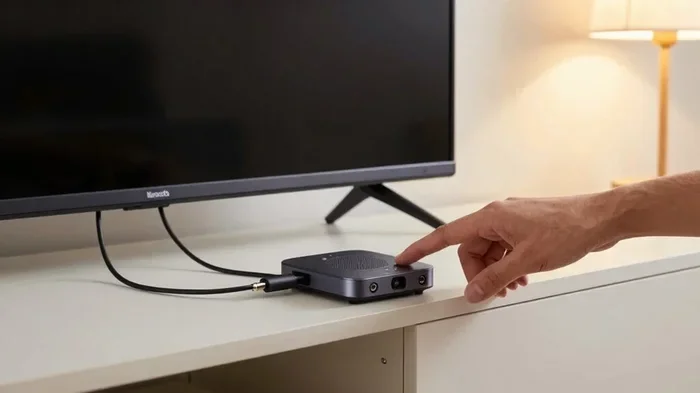
A Bluetooth radio transmitter is a small device that sends audio signals wirelessly using Bluetooth technology. Think of it as a bridge between your phone and your speaker. Instead of plugging in a cable, the transmitter sends the sound through the air using radio frequency waves.
These transmitters come in many shapes and sizes. Some plug right into a headphone jack. Others connect via USB or even attach to your car stereo. The main goal is always the same: to make your audio devices talk to each other without wires.
Many people use Bluetooth transmitters to make old speakers wireless. If you have a great set of wired speakers, a simple transmitter can breathe new life into them. You can also use one to add wireless capability to your car audio system.
## How Bluetooth Radio Transmitters Work Step by Step
Understanding how Bluetooth transmitters work does not require a degree in engineering. Let us break it down into simple steps.
### Step 1: The Audio Signal Is Captured
Everything starts with sound. When you play music on your phone, the audio file gets converted into an electrical signal. This signal is the raw audio data that needs to be sent to your speaker or headphones.
The Bluetooth transmitter picks up this electrical signal through a wired or wireless connection. If it plugs into your phone’s headphone jack, it reads the analog audio directly. If it connects via Bluetooth itself, it receives the digital audio data from your phone.
### Step 2: The Audio Gets Encoded
Once the transmitter has the audio signal, it needs to compress and encode it. This is where audio codecs come into play. A codec is a software or hardware tool that encodes and decodes data.
Bluetooth uses specific codecs like SBC, AAC, aptX, and LDAC. Each codec handles audio data differently. Some prioritize sound quality, while others focus on low latency and smooth streaming. The transmitter takes the raw audio and converts it into a format suitable for wireless transmission.
### Step 3: The Signal Gets Converted to Radio Waves
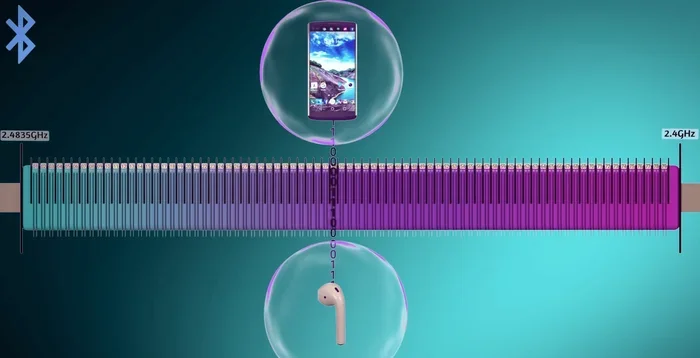
After encoding, the digital audio data gets converted into radio waves. This is the magic of Bluetooth technology. The transmitter uses a tiny antenna to broadcast these radio waves into the surrounding space.
Bluetooth operates on the 2.4 GHz frequency band. This is the same band used by Wi-Fi and microwaves. However, Bluetooth uses a special technique called frequency hopping to avoid interference.
### Step 4: The Receiver Picks Up the Signal
On the other end, a Bluetooth receiver catches those radio waves. The receiver decodes the signal and converts it back into audio. This audio then plays through your speaker, headphones, or car stereo.
The whole process happens in milliseconds. You press play on your phone, and the sound comes out of the speaker almost instantly. The entire wireless transmission process is incredibly fast and seamless.
### Step 5: The Connection Stays Stable
Bluetooth transmitters continuously monitor the connection. If interference occurs, the transmitter adjusts the frequency to maintain a stable link. This is part of the frequency hopping spread spectrum technology.
This constant adjustment is why Bluetooth connections are so reliable, even in busy environments like airports or shopping malls. The transmitter keeps finding clear frequencies to keep your music playing without interruption.
## The Technology Behind Bluetooth Transmission
Now let us dive a little deeper into the tech. Understanding the underlying technology helps you appreciate what your Bluetooth transmitter does every day.
### Frequency Hopping Spread Spectrum
Frequency hopping is one of the coolest parts of Bluetooth technology. Instead of staying on one frequency, Bluetooth switches between 79 different frequencies 1,600 times per second. This rapid switching is called frequency hopping.
The reason for this is simple. Many wireless devices share the 2.4 GHz band. Wi-Fi routers, microwaves, and other Bluetooth devices all compete for space on this band. By hopping frequencies, Bluetooth avoids conflicts and keeps connections strong.
This technology was developed in the 1990s and has proven incredibly effective. It is one of the main reasons Bluetooth remains so popular after all these years.
### Bluetooth Pairing Process
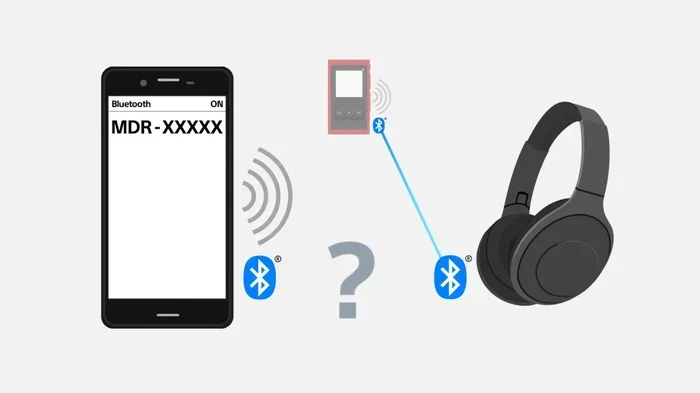
Before any audio can flow, your devices need to pair. The pairing process is what establishes trust between two Bluetooth devices. Here is how it works:
- Discovery: The transmitter broadcasts a signal saying it is available to pair.
- Authentication: The two devices exchange security keys to verify each other.
- Connection: A secure link is established, and audio data can now flow.
The pairing process only happens once. After that, your devices remember each other and reconnect automatically. This is why you can just turn on your transmitter and your phone recognizes it instantly.
### Bluetooth Versions and Their Impact
Bluetooth has evolved a lot over the years. Each new version brought improvements in range, speed, and energy efficiency. Here is a quick look at the major versions:
- Bluetooth 4.0: Introduced Low Energy Bluetooth. Great for small devices like fitness trackers.
- Bluetooth 4.2: Improved security and data transfer speeds.
- Bluetooth 5.0: Doubled the range and speed. Better for audio streaming.
- Bluetooth 5.3: The latest version with enhanced connection stability and lower power use.
If you are shopping for a transmitter, look for one that supports at least Bluetooth 5.0. You will get better range and sound quality compared to older versions.
## Types of Bluetooth Radio Transmitters
Not all Bluetooth transmitters are the same. Different types serve different purposes. Let us look at the most common ones.
### 3.5mm Jack Transmitters
These are the most popular type. They plug into the headphone jack of your phone, tablet, or laptop. They are small, portable, and easy to use. You just plug them in and they start transmitting.
Many people use these to make their car stereos wireless. You plug the transmitter into your car’s aux port, pair it with your phone, and enjoy hands-free music. This is a great option for older cars that do not have built-in Bluetooth.
Some of these transmitters also double as receivers. You can use them to turn regular speakers into Bluetooth speakers by plugging them into your speaker’s audio input.
### USB Bluetooth Transmitters
USB transmitters connect to computers or laptops through a USB port. They are ideal for desktop setups where you want wireless audio from your PC. These transmitters often have better range and stability than 3.5mm jack models.
They are also great for people who work from home and want to take calls wirelessly. You can pair them with your headset and move around your office freely.
### Car Bluetooth Adapters
Car Bluetooth adapters are designed specifically for vehicles. They connect to your car’s FM radio or AUX input and stream audio from your phone. Some models even let you make and receive phone calls through your car’s built-in microphone.
These adapters are a fantastic way to upgrade older cars without replacing the entire stereo system. They are affordable and easy to install.
### Gaming and Low-Latency Transmitters
If you are a gamer, regular Bluetooth transmitters might not cut it. The slight delay in audio can throw off your gameplay. Low-latency transmitters use special codecs to reduce this delay to almost zero.
You can use Bluetooth headphones for gaming with these transmitters and enjoy immersive sound without any lag. They are a game-changer for competitive gaming and immersive single-player experiences.
## Common Uses for Bluetooth Radio Transmitters
Bluetooth transmitters are incredibly versatile. Here are some of the most popular ways people use them.
### Making Old Speakers Wireless
One of the best uses for a Bluetooth transmitter is giving old speakers a wireless upgrade. If you have a great set of wired speakers, a transmitter can make them Bluetooth-enabled. This saves you money and reduces electronic waste.
### Wireless Audio in the Car
Many older cars do not have Bluetooth built in. A car Bluetooth transmitter solves this problem easily. You plug it into the AUX port or FM radio, pair it with your phone, and enjoy wireless music and calls. It is a simple and affordable upgrade.
### Home Audio Streaming
Bluetooth transmitters work great for home audio setups. You can stream music from your phone to your living room speakers without any cables. This is perfect for parties or just relaxing at home.
### Hearing Aid and Accessibility Support
Some Bluetooth transmitters are designed specifically for hearing aids and accessibility devices. They send audio directly to hearing aids or cochlear implants, making it easier for people with hearing loss to enjoy music, TV, and phone calls.
## Tips for Getting the Best Performance From Your Bluetooth Transmitter
A Bluetooth transmitter can deliver excellent sound, but only if you use it correctly. Here are some tips to get the best performance.
### Keep Distance in Mind
Bluetooth has a typical range of about 30 feet. However, walls, furniture, and other obstacles can reduce this range. Try to keep your transmitter and receiver within a clear line of sight for the best results.
If you are using a transmitter in your car, place it near the front seat. This reduces the distance the signal has to travel and keeps the connection strong.
### Choose the Right Codec
Not all Bluetooth codecs are the same. If you want the best sound quality, look for a transmitter that supports aptX or LDAC codecs. These codecs deliver higher audio fidelity compared to standard SBC.
If you are more concerned about low latency for gaming or video watching, look for transmitters with aptX Low Latency support.
### Keep Your Devices Updated
Bluetooth technology improves with firmware updates. Check if your transmitter and phone have the latest updates. Updated firmware often brings better connection stability and improved audio quality.
### Avoid Interference Sources
Wi-Fi routers, microwaves, and other wireless devices can interfere with your Bluetooth signal. Try to keep your transmitter away from these sources for a cleaner connection.
### Charge Your Transmitter Regularly
Most Bluetooth transmitters run on battery power. If the battery gets low, the connection quality can drop. Keep your transmitter charged to ensure consistent performance.
## Common Mistakes People Make With Bluetooth Transmitters
Even though Bluetooth transmitters are simple to use, people still make mistakes that affect performance.
### Pairing Too Many Devices at Once
Most Bluetooth transmitters can only connect to one device at a time. Trying to pair with multiple devices simultaneously causes connection issues. Stick to one paired device for the best experience.
### Ignoring Firmware Updates
Firmware updates fix bugs and improve performance. Skipping updates means you might be missing out on better sound quality and connection stability.
### Placing the Transmitter in Enclosed Spaces
Bluetooth signals need room to travel. Placing your transmitter inside a closed drawer or behind thick furniture weakens the signal. Keep it in an open area for the best results.
### Using Low-Quality Cables
If your transmitter uses a wired connection to your device, the cable matters. Cheap cables can introduce noise and reduce audio quality. Invest in a good quality cable for clean sound.
## Expert Insights on Bluetooth Radio Transmitter Technology
Bluetooth technology has come a long way since its invention in 1994. What started as a simple wireless data transfer protocol has evolved into a powerful audio streaming platform. Engineers continue to push the boundaries with each new version.
The introduction of Bluetooth 5.0 was a major milestone for audio streaming. It doubled the range and increased data transfer speeds significantly. This made Bluetooth a viable option for high-quality audio in cars, homes, and even professional settings.
Looking ahead, experts expect Bluetooth to keep improving. Features like LE Audio and the LC3 codec promise even better sound quality and lower power consumption. These advancements will make wireless audio even more seamless in the near future.
## Frequently Asked Questions
How far can a Bluetooth radio transmitter reach?
Most Bluetooth transmitters have a range of about 30 feet in open space. Walls, furniture, and other obstacles can reduce this distance. Newer Bluetooth versions like 5.0 and above offer longer range than older versions.
Can I use a Bluetooth transmitter with any speaker?
Yes, as long as your speaker has a 3.5mm input or AUX port. You plug the transmitter into the speaker’s input, pair it with your phone, and start streaming. Some transmitters also work with USB-powered speakers.
Is Bluetooth audio transmission safe?
Yes, Bluetooth uses low-power radio waves that are considered safe. The technology has been tested extensively and meets all international safety standards. Bluetooth transmitters use very little energy compared to cell phones.
Why does my Bluetooth audio have a delay?
Audio delay, also called latency, happens when the transmitter takes too long to encode and send the audio signal. Using a transmitter with aptX Low Latency support can greatly reduce this delay. Cheap transmitters without advanced codecs are more likely to have noticeable lag.
Can I use a Bluetooth transmitter in my car?
Absolutely. Car Bluetooth transmitters plug into your car’s AUX port or FM radio. They let you stream music wirelessly from your phone. You can also make hands-free calls through your car’s built-in microphone system.
Do I need to re-pair my devices every time I use the transmitter?
No, Bluetooth devices remember each other after the first pairing. As long as both devices have Bluetooth turned on, they will reconnect automatically. You only need to pair them again if you reset the connection or add a new device.
## Conclusion
Bluetooth radio transmitters are amazing little devices that make wireless audio possible. They take the audio signal from your phone, encode it, convert it to radio waves, and send it to your speaker or headphones. The entire process happens in milliseconds, giving you seamless wireless sound.
Understanding how these transmitters work helps you make better buying decisions. You can choose the right type, the right codec support, and the right range for your needs. Whether you want to upgrade your car stereo to Bluetooth or simply make your old speakers wireless, a Bluetooth transmitter is the answer.
The technology continues to improve with each new Bluetooth version. Better range, better sound quality, and lower power use are all on the horizon. By staying informed, you can enjoy the best wireless audio experience today and be ready for what comes next. Start exploring your options, and you will wonder how you ever lived without wireless audio.
Key Takeaways
- Bluetooth transmitters convert audio into wireless signals that travel between devices using radio waves.
- The pairing process involves discovery, authentication, and establishing a secure connection between two devices.
- Frequency hopping spread spectrum is the core technology that keeps Bluetooth connections stable and interference-free.
- Audio codecs compress sound data so it can transmit smoothly over wireless connections without lag.
- Bluetooth range typically extends up to 30 feet, but walls and obstacles can reduce this significantly.
- Newer Bluetooth versions offer better range, speed, and energy efficiency compared to older versions.
- Choosing the right transmitter depends on your device, use case, and audio quality needs.
Frequently Asked Questions
What is How Do Bluetooth Radio Transmitters Work?
How Do Bluetooth Radio Transmitters Work is an important topic with many practical applications.