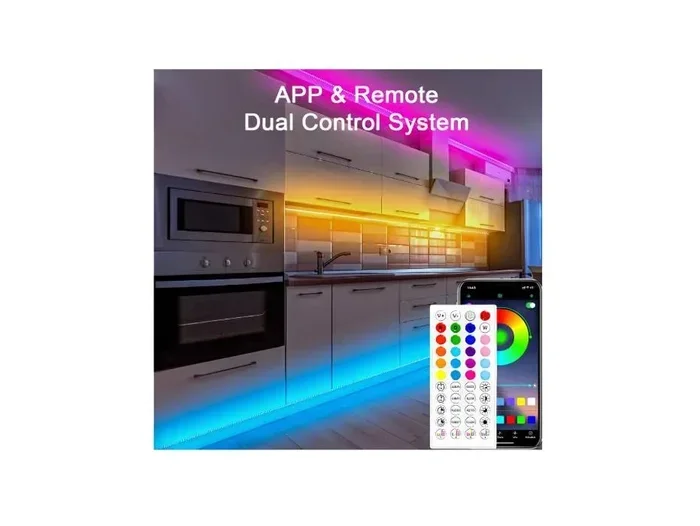
How Do Bluetooth Lights Work and Why They Matter So Much
Bluetooth lights use wireless radio signals to connect directly to your phone or tablet, letting you control color, brightness, and schedules without any extra hubs. They work through a simple pairing process and rely on Bluetooth technology to send commands from your device to the light fixture. Understanding how Bluetooth lights work helps you choose the right smart lighting setup for your home, office, or car.
This is a comprehensive guide about How Do Bluetooth Lights Work.
Key Takeaways
- Bluetooth lights connect directly to your phone: No hub or router is needed for most basic setups, making installation simple and fast.
- They use short-range wireless signals: Bluetooth typically works within 30 to 100 feet, depending on the version and obstacles in the way.
- Smart bulbs and strips are the most popular types: You can find Bluetooth lights in bulbs, strips, panels, and even car accessories.
- Setting up Bluetooth lights is easy: Most products pair in under two minutes using a free mobile app.
- They save energy and money: LED-based Bluetooth lights use far less power than traditional bulbs and last much longer.
- Common issues are easy to fix: Range problems, pairing failures, and app glitches can usually be solved with simple troubleshooting steps.
- Bluetooth lights work great alongside other smart devices: You can integrate them with speakers, radios, and phone-based controls for a full wireless experience.
[FEATURED_IMAGE_PLACEHOLDER]
You have probably seen those colorful smart bulbs that change with a tap on your phone and wondered, how do Bluetooth lights work exactly? The answer is simpler than you might think. Bluetooth lights use the same short-range wireless technology found in your headphones, speakers, and car stereo to receive commands without needing a cable or a central hub.
In the last few years, smart lighting has exploded in popularity. People want to control the mood of their rooms, set up automated schedules, and even change colors using nothing more than their smartphone. Bluetooth lights make this possible without the complexity of Wi-Fi-based systems. They are affordable, easy to set up, and work straight out of the box.
Whether you are looking to upgrade your bedroom lighting, add some color to your living room, or explore home automation basics, understanding how Bluetooth lights function is the first step. This guide breaks down the technology, the different types available, setup tips, and common problems so you can make informed decisions about your lighting setup.
What Are Bluetooth Lights?
Bluetooth lights are lighting devices that use Bluetooth wireless technology to connect and communicate with your phone, tablet, or other smart device. Instead of relying on a wall switch or a physical connection, these lights receive signals through the air using the Bluetooth protocol. This allows you to turn them on, dim them, change their color, and set schedules from anywhere within range.
The technology behind Bluetooth lights is not new. Bluetooth has been around since the late 1990s and is used in countless devices every day. What is new is how manufacturers have adapted this mature technology for lighting. The result is a simple, reliable way to bring wireless control into any room without needing a complicated setup.
How Bluetooth Technology Powers Smart Lighting
At its core, Bluetooth technology works by sending and receiving radio waves between two devices. When you open a Bluetooth lighting app on your phone, it sends a signal to the light bulb or strip using these radio waves. The light receives the signal and follows the command, whether that is turning on, changing color, or adjusting brightness.
Modern Bluetooth lights use Bluetooth Low Energy, or BLE. This version of Bluetooth uses very little power, which means your smart bulbs can last for years on a single LED chip. BLE is designed specifically for devices that need to stay connected but use minimal energy, making it a perfect match for wireless lighting applications.
How Do Bluetooth Lights Work Step by Step
Understanding the step-by-step process of how Bluetooth lights operate helps you troubleshoot issues and get the most from your setup. The process is straightforward and happens in seconds every time you use your lights.
Step 1: The Bluetooth Pairing Process
When you first set up your Bluetooth lights, you need to pair them with your device. This is called Bluetooth pairing, and it creates a direct connection between the light and your phone. The app on your phone searches for available Bluetooth devices nearby. Once it finds your light, you confirm the connection, and the two devices exchange a small amount of data to establish communication.
After pairing, your phone remembers the Bluetooth device, so you do not need to repeat this process every time. The connection happens automatically when both devices have Bluetooth turned on and are within range.
Step 2: Sending Commands Wirelessly
Once paired, your phone acts as the remote control. When you tap a button in the app to change the color or brightness, your phone sends a wireless signal to the light. The Bluetooth signal travels through the air at the speed of light and reaches the light’s built-in receiver. The light then adjusts its output based on the command it received.
This all happens in milliseconds. You tap a button on your screen, and the light responds almost instantly. There is no lag, no waiting, and no intermediate equipment needed for most Bluetooth lighting setups.
Step 3: Building Automation and Schedules
Most Bluetooth smart lights come with apps that let you create schedules and automation routines. You can set your lights to turn on at sunset, dim at bedtime, or flash a specific color when you receive a notification. These automations run on your phone, and the commands are pushed to the light using Bluetooth connectivity.
Some advanced Bluetooth lights also support mesh networking. This means multiple lights can talk to each other and coordinate their behavior. If one light receives a command, it can pass that command along to nearby lights, extending the range and creating a synchronized lighting experience across your entire room.
Types of Bluetooth Lights Available
The market for Bluetooth lights has grown tremendously. You can now find Bluetooth-enabled versions of almost every type of lighting product. Here are the most common options available today.
Bluetooth Smart Bulbs
Bluetooth smart bulbs are the most popular type of Bluetooth lights. They replace your regular light bulb and screw right into any standard socket. You can control them from your phone, change their color, and set dimming levels. These bulbs work great in lamps, bedside tables, and ceiling fixtures where you want individual control.
Bluetooth LED Strips
Bluetooth LED strips are flexible strips of lights that you can stick behind furniture, under cabinets, or along walls. They are perfect for adding ambient lighting to any room. Most strips come with a controller that receives Bluetooth signals from your phone and changes the color or brightness of the entire strip.
Bluetooth Light Panels and Fixtures
For a more polished look, Bluetooth light panels offer large-area lighting with smart controls. These are popular in offices, studios, and modern living rooms. They connect to your phone the same way as bulbs and strips, giving you wireless control over a bigger lighting surface.
Bluetooth Car Lights and Accessories
You can also find Bluetooth lights designed for your car. These include interior accent lighting, dashboard ambient lights, and even under-car LED strips. If you have ever thought about adding Bluetooth radio functionality to your vehicle, you know how convenient wireless control can be. The same principle applies to smart car lighting.
Setting Up Your Bluetooth Lights
Setting up Bluetooth lights is one of the easiest parts of the whole experience. Unlike Wi-Fi smart lights that require a router and sometimes a hub, Bluetooth lights connect directly to your phone. Here is how to get started.
- Unbox your Bluetooth light: Install the bulb, strip, or fixture in the desired location.
- Download the companion app: Most brands offer a free app for iOS and Android. Search for it in your app store.
- Turn on Bluetooth: Go to your phone settings and make sure Bluetooth is enabled.
- Power on the light: Turn the light on using the physical switch or by plugging it in.
- Open the app and pair: The app will search for nearby Bluetooth devices. Select your light when it appears and follow the on-screen prompts.
- Start controlling: Once paired, you can change colors, adjust brightness, and set schedules right away.
One thing to keep in mind is that Bluetooth range typically extends about 30 to 100 feet in open space. Walls and other obstacles can reduce this range. If your light is in a different room and you find it hard to connect, try moving closer to the light during the initial pairing process.
Also, if you already know how to turn your phone into a Bluetooth speaker, the pairing process for Bluetooth lights works in a very similar way. Your phone just needs to find the device, and you confirm the connection. It is that simple.
Benefits of Using Bluetooth Lights
Bluetooth lights offer several advantages over traditional lighting and even some other smart lighting options. Here is why so many people are making the switch.
Easy Setup Without Extra Equipment
You do not need a hub, a bridge, or a special router to use Bluetooth lights. Your phone does all the work. This makes them ideal for renters, apartment dwellers, or anyone who wants a quick and simple smart lighting solution.
Low Energy Consumption
Most Bluetooth lights use LED technology combined with Bluetooth Low Energy. This means they consume very little power while still delivering bright, vibrant lighting. Over time, this can lead to noticeable savings on your electricity bill.
Portability and Flexibility
Because Bluetooth lights connect directly to your phone, you can take them with you. Moving to a new apartment? Just unplug your smart bulbs and screw them into the new place. The pairing stays saved in the app, so setup is fast and easy.
Privacy and Security
Since Bluetooth lights do not connect to the internet, they do not send data to cloud servers. This means your lighting habits stay private and your setup is less vulnerable to hacking. For people concerned about Wi-Fi security and data privacy, Bluetooth lights offer a reassuring alternative.
Great for Room Personalization
Whether you want soft warm light for reading, cool blue light for working, or vibrant colors for a party, Bluetooth lights let you customize your space instantly. The ability to change the entire mood of a room from your phone is a game-changer for home entertainment and relaxation.
Common Problems with Bluetooth Lights and How to Fix Them
While Bluetooth lights are reliable, you may run into occasional issues. Here are the most common problems and simple fixes.
Light Not Showing Up in the App
If your Bluetooth light does not appear in the app, make sure Bluetooth is turned on and the light is powered on. Move closer to the light and try refreshing the device list in the app. Sometimes restarting your phone’s Bluetooth or toggling it off and on again resolves the issue.
Connection Keeps Dropping
Bluetooth range can be affected by walls, metal objects, and other electronic devices. If your connection keeps dropping, try moving the light closer to your phone or reducing obstacles between them. Also, make sure your phone’s Bluetooth is updated to the latest version.
App Freezes or Crashes
If the companion app for your Bluetooth lights freezes, try closing it completely and reopening it. Check for app updates in your app store. If the problem persists, uninstall and reinstall the app, then re-pair your light.
Color or Brightness Not Changing
This usually happens when the light is too far from your phone or when the Bluetooth signal is weak. Move closer to the light and try again. If the problem continues, check for firmware updates in the app, as manufacturers often release updates that fix connectivity and performance issues.
Bluetooth Lights vs Other Smart Lighting Options
When choosing smart lighting, you will likely come across Bluetooth lights alongside Wi-Fi and Zigbee options. Each has its strengths, and understanding the differences helps you choose the right one for your needs.
| Feature | Bluetooth Lights | Wi-Fi Lights | Zigbee Lights |
|---|---|---|---|
| Hub Required | No | No | Yes |
| Range | 30-100 feet | Depends on Wi-Fi | Up to 100 feet |
| Power Use | Very Low | Low | Very Low |
| Setup Complexity | Very Easy | Easy | Moderate |
| Internet Required | No | Yes | No |
| Privacy Level | High | Medium | High |
Bluetooth lights shine when you want a simple, no-fuss setup. They are perfect for individual rooms or small spaces. Wi-Fi lights work better for large homes with existing networks, and Zigbee lights are ideal for complex, multi-room setups that use a central hub. But for most people starting with smart lighting, Bluetooth lights are the easiest and most affordable entry point.
If you are already comfortable with Bluetooth devices like your headset or car stereo, Bluetooth lights will feel just as familiar. The technology is the same, and the experience is just as seamless. For those who have used Bluetooth speakers or know how to make wired headphones Bluetooth, the transition to smart lighting is natural and intuitive.
Final Thoughts on Bluetooth Lights
Bluetooth lights have made smart lighting accessible to everyone. They are affordable, easy to set up, and deliver real wireless control without the need for extra equipment. Whether you are a tech enthusiast or just starting to explore home automation, Bluetooth lights offer a simple and satisfying way to upgrade your space.
The technology behind Bluetooth lights continues to improve with each new version of the Bluetooth standard. Future lights will offer even longer range, faster response times, and more features. But even today’s Bluetooth lighting products deliver an excellent experience that beats traditional lighting in almost every way.
If you have been curious about smart lighting, now is the perfect time to start. Pick up a few Bluetooth smart bulbs, download a free app, and see how easy it is to bring wireless control into your home. Once you experience the convenience of controlling your lights from your phone, you will wonder how you ever lived without them.
FAQ
Do Bluetooth lights need Wi-Fi to work?
No, Bluetooth lights do not need Wi-Fi. They connect directly to your phone using Bluetooth signals. This is one of their biggest advantages, as you can use them even if your home has no internet connection or router.
How far can Bluetooth lights reach from your phone?
Most Bluetooth lights work within 30 to 100 feet in open space. Walls and obstacles can reduce this range. If you need coverage across a large home, consider Bluetooth lights that support mesh networking, which extends the range by having lights relay signals to each other.
Can I control Bluetooth lights when I am not at home?
Standard Bluetooth lights only work within range of your phone. However, some brands offer hubs or bridges that connect your Bluetooth lights to the internet, allowing remote control from anywhere. Check the product specifications before buying if remote access is important to you.
Are Bluetooth lights safe and secure?
Yes, Bluetooth lights are generally very safe. Because they do not connect to the internet, there is less risk of hacking or data breaches. Bluetooth itself uses encrypted signals, and the short range means unauthorized access is unlikely unless someone is physically very close to your lights.
Do Bluetooth lights work with all phones?
Most Bluetooth lights work with both iOS and Android phones that support Bluetooth 4.0 or later. If your phone can connect to Bluetooth headphones or speakers, it should work fine with Bluetooth lights. Always check the product compatibility list before purchasing.
Can I use Bluetooth lights outdoors?
Yes, many Bluetooth lights are rated for outdoor use. Look for lights with an IP rating that indicates weather resistance. Keep in mind that outdoor range may be shorter due to walls, moisture, and interference, so place your phone closer to the lights when controlling them outside.
Frequently Asked Questions
What is How Do Bluetooth Lights Work?
How Do Bluetooth Lights Work is an important topic with many practical applications.