Can I Use Hdmi Arc As Regular Hdmi Yes You Absolutely Can
Yes, you can absolutely use HDMI ARC as a regular HDMI port for audio and video. HDMI ARC is fully backward compatible and works just like a standard HDMI connection. Many users don’t realize that their HDMI ARC port can handle regular audio and video signals from streaming devices, gaming consoles, and Blu-ray players. Understanding how HDMI ARC works helps you get the most out of your home entertainment setup without buying extra cables or adapters.
If you have ever looked at the back of your TV and noticed a port labeled “HDMI ARC,” you might have wondered what it does. Can I use HDMI ARC as a regular HDMI? The short answer is a big yes. You can plug any HDMI device into an ARC port, and it will work just like any other HDMI port. This is great news if you are short on ports or want to simplify your home entertainment setup.
HDMI ARC stands for Audio Return Channel. It is a special feature built into HDMI cables that allows audio to travel in both directions. This means your TV can send sound back to a soundbar, receiver, or home theater system using just one cable. But here is the part that surprises many people: the ARC feature does not stop the port from working as a regular HDMI connection. You get the best of both worlds.
In this guide, we will walk you through everything you need to know about using HDMI ARC as a regular HDMI port. We will cover how it works, what makes it different, and how to get the best performance from your setup. Whether you are connecting a soundbar, gaming console, streaming stick, or Blu-ray player, this article has you covered.
Key Takeaways
- HDMI ARC works as a regular HDMI port: You can connect any HDMI device to an ARC port and it will function normally.
- Audio return channel is a bonus feature: ARC lets audio travel back from your TV to a soundbar or receiver through a single cable.
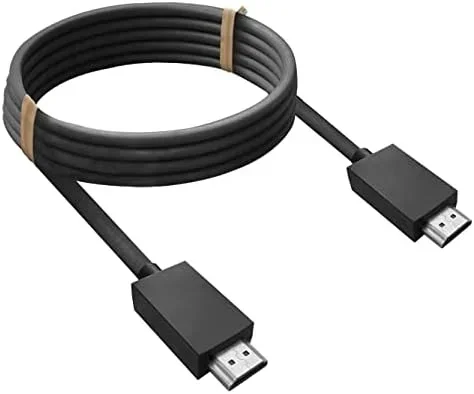
- No special cables are needed: A standard high-speed HDMI cable works with ARC ports for regular use.
- HDMI-CEC control simplifies your setup: You can control multiple devices with one remote when using ARC.
- eARC offers even better audio quality: Enhanced ARC supports newer formats like Dolby Atmos and DTS:X.
- Common issues are easy to fix: Most HDMI ARC problems can be solved with simple troubleshooting steps.
- Compatibility is almost universal: Nearly all modern TVs and audio devices support HDMI ARC.
📑 Table of Contents
- What Is HDMI ARC and How Does It Work
- Can You Use HDMI ARC as a Regular HDMI Port
- How to Set Up HDMI ARC for Regular Use
- HDMI ARC vs Regular HDMI: Key Differences
- Common HDMI ARC Problems and How to Fix Them
- Expert Tips for Getting the Most from HDMI ARC
- Final Thoughts on Using HDMI ARC as Regular HDMI
What Is HDMI ARC and How Does It Work
HDMI ARC is a feature that was introduced with the HDMI 1.4 standard back in 2009. It was designed to simplify the way audio flows between your TV and external audio devices. Before ARC existed, you needed multiple cables to connect your TV to a sound system. Now, a single HDMI cable can handle both video input and audio output.
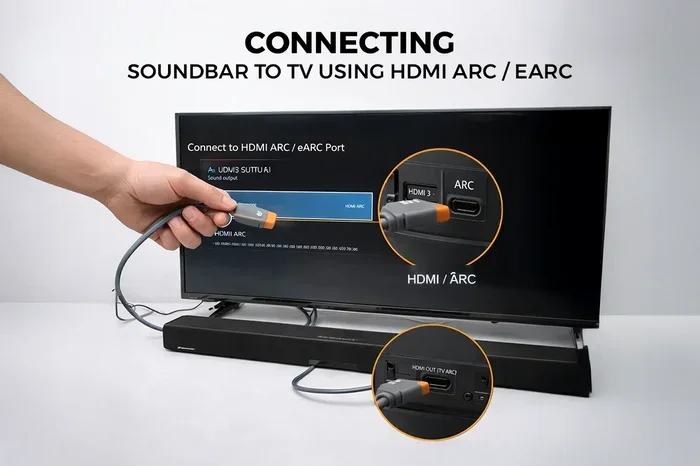
The way it works is simple. When you connect your TV to a soundbar or AV receiver using an HDMI ARC cable, the TV can send audio signals back through that same cable. This includes audio from built-in TV apps, live TV, and any other source playing on your TV screen. Your soundbar or receiver then plays that audio with better quality than the TV speakers.
HDMI-CEC is another feature that works hand in hand with ARC. CEC stands for Consumer Electronics Control. It lets you control multiple devices with one remote. So when you turn on your TV, your soundbar can turn on too. When you change the volume on your TV remote, it controls the soundbar as well. This makes the whole experience much smoother and more convenient.
Which Devices Support HDMI ARC
Most modern devices support HDMI ARC. Here is a quick list of common devices that use this feature:
- Smart TVs from Samsung, LG, Sony, TCL, Vizio, and most major brands
- Soundbars from Sonos, Bose, JBL, Samsung, and many others
- AV receivers from brands like Denon, Marantz, Yamaha, and Onkyo
- Streaming devices such as Apple TV, Roku, Amazon Fire Stick, and Chromecast
- Gaming consoles including PlayStation 4, PlayStation 5, Xbox One, and Xbox Series X
- Blu-ray players and media players
Almost any device with an HDMI output can connect to an HDMI ARC port. The device does not even need to be ARC-aware to work as a regular HDMI connection. It will still transmit video and audio just fine.
Can You Use HDMI ARC as a Regular HDMI Port
The answer is a firm and simple yes. An HDMI ARC port is fully backward compatible with standard HDMI devices. When you plug a regular HDMI cable from your streaming stick, game console, or laptop into an HDMI ARC port on your TV, it works exactly like any other HDMI port. The ARC feature simply adds extra capability on top of the standard HDMI function.
This is one of the best things about HDMI ARC. You do not need to choose between using a port for ARC or for regular use. It does both at the same time. If you connect your PlayStation 5 to an HDMI ARC port, you get full 4K video and surround sound. If you connect a basic streaming stick to the same port, it works perfectly for video and audio too.
Think of HDMI ARC like a highway with an extra lane. The regular lanes handle standard traffic (video and audio in one direction). The extra lane (ARC) handles audio going the other direction. All lanes work at the same time, and regular traffic can use every lane without any problem.
When to Use HDMI ARC vs Regular HDMI Ports
Even though HDMI ARC ports work as regular ports, there are times when you might want to use one over the other:
- Use HDMI ARC when: You want to send audio from your TV to a soundbar, sound system, or AV receiver. This is the main purpose of ARC and it works best on these ports.
- Use regular HDMI ports when: You are connecting a device that does not need audio return, like a cable box or a second streaming device that has its own audio output.
- Use any port when: You just need a simple video and audio connection and do not care about audio return. In this case, it does not matter which port you use.
The bottom line is that you have flexibility. You can mix and match ARC and regular HDMI ports however you like. Your devices will work either way.
How to Set Up HDMI ARC for Regular Use
Setting up HDMI ARC for regular use is very straightforward. You do not need any special equipment or technical skills. Here is a simple step-by-step guide to get you started.
Step-by-Step Setup Process
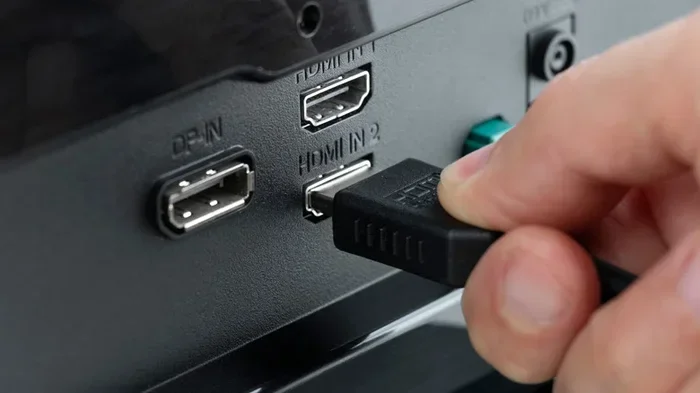
- Check your TV ports. Look at the back or side of your TV for ports labeled “HDMI ARC” or “ARC.” They are usually marked clearly.
- Plug in your device. Connect your streaming stick, game console, or other HDMI device to the ARC port using a standard HDMI cable.
- Turn on the TV. Switch your TV to the correct HDMI input channel.
- Go to TV settings. Navigate to the sound or audio settings menu on your TV.
- Enable HDMI CEC. This setting might be called different things depending on your TV brand. Samsung calls it Anynet+, LG calls it Simplink, Sony calls it BRAVIA Sync, and Toshiba calls it CE-Link.
- Enable HDMI ARC. Make sure the ARC setting is turned on in your TV audio settings.
- Test the connection. Play some content and check if both video and audio are working properly.
That is it. Your HDMI ARC port is now working as a regular HDMI port with full audio and video capability. If you also want to use the ARC audio return feature, you would connect an audio device to the same port and it will work automatically.
Quick Tips for a Smooth Setup
- Always use a high-speed HDMI cable to ensure the best video and audio quality.
- If your TV has multiple HDMI ARC ports, you can use any of them for regular devices too.
- Restart your devices after making new connections. This helps them recognize each other.
- Keep your TV and device firmware updated for the best compatibility.
HDMI ARC vs Regular HDMI: Key Differences
While HDMI ARC ports can do everything regular HDMI ports do, there are some differences worth understanding. These differences help you make smart decisions about how you set up your home entertainment system.
| Feature | HDMI ARC Port | Regular HDMI Port |
|---|---|---|
| Video Support | Yes (4K, 8K, HDR) | Yes (4K, 8K, HDR) |
| Audio Support | Yes (two-way audio) | Yes (one-way audio) |
| Audio Return Channel | Yes | No |
| HDMI-CEC Support | Yes | Yes (on most ports) |
| eARC Support | Yes (on eARC ports) | No |
| Backward Compatible | Yes | Yes |
| Works with All HDMI Devices | Yes | Yes |
As you can see from the comparison table, the main difference is the audio return channel feature. Everything else is the same. An HDMI ARC port can handle all the same video resolutions, audio formats, and device connections as a regular HDMI port. It simply adds the ability to send audio back from the TV to another device.
One thing to keep in mind is eARC, which stands for Enhanced Audio Return Channel. eARC is a newer version of ARC found on HDMI 2.1 ports. It supports advanced audio formats like Dolby Atmos and DTS:X with higher bandwidth. If your TV has an eARC port, it is also backward compatible with regular ARC and standard HDMI devices.
Common HDMI ARC Problems and How to Fix Them
Even though HDMI ARC is reliable, you might run into some issues now and then. These problems are usually easy to fix. Here are the most common ones and their solutions.
No Sound Through Your Audio Device
If you are using HDMI ARC to connect your TV to a soundbar but there is no sound, try these steps:
- Check that HDMI CEC is enabled on your TV.
- Make sure the TV audio output is set to HDMI ARC, not internal speakers.
- Try unplugging the HDMI cable and plugging it back in.
- Check if your soundbar is set to the correct input source.
- Restart both your TV and soundbar.
Video Not Displaying Properly
Sometimes the video might not show or might show in low resolution. This is usually caused by the cable or the port. Try using a different high-speed HDMI cable. Make sure the cable supports the resolution you need, such as 4K at 60Hz or 4K at 120Hz for gaming.
Audio and Video Out of Sync
Lip sync issues happen when the audio and video are not matching up. This can occur with HDMI ARC connections. To fix this, look for an audio delay or lip sync setting in your TV audio menu. Adjust the delay until the sound matches the picture. Most modern TVs have this feature built in.
HDMI ARC Keeps Disconnecting
If your HDMI ARC connection keeps dropping, the cable might be faulty. Try a different high-quality HDMI cable. Also, make sure the cable is fully inserted into both ports. A loose connection is the most common cause of intermittent ARC issues.
Device Not Recognized by TV
If your TV does not recognize a device plugged into the HDMI ARC port, try this: turn off the TV, unplug the device, wait 30 seconds, plug it back in, and turn the TV on. This simple reset often fixes recognition problems.
Expert Tips for Getting the Most from HDMI ARC
To get the best experience from your HDMI ARC setup, keep these expert tips in mind:
- Label your cables. If you use an HDMI ARC port for a soundbar, label the cable so you always know which port is for ARC. This saves time when troubleshooting.
- Use one ARC port for your audio device. Keep your soundbar or receiver on the ARC port and use regular HDMI ports for video-only devices. This keeps your setup clean and organized.
- Upgrade to eARC if possible. If you have a newer TV with eARC, use it for your soundbar or home theater. You will get better audio quality and support for the latest formats.
- Do not use HDMI splitters with ARC. HDMI splitters can interfere with the ARC signal and cause audio issues. Use a receiver or soundbar with multiple HDMI inputs instead.
- Keep your HDMI cables short. Longer cables can sometimes cause signal degradation. Use the shortest cable that reaches your devices comfortably.
Final Thoughts on Using HDMI ARC as Regular HDMI
To answer the question once more, can I use HDMI ARC as a regular HDMI? Absolutely yes. HDMI ARC ports are designed to be fully compatible with all standard HDMI devices. You get the regular HDMI functionality plus the added bonus of audio return channel when you need it. This makes HDMI ARC one of the most versatile and practical features on modern TVs.
Whether you are setting up a new home theater, connecting a soundbar, or just plugging in a streaming device, your HDMI ARC port has you covered. It handles video and audio for all your devices with ease. You do not need to worry about buying special cables or buying extra hardware. A standard HDMI cable and a quick settings check is all you need.
The next time you look at the back of your TV and see that HDMI ARC port, you will know exactly what it can do. Use it for your soundbar to enjoy better audio. Use it for your game console to enjoy high-quality video. Or use it for any other HDMI device, just like a regular port. The choice is yours, and the flexibility is entirely on your side.
Take a few minutes to explore your TV settings and make sure HDMI ARC and CEC are enabled. You will be amazed at how much smoother your home entertainment experience becomes. One port, two directions, and endless possibilities. That is the power of HDMI ARC.
Frequently Asked Questions
Is HDMI ARC the same as a regular HDMI port?
HDMI ARC is a regular HDMI port with an added feature. The port can do everything a standard HDMI port does, plus it supports audio return channel. This means audio can travel from your TV back to a soundbar or receiver through the same cable.
Do I need a special HDMI cable for HDMI ARC?
No, you do not need a special cable. A standard high-speed HDMI cable works perfectly for HDMI ARC connections. If you want to use eARC for advanced audio formats, you should use an HDMI premium high-speed cable with ethernet.
Can I connect a gaming console to an HDMI ARC port?
Yes, you can connect any gaming console to an HDMI ARC port. It will work just like a regular HDMI port for video and audio. The ARC feature will be available if you also want to send audio back to a soundbar or receiver.
Why is my HDMI ARC not working?
The most common reasons are a loose cable, disabled CEC settings, or incorrect audio output settings on your TV. Try unplugging and replugging the cable, enabling HDMI CEC, and checking your TV audio output settings. Restarting both devices often fixes the issue too.
Can I use HDMI ARC with a soundbar that does not have ARC?
No, both devices need to support HDMI ARC for the feature to work. If your soundbar does not have an HDMI ARC port, you can still use the ARC port on your TV as a regular HDMI port for video and audio output to the soundbar through other connections like optical or aux.
What is the difference between HDMI ARC and eARC?
eARC stands for Enhanced Audio Return Channel. It is an upgraded version of HDMI ARC that supports higher-quality audio formats like Dolby Atmos and DTS:X. eARC also has better error correction and works over HDMI 2.1 connections. Both ARC and eARC ports work as regular HDMI ports too.
=== CONCLUSION ===
HDMI ARC is one of the most useful and versatile features on modern TVs. It gives you the ability to connect all your devices while also enabling smart audio routing. And yes, you can use HDMI ARC as a regular HDMI port without any issues at all. The dual functionality makes it a valuable part of any home entertainment setup.
Now that you know the answer to “can I use HDMI ARC as regular HDMI,” you can set up your devices with confidence. Whether you are connecting a soundbar, gaming console, streaming device, or Blu-ray player, your HDMI ARC port will handle it all. Keep your cables organized, your settings updated, and your devices compatible, and you will enjoy a seamless audio and video experience every time.
Take action today. Check your TV ports, grab an HDMI cable, and start experimenting with your setup. You will be surprised how much cleaner and simpler your entertainment area becomes when you understand what each port can do. HDMI ARC is your friend, and now you know exactly how to use it to its full potential.