Can I Use A USB Bluetooth Adapter In My Car For Streaming
Yes, you can use a USB Bluetooth adapter in your car for streaming music and making hands-free calls. A USB Bluetooth adapter connects your phone wirelessly to your car stereo, giving you wireless audio without expensive upgrades. This guide walks you through setup, top picks, and troubleshooting tips for a smooth experience.
Can you plug a USB Bluetooth adapter into your car and start streaming music right away? The short answer is yes. But like anything tech-related, there are a few things you should know before you buy one and hit the road.
Whether you drive an older car with a basic stereo or a newer model with limited connectivity, a USB Bluetooth adapter can transform how you listen to audio on the go. It opens up wireless audio streaming from your phone, lets you take calls without touching your device, and saves you from digging around for cables every time you get in the car.
In this guide, we will walk you through everything you need to know. From how these adapters work to which ones are worth your money, we have got you covered. Let us dive in.
Key Takeaways
- A USB Bluetooth adapter works in most cars: It plugs into your USB port and pairs with your phone for wireless streaming.
- Setup is simple: You just plug it in, pair your device, and start streaming within minutes.
- Audio quality varies: Choosing the right adapter and codec makes a big difference in sound.
- Hands-free calling is a bonus: Most adapters let you make and receive calls safely while driving.
- Common issues are fixable: Pairing problems and audio lag usually have straightforward solutions.
- USB Bluetooth adapters are affordable: You can get a reliable one for under $30 in most cases.
📑 Table of Contents
- What Is A USB Bluetooth Adapter And How Does It Work?
- Benefits Of Using A USB Bluetooth Adapter In Your Car
- How To Set Up A USB Bluetooth Adapter In Your Car
- Best USB Bluetooth Adapters For Car Streaming
- Common Problems And How To Fix Them
- USB Bluetooth Adapter Vs Other Wireless Options
- Expert Tips For The Best Experience
- Final Thoughts
What Is A USB Bluetooth Adapter And How Does It Work?
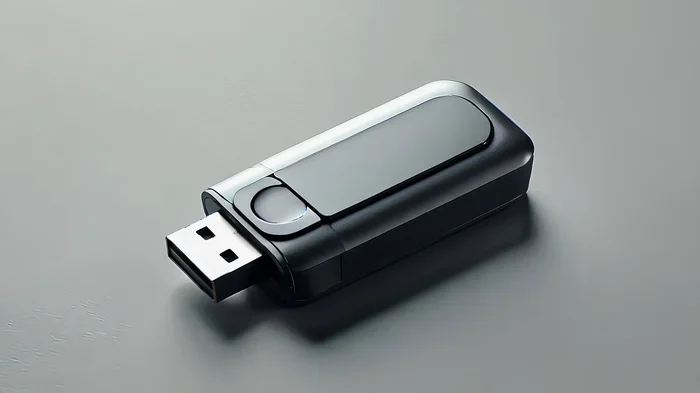
A USB Bluetooth adapter is a small device that plugs into your car’s USB port. It acts as a bridge between your phone and your car stereo. Instead of using a cable to play music, it sends audio wirelessly through Bluetooth connectivity.
Here is how it works in simple terms:
- You plug the adapter into your car’s USB port.
- The adapter powers up and becomes visible as a Bluetooth device.
- You pair your phone with the adapter through your phone’s Bluetooth settings.
- Once connected, your phone streams audio directly to the adapter.
- The adapter sends that audio to your car stereo for everyone to hear.
It really is that simple. Most adapters take less than a minute to pair. And once your phone is connected, it will often reconnect automatically every time you get in the car.
Some adapters also support hands-free calling. This means you can answer phone calls through your car speakers without picking up your phone. It is a nice safety feature that keeps your eyes on the road.
Benefits Of Using A USB Bluetooth Adapter In Your Car
There are many reasons to consider adding a USB Bluetooth adapter to your car. Let us look at the biggest benefits.
1. Wireless Freedom
Say goodbye to tangled cables. With a Bluetooth adapter, your phone stays in your pocket or bag. You can control your music from your phone without reaching for a cord. This is especially helpful on long road trips when you want to keep your phone charged and accessible.
2. Works With Almost Any Car
Even if your car does not have Bluetooth built in, a USB Bluetooth adapter can add that feature. It works with cars that have USB ports, which most modern vehicles do. You do not need to replace your stereo or buy expensive equipment.
3. Better Audio Quality Than FM Transmitters
If you have used an FM transmitter before, you know the sound quality can be hit or miss. A USB Bluetooth adapter sends a cleaner digital signal. The result is better audio quality with less static and interference.
4. Easy To Move Between Vehicles
Most adapters are small and portable. You can take one out of your daily driver and plug it into your rental car or a friend’s vehicle. This makes them very versatile car accessories.
5. Affordable Upgrade
You do not need to spend hundreds of dollars. A good USB Bluetooth adapter costs between $10 and $40. It is one of the cheapest ways to add wireless streaming to your car.
How To Set Up A USB Bluetooth Adapter In Your Car
Setting up a USB Bluetooth adapter is straightforward. Here is a step-by-step guide to get you started.
Step 1: Plug The Adapter Into Your USB Port
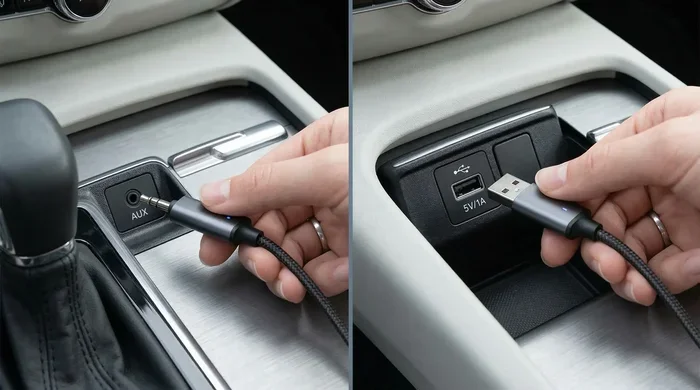
Find an available USB port in your car. Some cars have ports in the dashboard, center console, or even the glove box. Plug the adapter in and wait for it to power on. You may see a small light flash to show it is ready.
Step 2: Turn On Bluetooth On Your Phone
Go to your phone’s settings and turn on Bluetooth. Make sure it is set to be visible or discoverable. This lets the adapter find your phone during pairing.
Step 3: Pair Your Phone With The Adapter
Look for the adapter’s name in your phone’s Bluetooth device list. Tap on it to pair. Some adapters will show a PIN on their screen that you need to enter on your phone. Others pair with just one tap.
Step 4: Start Streaming
Once paired, open your music app and hit play. The audio should come through your car speakers. If it does not, check that the adapter is set as your audio output device.
Quick Tip: If your car has an auxiliary input but no USB port, you can use a USB Bluetooth adapter with a 3.5mm cable instead. Just plug the cable into your car’s aux port and the adapter into a USB power source.
Step 5: Save Your Pairing
Most adapters remember your phone once paired. The next time you get in the car, it should reconnect automatically. This saves you the hassle of pairing every single time.
Best USB Bluetooth Adapters For Car Streaming
Not all adapters are created equal. Here are some things to look for when choosing the right one for your needs.
Key Features To Look For
- Bluetooth version: Look for Bluetooth 4.0 or higher for a stable connection and better range.
- Codec support: Adapters that support codecs like aptX or AAC deliver better audio quality.
- Battery life: If the adapter has a built-in battery, make sure it lasts long enough for your trips.
- Multi-device pairing: Some adapters can remember multiple phones, which is great for families.
- Built-in microphone: This enables hands-free calling without needing an extra accessory.
Popular Options On The Market
Some well-known brands in the car accessories space include brands like Anker, TaoTronics, and Mpow. These brands offer reliable adapters with good customer reviews. Prices typically range from $10 to $35 depending on features.
When shopping, read recent reviews carefully. Look for comments about Bluetooth pairing ease and real-world audio quality. A cheap adapter that drops connections constantly will frustrate you more than it helps.
Common Problems And How To Fix Them
Even the best USB Bluetooth adapter can have occasional issues. Here are the most common problems and how to solve them.
Adapter Not Pairing With Your Phone
This is the most common issue. Try these fixes:
- Turn Bluetooth off and on again on your phone.
- Remove the adapter from your phone’s Bluetooth memory and re-pair.
- Make sure the adapter is in pairing mode (usually indicated by a flashing light).
- Restart both your phone and the adapter.
Poor Audio Quality Or Static
If your music sounds crackly or full of static, try moving your phone closer to the adapter. Bluetooth range is typically about 30 feet, but walls and metal can reduce that. Also, check that you are using the right Bluetooth codec for the best sound.
Audio Lag Or Delay
A slight delay between video and audio can be annoying. This often happens with cheaper adapters. Look for one that supports low-latency codecs. If you are organizing your music playlists and need to manage files efficiently, you might also find it helpful to keep your library clean, much like keeping your digital files organized, which is something you can learn more about in our guide on managing lines in Microsoft Excel for spreadsheet cleanup.
Adapter Keeps Disconnecting
Interference from other devices can cause dropouts. Try plugging the adapter into a different USB port. Also, make sure your phone’s software is up to date, as updates often fix Bluetooth connectivity bugs.
USB Bluetooth Adapter Vs Other Wireless Options
There are a few ways to get wireless audio in your car. Let us compare them side by side.
| Feature | USB Bluetooth Adapter | FM Transmitter | CarPlay / Android Auto | Aux Cable |
|---|---|---|---|---|
| Wireless? | Yes | Yes | Yes | No |
| Audio Quality | Good to Great | Fair | Excellent | Good |
| Price Range | $10 – $40 | $10 – $25 | Built-in or $100+ | $5 – $15 |
| Hands-Free Calling | Yes | Yes | Yes | No |
| Ease Of Setup | Very Easy | Easy | Moderate | Very Easy |
| Works With Old Cars | Yes | Yes | No | Yes |
As you can see, a USB Bluetooth adapter offers a great balance of price, ease of use, and audio quality. It is not as advanced as CarPlay or Android Auto, but it costs a fraction of the price and works with almost any car.
If your car does not support smart features, a USB Bluetooth adapter is your best bet for wireless connection and streaming. It gives you most of the benefits of a modern infotainment system without the expensive upgrade.
Expert Tips For The Best Experience
Here are some insider tips to get the most out of your USB Bluetooth adapter:
- Keep your adapter plugged in when not in use. This ensures it is always ready to connect. Some adapters remember paired devices even after being unplugged, but keeping it connected saves time.
- Update your adapter’s firmware if the manufacturer provides an app or update tool. Firmware updates often improve Bluetooth pairing stability and audio quality.
- Place your phone in a central location. This reduces signal interference and keeps your Bluetooth connection strong throughout the car.
- Use a high-quality USB port for power. Some car USB ports only provide low power, which can cause the adapter to malfunction or disconnect.
- Clean your USB port regularly. Dust and debris can cause poor connections. A quick blast of compressed air keeps everything working smoothly.
Final Thoughts
Using a USB Bluetooth adapter in your car for streaming is one of the easiest and most affordable upgrades you can make. It brings wireless audio to almost any vehicle, lets you stream music and podcasts effortlessly, and keeps you connected through hands-free calling.
The setup takes just a few minutes, and the benefits last for years. Whether you drive a classic car or a modern ride, a USB Bluetooth adapter fills the gap between your phone and your car stereo beautifully.
If you have been thinking about going wireless in your car, now is the perfect time. Grab a Bluetooth adapter, follow the steps in this guide, and enjoy audio streaming on every drive. Your ears will thank you.
Frequently Asked Questions
Can I use any USB Bluetooth adapter in my car?
Most USB Bluetooth adapters work in any car with a USB port. However, check that your car’s USB port provides enough power. Some adapters need more power than older USB ports can supply, which can cause connection issues.
Will a USB Bluetooth adapter work with my iPhone?
Yes. USB Bluetooth adapters work with both iPhones and Android phones. They connect through standard Bluetooth protocols, so you do not need a special adapter for either platform. Just pair your device and start streaming.
Does using a Bluetooth adapter drain my phone battery?
It does use some battery, but not a lot. Bluetooth uses very little power compared to screen time or GPS. If you are concerned, you can turn off Bluetooth when you are not actively streaming to save battery.
Can I make phone calls through a USB Bluetooth adapter?
Yes, most adapters come with a built-in microphone. This allows you to make and receive calls through your car speakers. The call audio routes through the adapter, keeping your hands free while driving.
What is the difference between a USB Bluetooth adapter and a Bluetooth receiver?
They are essentially the same thing. Both devices receive Bluetooth signals and send audio to your car stereo. The terms are used interchangeably in the car accessories market. Look for features and reviews rather than the name.
How far can my phone be from the adapter before the connection drops?
Most adapters have a Bluetooth range of about 30 feet. Metal car bodies, other electronic devices, and physical barriers can reduce this range. Keep your phone within a few feet of the adapter for the best Bluetooth connectivity.