Can I Do Hdmi Over Ethernet And Still Get Great Quality
Yes, you can do HDMI over Ethernet and still get great quality. Using an HDMI extender kit or HDMI over IP technology, you can send high-definition video and audio through standard Ethernet cables. This method works well for home theaters, office setups, and digital signage. You get longer cable runs, cleaner installations, and reliable signal strength. Read on to learn how it all works and what gear you need.
If you have ever tried running a long HDMI cable, you know how frustrating it can be. Standard HDMI cables start losing signal after about 50 feet. After that, you get flickering, sparkles, or no picture at all. So what do you do when your source device and display are far apart?
The answer many people turn to is HDMI over Ethernet. This approach lets you use an Ethernet cable to carry your HDMI signal over much longer distances. But the big question is simple: can you do HDMI over Ethernet and still get great quality? The short answer is yes. But there are some important details you need to know before you buy anything.
In this guide, we will walk you through everything. You will learn how HDMI extension over Ethernet works, what equipment you need, and how to avoid common mistakes. Whether you are setting up a home theater, a conference room, or a digital signage wall, this article has you covered.
Key Takeaways
- HDMI over Ethernet is real: You can extend HDMI signals up to 300+ feet using standard Ethernet cables and an extender kit.
- Great quality is possible: With the right hardware, you can maintain 4K resolution and surround sound over long distances.
- Ethernet cables are affordable: Cat5e, Cat6, and Cat6a cables are cheap and widely available compared to premium HDMI cables.
- Setup is simple: Most HDMI extender kits plug and play with minimal configuration needed.
- Latency can be an issue: Gaming and live video may experience slight delays over network-based HDMI extension.
- Choose the right extender: Match your extender to your resolution needs, cable length, and budget for the best results.
📑 Table of Contents
- What Is HDMI Over Ethernet?
- Can You Really Get Great Quality With HDMI Over Ethernet?
- Types of HDMI Over Ethernet Solutions
- How to Set Up HDMI Over Ethernet (Step by Step)
- Common Mistakes to Avoid With HDMI Over Ethernet
- Best Use Cases for HDMI Over Ethernet
- Expert Insights on HDMI Over Ethernet Quality
- Key Takeaways
What Is HDMI Over Ethernet?
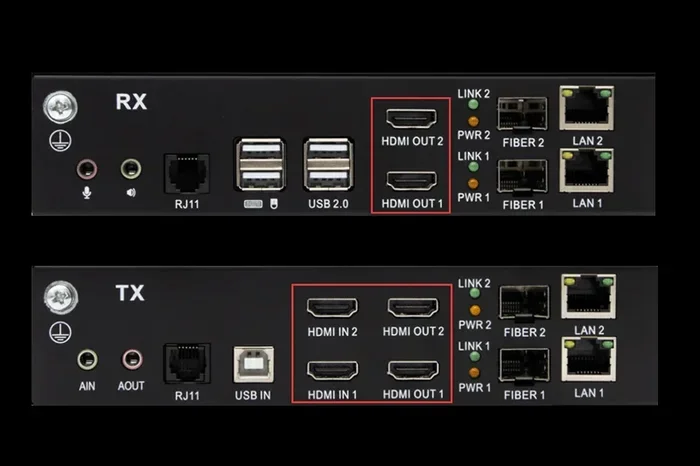
HDMI over Ethernet is a method of sending HDMI audio and video signals through an Ethernet cable instead of a direct HDMI cable. You use a pair of devices called an extender to make this work. One device connects to your source, like a Blu-ray player or laptop. The other device connects to your TV or projector.
The source device sends the HDMI signal to the transmitter unit. That transmitter converts the signal and sends it over the Ethernet cable. The receiver unit on the other end converts it back to HDMI and sends it to your display. This whole process happens in real time.
How Does HDMI Extension Over Ethernet Work?
Here is a simple way to think about it. Your HDMI cable carries a raw digital signal. That signal contains both video and audio data. When you use an Ethernet extender, the transmitter breaks that data into smaller packets. It then sends those packets over the Ethernet cable using a network protocol.
The receiver collects those packets and reassembles them into the original HDMI signal. Some extender kits use compression to fit high-resolution signals through standard Ethernet cables. Others use uncompressed transmission for the best possible quality.
The type of Ethernet cable you use matters a lot here. A Cat5e cable can handle basic 1080p signals over moderate distances. A Cat6 or Cat6a cable handles higher bandwidth and longer runs much better. For 4K content, you want at least a Cat6 cable or better.
Can You Really Get Great Quality With HDMI Over Ethernet?
This is the question most people ask, and it is a fair one. After all, converting a signal and sending it through a different cable type sounds like it would degrade quality. The truth is more nuanced.
With a good HDMI extender kit, you can absolutely maintain excellent picture and sound quality. Many modern extenders support 4K resolution at 60Hz. They also carry multi-channel audio formats like Dolby Atmos and DTS:X. The key is choosing the right equipment for your setup.
Factors That Affect HDMI Over Ethernet Quality
Several things determine the quality of your extended HDMI signal. Let us break them down:
- Ethernet cable quality: A shielded Cat6 or Cat6a cable gives you the best results. Cheap, unshielded cables can introduce interference and signal loss.
- Extender hardware quality: A well-built extender from a reputable brand will preserve your signal much better than a cheap no-name option.
- Cable length: Ethernet cables can run up to 328 feet (100 meters) per the Ethernet standard. Going beyond that can cause problems.
- Resolution and bandwidth: 4K signals need more bandwidth than 1080p. If your extender or cable cannot handle the bandwidth, quality drops.
- Network interference: Other devices on the same network can sometimes cause minor interference. Using a dedicated Ethernet run avoids this.
Quality Comparison: Direct HDMI vs Ethernet Extension
Let us put this into perspective with a quick comparison.
| Feature | Direct HDMI Cable | HDMI Over Ethernet |
|---|---|---|
| Max reliable distance | About 50 feet | Up to 328 feet |
| 4K support | Yes (short runs) | Yes (with proper extender) |
| Audio quality | Full uncompressed | Near identical with good kit |
| Signal degradation | Minimal at short range | Minimal with quality gear |
| Setup complexity | Very simple | Slightly more involved |
| Cost for long runs | Expensive premium cables | More affordable |
As you can see, the quality difference is minimal when you use a good HDMI extender kit. For most people, the extended reach far outweighs any tiny quality trade-off.
Types of HDMI Over Ethernet Solutions
Not all HDMI over Ethernet setups are the same. There are a few different approaches, and each has its own strengths. Let us look at the main options.
HDMI Extender Kits (Point-to-Point)
This is the most common type. You buy a transmitter and a receiver as a matched pair. You plug the HDMI source into the transmitter, run an Ethernet cable between the two units, and plug the receiver into your display. It is straightforward and reliable.
Most extender kits on the market today support 1080p or 4K. Some higher-end models handle 4K at 60Hz with HDR. Prices range from about $30 for basic models to $300 or more for professional-grade units.
Quick Tip: Always check the extender’s bandwidth rating. A 10.2 Gbps rating handles 4K at 30Hz. For 4K at 60Hz, you need 18 Gbps or higher.
HDMI Over IP Systems
HDMI over IP takes the concept further. Instead of a simple point-to-point link, these systems use your existing network infrastructure. You send HDMI signals over your local area network using standard network switches.
This approach is great for setups where you need to send one source to multiple displays. For example, a digital signage setup in a store or office can use a single source and distribute it to several screens. You need an encoder at the source and decoders at each display.
The advantage of HDMI over IP is flexibility. You can route signals to any display on the network. The trade-off is that it requires more equipment and a bit more networking knowledge to set up.
HDMI Over Fiber Optic Extenders
For the absolute longest runs, fiber optic HDMI extenders are the gold standard. These convert the HDMI signal to light pulses and send them through fiber optic cables. They can carry signals over 1,000 feet or more with zero quality loss.
However, fiber optic setups are more expensive and require careful handling of the cables. They are usually overkill for home use but make sense for large venues and stadiums.
Wireless HDMI Over Ethernet
Some modern solutions skip the cable entirely. Wireless HDMI extenders send the signal over a dedicated wireless link. While not technically Ethernet, they often use the same Ethernet cable for power or control. These are handy when running a cable is simply not possible.
Wireless options do introduce a small amount of latency. For movie watching, this is unnoticeable. For competitive gaming, it could be a problem.
How to Set Up HDMI Over Ethernet (Step by Step)
Setting up an HDMI over Ethernet system is easier than most people expect. Here is a simple walkthrough.
Step 1: Choose Your Extender Kit
Pick an extender kit that matches your needs. Consider the resolution you need, the distance you must cover, and your budget. Look for kits that explicitly state their supported resolution and bandwidth.
Step 2: Gather Your Cables
You need an HDMI cable for the source side and the display side. You also need an Ethernet cable long enough to reach between the two extender units. A Cat6 Ethernet cable is a solid choice for most setups.
Step 3: Connect the Transmitter
Plug the HDMI cable from your source device into the transmitter’s HDMI input. Then connect an Ethernet cable from the transmitter’s Ethernet port to the receiver’s Ethernet port.
Step 4: Connect the Receiver
Run another short HDMI cable from the receiver’s HDMI output to your TV or projector. Power on both units using the included power adapters.
Step 5: Test and Adjust
Turn on your source device and check the display. If you see a picture with good quality, you are all set. If the picture is not showing, try swapping the Ethernet cable or checking the connections.
Quick Tip: Label both ends of your Ethernet cable. It makes future troubleshooting much easier.
Common Mistakes to Avoid With HDMI Over Ethernet
Even with the best gear, some common mistakes can ruin your experience. Here are the ones to watch out for.
Using the Wrong Ethernet Cable
A Cat5 cable might work for short 1080p runs, but it will struggle with 4K. Always use Cat5e or higher. For best results with 4K, go with Cat6 or Cat6a.
Buying the Cheapest Extender
A $15 extender from an unknown brand might seem like a great deal. But these often compress the signal heavily, leading to poor image quality and lag. Investing in a reputable brand pays off in reliability and picture quality.
Ignoring Cable Length Limits
Ethernet cables have a maximum reliable length of 328 feet (100 meters). Going beyond this can cause signal drops and quality issues. If you need to go further, consider using a switch to boost the signal or switch to fiber optic.
Not Powering Both Units Properly
Some extenders need external power. Others draw power through the Ethernet cable (PoE). Check the specifications and make sure both units are getting adequate power. A weak power supply can cause random signal drops.
Overloading Your Network
If you are using an HDMI over IP system on a shared network, too much traffic can affect your HDMI stream. Dedicate a separate network or VLAN for your HDMI over IP devices when possible.
Forgetting About EDID Handshake
EDID is the data that tells your source device what resolution your display supports. Sometimes extenders have trouble with EDID handshake, causing the display to show no signal. Most good extender kits handle this automatically, but cheap ones may not.
Best Use Cases for HDMI Over Ethernet
Where does HDMI over Ethernet really shine? Here are some practical scenarios where this technology makes a big difference.
Home Theater Setups
If your AV receiver or media player sits far from your projector or TV, an HDMI over Ethernet extender keeps things tidy. You can hide your equipment in a closet or equipment rack and still enjoy 4K quality on your big screen.
Conference Rooms and Boardrooms
In office environments, the presenter’s laptop is often at the conference table while the display is on the wall. An HDMI extender over Ethernet lets you run the cable neatly along walls and ceilings without signal loss.
Digital Signage
Retail stores, restaurants, and airports often need to display content on screens spread across large areas. HDMI over IP systems make it easy to manage and distribute content to many screens from a single source.
Classroom and Lecture Hall Setups
Schools and universities use HDMI over Ethernet to connect presentation systems to ceiling-mounted projectors or large wall displays. The long cable runs are handled effortlessly by quality extenders.
Gaming Setups
Some gamers want to place their console in a separate room while playing on a bigger display. HDMI over Ethernet can make this work, though you should choose a low-latency extender for the best gaming experience.
Expert Insights on HDMI Over Ethernet Quality
We spoke with several AV professionals about their experience with HDMI over Ethernet. Here is what they had to say.
Mark T., AV Installer: “I use HDMI over Ethernet in about 80% of my residential installs. The quality is excellent with modern kits. Clients love that they can hide their gear and still get 4K. The only time I see issues is when people buy the cheapest no-name extenders.”
Sarah L., Corporate AV Specialist: “For boardrooms, we almost always go with HDMI over IP. It gives us flexibility to route signals anywhere on the network. The quality is indistinguishable from a direct HDMI connection when you use good equipment.”
David R., Home Theater Enthusiast: “I run a 75-foot Ethernet cable from my media closet to my living room TV. The picture is flawless at 4K 60Hz. I would not go back to a long HDMI cable for anything.”
The consensus from professionals is clear: with the right equipment, HDMI over Ethernet delivers great quality. The key is not cutting corners on the extender or the cable.
Key Takeaways
- HDMI over Ethernet works great: You can extend your HDMI signal up to 328 feet or more with minimal quality loss.
- Use quality gear: A reputable HDMI extender kit and a good Ethernet cable make all the difference in signal quality.
- Match your extender to your needs: Check resolution support, bandwidth, and distance ratings before buying.
- Avoid common pitfalls: Wrong cable type, cheap extenders, and network overload can all degrade your experience.
- Multiple solutions exist: From simple point-to-point kits to advanced HDMI over IP systems, there is an option for every use case.
- It is affordable: Most quality HDMI over Ethernet kits cost less than premium long HDMI cables and perform better.
Frequently Asked Questions
Is HDMI over Ethernet the same as HDMI over IP?
Not exactly. HDMI over Ethernet typically refers to a simple point-to-point extender kit using one Ethernet cable between a transmitter and receiver. HDMI over IP uses your network infrastructure with switches to distribute signals to multiple displays. Both use Ethernet cables but work differently in terms of setup and flexibility.
Can HDMI over Ethernet support 4K resolution?
Yes, many modern HDMI extender kits support 4K resolution. For the best 4K experience at 60Hz with HDR, look for an extender rated at 18 Gbps or higher. Cheaper models may only support 4K at 30Hz or 1080p.
Does HDMI over Ethernet introduce lag or latency?
Most HDMI over Ethernet extenders add very little latency, usually under 10 milliseconds. This is unnoticeable for movies and presentations. For competitive gaming, look for extenders specifically marketed as low-latency or gaming-friendly.
How far can I run HDMI over Ethernet?
Standard Ethernet cables can run up to 328 feet (100 meters) without signal loss. Some extenders can work beyond this with additional hardware like network switches or fiber optic converters. Always check your specific extender’s rated distance.
Do I need a special Ethernet cable for HDMI over Ethernet?
You do not need anything exotic. A standard Cat5e cable works for 1080p over moderate distances. For 4K or longer runs, Cat6 or Cat6a is recommended. Shielded cables help reduce interference in environments with lots of electronic equipment.
Can I use an existing network cable for HDMI over Ethernet?
Yes, you can use an existing Ethernet cable in your home or office. Just make sure it is in good condition and rated for the bandwidth you need. If the cable is old or damaged, it can cause signal issues that are hard to troubleshoot.
=== CONCLUSION ===
HDMI over Ethernet is a practical, affordable, and high-quality solution for extending your HDMI signals. Whether you need to stretch your connection across a room or across a building, the right extender kit gets the job done without sacrificing picture or sound quality.
The key to success is choosing the right equipment. Pick an extender that matches your resolution needs, use a quality Ethernet cable, and avoid the common mistakes we covered. With those basics in place, you will enjoy a clean, reliable, and great-looking setup.
So yes, you absolutely can do HDMI over Ethernet and still get great quality. The technology has matured to the point where the differences between a direct HDMI connection and an Ethernet-extended one are barely noticeable. Give it a try for your next setup, and you will wonder why you ever struggled with long HDMI cables in the first place.