Are Vga Cables Still Used Today Or Are They Obsolete
VGA cables are still used today, especially in legacy systems, projectors, and older monitors. While digital connections like HDMI and DisplayPort dominate, analog VGA remains relevant for backward compatibility and specific use cases. Many businesses, schools, and home setups still rely on VGA cables for video output.
Are VGA cables still used today? The short answer is yes. Many people still rely on VGA cables for connecting monitors, projectors, and older computers. While the tech world has moved toward digital connections like HDMI and DisplayPort, analog VGA remains surprisingly relevant. You will find VGA ports in schools, offices, and even some home setups. Let us explore why these cables have not disappeared and when they still make sense.
The story of VGA cables is a story of persistence. Despite being introduced in 1987 by IBM, VGA technology has survived for nearly four decades. That is remarkable in the fast-moving world of technology. People often assume that older means outdated, but VGA cables prove that is not always true. They continue to serve a purpose in a world dominated by digital signals.
Key Takeaways
- VGA cables are not fully obsolete: Many devices still support VGA connections for legacy compatibility.
- VGA cables work best for older monitors and projectors: They remain a go-to choice in classrooms and conference rooms.
- Signal quality degrades over longer distances: This is a key limitation compared to digital cables like HDMI.
- Adapters and converters make VGA versatile: You can connect VGA to modern displays with the right tools.
- Digital connections offer better performance: HDMI and DisplayPort provide higher resolutions and sharper images.
- VGA cables still serve a niche purpose: They are affordable and widely available for older equipment.
📑 Table of Contents
- What Are VGA Cables and How Do They Work
- The Rise and Fall of VGA Technology
- Are VGA Cables Still Used in Modern Setups
- VGA vs HDMI and DisplayPort: The Real Comparison
- When You Still Need a VGA Cable
- How to Get the Best Performance From VGA Cables
- Common Mistakes People Make With VGA Cables
- Expert Insights on VGA Cable Longevity
- Key Takeaways
What Are VGA Cables and How Do They Work
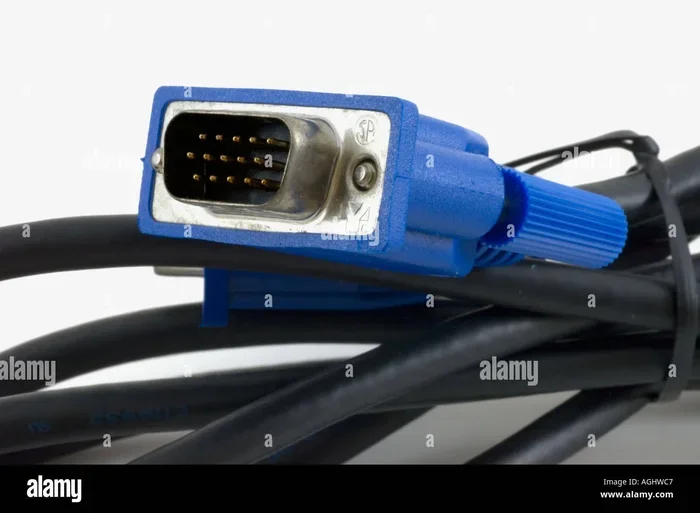
VGA stands for Video Graphics Array. It is an analog connection standard used to transmit video signals from a source to a display. The connector is the familiar blue D-sub 15-pin plug that most people recognize immediately. VGA cables carry red, green, and blue color channels along with horizontal and vertical sync signals.
The Anatomy of a VGA Cable
A standard VGA cable has 15 pins arranged in three rows. Each pin has a specific role in transmitting the video signal. The cable uses coaxial shielding to reduce interference. Better quality VGA cables have thicker shielding and thicker gauge wires. This improves signal strength and reduces ghosting or blurring.
The analog nature of VGA is both its strength and its weakness. Because it uses continuous electrical signals, the image quality can degrade over distance. This is different from digital cables that regenerate the signal. Still, for short runs under 15 feet, a good VGA cable delivers perfectly acceptable picture quality.
How VGA Compares to Digital Connections
Digital connections like HDMI and DisplayPort convert video into binary data. This means the signal either arrives perfectly or not at all. VGA cables work differently. The analog signal is more vulnerable to interference, crosstalk, and distance loss. However, for many everyday uses, this difference is barely noticeable.
The Rise and Fall of VGA Technology
VGA was the standard for video output for many years. Nearly every desktop computer came with a VGA port. Monitors, projectors, and TVs supported VGA connections. The technology became so universal that it defined the look of computer rooms for decades. The blue connector became instantly recognizable.
Why VGA Was So Popular
VGA offered a universal standard at a time when every manufacturer had different connectors. Before VGA, computers used a variety of proprietary video outputs. VGA changed that by providing a single, consistent connector. This made it easy for users to connect any monitor to any computer. The simplicity and widespread adoption made VGA cables a household item.
Another reason for VGA’s success was cost. The connectors were cheap to manufacture. Cables were affordable and widely available. This helped VGA spread to every corner of the computing world. Even today, you can buy a VGA cable for just a few dollars at any electronics store.
The Shift to Digital
The transition to digital video began in earnest in the mid-2000s. HDMI offered better image quality, higher resolutions, and audio in a single cable. DisplayPort followed with even more advanced features. Manufacturers started dropping VGA ports from laptops and monitors. The writing was on the wall for analog technology.
However, the shift was gradual. Many devices continued to include VGA ports well into the 2010s. Some manufacturers kept VGA support because of demand from businesses and institutions. Legacy equipment still required VGA connections. This is why VGA cables remain in production and use today.
Are VGA Cables Still Used in Modern Setups
Yes, VGA cables are still used in many modern environments. The question is not whether they are used, but where and why. Let us look at the places where VGA cables continue to play an important role.
In Classrooms and Schools
Schools are one of the biggest remaining users of VGA technology. Many classroom projectors still have VGA inputs. Schools often have older computers and laptops that only output VGA. Budget constraints mean schools cannot always upgrade their equipment quickly. As a result, VGA cables remain a staple in educational settings.
Teachers rely on VGA connections to display presentations and videos. The simplicity of plugging in a VGA cable makes it practical for daily use. IT departments in schools appreciate the familiarity and ease of troubleshooting VGA connections. Even as schools gradually adopt digital projectors, the transition takes time.
In Business Conference Rooms
Conference rooms in many offices still have VGA connections. Corporate AV systems often include VGA inputs for compatibility with older laptops. Presenters frequently need to connect their devices to projectors or large displays. Having a VGA option ensures that anyone can connect, regardless of their laptop’s ports.
Some businesses deliberately keep VGA ports available. They want to avoid situations where a guest cannot connect their device. This backward compatibility approach keeps VGA cables relevant in professional environments. The cost of maintaining VGA support is low compared to the convenience it provides.
In Home Entertainment and Gaming Setups
Home users also find uses for VGA cables. Retro gamers often connect older consoles and computers to monitors with VGA inputs. Some vintage gaming systems output VGA natively. Others require simple adapters to convert their signals. Enthusiasts appreciate the nostalgic charm of retro setups.
Home theater projectors often include VGA ports. Budget projectors in particular favor VGA for its simplicity and low cost. If you are setting up a home theater with a projector, you might need a VGA cable. Many people also use VGA to connect desktop computers to secondary monitors.
The Role of Technology Evolution
The broader technology landscape explains why VGA persists. Not everyone upgrades their equipment at the same pace. Many users still have devices with VGA outputs. The ecosystem of VGA-compatible devices remains large. This ensures ongoing demand for VGA cables and related accessories.
Technology evolution does not happen overnight. New standards take years to replace old ones completely. USB did not kill all other connection types instantly. Similarly, HDMI and DisplayPort have not eliminated VGA entirely. The transition is happening, but it is slow and incomplete.
VGA vs HDMI and DisplayPort: The Real Comparison
Understanding the differences between VGA and modern digital connections helps explain why VGA persists and where it falls short. Each connection type has its strengths and ideal use cases.
Image Quality Comparison
HDMI and DisplayPort offer significantly better image quality than VGA. Digital connections support higher resolutions like 4K and even 8K. They also support higher refresh rates for smoother motion. VGA cables are limited to lower resolutions and can suffer from signal degradation. For tasks that demand sharp, clear images, digital connections are the better choice.
However, for standard office work and presentations, VGA quality is often sufficient. Text and basic graphics look fine over VGA at common resolutions. The difference becomes more noticeable at higher resolutions or with detailed images. For casual use, many users do not notice a big gap.
Audio Support
One major advantage of HDMI over VGA is audio support. HDMI carries both video and audio through a single cable. VGA only transmits video signals. You need a separate audio connection when using VGA. This adds complexity to setups and can create cable management challenges.
DisplayPort also carries audio, making it more versatile than VGA. For users who want a clean, simple setup, the lack of audio support is a significant drawback for VGA cables. However, for environments where audio is handled separately, this is less of an issue.
Distance and Signal Quality
Signal quality over distance is where VGA faces real challenges. Digital cables like HDMI can transmit signals over longer distances with minimal loss. VGA signals degrade more quickly, especially over distances longer than 15 feet. This makes VGA less ideal for large rooms or auditoriums.
Active boosters and high-quality cables can extend VGA range. However, these add cost and complexity. For most short-distance connections, VGA works well enough. But for professional installations that require long cable runs, digital connections are preferable.
Compatibility and Convenience
VGA has one clear advantage over HDMI and DisplayPort: compatibility. Almost every older computer and monitor supports VGA. This universal compatibility makes VGA cables incredibly convenient for connecting legacy devices. You do not need adapters or converters for basic VGA-to-VGA connections.
Modern devices increasingly lack VGA ports. This means users often need adapters to connect VGA devices to modern displays. These adapters add cost and can introduce signal quality issues. The convenience of VGA is greatest when both devices natively support it.
| Feature | VGA | HDMI | DisplayPort |
|---|---|---|---|
| Signal Type | Analog | Digital | Digital |
| Max Resolution | 2048×1536 | 4K/8K | 8K |
| Audio Support | No | Yes | Yes |
| Max Cable Length (reliable) | 15 feet | 50 feet | 6 feet (passive) |
| Connector Color | Blue | Black | Gray/White |
| Common Use | Legacy devices, projectors | TVs, monitors, AV | Monitors, GPUs |
| Cost | Very Low | Low to Medium | Low to Medium |
When You Still Need a VGA Cable
There are specific situations where a VGA cable is the best or only option. Recognizing these scenarios helps you understand the ongoing relevance of VGA cables.
Connecting Older Computers and Laptops
Many older computers only have VGA video outputs. If you have a desktop PC from the early 2010s or earlier, it likely uses VGA. Connecting such a computer to a monitor or projector often requires a VGA cable. There is no way around it without purchasing expensive adapters or upgrade cards.
Some budget laptops still include VGA ports. Chromebooks and education-focused laptops sometimes feature VGA outputs. These devices target schools and institutions where VGA infrastructure already exists. The demand for VGA-compatible devices keeps the cable relevant.
Using Legacy Projectors
Many projectors in use today are older models with only VGA inputs. Replacing a projector is a significant expense for schools and businesses. As long as these projectors function, they need VGA cables to operate. The installed base of VGA projectors is enormous worldwide.
Portable projectors and some home theater projectors also use VGA. Users who already own these devices benefit from keeping VGA cables on hand. The cost of a VGA cable is minimal compared to replacing a projector.
Industrial and Specialized Equipment
Industrial machines, medical devices, and specialized equipment often use VGA connections. These devices have long lifecycles and are not frequently upgraded. The VGA output is built into the equipment for reliability and compatibility. In these settings, VGA cables are essential and irreplaceable.
Manufacturing displays, control panels, and testing equipment frequently use VGA. The simplicity and reliability of analog signals appeal to industrial applications. Digital connections can sometimes introduce complications in these environments.
Retro Computing and Gaming
Retro enthusiasts love VGA for its authentic connection to older hardware. Vintage computers and gaming consoles from the 1990s and early 2000s often use VGA. CRT monitors designed for VGA offer a unique display experience that modern screens cannot replicate. For these users, VGA cables are essential, not optional.
The retro computing community continues to grow. Enthusiasts restore old computers and use them daily. VGA is a natural part of this ecosystem. The availability and affordability of VGA cables support this hobby perfectly.
How to Get the Best Performance From VGA Cables
If you still use VGA cables, there are steps you can take to improve performance. Proper selection and usage make a real difference in image quality and reliability.
Choose the Right Cable Quality
Not all VGA cables are created equal. Cheap cables with thin wires and poor shielding cause signal problems. Look for cables with thick gauge wires and double shielding. Gold-plated connectors reduce corrosion and improve contact quality. A well-made VGA cable costs a little more but performs much better.
Cable length matters too. Shorter cables maintain better signal quality. If you need a longer run, consider a higher-quality cable with better shielding. Some premium VGA cables include built-in signal amplifiers for longer distances.
Keep Cables Away From Interference
VGA cables are susceptible to electromagnetic interference. Keep them away from power cables and other sources of interference. Running VGA cables parallel to power cables can cause ghosting or color distortion. Use cable ties and clips to keep VGA cables separated from power lines.
Proper cable management also prevents accidental disconnections. A secure, organized setup reduces signal dropouts and maintains consistent image quality. These small steps extend the effective life of your VGA cables and improve your experience.
Use Quality Adapters When Needed
If you need to connect VGA to a modern display, use a quality adapter. Cheap adapters can degrade the signal and cause image problems. Look for adapters with built-in signal conversion circuitry. Active adapters perform better than passive ones for most applications.
Some adapters convert VGA to HDMI or DisplayPort. Others handle the reverse conversion. Make sure you choose the right type for your setup. A good adapter preserves as much of the original signal quality as possible.
Check Your Source Device Settings
The output settings on your source device affect VGA performance. Set the resolution to match your display’s native resolution. Using an unsupported resolution causes blurry or distorted images. Adjust refresh rate settings to reduce flickering and eye strain.
Most operating systems detect VGA displays automatically. However, manual adjustment sometimes produces better results. Take a few minutes to optimize your settings for the best experience with your VGA cables.
Common Mistakes People Make With VGA Cables
Avoiding common mistakes helps you get the most from your VGA setup. These simple tips save time and prevent frustration.
- Using damaged cables: Frayed or bent connectors cause intermittent signal loss. Inspect your cables regularly and replace damaged ones.
- Ignoring cable length limits: Long VGA cables degrade the signal. Keep runs under 15 feet for best results.
- Mixing cheap adapters: Low-quality adapters introduce noise and distortion. Invest in reputable adapter brands.
- Running VGA near power cables: Electromagnetic interference causes image problems. Keep VGA and power cables separated.
- Assuming all VGA cables are the same: Cable quality varies widely. Better cables with proper shielding perform noticeably better.
- Using VGA for high-resolution displays: VGA cannot support modern high-resolution displays effectively. Use digital connections for 4K and above.
Expert Insights on VGA Cable Longevity
Technology experts have mixed opinions about the future of VGA. Some believe VGA will disappear within the next decade. Others point to its continued use in specific markets. The consensus is that VGA will remain relevant as long as legacy devices exist.
The broader technology industry follows predictable patterns of adoption and decline. Technologies like VGA do not vanish overnight. They linger in niches where they serve specific needs. This pattern applies to many older technologies that still have dedicated user bases.
Some experts compare VGA to other legacy connectors that have survived longer than expected. The RCA audio connector, for example, is still widely used despite being decades old. VGA follows a similar trajectory. It may not be the future of video connections, but it is far from dead.
For users who need VGA today, the message is clear. There is no urgent reason to replace working VGA equipment. The cables are affordable, widely available, and perfectly functional for their intended purposes. As long as devices with VGA ports exist, VGA cables will have a place in our technology ecosystem.
The digital transition continues to accelerate. New devices increasingly omit VGA ports entirely. This trend will eventually make VGA cables a thing of the past. But that day is still years away. In the meantime, VGA cables remain a practical and reliable choice for many users.
Technology adapters and converters also extend VGA’s usefulness. You can bridge the gap between old and new devices with the right accessories. This flexibility helps VGA cables stay relevant in mixed-technology environments. The ability to adapt keeps VGA cables useful even as the world moves toward digital-only connections.
Looking ahead, it is clear that VGA cables will follow a slow decline rather than a sudden disappearance. They will become less common but never fully vanish. Niche markets and legacy systems will keep demand alive for years to come. Understanding this helps users make informed decisions about their current and future equipment needs.
The broader lesson from VGA’s longevity is that older technologies often have more life in them than we assume. Innovation does not instantly render previous technology useless. Practical needs, cost considerations, and compatibility requirements all extend a technology’s lifespan. This is true for VGA cables and many other legacy technologies that continue to serve us well.
Key Takeaways
- VGA cables are still used today: They remain relevant for legacy devices, projectors, and older monitors.
- VGA offers universal compatibility: Nearly every older computer and display supports VGA connections.
- Digital connections outperform VGA: HDMI and DisplayPort provide better image quality and audio support.
- VGA cables are affordable and widely available: They are an economical choice for basic video connections.
- Signal quality degrades over distance: Keep VGA cable runs under 15 feet for best results.
- VGA serves specific niches well: Schools, businesses, retro enthusiasts, and industrial settings rely on VGA.
- The future is digital but VGA persists: VGA cables will gradually decline but remain in use for years.
Frequently Asked Questions
Are VGA cables still manufactured and sold?
Yes, VGA cables are still manufactured and sold widely. Many electronics retailers carry them both in-store and online. The demand from legacy devices keeps production going. You can easily find VGA cables at affordable prices from most suppliers.
Can I use a VGA cable with a modern TV or monitor?
You can if the TV or monitor has a VGA input. Many older models include VGA ports. However, most modern displays have moved to HDMI or DisplayPort. You may need an adapter or converter to connect VGA to a modern display without a VGA port.
Does a VGA cable support audio?
No, VGA cables do not carry audio signals. They transmit video only. You will need a separate audio cable or connection if your setup requires sound. This is one of the main limitations of VGA compared to HDMI and DisplayPort.
How long can a VGA cable be before signal quality drops?
VGA cables work best at lengths under 15 feet. Beyond that, signal degradation becomes noticeable. You may experience blurring, ghosting, or color distortion. High-quality cables with better shielding can extend the reliable range somewhat.
Is VGA better than HDMI for gaming?
No, HDMI is significantly better for gaming. HDMI supports higher resolutions, faster refresh rates, and audio. VGA is limited in resolution and does not carry audio. For modern gaming, digital connections like HDMI or DisplayPort are the clear choice.
Will VGA cables become completely obsolete?
VGA cables will likely become rare as devices stop including VGA ports. However, they will probably never become completely obsolete. Legacy equipment, industrial devices, and niche applications will keep demand alive for many years to come.
=== CONCLUSION ===
VGA cables are still used today, and they are far from obsolete. While digital connections like HDMI and DisplayPort have taken over the mainstream market, VGA continues to serve important roles in schools, businesses, retro setups, and industrial environments. The simplicity, affordability, and universal compatibility of VGA cables ensure they remain relevant even as technology evolves.
If you still have devices that use VGA connections, there is no rush to replace them. A good quality VGA cable will serve you well for years. Understanding when and how to use VGA effectively helps you get the best results from your setup. As the technology landscape continues to change, VGA cables will gradually become less common, but they are not going away anytime soon.
Embrace the technology that works for your needs. Whether you are connecting a vintage computer, a classroom projector, or a business presentation setup, VGA cables remain a reliable and practical choice. The key is knowing when VGA is the right tool for the job and when to upgrade to digital connections for better performance.