Can A Microsoft Surface Do Everything A Laptop Can Do
The Microsoft Surface is a powerful 2-in-1 device that can handle most tasks a traditional laptop does. It runs full Windows, supports desktop software, and works with a keyboard and mouse for complete productivity. While it may lack some ports and raw power for heavy gaming or video editing, the Surface covers everyday computing needs with ease. If you want a portable hybrid that doubles as a tablet, the Surface is a strong contender. This guide breaks down whether the Surface can truly do everything a laptop can do.
Let us talk about something that has been on a lot of people’s minds lately. Can a Microsoft Surface do everything a laptop can do? It is a fair question. The Surface looks like a laptop. It feels like a laptop. But it also flips into a tablet and folds in ways no traditional laptop can. So does it really match up? The short answer is yes, mostly. But there are some trade-offs you need to know about. In this article, we will walk through every angle. We will compare performance, features, ports, software, and real-world use. By the end, you will have a clear answer for your own needs.
More people are choosing hybrid devices over traditional laptops. The Microsoft Surface line has been leading this shift for years. It offers the flexibility of a tablet with the power of a laptop. But flexibility does not always mean perfection. Some tasks still push the Surface to its limits. So let us dig in and find out where the Surface shines and where it falls short.
Key Takeaways
- Full Windows Experience: The Microsoft Surface runs complete Windows 11, so you get the same software and desktop environment as any laptop.
- Versatile 2-in-1 Design: The Surface works as both a tablet and a laptop with detachable keyboards and touchscreen support.
- Great for Everyday Tasks: Browsing, office work, streaming, and light creative tasks run smoothly on the Surface.
- Port Limitations Exist: Surfaces typically have fewer ports than traditional laptops, so you may need a hub or dock.
- Not Ideal for Heavy Gaming: Surface devices use integrated graphics and are not built for demanding games or 3D rendering.
- Battery Life Varies: The Surface offers decent battery life but may not match the longest-lasting laptops.
- Best for Students and Professionals: The Surface shines for people who need portability and flexibility in their daily workflow.
📑 Table of Contents
What Is a Microsoft Surface?
The Microsoft Surface is a line of hybrid devices made by Microsoft itself. These devices blend the features of a laptop and a tablet into one package. The most popular models include the Surface Pro, Surface Laptop, and Surface Go. Each one targets a slightly different user. The Surface Pro is the most versatile. It comes with a detachable keyboard and a touchscreen display. The Surface Laptop is more traditional in design but still packs a touchscreen. The Surface Go is a budget-friendly option that trades power for portability.
All Surface devices run full Windows 11. This is a big deal. Many tablets run mobile operating systems that cannot run desktop software. The Surface does not have that problem. You can install Microsoft Office, Adobe programs, browser apps, and more. It feels like a laptop in every way that matters. The Surface also supports a pen input through the Surface Pen. This makes it great for note-taking, drawing, and annotation.
Why People Choose a Surface Over a Laptop
There are several reasons people pick a Surface instead of a regular laptop. Portability is a huge factor. Surface devices are thin and light. They fit easily into a bag or even a large pocket. The touchscreen adds a whole new way to interact with your device. You can swipe, tap, and draw directly on the screen. The detachable keyboard means you can use it as a tablet when you want. And the build quality is excellent. The Surface feels premium in hand.
Another reason is flexibility. You can use a Surface in tent mode for watching videos. You can use it as a tablet for reading and browsing. You can attach the keyboard for typing and work. Very few traditional laptops offer this kind of versatility.
Surface vs Laptop: Key Differences
When you compare a Microsoft Surface to a traditional laptop, the differences are clear. Some of them favor the Surface. Others favor the laptop. Let us break down the main areas where they differ.
Design and Form Factor
A traditional laptop has a fixed screen and keyboard. The two parts are connected and cannot be separated. A Surface, on the other hand, can be used as a standalone tablet. The keyboard attaches magnetically and can be removed in seconds. This gives you two devices in one. You get the portability of a tablet and the productivity of a laptop.
However, this detachable design comes with a trade-off. The keyboard on a Surface is smaller than a full laptop keyboard. The key travel is shorter. Some people find it less comfortable for long typing sessions. If you type a lot for work, this is something to consider.
Ports and Connectivity
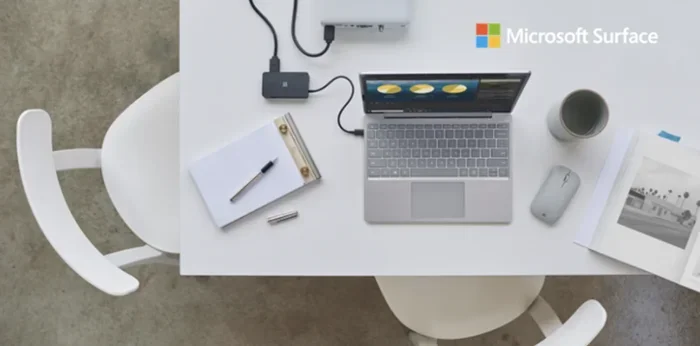
This is where many laptops have an edge. Traditional laptops usually come with multiple USB ports, an HDMI output, an SD card reader, and more. Surface devices tend to have fewer ports. Most models only have a USB-C or USB-A port and a headphone jack. You may need to buy a USB hub or docking station to connect all your peripherals. This adds cost and inconvenience.
Keyboard and Trackpad
The Surface keyboard is good but not great. It has a nice feel and backlit keys. But the key travel is shallow compared to a full-size laptop keyboard. The trackpad works well for most tasks. But if you are used to a large laptop trackpad, the Surface trackpad may feel small. For everyday use, these differences are minor. For heavy typing or precise cursor control, a traditional laptop may feel better.
Can a Microsoft Surface Handle Everyday Tasks?
This is the question most people really want answered. Can you use a Surface for your daily computing needs? The answer is a strong yes for most people. Let us look at the common tasks you probably do every day.
Web Browsing and Email
Browsing the web on a Surface is smooth and fast. The touchscreen makes scrolling and clicking feel natural. You can open multiple tabs without any issues. Email works perfectly with Outlook or any other email client. The Surface handles all of this with ease. Whether you use a Surface Pro or a Surface Go, web browsing is never a problem.
Office Work and Productivity
Microsoft Office runs natively on the Surface. Word, Excel, PowerPoint, and OneNote all work great. You can type documents, create spreadsheets, and build presentations just like you would on a laptop. The touchscreen adds a nice touch for navigating slides and annotating documents. OneNote is especially powerful on the Surface because you can write notes by hand with the Surface Pen.
Video conferencing also works well on the Surface. The built-in cameras and microphones are good enough for meetings. The screen size makes it easy to see other participants. Many professionals use the Surface as their primary work device and love it.
Media Consumption
Watching movies and TV shows on a Surface is a great experience. The touchscreen displays are bright and colorful. The speakers are decent for a portable device. You can also connect to external monitors or TVs for a bigger screen. Streaming services like Netflix, Hulu, and Disney+ all work perfectly on the Surface.
Creative Work
The Surface is surprisingly good for creative tasks. The Surface Pen allows for precise drawing and note-taking. Apps like Adobe Photoshop and Illustrator run on the Surface. The touchscreen makes editing photos and designing feel intuitive. Music producers can use the Surface for composing and editing audio. The Surface is not a replacement for a dedicated workstation, but it handles creative work well for most users.
Quick Tips for Getting the Most Out of Your Surface
- Use a Surface Pen: It transforms the device for note-taking and drawing.
- Invest in a good keyboard: The Type Cover makes a huge difference for typing comfort.
- Get a USB hub: This solves the port limitation problem quickly and affordably.
- Use tablet mode: Switch to tablet mode for a more touch-friendly experience.
- Optimize battery settings: Use battery saver mode to extend your runtime on the go.
Performance: Surface vs Traditional Laptop
Performance is where things get interesting. The Microsoft Surface comes in different configurations. Some models are very powerful. Others are more modest. Let us compare how the Surface stacks up against a typical laptop in key performance areas.
Processor and Speed
The Surface Pro and Surface Laptop use Intel or AMD processors. These are the same chip families found in most laptops. The Surface Pro with an Intel Core i5 or i7 chip can handle multitasking, office work, and light creative tasks with ease. The Surface Go uses less powerful processors, which is fine for basic tasks but may struggle with heavier workloads.
For most users, the Surface provides more than enough speed. You will not notice a big difference between a Surface and a similarly priced laptop for everyday tasks. The real performance gap shows up in specialized workloads.
Gaming and Graphics
If you are a gamer, the Surface is not your best bet. Most Surface models use integrated graphics. They can handle casual games and older titles. But modern AAA games will not run well. Even mid-tier games may struggle on the Surface. The screen size and resolution are also not optimized for gaming.
If you need a device for gaming, a traditional laptop with a dedicated GPU is the better choice. The Surface is simply not built for that purpose.
Video Editing and Rendering
Light video editing on the Surface is doable. You can trim clips, add transitions, and export short videos. But for heavy video editing with 4K footage, the Surface will slow down. The lack of a dedicated graphics card and limited thermal headroom are the main bottlenecks. Professional video editors should stick with a powerful laptop or desktop workstation.
Battery Life
Battery life on the Surface is decent but not class-leading. The Surface Pro typically lasts around 8 to 10 hours with normal use. The Surface Laptop can go a bit longer, around 10 to 15 hours. Compare this to some laptops that last 15 to 20 hours, and the gap becomes clear. If you need all-day battery life without a charger, some laptops will serve you better.
Storage and Memory
Surface devices come with solid-state drives, which are fast and reliable. Storage options range from 128 GB to 1 TB depending on the model. RAM options typically go up to 16 GB or 32 GB on higher-end models. For most users, this is plenty. But if you work with large files or run many applications at once, you may want to max out the RAM and storage.
Common Mistakes People Make When Choosing a Surface
Before you buy a Microsoft Surface, there are a few common mistakes you should avoid. These pitfalls can lead to disappointment if you are not careful.
Mistake 1: Expecting it to be a full laptop replacement for every task. The Surface is versatile, but it is not perfect for everything. Heavy gaming, professional video editing, and software that requires dedicated hardware will be limited.
Mistake 2: Ignoring the port situation. If you rely on multiple external devices, the limited ports on the Surface will frustrate you. Plan ahead and budget for a USB hub or docking station.
Mistake 3: Buying the wrong model for your needs. The Surface Go is great for light use. But if you need serious power, go for the Surface Pro or Surface Laptop. Choosing the wrong model means either overspending or underperforming.
Mistake 4: Skipping the Type Cover. A Surface without a keyboard is just a tablet. If you plan to do any typing, the Type Cover is essential. It is not included with all models, so check before you buy.
Mistake 5: Underestimating the value of the Surface Pen. If you plan to take notes or draw, the Surface Pen is a game-changer. It is sold separately on most models, so factor that cost into your budget.
Who Should Choose a Microsoft Surface?
The Surface is not for everyone. But for the right user, it is an excellent device. Let us look at who benefits most from choosing a Surface over a traditional laptop.
Students will love the Surface. It is light, portable, and great for taking notes in class. The touchscreen and pen support make studying more interactive. You can read textbooks, annotate PDFs, and type papers all on one device. The battery life is good enough for a full day of classes.
Business professionals who travel often will appreciate the Surface’s portability. It fits easily in a carry-on bag. The build quality looks professional in any setting. And the full Windows experience means you can run all your work software without issues.
Creative professionals like artists, designers, and photographers will enjoy the Surface Pen and touchscreen workflow. It is not as powerful as a dedicated workstation, but for many creative tasks, it is more than enough.
Casual users who mainly browse the web, watch videos, and check email will find the Surface to be a delightful device. It is fun to use and easy to carry around.
The Verdict: Is a Surface Enough?
So, can a Microsoft Surface do everything a laptop can do? The honest answer is almost yes. For the vast majority of daily computing tasks, the Surface is more than capable. It runs full Windows, supports desktop software, and handles productivity, media, and creative work beautifully. It is portable, versatile, and well-built.
But it is not perfect. The limited ports, shorter keyboard travel, and lack of dedicated graphics are real trade-offs. If you need raw processing power for gaming or professional rendering, a traditional laptop will serve you better. And if you rely heavily on external hardware, the port situation on the Surface may be a dealbreaker.
For most people though, the Surface is more than enough. It covers everything from email to creative work to entertainment. It does not try to be everything at once. Instead, it excels at being a flexible, portable, and reliable daily driver. If that sounds like what you need, the Microsoft Surface is a fantastic choice.
Think about how you use your computer the most. If portability and versatility matter to you, the Surface is hard to beat. If raw power and expandability are your priorities, stick with a traditional laptop. Both are great devices. They just serve different needs.
The Microsoft Surface has proven itself as a legitimate laptop alternative. It has earned its place in the market. And for millions of users around the world, it has replaced their laptop entirely. If you are on the fence, give it a try. You might be surprised at how much a Surface can do.
Frequently Asked Questions
Can a Microsoft Surface replace a laptop for work?
Yes, for most office and professional tasks, a Microsoft Surface can fully replace a laptop. It runs all Windows software, supports Microsoft Office, and handles email, video calls, and document editing without any issues. The detachable keyboard and touchscreen add extra flexibility for work on the go.
Is the Microsoft Surface good for students?
Absolutely. The Surface is an excellent choice for students. It is lightweight, has great battery life, and the touchscreen with pen support makes note-taking and studying more interactive. It can handle all the software students need, from word processors to research tools and presentation apps.
Can you play games on a Microsoft Surface?
You can play casual and older games on the Surface. However, it is not designed for heavy gaming. The integrated graphics and thin design limit performance. If gaming is a priority, a traditional laptop with a dedicated graphics card will be a much better choice.
Does the Microsoft Surface have enough ports?
The Surface has fewer ports than most traditional laptops. Most models include one or two USB ports and a headphone jack. If you need more connectivity, a USB hub or docking station is recommended. This is the most common trade-off Surface users mention.
How is the battery life on a Microsoft Surface?
Battery life varies by model. The Surface Pro typically lasts 8 to 10 hours with normal use. The Surface Laptop can last 10 to 15 hours. While this is good, some traditional laptops offer longer battery life, especially those with larger batteries designed for endurance.
Is the Microsoft Surface worth the price?
The Surface is worth it if you value portability, versatility, and build quality. It costs more than some budget laptops, but the hybrid design and premium experience justify the price for many users. If you need a device that works as both a tablet and a laptop, the Surface delivers excellent value.
=== CONCLUSION ===
The Microsoft Surface has come a long way. It is no longer just a fancy tablet. It is a full-powered computer that can handle most of what you throw at it. From browsing the web to editing documents to creating art, the Surface does it all. It may not be the best at any single thing, but it is great at everything. And that is exactly what makes it special.
If you have been wondering whether a Surface can do everything a laptop can do, the answer is clear. For everyday computing, work, study, and entertainment, the Surface holds its own. It even adds benefits that no traditional laptop can match. The flexibility, the portability, and the touchscreen experience set it apart.
So go ahead and explore the Surface lineup. Find the model that fits your life. You might just discover that your next computer does not need to be a laptop at all. It can be something better. It can be a Surface.