Can A Laptop Charger Stop Working And Why It Happens
Can a laptop charger stop working? Yes, and it is a common problem that frustrates millions of users every year. Laptop charger failure can stem from power surges, worn-out cables, overheating, or compatibility issues. This guide walks you through the exact reasons, warning signs, and simple solutions to get your power adapter working again.
You plug in your laptop and nothing happens. The charging light stays off, the battery icon barely moves, and you are left staring at a dead screen. It is a moment every laptop user knows too well. The question is simple but stressful: can a laptop charger stop working?
The answer is a firm yes. Laptop chargers fail more often than most people expect. They deal with heat, movement, power fluctuations, and daily wear and tear. Over time, these factors wear down the internal components until the charger simply gives up. Understanding why this happens can save you money, frustration, and a lot of guesswork.
In this guide, we will break down every reason your laptop charger might stop working. We will look at the warning signs you should never ignore. We will also cover practical fixes, replacement advice, and easy prevention tips. Whether your charger just died or you want to stop it from happening in the future, this article has you covered.
Key Takeaways
- Charger failure is normal: Laptop chargers have a limited lifespan and wear out over time due to regular use.
- Power surges are a top culprit: Electrical spikes can fry your charger’s internal circuitry without warning.
- Physical damage matters: Frayed cables, bent tips, and loose connections cause most charging problems.
- Compatibility is key: Using the wrong wattage or a third-party charger can stop your laptop from charging.
- Simple tests help: You can diagnose many charger issues at home with basic checks and tools.
- Prevention works: Proper care and storage can significantly extend your charger’s life.
📑 Table of Contents
Why Do Laptop Chargers Stop Working?
A laptop charger is not built to last forever. It is a small device that works hard every single day. Inside that little power brick, there are circuits, transformers, and wiring that handle a lot of electrical stress. Over months and years, these parts degrade. The result is a charger that slowly loses its ability to deliver power.
But degradation is not the only reason. Sometimes a charger fails suddenly and completely. A power surge, a physical accident, or a manufacturing defect can kill a charger overnight. The key is understanding what went wrong so you can fix it or replace it the right way.
Understanding How Your Charger Works
Your laptop charger converts AC power from your wall outlet into DC power your laptop can use. It steps down the voltage to match what your device needs. Inside the charger, a voltage regulator keeps the output steady. A charging cable carries that power to your laptop through the charging port.
When any part of this system breaks, the whole process stops. The charger might still feel warm. The cable might look fine on the outside. But inside, a blown fuse, a damaged transformer, or a cracked solder joint can kill the flow of electricity. That is why laptop not charging issues are so common and so confusing.
The Role Of Internal Components
Every charger has a few key parts that can fail:
- The transformer: Converts voltage levels. Heat and age can damage it over time.
- The capacitor: Smooths out the electrical current. A blown capacitor means no power output.
- The fuse: Protects the charger from surges. Once it blows, the charger stops working entirely.
- The wiring and solder joints: Handle the physical flow of electricity. They can crack or break from repeated bending.
- The output tip: Connects to your laptop. It wears out from plugging and unplugging hundreds of times.
Each of these parts has a lifespan. When one fails, the whole charger goes down with it. This is the most common answer to the question: can a laptop charger stop working for no obvious reason.
Common Signs Your Laptop Charger Is Failing
Most chargers do not die instantly. They give you warning signs first. Spotting these early can save you from a dead battery at the worst possible moment. Here are the most common signals that your power adapter is on its way out.
Warning Lights And Indicators
Many laptops have a small LED light on the charging port or on the charger itself. If this light never turns on when you plug in, something is wrong. A flickering light is also a red flag. It often means the connection is loose or the charger is struggling to deliver power.
Some laptops show a battery icon with a lightning bolt when charging. If that icon disappears even when the charger is plugged in, your charger might not be sending power. Pay attention to these small details. They tell a big story about your charger’s health.
Physical Damage To Watch For
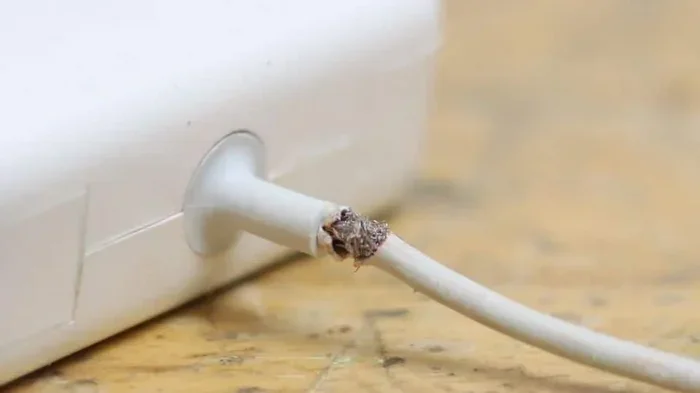
Your eyes are your best diagnostic tool. Look at the charging cable closely. Do you see fraying near the ends? Are there kinks or bends that did not used to be there? A damaged cable outer layer exposes the inner wires. This creates a safety hazard and kills charging ability.
Check the charging tip too. Is it bent, discolored, or loose in the laptop port? A damaged tip cannot make proper contact. Even a tiny bend in the metal pin can stop the charger from working. If you see any burn marks or smell something burning, unplug the charger immediately. That is a serious sign of internal damage.
Intermittent Charging
Does your laptop charge only when you hold the cable at a certain angle? This is a classic sign of a failing charger or cable. The internal wires are likely broken, and the connection only works in one position. This is not a minor issue. It means the charger is close to dying completely.
Top Reasons A Laptop Charger Can Stop Working
Now let us get into the specific causes. There are many reasons a laptop charger can fail. Some are preventable. Others are just bad luck. Understanding each one helps you take the right action.
Power Surges And Electrical Issues
Power surges are one of the biggest enemies of electronics. A sudden spike in voltage from your electrical outlet can overwhelm your charger. The internal components are not designed to handle that extra power. A surge can blow the fuse, fry the transformer, or damage the voltage regulator.
Surges happen during storms. They happen when heavy appliances turn on and off. They can even happen from a faulty outlet in your home. Using a surge protector is one of the easiest ways to prevent this damage. It is a small investment that can save an expensive charger.
Wear And Tear Over Time
Let us be honest. Chargers take a beating. They get yanked from outlets. They get wrapped up and stuffed in bags. They get stepped on, bent, and pulled. All of this physical stress adds up. The cable insulation cracks. The internal wires break. The charging tip loosens.
A typical charger lasts between two and five years with normal use. Heavy use shortens that lifespan. If you use your laptop in the same spot every day, the cable might not move much. But if you travel often, your charger goes through more abuse. That wear and tear is the second most common reason can a laptop charger stop working becomes a real problem.
Compatibility Problems
Not all chargers are the same. Your laptop needs a specific wattage rating and voltage output to charge properly. Using a charger with the wrong specs can cause all kinds of issues.
A charger with too low a wattage might charge your laptop very slowly or not at all. A charger with too high a wattage is generally safe because the laptop only draws what it needs. But using the wrong connector type or polarity can damage the charging port. Always match your replacement charger to your laptop’s specifications.
Overheating Issues
Chargers generate heat. That is normal. But too much heat is a problem. When a charger gets too hot, its internal components degrade faster. The plastic housing can warp. The solder joints can weaken. Over time, overheating kills the charger.
Overheating happens when you use your laptop on soft surfaces like beds or couches. Those surfaces block the air vents and trap heat. It also happens when you use a charger that is not rated for your laptop’s power needs. Keep your charger on a hard, flat surface while it works.
Manufacturing Defects
Sometimes the problem is not your fault. A charger can have a defect straight from the factory. A weak solder joint, a poorly placed component, or a substandard part can cause early failure. This is more common with cheap, off-brand chargers. Buying from reputable brands reduces this risk significantly.
Moisture And Liquid Damage
Water and electronics do not mix. If your charger gets wet, even a small splash, the internal circuitry can short out. Moisture can also creep into the cable ends and corrode the metal contacts. Always keep your charger dry. If it does get wet, let it dry completely before plugging it in.
How To Diagnose A Dead Laptop Charger
Before you rush out to buy a new one, try to figure out what is actually wrong. Sometimes the problem is not the charger at all. It could be the laptop, the cable, or the wall outlet. A few simple checks can save you a lot of money.
Simple Tests You Can Do At Home
Start with the basics. Unplug the charger and plug it back in. Try a different wall outlet. Check if the outlet itself is working by plugging in another device. These small steps rule out simple problems before you dig deeper.
Next, inspect the cable. Look for visible damage along its entire length. Gently bend it near the connectors and see if the charging light flickers. If it does, you have found the problem. A damaged cable needs replacement, not the whole charger unit.
You can also try a different charger if you have access to one. A friend or family member with the same laptop model might let you borrow theirs. If their charger works, your original charger is definitely the problem.
Some laptops let you check the battery health in the settings menu. If the battery is healthy but the laptop still will not charge, the charger is the likely culprit. If the battery shows damage or rapid degradation, the problem might be the battery itself, not the charger.
When To Seek Professional Help
If your basic tests do not reveal the issue, it might be time to see a professional. A technician can test the charger’s voltage output with a multimeter. They can check the charging port on your laptop for damage. They can also test the motherboard to see if it is receiving power correctly.
Professional diagnosis is especially important if you suspect a motherboard issue. A damaged motherboard can prevent charging even with a perfectly good charger. Trying to fix this on your own can make things worse. Leave the complex stuff to the experts.
How To Fix Or Replace A Failed Charger
Once you know your charger is dead, you have a few options. You can try a fix, replace it, or explore alternatives. The right choice depends on the cause of the failure and your budget.
DIY Fixes Worth Trying
Some charger problems are easy to fix at home. If the cable is damaged but the power brick still works, you can replace just the cable. Many online stores sell replacement cables for popular laptop brands. This is the cheapest fix available.
If the charging tip is loose, you can sometimes re-solder it. But this requires skill and the right tools. If you are not comfortable with soldering, skip this one. A bad solder job can cause more damage.
Another simple fix is cleaning the charging port. Dust and lint can build up inside the port and block the connection. Use a toothpick or compressed air to gently remove debris. This small step can sometimes restore charging without any cost at all.
Choosing The Right Replacement
When you need a new charger, make sure you pick the right one. Here are the key specs to check:
- Wattage: Match or exceed your laptop’s original wattage.
- Voltage: Must match exactly. A different voltage can damage your laptop.
- Connector type: The tip must fit your laptop’s charging port snugly.
- Polarity: Center-positive is most common, but always double-check.
- Brand quality: Stick with reputable brands or the original manufacturer.
Buying an original charger from the laptop manufacturer is the safest choice. It might cost more, but it guarantees compatibility and safety. If you go with a third-party charger, make sure it has safety certifications like UL or CE marking.
| Charger Type | Pros | Cons |
|---|---|---|
| Original Manufacturer | Perfect fit, safest, reliable | Higher price, harder to find |
| Certified Third-Party | More affordable, widely available | Quality varies, check certifications |
| Universal Charger | Works with multiple laptops | May not fit perfectly, lower quality |
| USB-C Charger | Convenient, universal connector | Only works with USB-C laptops |
Can You Repair A Charger Instead Of Replacing It?
In most cases, repairing a charger is not worth the cost or the risk. The internal components are small and densely packed. A professional repair might cost almost as much as a new charger. And there is no guarantee the repair will last. For most people, replacing the charger is the smartest move.
Preventing Future Charger Failures
The best way to deal with a dead charger is to prevent it from happening in the first place. A few simple habits can extend your charger’s life by years.
Best Practices For Charger Care
Treat your charger with care. Do not wrap the cable too tightly. Do not yank it from the outlet by pulling on the cable. Store it in a cool, dry place. Avoid running the cable under rugs or furniture where it can get pinched.
Unplug your charger during storms. Power surges from lightning strikes can destroy electronics instantly. If you live in an area with frequent electrical storms, invest in a good surge protector for your charging station.
Quick Tips For Longevity
- Keep the charging tip clean and free of dust.
- Do not use your laptop while it is charging in hot environments.
- Let the charger cool down before wrapping it up.
- Avoid using extension cords for long-term charging.
- Buy a spare charger if you rely heavily on your laptop.
- Check the cable regularly for early signs of wear.
- Use a cable management setup to reduce strain on the connector.
These small habits add up over time. They keep your laptop battery and charger in good shape for the long haul. A little prevention goes a long way toward avoiding the frustration of a dead charger.
Common Mistakes That Shorten Charger Life
Many people unknowingly damage their chargers through bad habits. Here are the most common mistakes:
- Using the wrong charger: A mismatched wattage or connector can cause damage over time.
- Ignoring warning signs: A flickering light or intermittent charging is not normal. Address it early.
- Cheap knockoff chargers: They might save money upfront but often fail quickly and can be unsafe.
- Rolling over the cable with a chair: This pinches and breaks the internal wires silently.
- Charging in hot rooms: Heat is the enemy of electronics. Keep your charging area cool.
Avoiding these mistakes alone can add years to your charger’s life. It is worth being mindful of how you handle this everyday device.
Final Thoughts
So, can a laptop charger stop working? Absolutely. It happens to everyone at some point. The good news is that most charger failures are predictable and preventable. You now know the warning signs, the common causes, and the practical steps to take when your charger dies.
Remember to take care of your charger. Handle it gently. Keep it dry and cool. Use the right specs for your laptop. And when the time comes to replace it, choose quality over price. A good charger keeps your laptop running and your work moving forward without interruption.
Stay proactive about your power adapter health. A few minutes of attention today can save you hours of frustration tomorrow. Your laptop depends on that little charger more than you probably realize. Give it the care it deserves.
Frequently Asked Questions
Why did my laptop charger suddenly stop working?
A sudden failure is often caused by a power surge, a blown internal fuse, or a short circuit. Check the wall outlet and try a different one first. If the charger still does not work, the internal components likely failed and the charger needs replacement.
Can a loose charging port cause the charger to stop working?
Yes, absolutely. A loose or damaged charging port on your laptop can prevent the charger from making proper contact. This is a common reason a laptop will not charge even with a perfectly good charger. A technician can repair or replace the port.
Is it safe to use a third-party laptop charger?
It can be safe if the third-party charger matches your laptop’s exact voltage and wattage requirements. Look for chargers with safety certifications like UL or CE. Avoid cheap, uncertified chargers as they can damage your laptop or pose a fire risk.
How long should a laptop charger last?
A quality charger typically lasts between two and five years. Heavy daily use, exposure to heat, and physical damage can shorten that lifespan significantly. Proper care and storage can help your charger last longer.
Can a dead charger damage my laptop battery?
Usually no. A dead charger simply stops delivering power. However, a faulty charger with incorrect voltage can potentially harm your battery or motherboard. Always replace a failed charger with one that matches your laptop’s specifications exactly.
What should I do if my charger gets wet?
Unplug it immediately and do not use it. Let it dry completely for at least 24 hours before attempting to plug it in again. If moisture has gotten inside the power brick, the charger may be permanently damaged and should be replaced.
=== CONCLUSION ===
Can a laptop charger stop working is a question with a clear and simple answer: yes, and it happens for many different reasons. From power surges and overheating to physical wear and compatibility issues, your charger faces plenty of threats every day. The good news is that you now have the knowledge to spot the warning signs early, diagnose the problem, and take the right action.
Keep your charger clean, cool, and handled with care. Replace it when needed with a quality, compatible option. And do not ignore the small signals that something is wrong. A little attention goes a long way in keeping your laptop powered up and ready to go whenever you need it.