Do Bluetooth Mouses Exist Here Is Everything You Need
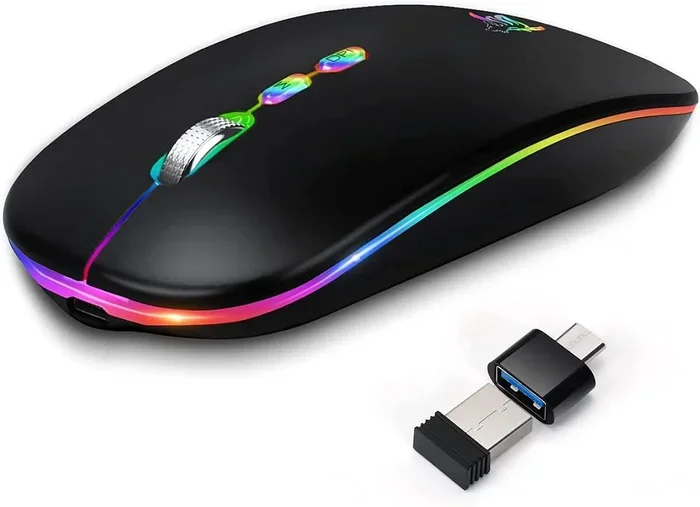
Yes, Bluetooth mouses absolutely exist and they are a game-changer for anyone who wants a clean, clutter-free workspace. These wireless mice connect directly to your computer without needing a USB receiver, making them super convenient for laptops, desktops, and even gaming setups. In this guide, we will cover everything you need to know about Bluetooth mouse options, how they compare to traditional wireless mice, and which one you should pick.
Have you ever looked at your desk and thought, “Why do I have all these wires?” If so, you are not alone. A Bluetooth mouse can change your whole setup. But do Bluetooth mouses really exist? And if they do, how do they work? Let us find out.
The short answer is yes. Bluetooth mouses are real, widely available, and more popular than ever. Whether you are using a laptop, a desktop computer, or even a tablet, a wireless Bluetooth mouse can make your life much easier. In this article, we will walk through everything you need to know. We will cover how they work, what to look for, and which ones are worth your money.
Key Takeaways
- Bluetooth mouses do exist: Many brands make mice that connect via Bluetooth without needing a USB dongle.
- They work with most modern devices: Laptops, desktops, tablets, and even some smart TVs support Bluetooth mouse connections.
- Battery life varies: Most Bluetooth mouses last between one and three months on a single charge depending on usage.
- Latency has improved a lot: Modern Bluetooth mice have minimal delay, making them great for everyday tasks and even light gaming.
- They reduce cable clutter: Going wireless with Bluetooth means fewer wires on your desk.
- Not all Bluetooth mouses are equal: Some are built for productivity, others for gaming, and some for basic browsing.
📑 Table of Contents
- What Is a Bluetooth Mouse?
- Bluetooth Mouse vs. Wireless Mouse With USB Receiver
- Can You Use a Bluetooth Mouse With Any Device?
- How to Set Up a Bluetooth Mouse
- Best Bluetooth Mice You Can Buy Right Now
- Common Problems With Bluetooth Mice and How to Fix Them
- Do You Need a Bluetooth Mouse? Here Is How to Decide
- Quick Tips for Getting the Most Out of Your Bluetooth Mouse
- Final Thoughts
What Is a Bluetooth Mouse?
A Bluetooth mouse is a wireless mouse that connects to your computer using Bluetooth technology. Instead of plugging in a USB receiver, it pairs directly with your device. This is a big deal because it means fewer cords, fewer things to lose, and a cleaner desk.
Most modern laptops and desktops come with built-in Bluetooth. That means you can connect a Bluetooth mouse right out of the box. You do not need to buy any extra hardware. Just turn on the mouse, put it in pairing mode, and connect it to your computer.
How Does a Bluetooth Mouse Work?
A Bluetooth mouse sends signals using radio waves in the 2.4 GHz band. This is the same frequency range that many wireless devices use. The mouse talks to your computer’s Bluetooth chip, which translates those signals into cursor movements on your screen.
Here is how the process works in simple steps:
- You move the mouse on your desk.
- The sensor inside the mouse tracks the movement.
- The mouse sends that data through Bluetooth to your computer.
- Your computer moves the cursor on screen accordingly.
The whole process happens in milliseconds. You barely notice any delay at all. This makes Bluetooth mice great for everyday use like browsing, working, and even casual gaming.
Bluetooth Mouse vs. Wireless Mouse With USB Receiver
People often confuse Bluetooth mice with regular wireless mice. Both are wireless, but they connect to your computer differently. Understanding the difference helps you pick the right one.
A regular wireless mouse uses a small USB receiver that you plug into your computer. The mouse talks to that receiver. A Bluetooth mouse skips the receiver entirely. It connects directly to your computer’s Bluetooth hardware.
| Feature | Bluetooth Mouse | Wireless Mouse With USB Receiver |
|---|---|---|
| Connection | Direct Bluetooth pairing | USB dongle plugged into computer |
| Ports Needed | None | One USB port |
| Compatibility | Any device with Bluetooth | Any device with a USB port |
| Portability | Very portable | Slightly less portable |
| Latency | Slightly higher | Slightly lower |
| Price Range | Similar pricing | Similar pricing |
Both types of mice work great for most people. If you use a laptop a lot, a Bluetooth mouse is a great choice because you do not need to worry about losing the USB receiver. If you need the fastest possible response time for competitive gaming, a USB receiver mouse might be a better fit.
Can You Use a Bluetooth Mouse With Any Device?
One of the best things about a Bluetooth mouse is its versatility. You can use it with many different devices. But not every device supports Bluetooth, so it is important to check before you buy.
Bluetooth Mouse for Laptops
Most modern laptops have Bluetooth built in. Whether you use Windows, macOS, or Chrome OS, you can pair a Bluetooth mouse easily. This is perfect for people who want a cleaner setup without wires. Just pair the mouse and you are good to go.
Bluetooth Mouse for Desktops
Desktops can also use a Bluetooth mouse, but there is one catch. Older desktop computers may not have Bluetooth built in. If your desktop does not have Bluetooth, you can buy a cheap Bluetooth adapter. This small USB device gives your computer Bluetooth capability. Once you plug it in, your desktop can connect to a Bluetooth mouse just like a laptop would.
Bluetooth Mouse for Tablets
iPads and Android tablets support Bluetooth connections. A Bluetooth mouse works great with tablets, especially if you use your tablet for work or productivity. It turns your tablet into something that feels more like a computer.
Bluetooth Mouse for Smart TVs and Gaming Consoles
Some smart TVs and gaming consoles support Bluetooth mice, but it depends on the device. For example, you might be able to pair a Bluetooth mouse with certain Android TV boxes. However, consoles like the PlayStation or Xbox usually do not support Bluetooth mice directly. If you want to use a wireless mouse with a console, you might need to explore other options like the ones discussed in Can I Pair Bluetooth Headphones To Xbox One, which covers Bluetooth pairing with gaming devices.
How to Set Up a Bluetooth Mouse
Setting up a Bluetooth mouse is simple. You do not need to be a tech expert. Here is a step-by-step guide that works for most devices.
Step 1: Turn on your Bluetooth mouse. Most mice have a power switch on the bottom. Flip it to the on position.
Step 2: Put the mouse in pairing mode. Usually, you hold down a button on the bottom of the mouse for a few seconds. A light will start blinking. This means the mouse is ready to be found.
Step 3: Go to your computer’s Bluetooth settings. On Windows, click the Start menu and go to Settings, then Bluetooth. On Mac, click the Apple menu and go to System Preferences, then Bluetooth.
Step 4: Find your mouse in the list of available devices. Click on it and select Pair.
Step 5: Test the mouse. Move it around and make sure the cursor responds. You are all set!
That is really it. The whole process takes about one minute. If you run into any issues, try turning Bluetooth off and back on. You can also check out Can I Remove Intel Wireless Bluetooth for tips on managing Bluetooth connections on your computer.
Best Bluetooth Mice You Can Buy Right Now
There are many Bluetooth mice on the market. Choosing the right one depends on what you need it for. Here are some popular options across different categories.
Best Bluetooth Mouse for Everyday Use
If you just need a mouse for browsing, typing, and everyday tasks, look for something simple and comfortable. The Logitech Pebble and the Microsoft Sculpt Mobile Mouse are both excellent choices. They are small, lightweight, and easy to carry around. Battery life is great too, with some lasting up to six months on a single AA battery.
Best Bluetooth Mouse for Productivity
For people who work long hours at a desk, comfort matters a lot. The Logitech MX Master 3S is a top pick. It has a quiet click, a thumb wheel for easy scrolling, and it works across multiple devices. You can switch between your laptop, tablet, and desktop with the press of a button. This kind of mouse is perfect if you use multiple devices throughout the day.
Best Bluetooth Mouse for Gaming
You might be wondering, “Can you use a Bluetooth mouse for gaming?” The answer is yes, but with some caveats. Bluetooth mice have slightly more latency than USB receiver mice. For casual gaming, this does not matter. But for competitive or fast-paced games, you might notice a small delay. Still, there are some great options. Check out Can I Use Bluetooth Headphones For Gaming for more on Bluetooth gaming gear.
Some gaming mice now offer Bluetooth connectivity alongside a USB receiver. The Logitech G Pro X Superlight 2 is one example. It gives you the option to switch between Bluetooth and a USB receiver depending on your needs.
Best Budget Bluetooth Mouse
You do not need to spend a lot to get a good Bluetooth mouse. Brands like Logitech, Jelly Comb, and TECKNET offer affordable options that work great for basic tasks. You can find solid Bluetooth mice for under $20. They may not have all the fancy features, but they get the job done.
Common Problems With Bluetooth Mice and How to Fix Them
Bluetooth mice are great, but they are not perfect. Here are some common issues and how to solve them.
Mouse Keeps Disconnecting
If your Bluetooth mouse keeps disconnecting, the first thing to check is the battery. Low battery power can cause connection drops. Replace or recharge the battery and see if that fixes the problem. Also, make sure your computer’s Bluetooth is up to date. Old Bluetooth drivers can cause stability issues.
Cursor Moves Slowly or Jumps Around
This can happen if the mouse sensor is dirty. Clean the bottom of the mouse with a soft cloth. Also, make sure you are using the mouse on a flat surface. Some surfaces, like glass or dark tables, can interfere with the sensor.
Mouse Will Not Pair
If your Bluetooth mouse will not connect, try turning Bluetooth off and back on. You can also remove the mouse from your device’s Bluetooth list and try pairing again. Make sure the mouse is in pairing mode. If nothing works, restart your computer and try again.
Interference From Other Devices
Bluetooth operates on the same frequency as Wi-Fi and other wireless devices. If you have a lot of wireless devices near your computer, they can interfere with the mouse signal. Moving closer to your computer or turning off nearby Bluetooth devices can help.
Do You Need a Bluetooth Mouse? Here Is How to Decide
Not everyone needs a Bluetooth mouse. But for many people, it makes a huge difference. Here are some situations where a Bluetooth mouse is a great idea.
- You use a laptop on the go: A Bluetooth mouse takes up no space and adds no weight to your bag.
- You hate cable clutter: A wireless Bluetooth mouse keeps your desk clean and organized.
- You switch between devices: Many Bluetooth mice can connect to multiple devices. You can use one mouse with your laptop and desktop.
- You do not have extra USB ports: Without a USB receiver, you free up a port for other devices like a flash drive or external hard drive.
- You want a cleaner aesthetic: No wires, no dongles, just a clean and simple setup.
On the other hand, if you need the absolute fastest response time for competitive gaming, a USB receiver mouse might still be the better choice. Also, if your computer does not have Bluetooth and you do not want to buy an adapter, a regular wireless mouse is the way to go.
Quick Tips for Getting the Most Out of Your Bluetooth Mouse
Want your Bluetooth mouse to last longer and work better? Follow these simple tips.
- Turn it off when not in use. This saves battery life and prevents accidental clicks.
- Keep the battery fresh. Replace batteries regularly or charge your rechargeable mouse before it dies completely.
- Use a clean surface. A smooth, light-colored mousepad works best for Bluetooth mouse sensors.
- Update your Bluetooth drivers. This keeps your connection stable and fast.
- Keep the mouse close to your computer. Bluetooth has a range of about 30 feet. Staying within that range ensures a strong connection.
- Paired devices can be saved. Most Bluetooth mice remember multiple devices. You can switch between them easily.
Final Thoughts
Bluetooth mouses are real, they work great, and they are more convenient than ever. Whether you are a student, a professional, or just someone who wants a cleaner desk, a Bluetooth mouse is a smart investment. They connect easily, they work with most modern devices, and they eliminate the hassle of USB receivers and extra cables.
The technology has come a long way. Modern Bluetooth mice offer fast response times, long battery life, and comfortable designs. You do not have to sacrifice performance to go wireless. With so many options available at different price points, there is a Bluetooth mouse for everyone.
So yes, Bluetooth mouses absolutely exist, and now you know everything you need to make an informed choice. Pick one that fits your needs, set it up, and enjoy a wire-free workspace.
Frequently Asked Questions
Do Bluetooth mouses exist?
Yes, Bluetooth mouses are real and widely available. Many major brands like Logitech and Microsoft make Bluetooth mice that connect directly to your computer without needing a USB receiver. They work with laptops, desktops, and tablets that have built-in Bluetooth.
Is a Bluetooth mouse as good as a wireless mouse with a USB receiver?
For most everyday tasks, a Bluetooth mouse works just as well as a wireless mouse with a USB receiver. The main difference is that a Bluetooth mouse does not need a dongle. However, USB receiver mice tend to have slightly lower latency, which can matter for fast-paced gaming.
Can I use a Bluetooth mouse with my laptop?
Absolutely. Most modern laptops have Bluetooth built in, so you can pair a Bluetooth mouse easily. Just go to your Bluetooth settings, put the mouse in pairing mode, and connect. It is a quick and simple process that works with Windows, macOS, and Chrome OS.
How long does a Bluetooth mouse battery last?
Battery life depends on the model and how much you use it. Most Bluetooth mice last between one and six months on a single set of batteries. Some rechargeable models can last for weeks on a single charge. Turning the mouse off when you are not using it helps extend battery life significantly.
Can I use a Bluetooth mouse for gaming?
Yes, you can use a Bluetooth mouse for casual gaming. However, Bluetooth has slightly more latency than a USB receiver connection. For competitive gaming where every millisecond counts, a USB receiver mouse is usually the better choice. But for casual and moderate gaming, a Bluetooth mouse works just fine.
What should I do if my Bluetooth mouse will not connect?
First, make sure the mouse battery is charged or fresh. Then check that Bluetooth is turned on your computer. Try removing the mouse from your Bluetooth device list and pairing it again. If that does not work, restart your computer and try once more. Keeping your Bluetooth drivers updated can also prevent connection problems.