How Do I Choose A Projector Screen For My Home Theater
Choosing the right projector screen for your home theater doesn’t have to be overwhelming. This guide walks you through every key factor, from screen size and material to aspect ratio and placement. You’ll learn how to match your screen to your room, projector, and viewing goals so you can enjoy a cinematic experience at home. We also share expert tips and common mistakes to avoid.
Setting up a home theater is one of the most exciting projects you can tackle. But the secret to a truly cinematic experience starts with one simple decision: choosing the right projector screen. Many people focus all their attention on the projector itself and forget that the screen plays an equally important role in delivering sharp, vibrant images.
Whether you’re building a dedicated home cinema or just want a bigger picture in your living room, this guide will help you make the right choice. We’ll cover everything from screen size and material to aspect ratio and placement. By the end, you’ll know exactly what to look for and what to avoid. Let’s dive in.
Key Takeaways
- Screen size matters: Measure your room and viewing distance before buying to get the best picture quality.
- Material and gain affect brightness: Different screen materials work better in different lighting conditions.
- Aspect ratio should match your content: Choose between 16:9, 2.35:1, or 4:3 depending on what you watch most.
- Placement and throw distance are critical: Your projector’s position determines how large your image can be.
- Motorized and retractable screens offer convenience: They save space and look sleek in a home theater setup.
- Avoid common mistakes: Don’t pick a screen based on price alone; consider your room’s lighting and projector specs.
📑 Table of Contents
- Why Your Projector Screen Choice Matters
- Types of Projector Screens
- Screen Size and Aspect Ratio
- Screen Materials and Gain
- Projector Placement and Screen Positioning
- Common Mistakes to Avoid When Choosing a Projector Screen
- Expert Tips for Getting the Most Out of Your Projector Screen
- Final Thoughts
Why Your Projector Screen Choice Matters
A projector is only half the equation. The screen you display it on can make or break your viewing experience. A great projector paired with a poor screen will still look mediocre. But a good projector on a well-chosen screen can deliver stunning results. Think of the screen as the final canvas for your visual content.
The right screen affects brightness, contrast, color accuracy, and overall image quality. It also influences how comfortable your viewing experience feels. A screen that’s too small forces your eyes to strain. One that’s too large can wash out the picture. Finding the sweet spot is all about understanding your room and your needs.
How Room Size Affects Your Screen Choice
The dimensions of your room are the single biggest factor in choosing a projector screen. A large screen in a small room creates a cramped feeling and can cause eye fatigue. A small screen in a large room looks weak and unimpressive. You need to balance both.
Start by measuring the distance between your projector and the wall or screen location. This is called the throw distance. Most projectors come with a throw ratio specification that tells you how wide the image will be at a given distance. Use this ratio to calculate the ideal screen width for your space.
Also consider the height of your seating area. The top of the screen should be slightly above eye level when you’re seated comfortably. This ensures everyone in the room gets a clear view without tilting their head back too far.
Types of Projector Screens
Not all projector screens are the same. Different types serve different purposes and work better in different setups. Understanding the options helps you pick the one that fits your home theater best.
Fixed Frame Screens
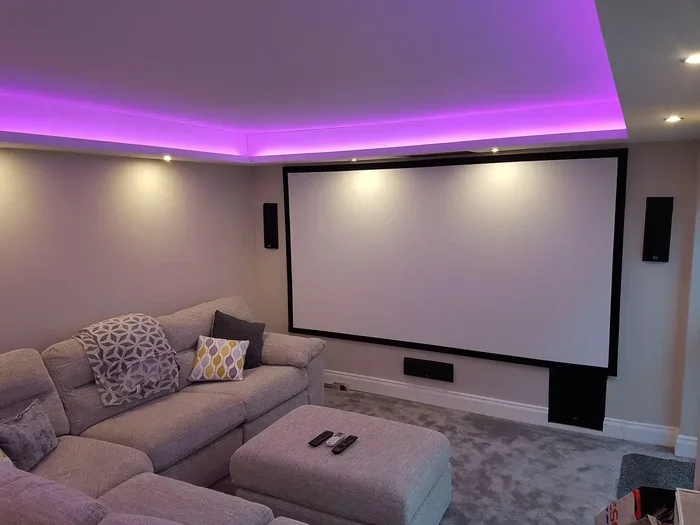
Fixed frame screens are the most popular choice for dedicated home theaters. They mount flush against the wall and remain permanently in place. These screens offer a perfectly flat surface that delivers consistent image quality across the entire display.
Because they don’t roll up or fold, fixed frame screens eliminate wrinkles and creases. This means you get a smooth, uniform picture every time. They also tend to have better tensioning, which keeps the surface taut and distortion-free. If you’re building a serious home cinema, a fixed frame screen is hard to beat.
Retractable and Motorized Screens
Retractable screens roll up into a casing when not in use. They’re perfect for rooms that serve multiple purposes, like a living room or basement. You can lower the screen when it’s movie time and roll it back up when you need the wall for something else.
Motorized screens take convenience one step further. With a remote control or smart home integration, you can raise and lower the screen with the push of a button. They look sleek and modern, and they save you the hassle of unrolling a manual screen every time. If you want a clean, minimalist look in your home theater, a motorized retractable screen is a great option.
Portable and Foldable Screens
Portable screens are lightweight and easy to set up anywhere. They’re ideal for people who want flexibility or who don’t have a dedicated theater room. You can move a portable screen from the living room to the backyard for an outdoor movie night.
However, portable screens don’t always deliver the same image quality as fixed or retractable options. They can have slight wrinkles or uneven surfaces. They work well for casual viewing but may not satisfy serious home theater enthusiasts.
Screen Size and Aspect Ratio
Getting the right screen size is one of the most important decisions you’ll make. Too small, and you lose the immersive feel. Too large, and the image can look pixelated or washed out. The key is finding the right balance for your specific setup.
A good rule of thumb is to sit about 1.5 to 2 times the diagonal screen size away from the display. So if you have a 100-inch screen, your seating should be roughly 150 to 200 inches (about 12 to 16 feet) away. This range provides a comfortable viewing experience without straining your eyes.
Understanding Aspect Ratios
Aspect ratio describes the shape of your screen. The most common ratios are 16:9, 2.35:1, and 4:3. Each one suits different types of content.
The 16:9 ratio is the standard for most modern TVs and streaming content. It works great for everyday movies, TV shows, and gaming. If you watch a lot of broadcast content or use streaming services, a 16:9 screen is a safe and versatile choice.
The 2.35:1 ratio, often called CinemaScope, mimics the widescreen format used in commercial theaters. It’s perfect for movie lovers who want that true cinema feel at home. However, this ratio shows black bars at the top and bottom of the screen when watching standard 16:9 content.
The 4:3 ratio is older and less common today. You might encounter it if you watch classic films or certain educational content. Most modern projectors and screens focus on 16:9 or 2.35:1 formats.
How to Calculate Your Ideal Screen Size
Calculating your ideal screen size is easier than it sounds. Start with your throw distance, then use your projector’s throw ratio to determine the maximum image width. From there, choose a screen size that fits comfortably within that width while matching your preferred aspect ratio.
Many online calculators can do this math for you. Just enter your throw distance and projector model, and the calculator gives you the recommended screen size. This takes the guesswork out of the process and ensures you get the best possible fit.
Screen Materials and Gain
The material of your screen has a huge impact on image quality. Different materials reflect light differently, which affects brightness, color accuracy, and viewing angles. Understanding screen materials helps you choose one that works best in your specific environment.
What Is Screen Gain?
Screen gain measures how much light the screen reflects back to the viewer. A screen with a gain of 1.0 reflects light exactly as it hits the surface. A gain above 1.0 reflects more light, making the image appear brighter. A gain below 1.0 absorbs some light, which can improve contrast in bright rooms.
Higher gain screens can make your image look brighter, but they often narrow the viewing angle. This means people sitting off to the sides might see a dimmer or distorted image. Lower gain screens offer wider viewing angles but may not be bright enough in rooms with lots of ambient light.
Common Screen Materials
White screens are the most versatile option. They work well in dark rooms and provide accurate color reproduction. If your home theater has controlled lighting, a standard white screen is a solid choice.
Gray screens are designed for rooms with some ambient light. They absorb more light than white screens, which improves contrast and deepens blacks. If your living room has windows or other light sources, a gray screen can help maintain picture quality.
High-contrast screens use special coatings to enhance the difference between bright and dark areas of the image. They’re excellent for rooms where you can’t fully control lighting. These screens make colors pop and details stand out, even in less-than-ideal conditions.
Ambient Light Rejecting Screens
Ambient light rejecting screens, often called AR screens, are designed to reject light from sources other than the projector. They use specialized surfaces that reflect the projector’s light directly back to the viewer while absorbing light from room lamps, windows, and other sources.
AR screens are a game-changer for bright rooms. They allow you to enjoy a crisp, vibrant image even during daytime viewing. However, they tend to be more expensive than standard screens. If you can’t control the lighting in your room, an AR screen is worth the investment.
Projector Placement and Screen Positioning
Where you place your projector directly affects your screen choice. The projector’s position determines the throw distance, image size, and overall setup layout. Getting this right ensures your screen and projector work together seamlessly.
Front projection is the most common setup. The projector sits in front of the screen, facing it. This works well in most rooms and offers the widest range of screen options. Just make sure the projector has enough distance to project your desired screen size.
Rear projection places the projector behind the screen, facing the viewer. This setup keeps the projector hidden and creates a clean, minimalist look. However, it requires more space behind the screen and a special translucent screen material. Rear projection works well in dedicated home theaters where space isn’t a constraint.
Ceiling vs. Wall Mounting
Ceiling mounting your projector keeps it out of the way and creates a more immersive experience. The projector sits directly above the screen, projecting downward. This setup works best for fixed installations and dedicated theater rooms.
Wall mounting is simpler and works well for temporary or flexible setups. You can place the projector on a shelf or table in front of the screen. This option is more affordable and easier to adjust if you need to change the setup later.
If you’re considering a ceiling mount, make sure your ceiling height allows for proper throw distance. A projector mounted too high or too low can cause keystone distortion or reduce image quality. Always check your projector’s mounting specifications before installing.
Common Mistakes to Avoid When Choosing a Projector Screen
Even with the best intentions, many people make avoidable mistakes when selecting a projector screen. Steering clear of these pitfalls saves you time, money, and disappointment.
- Buying a screen that’s too large for the room. An oversized screen in a small room looks blurry and feels overwhelming. Always measure your space first.
- Ignoring ambient light. If your room has windows or bright lamps, a standard white screen will wash out. Choose a material designed for your lighting conditions.
- Matching aspect ratio to the wrong content. A 2.35:1 screen looks great for movies but adds black bars to TV shows and gaming content. Pick the ratio that matches what you watch most.
- Skipping the gain rating. Gain affects brightness and viewing angles. A screen with the wrong gain can make your projector look weaker than it is.
- Forgetting about screen tensioning. Wrinkled or sagging screens distort the image. Fixed frame and high-quality retractable screens maintain a smooth surface.
- Not considering the projector’s native resolution. A 4K projector needs a high-quality screen material to display its full potential. Cheap screens can soften the image.
Take your time and avoid rushing the decision. The best projector screen is the one that matches your specific room, projector, and viewing habits.
Expert Tips for Getting the Most Out of Your Projector Screen
Once you’ve chosen your screen, a few extra steps can elevate your experience even further. These tips come from home theater enthusiasts and industry professionals.
First, paint your walls a dark color. Dark walls absorb light and reduce glare, which helps your screen look its best. A matte dark gray or navy blue works well for most home theaters.
Second, manage your lighting carefully. Use blackout curtains or blinds to block outside light during movie sessions. If you need some ambient light, position lamps behind the seating area so they don’t shine directly on the screen.
Third, calibrate your projector after installation. Most projectors come with basic settings that aren’t optimized for your specific screen. Adjusting brightness, contrast, and color settings can make a dramatic difference in picture quality.
Finally, consider your projector’s throw ratio carefully. A short-throw projector can create a large image from a short distance, which is perfect for smaller rooms. A standard-throw projector needs more space but offers flexibility in placement. Matching your projector type to your room layout ensures the best possible result.
Can You Use a Projector As a TV?
Many people wonder whether a projector can replace a TV entirely. The answer is yes, with the right setup. A projector paired with a quality screen can deliver a larger, more immersive image than most TVs. You can even use streaming devices like a fire stick with your projector for smart features. However, projectors work best in darker environments, so consider your room’s lighting before making the switch.
If you’re thinking about replacing your TV with a projector, make sure you choose a screen that complements the setup. A screen with the right gain and material will make the projector look its best. And don’t forget to factor in the projector’s placement and throw distance for the ideal image size.
Final Thoughts
Choosing a projector screen for your home theater is a rewarding process when you know what to look for. The right screen transforms your living room into a cinematic space where every movie night feels special. From screen size and material to aspect ratio and placement, each factor plays a vital role in delivering the best possible image.
Take the time to measure your room, understand your projector’s capabilities, and consider your viewing habits. Whether you go with a fixed frame screen, a motorized retractable option, or a portable foldable screen, the key is matching the screen to your unique setup. With the right choice, you’ll enjoy a home theater experience that rivals any commercial cinema.
Start with the basics covered in this guide, and don’t be afraid to experiment until you find the perfect setup. Your home theater is your space, and the right projector screen makes it truly yours. Happy viewing, and enjoy the show.
Frequently Asked Questions
What size projector screen do I need for my home theater?
The right screen size depends on your room dimensions and viewing distance. A general rule is to sit 1.5 to 2 times the diagonal screen size away from the display. Measure your room first, then use your projector’s throw ratio to calculate the ideal size for your space.
What is the best screen material for a bright room?
Gray screens and ambient light rejecting (AR) screens work best in bright rooms. They absorb excess light and improve contrast, which keeps your image looking sharp even with windows or lamps nearby. If you can’t control the lighting, invest in a screen designed for brighter environments.
Should I choose a fixed frame or retractable screen?
Fixed frame screens offer the best image quality and are ideal for dedicated home theaters. Retractable screens are better for multi-purpose rooms where you need to store the screen when not in use. Choose based on how you use the space and whether you want a permanent or flexible setup.
Can I use a projector screen outdoors?
Yes, you can use a portable projector screen outdoors for movie nights or presentations. Look for screens with a sturdy frame and weather-resistant material. Keep in mind that outdoor viewing works best at dusk or in shaded areas where ambient light is minimal.
Does screen gain really matter?
Yes, screen gain directly affects brightness and viewing angles. A higher gain screen makes the image brighter but narrows the viewing area. A lower gain screen offers wider viewing angles but may not be bright enough in well-lit rooms. Match the gain to your room’s lighting conditions for the best results.
How do I know if my projector is compatible with my chosen screen?
Check your projector’s throw ratio and native resolution before buying a screen. The throw ratio determines how large the image will be at your specific distance. The resolution should match or exceed the screen size to ensure a sharp, clear picture. Most projector manuals list these specifications clearly.