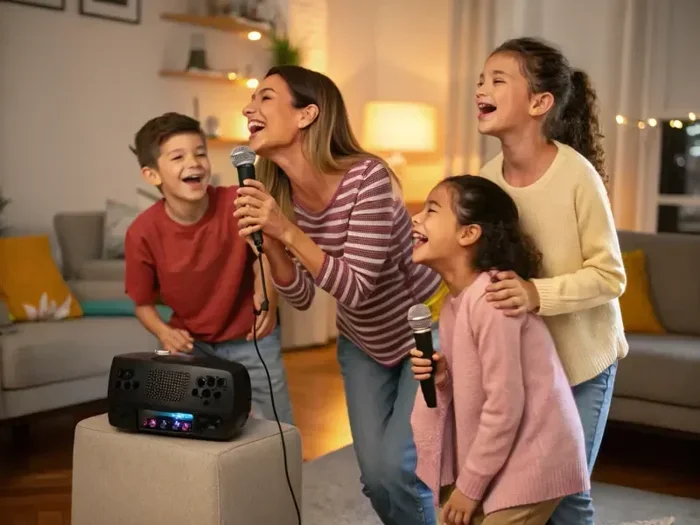
How Do I Choose A Karaoke Machine For The Best Experience
Choosing the right karaoke machine means balancing sound quality, connectivity, and ease of use. This guide helps you pick the perfect karaoke machine for your space, whether you need a portable option or a full home setup. You’ll learn what features matter most and how to avoid common pitfalls.
If you’ve ever dreamed of hosting the perfect karaoke night, the first step is picking the right karaoke machine. The market is packed with options, from compact Bluetooth boxes to full-featured systems with screens. This guide breaks down everything you need to know to make a confident choice.
A great karaoke setup isn’t just about the machine itself. You also need to think about speakers, microphones, and how you’ll display lyrics. Whether you’re planning a backyard party or a quiet night in, the right equipment makes all the difference.
In the sections below, I’ll walk you through the key features, compare different types, and share practical tips. By the end, you’ll know exactly how to choose a karaoke machine that fits your needs and budget.
Key Takeaways
- Match the machine to your space: Portable units suit small rooms, while all-in-one systems work best for dedicated karaoke rooms.
- Prioritize sound quality: Look for built-in speakers with enough wattage or plan to use external speakers via Bluetooth or HDMI.
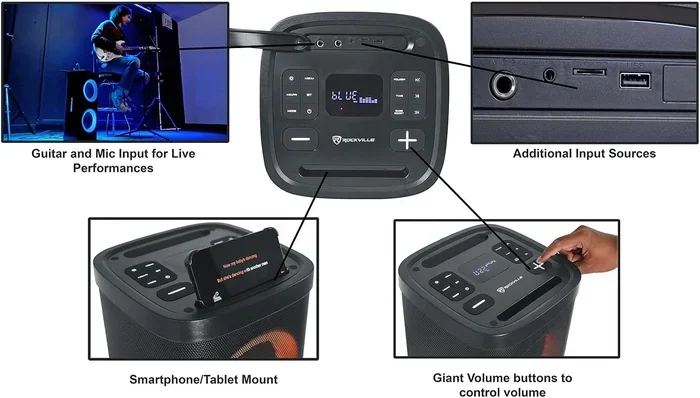
- Check connectivity options: HDMI, USB, Bluetooth, and microphone inputs determine what you can connect.
- Consider the display: A screen that shows lyrics clearly makes a huge difference for karaoke video playback.
- Don’t forget the microphone: A quality microphone with echo and reverb controls enhances the karaoke experience.
- Think about portability: If you move the machine often, a battery-powered option gives you portable karaoke freedom.
- Set a budget: Entry-level machines under $100 can still deliver great fun for karaoke with friends.
📑 Table of Contents
How Do I Choose A Karaoke Machine?
Choosing a karaoke machine can feel overwhelming at first. There are so many brands, shapes, and price points. But if you focus on a few core areas, the decision becomes much simpler. The goal is to find a machine that delivers clear sound, easy controls, and the right connections for your setup.
What to Look for in a Karaoke Machine
Before you dive into specific models, understand what really matters. Here are the key factors to weigh:
- Sound output: Check the wattage of built-in speakers. Higher wattage means louder, cleaner sound for larger rooms.
- Microphone inputs: Most machines support one or two microphones. Some offer wireless options, while others use wired mics.
- Connectivity: Look for Bluetooth, HDMI, USB, and auxiliary inputs. These determine what you can pair with the machine.
- Display: A built-in screen shows lyrics. Some machines use a phone app instead, which can work but adds another device to manage.
- Portability: If you plan to move the machine around, look for lightweight designs with handles or battery power.
- Price: Entry-level machines start around $50. Mid-range options sit between $100 and $300. Professional setups can go well above $500.
Sound Quality and Speaker Power
Sound quality is the heart of any karaoke experience. A machine with weak speakers will leave your guests straining to hear the lyrics. Look for a system with at least 10 to 20 watts for small to medium rooms. For larger gatherings, 30 watts or more is better.
If the built-in speakers aren’t strong enough, you can always connect external speakers. In fact, if you don’t want to buy a separate amplifier, you can simply use a Bluetooth speaker to amplify your voice and get decent volume. Just make sure the speaker has a good frequency range to handle vocals clearly.
Connectivity Options
Connectivity determines how flexible your setup can be. Modern karaoke machines offer a mix of wired and wireless options. Here’s what to look for:
- Bluetooth: Lets you pair wireless microphones or speakers. Great for quick setups without cables.
- HDMI: Sends high-definition video to a TV or projector. Essential if you want to display lyrics on a big screen.
- USB: Useful for loading music files or updating the machine’s software.
- Auxiliary input: A simple 3.5mm jack works with almost any speaker or audio system.
For the simplest setup, you can use HDMI for video and Bluetooth for audio to send lyrics to your TV while keeping the sound wireless. This combination gives you a clean, cable-free experience that most people love.
Screen and Display
A built-in screen makes the karaoke machine feel complete. You don’t need to fuss with a separate monitor or tablet. Screens typically range from 7 to 15 inches. Larger screens are easier to read from across the room, but they also make the machine heavier.
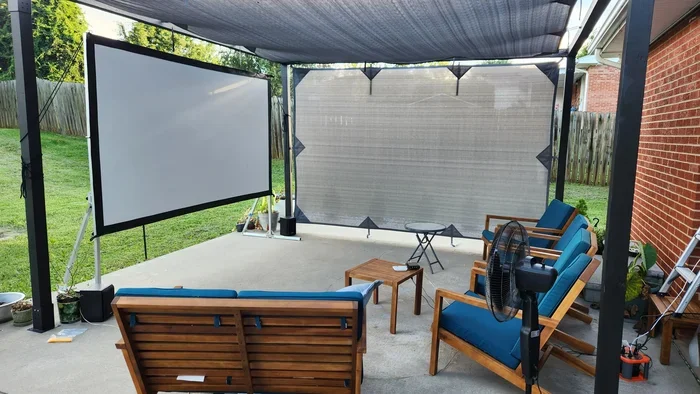
If you prefer a more immersive setup, you can connect the machine to a TV or projector. The machine sends the video signal, and the lyrics fill the big screen. This approach works especially well for karaoke nights where you want a cinematic feel.
Microphone Quality
The microphone is just as important as the machine itself. A cheap mic can make even a great singer sound muddy. Look for microphones with built-in echo and reverb controls. These effects help blend the voice with the music and hide minor pitch issues.
Wireless microphones offer freedom of movement, which is perfect for performers who like to dance. However, they need batteries and can sometimes experience interference. Wired microphones are more reliable but limit your stage presence. Choose based on who will be using the setup most often.
Types of Karaoke Machines
Not all karaoke machines are the same. They fall into a few distinct categories, each with its own strengths. Understanding these types helps you narrow down your choices.
All-in-One Systems
All-in-one systems include everything you need in one box: a screen, speakers, microphone inputs, and a music library. They are the easiest option for beginners. You plug the machine into a power outlet, turn it on, and start singing.
These systems often come with hundreds or even thousands of built-in songs. Some allow you to download additional tracks through an app. They are perfect for dedicated karaoke rooms or families who plan to use the machine regularly.
Portable Bluetooth Karaoke
Portable karaoke machines are compact and battery-powered. They weigh just a few pounds and can fit in a backpack. These units are ideal for picnics, camping trips, or small apartment gatherings.
Most portable machines rely on Bluetooth to stream music from a phone or tablet. They usually have a small built-in screen or connect to a phone for lyrics. While they lack the power of full-size systems, they deliver surprisingly good sound for their size.
PC and App-Based Setups
Some people prefer to build a karaoke system around a laptop or desktop computer. You use karaoke software or apps, connect a microphone, and output audio through your computer’s speakers or a separate sound system. This approach gives you access to massive online song libraries.
The downside is that it requires more setup and a reliable computer. If you already have a good sound system, though, this can be a very flexible and cost-effective way to get into karaoke.
| Type | Best For | Pros | Cons |
|---|---|---|---|
| All-in-One | Dedicated rooms, families | Everything included, easy to use | Heavier, higher price |
| Portable Bluetooth | Travel, small spaces | Lightweight, battery-powered | Smaller speakers, fewer inputs |
| PC/App-Based | Tech-savvy users, large libraries | Huge song selection, flexible | Requires a computer, more setup |
Setting Up Your Karaoke System
Once you have your machine, the setup process is straightforward. A good setup ensures everyone can sing comfortably and the sound fills the room without distortion.
Connecting to a TV
Most modern karaoke machines have an HDMI output. Simply connect an HDMI cable from the machine to your TV. The TV will display the lyrics while the machine handles the audio. If your machine has only VGA or composite outputs, you can use an adapter. For example, you can convert VGA to HDMI if needed, though many newer machines skip VGA entirely.
Make sure your TV is set to the correct input source. If you have trouble with the picture, check the cable connections and try a different port. A stable connection keeps the lyrics scrolling smoothly, which is essential for a fun karaoke experience.
Using Wireless Speakers
If your machine supports Bluetooth, pairing a wireless speaker is quick. Turn on the speaker, put it in pairing mode, and select it from the machine’s Bluetooth menu. The audio streams directly to the speaker, giving you more flexibility in where you place the equipment.
On a budget, you can also turn your phone into a Bluetooth speaker using apps that work in the background. This trick is handy when you need extra volume on the fly and don’t have a dedicated speaker with you.
Common Mistakes to Avoid
Even experienced karaoke hosts make a few slip-ups. Steering clear of these common errors saves time and frustration.
Ignoring Room Acoustics
A bare room with hard walls can create echo and feedback. If possible, set up your machine in a space with some soft furnishings like carpets, curtains, or cushions. These absorb excess sound and make vocals clearer. A small room acoustic adjustment can transform a muddy sound into a crisp, enjoyable performance.
Overlooking Microphone Quality
It’s tempting to grab the cheapest microphone included with a budget machine. But a poor mic can ruin the night. Invest in a decent wireless microphone with adjustable echo. Your guests will notice the difference immediately, and singers will feel more confident.
Skipping the Test Run
Never set up your machine for the first time right before guests arrive. Do a full test at home. Check the volume, the lyric sync, and the microphone feedback. This quick step prevents awkward delays and keeps the party flowing smoothly.
Expert Tips for the Best Karaoke Experience
A great karaoke night is about more than just the machine. A few extra touches make the event memorable.
Testing Before You Buy
If you can, visit a store and listen to a demo unit. Pay attention to how the machine handles high notes and bass. Ask the salesperson about return policies in case the sound doesn’t meet your expectations. Many online retailers also have generous return windows, so you can test at home risk-free.
Building a Karaoke Playlist
Before the party, curate a playlist that suits your crowd. Mix popular hits with a few crowd-pleasers from different decades. Include songs in various languages if your group is diverse. A well-thought-out playlist keeps the energy high and ensures everyone gets a turn.
Also, check that your machine supports the file formats you plan to use. Most accept MP3 and MP4, but some work best with specific formats. Having your songs ready in advance avoids last-minute scrambling.
Adding Fun Extras
Consider adding simple extras like a disco light or a themed backdrop. These small touches create a party atmosphere without adding complexity. A festive environment encourages even shy guests to grab the microphone and sing.
Conclusion
Choosing the right karaoke machine doesn’t have to be complicated. Focus on sound quality, connectivity, and ease of use. Decide whether an all-in-one system, a portable unit, or a PC-based setup fits your lifestyle. Avoid common pitfalls like poor room acoustics and cheap microphones. With the right setup, you’ll create countless memorable nights for friends and family.
Start by setting a realistic budget, then prioritize the features that matter most to you. Whether you’re hosting a quiet evening or a big celebration, the perfect karaoke machine is out there waiting for you. Grab the mic, press play, and let the good times roll.
Frequently Asked Questions
What features should I prioritize in a karaoke machine?
Focus on sound quality, microphone inputs, and connectivity options like Bluetooth and HDMI. A clear display and adjustable echo controls also make a big difference for beginners.
Can I use a karaoke machine without a built-in screen?
Yes. Many machines connect to a TV or projector via HDMI, or you can use a phone app to display lyrics. This works well for portable setups and larger rooms.
How many microphones do I need for a karaoke party?
Two microphones are ideal for most groups. They allow duets and friendly competitions. Some machines support more, but two is a good starting point for home use.
Is Bluetooth karaoke reliable for live singing?
Bluetooth works well for streaming music, but wireless microphones can sometimes experience slight delays. For critical live performances, wired microphones or a machine with low-latency wireless tech is safer.
What is the best budget karaoke machine for beginners?
Look for an all-in-one unit under $100 that includes a basic microphone and a decent speaker. Portable Bluetooth models in this range often deliver surprisingly good sound for casual use.
Can I connect my karaoke machine to a home theater system?
Absolutely. Most machines have an auxiliary output or HDMI. You can run the audio to your home theater receiver for richer, room-filling sound during your next karaoke night.