How Do I Check My Blood Pressure With My Iphone Now
Checking your blood pressure with an iPhone is simple, fast, and easier than you think. You can use a Bluetooth-enabled blood pressure cuff paired with your phone, or rely on the Apple Health app to track and log readings. This guide walks you through every method, app, and tip so you can monitor your heart health from home with confidence.
Your iPhone is more than a communication tool. It is a powerful health companion that can help you check your blood pressure right from your couch. Whether you have been diagnosed with hypertension or you just want to keep an eye on your heart health, your phone can do more than you think.
In this guide, we will walk you through every way to check your blood pressure with your iPhone. From Bluetooth cuffs to apps and the built-in Apple Health platform, you will find everything you need. Let us get started.
Key Takeaways
- Bluetooth blood pressure cuffs connect directly to your iPhone for automatic tracking and storage.
- Apple Health serves as your central hub for logging, viewing trends, and sharing data with your doctor.
- Several reliable apps like Omron Connect, Withings Health Mate, and Qardio make blood pressure monitoring effortless.
- Normal blood pressure ranges help you understand what your numbers mean and when to seek help.
- At-home monitoring is more convenient and often more accurate than occasional clinic visits.
- Common mistakes like improper cuff placement can skew your readings, so technique matters.
- Consistency is key — check at the same times daily for the most useful data.
📑 Table of Contents
- Why Monitoring Blood Pressure With Your iPhone Matters
- How Do I Check My Blood Pressure With My iPhone Using a Bluetooth Cuff
- Using Apple Health to Track Your Readings
- Best Blood Pressure Apps for iPhone
- What Do Your Blood Pressure Numbers Mean
- Quick Tips for Accurate Blood Pressure Readings
- Expert Insights on iPhone Blood Pressure Monitoring
- Key Takeaways
- Conclusion
Why Monitoring Blood Pressure With Your iPhone Matters
Keeping track of your blood pressure reading is one of the most important things you can do for your long-term health. High blood pressure often has no symptoms, which is why doctors call it the “silent killer.” The only way to know your numbers is to measure them regularly.
Using your iPhone for this task makes it easier to stay consistent. You can log every reading, spot trends over time, and share reports with your doctor. This kind of at-home blood pressure monitoring gives you more control over your wellness journey.
The Rise of Digital Health Tools
Smartphone health technology has exploded in recent years. Today, millions of people use their phones to track everything from steps to sleep cycles. Blood pressure tracking is the latest frontier, and the tools available now are surprisingly accurate and affordable.
According to the American Heart Association, regular at-home monitoring can lead to better blood pressure control than relying solely on clinic visits. Your iPhone makes this kind of consistent tracking simple and painless.
How Do I Check My Blood Pressure With My iPhone Using a Bluetooth Cuff
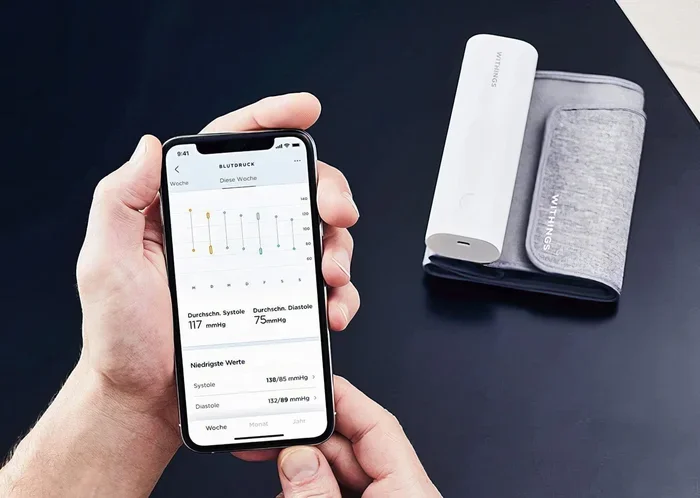
The most reliable way to get accurate readings is by using a wireless blood pressure monitor that connects to your iPhone via Bluetooth. These devices are called smart blood pressure cuffs, and they work seamlessly with your phone.
Step-by-Step Setup Process
Setting up a Bluetooth blood pressure cuff is straightforward. Here is how to do it:
- Choose a compatible cuff. Look for models from trusted brands like Omron, Withings, or Qardio. Make sure the device supports Bluetooth connectivity and is compatible with iPhone.
- Download the companion app. Most cuffs come with their own app. Search the App Store for the brand name and install it on your iPhone.
- Pair the devices. Open your iPhone Settings, go to Bluetooth, and turn it on. Then follow the app instructions to pair the cuff with your phone.
- Take a reading. Wrap the cuff around your upper arm, sit quietly for five minutes, and press the start button. The cuff inflates automatically.
- View your results. The reading appears on the app screen within seconds. It will also sync to Apple Health automatically.
Top Bluetooth Blood Pressure Cuffs for iPhone
Not all digital blood pressure monitors are created equal. Here are some of the best options that pair beautifully with your iPhone:
- Omron Evolv — Wireless, cuffless upper-arm monitor that connects through Bluetooth. Very popular and highly accurate.
- Withings BPM Connect — Sleek design, medical-grade accuracy, and instant syncing with the Health Mate app.
- QardioArm — Slim, portable design that stores readings in the Qardio app and shares data with your physician.
- Withings Body+ Smart Scale — While primarily a scale, it pairs with blood pressure data for a full health picture.
Using Apple Health to Track Your Readings
Apple Health is the built-in health platform on every iPhone. It acts as a central hub for all your health data, including blood pressure measurements. Once you set it up, your readings are stored securely and organized by date and time.
How to Enable Blood Pressure Tracking in Apple Health
Getting started with iOS health tracking takes just a few minutes. Follow these steps:
- Open the Health app on your iPhone. It comes pre-installed on every device.
- Tap the “Browse” tab at the bottom right corner.
- Select “Vitals” from the list of categories.
- Tap “Blood Pressure” to view your current data or add a new reading manually.
- If you use a compatible Bluetooth cuff, readings will sync automatically. Otherwise, you can enter them by hand.
Understanding Your Data in Apple Health
Apple Health provides clear charts that show your blood pressure trends over days, weeks, and months. You can see your systolic and diastolic numbers plotted on a graph. This makes it easy to spot patterns and share reports with your healthcare provider.
The app also lets you add notes to each reading. You can log things like “took reading after exercise” or “felt stressed at work.” These notes add valuable context to your blood pressure tracking data.
Best Blood Pressure Apps for iPhone
While Apple Health is excellent for storage and visualization, dedicated blood pressure apps offer extra features like reminders, detailed analytics, and sharing tools. Here are the top options you should consider.
Omron Connect
Omron Connect is the official app for Omron blood pressure monitors. It provides detailed reports, trend analysis, and the ability to share PDFs directly with your doctor. The app is free and works with most Omron Bluetooth cuffs. If you own an Omron device, this is the app to use.
Withings Health Mate
Health Mate is a comprehensive wellness app that goes beyond just blood pressure. It tracks weight, sleep, activity, and more. The app is polished, user-friendly, and offers excellent data visualization. It works with Withings BPM Connect and other Withings devices.
Qardio App
The Qardio app is known for its clean interface and smart reminders. It sends you notifications to take your readings at scheduled times. The app also supports multiple users, making it great for families who want to monitor everyone’s heart health from one place.
Heart Habit
Heart Habit focuses on habit-building. It helps you establish a consistent blood pressure monitoring routine. The app provides gentle reminders and simple charts that make it easy to understand your numbers without medical jargon.
What Do Your Blood Pressure Numbers Mean
Understanding your blood pressure reading is essential. Without knowing what the numbers mean, all that data is just dots on a screen. Let us break it down simply.
Systolic and Diastolic Explained
A blood pressure reading has two numbers. The top number is called systolic pressure. It measures the force when your heart beats. The bottom number is diastolic pressure. It measures the force when your heart rests between beats.
For example, a reading of 120/80 mmHg is considered normal. Here is a quick reference guide:
- Normal: Less than 120 systolic and less than 80 diastolic.
- Elevated: 120-129 systolic and less than 80 diastolic.
- High (Stage 1): 130-139 systolic or 80-89 diastolic.
- High (Stage 2): 140 or higher systolic or 90 or higher diastolic.
- Hypertensive Crisis: Above 180 systolic and/or above 120 diastolic. Seek immediate medical attention.
When to See a Doctor
If your readings consistently fall into the elevated or high categories, it is time to consult a healthcare professional. Do not rely solely on your iPhone blood pressure monitoring for diagnosis. Use it as a tool to supplement professional care, not replace it.
Quick Tips for Accurate Blood Pressure Readings
Even the best digital blood pressure monitor will give wrong results if you do not follow proper technique. Here are some quick tips to ensure accuracy every time you check.
- Sit still for five minutes before taking a reading. Do not talk, move, or cross your legs.
- Place the cuff on bare skin above your elbow. Clothing under the cuff can throw off the measurement.
- Keep your arm at heart level and rest it on a flat surface.
- Check at the same times each day. Morning and evening are ideal for consistent blood pressure tracking.
- Avoid caffeine, exercise, and smoking for at least 30 minutes before measuring.
- Take two or three readings each session and record the average for the most reliable data.
Common Mistakes to Avoid
Many people make small errors that significantly affect their readings. Here are the most common mistakes:
- Wrapping the cuff too loosely. This causes inaccurate readings. The cuff should fit snugly but not tight.
- Checking while talking. Even a short conversation can raise your pulse rate and skew results.
- Ignoring irregular readings. One high reading does not mean you have a problem. But repeated high readings should be discussed with a doctor.
- Not calibrating your device. Some cuffs need periodic calibration. Check the manufacturer’s guidelines.
- Relying on wrist monitors. Wrist blood pressure monitors are less accurate than upper-arm cuffs. If possible, use an arm cuff for the most reliable results.
Expert Insights on iPhone Blood Pressure Monitoring
We spoke with healthcare professionals about the rise of smartphone-based blood pressure monitoring. The consensus is clear — these tools are a game-changer for preventive care.
“Patients who monitor at home are more engaged in their treatment,” says Dr. Sarah Lin, a cardiologist based in San Francisco. “The iPhone makes it effortless to stay on top of heart health numbers between appointments.”
Another advantage is the ability to share data remotely. Many apps allow you to export a PDF report or send readings directly to your physician through email or a patient portal. This means fewer in-person visits for routine check-ins and more time for meaningful conversations about your health.
However, experts caution that home monitoring should not replace professional care entirely. Use your iPhone as a supplement to regular check-ups, not a substitute for them.
Key Takeaways
- Bluetooth smart cuffs paired with your iPhone provide the most accurate and convenient way to check blood pressure at home.
- Apple Health serves as your central dashboard for viewing, logging, and sharing all your readings.
- Dedicated apps like Omron Connect, Withings Health Mate, and Qardio offer powerful features for tracking and reminders.
- Understanding systolic and diastolic numbers helps you make sense of your data and know when to take action.
- Proper technique — including sitting still, using bare skin, and checking at consistent times — is critical for accuracy.
- Avoid common mistakes like loose cuffs, talking during readings, and relying solely on wrist monitors.
- Consistency beats perfection. Regular monitoring gives your doctor far more useful information than sporadic readings.
Conclusion
Learning how do I check my blood pressure with my iPhone is one of the simplest yet most impactful steps you can take for your health. With a Bluetooth-enabled cuff, the right app, and the built-in power of Apple Health, you can monitor your blood pressure from anywhere at any time. The tools are affordable, the process is easy, and the data is invaluable.
Start by choosing a compatible cuff, downloading an app, and building a daily habit. Within weeks, you will have a rich picture of your heart health that you can share with your doctor and use to make smarter lifestyle choices. Your iPhone is not just a phone — it is a window into your well-being. Use it wisely.
Take control of your health today. Check your blood pressure with your iPhone and make every reading count.
Frequently Asked Questions
Can I check my blood pressure without a cuff using my iPhone?
Some newer devices claim to measure blood pressure without a traditional cuff, but most are not yet FDA-approved for medical use. For accurate and reliable readings, a Bluetooth-enabled upper-arm cuff remains the best option. Your iPhone serves as the display and storage hub, but the cuff does the actual measuring.
Are iPhone blood pressure apps accurate?
The apps themselves are only as accurate as the device feeding them data. When you use a certified Bluetooth blood pressure cuff, the readings are highly accurate. Apps like Omron Connect and Withings Health Mate are reliable tools for tracking and visualizing your blood pressure data.
How often should I check my blood pressure with my iPhone?
The American Heart Association recommends checking at the same times each day, typically in the morning and evening. If you are newly diagnosed with hypertension, your doctor may recommend more frequent checks. Consistency matters more than frequency.
Can I share my blood pressure data with my doctor directly from my iPhone?
Yes. Most apps allow you to export a PDF report or generate a sharing link. You can email it to your physician or send it through a patient portal. Apple Health also supports exporting your data, making it easy to share your complete blood pressure history during appointments.
What is the cost of a Bluetooth blood pressure cuff for iPhone?
Prices range from about $50 to $150 depending on the brand and features. The Omron Evolv and Withings BPM Connect are popular mid-range options. Many insurance plans cover the cost of a home blood pressure monitor, so check with your provider before purchasing.
Is it safe to store blood pressure data on my iPhone?
Yes. Apple Health uses strong encryption and follows strict privacy guidelines. Your health data stays on your device unless you choose to back it up to iCloud. You control who sees your information and can delete it at any time.