How Can I Boost My Wifi Signal For Free Starting Today
You can significantly boost your wifi signal for free using simple router placement tricks, free software tools, and easy settings adjustments. These proven methods help you eliminate dead zones, improve wireless signal strength, and enjoy faster internet throughout your home. No expensive equipment or technical degree required.
Staring at a buffering screen is one of the most frustrating feelings in modern life. Your wifi signal drops in the bedroom, crawls in the living room, and basically disappears in the bathroom. Before you spend a single dollar on expensive equipment, there are plenty of ways to boost your wifi signal for free right now.
This guide walks you through every practical trick, setting adjustment, and placement hack that actually works. Whether you live in a small apartment or a large house, these free methods can transform your wireless connectivity overnight. Let us dive in and get your network running the way it should.
The truth is, most people never bother to optimize their home network. They set up their router once, forget about it, and wonder why their broadband performance suffers. A few simple changes can make a world of difference. You do not need to be a tech expert. You just need a few minutes and a willingness to experiment.
Key Takeaways
- Router Placement Matters: Moving your router to a central, elevated location can dramatically improve coverage.
- Free Software Helps: Tools like wifi analyzers let you find the least congested channel for better performance.
- DIY Hacks Work: Simple household items like aluminum foil or a tin can can extend your signal range.
- Settings Tweaks Add Up: Adjusting frequency bands and bandwidth settings can noticeably boost speed.
- Mesh Networks Scale Easily: Adding mesh nodes to your existing setup expands coverage without extra cost.
- Small Habits Make a Difference: Regular router reboots and firmware updates keep your network running smoothly.
📑 Table of Contents
Why Your Wifi Signal Might Be Weak
Understanding why your signal struggles is the first step toward fixing it. Several common factors weaken your wireless signal strength every single day. Let us look at the biggest culprits so you know what to tackle first.
Physical Obstacles In Your Home
Walls, floors, and furniture all block wifi signals. Thick concrete walls are the worst offenders. Even large mirrors and metal appliances can weaken your wireless connectivity significantly. If your router sits in a closet or behind a TV, the signal has to fight through multiple barriers before reaching your devices.
Water is another sneaky signal killer. Fish tanks, water pipes, and even indoor plants absorb wifi waves. This is why your signal often feels weaker in the kitchen or bathroom. Knowing where your signal gets blocked helps you decide where to move your router.
Interference From Other Devices
Many household devices operate on the same frequency as your wifi. Microwaves, baby monitors, cordless phones, and Bluetooth devices all create wifi interference. This is called channel congestion, and it slows down your network without you even realizing it.
Your neighbors wifi networks also contribute to the problem. If you live in an apartment building, dozens of routers compete for the same airspace. This congestion makes it harder for your signal to travel clearly. The good news is, you can fix this with free tools and simple adjustments.
Outdated Router Hardware
Older routers simply cannot keep up with modern demands. If your router is more than five years old, it likely lacks the latest network optimization features. Even so, you can still squeeze better performance out of older hardware through smart settings and placement.
Sometimes the router itself is the bottleneck. If you have tried everything else, changing out your router with Spectrum or your internet provider might be worth exploring. Many providers offer free router replacements when hardware is outdated. It never hurts to ask.
Router Placement Tips For Better Coverage
Where you place your router has a massive impact on your wifi coverage. A great router in a bad spot will always underperform. These free placement tips can boost your signal immediately.
Find The Center Of Your Home
Your router should sit as close to the center of your home as possible. This gives the signal equal distance to reach every room. Corner placement wastes signal by pushing it outside your walls instead of into your living space.
Think of your router like a speaker. If you put it in one corner of a room, only one area gets good sound. Moving it to the center spreads the coverage evenly. This one change alone can eliminate many wifi dead zones.
Elevate Your Router
Signal travels downward better than upward. Placing your router on a high shelf or mounting it on a wall dramatically improves coverage. Avoid putting it on the floor inside a cabinet or behind furniture.
A bookshelf or a tall piece of furniture works great. The goal is to get the router a few feet off the ground with nothing blocking it on any side. This simple adjustment improves wireless signal strength without any cost at all.
Keep It Away From Other Electronics
Your router should stay away from microwaves, cordless phone bases, and large metal objects. These items create interference that weakens your wireless connectivity. A clear space around the router lets the signal breathe and travel freely.
Try to maintain at least three feet of open space around the router on all sides. This might mean moving it to a different room or shelf. The improvement in broadband performance is often surprising.
Free Software And Settings Tweaks
Your router has built-in settings that control how your signal behaves. Tweaking these settings costs nothing and can deliver noticeable improvements. Here are the most effective free adjustments you can make right now.
Use A Free Wifi Analyzer App
Wifi analyzer apps show you which channels are crowded in your area. Most routers default to the same channel, which creates channel congestion when multiple networks overlap. A free app lets you see the full picture and pick the clearest channel.
Once you identify the least congested channel, log into your router settings and switch to it. The process is different for each router brand, but it usually takes less than five minutes. You can also get just wifi at home by separating your network from shared connections if you live in a multi-use building.
Switch Between 2.4Ghz And 5Ghz Bands
Most modern routers broadcast on two frequency bands. The 2.4ghz band travels farther but is slower and more crowded. The 5ghz band is faster but has a shorter range. Understanding which band to use for each device makes a big difference.
For devices far from the router, use the 2.4ghz band. For streaming and gaming close to the router, switch to 5ghz. Many routers let you name the two bands separately, so you can choose the right one for each device. This network optimization trick is completely free and takes just a few minutes.
Update Your Router Firmware
Router manufacturers release firmware updates that improve performance and fix bugs. These updates often include better signal boosting algorithms and bandwidth optimization features. Checking for updates takes a couple of minutes and costs nothing.
Log into your router admin panel and look for a firmware or update section. If an update is available, install it. Your router may restart once or twice during the process. Afterward, test your speed and you might notice an immediate improvement in internet speed test results.
Adjust Bandwidth And QoS Settings
Quality of Service (QoS) settings let you prioritize certain types of traffic. If you are streaming a movie, QoS can give your video stream priority over background downloads. This free feature ensures your most important activities get the bandwidth they need.
Look for QoS in your router settings under advanced or traffic management. Enable it and assign priorities to your devices or applications. This simple tweak can transform your wireless connectivity experience, especially in households with multiple users.
DIY Hardware Hacks To Boost Signal
You do not need to buy expensive equipment to improve your signal. Some of the most effective signal boosting methods use items you already have at home. These creative hacks cost zero dollars and work surprisingly well.
The Pringles Can Antenna Hack
A Pringles can (or any cylindrical tin) can focus your router signal in a specific direction. Cut a hole in the side of the can, slide your router antenna through it, and point the can toward the room that needs better coverage. This DIY wifi antenna reflector concentrates the signal and reduces waste.
This hack works best for single-direction boosting. If you need coverage in multiple rooms, you may need to adjust the can periodically. It is not a permanent solution, but it is a fantastic free trick for targeted coverage. People who try this hack often report stronger signals in previously weak areas.
Aluminum Foil Reflector
Wrapping aluminum foil around a piece of cardboard and placing it behind your router can reflect signal in the direction you need. This simple reflector redirects wireless signal strength toward dead zones instead of letting it spread uselessly behind the router.
Shape the foil into a curved reflector for best results. The curve focuses the signal like a satellite dish. Just make sure the foil does not touch the router or block any vents. This hack is safe, easy, and takes less than five minutes to set up.
Extend Your Network With Ethernet Cable
If your router is too far from certain areas, running an ethernet cable can help. You can connect a second router to the first one using a cable and extend your network coverage. This method provides a wired backbone that carries a strong signal to distant parts of your home.
Extending wifi with ethernet cable is one of the most reliable free methods available. You may already have an extra ethernet cable lying around. Even a long cable run through doorways and along baseboards can dramatically improve coverage in areas that currently struggle with weak signal.
Repurpose Old Routers As Signal Repeaters
If you have an old router sitting in a drawer, it can become a signal repeater. Most routers have a bridge or repeater mode that lets them extend an existing network. Place the old router halfway between your main router and the weak spot, and it will relay the signal.
This method costs nothing if you already own the second router. The setup process varies by brand, but most routers have a simple repeater mode in their settings. This is one of the most effective free ways to eliminate wifi dead zones in larger homes.
When To Consider A Mesh Network Setup
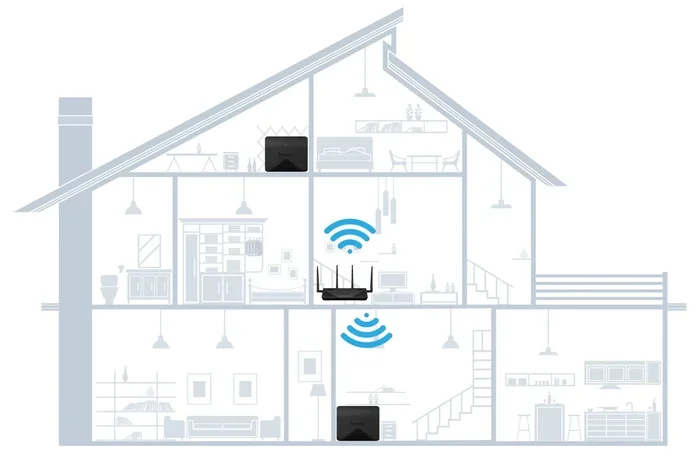
For larger homes or stubborn dead zones, a mesh network can be a game changer. Mesh systems use multiple nodes to create seamless wifi coverage throughout your home. While mesh systems can be pricey, you can sometimes add mesh nodes to an existing router setup for free or low cost.
If you already have a compatible router, adding mesh wifi to existing router might be an option you have not explored. Many modern routers support mesh functionality through a simple firmware update or app download. This lets you extend coverage without buying an entirely new system.
Mesh networks are especially helpful in homes with thick walls or multiple floors. The nodes communicate with each other to create a single strong network. Each node acts as a mini router, filling in the gaps your main router cannot reach. For many households, this is the difference between frustrating signal drops and reliable wireless connectivity everywhere.
Before investing in mesh hardware, check if your current router supports mesh features. Many internet providers now offer mesh-compatible equipment at no extra charge. Contact your provider or check your router settings to see if this option is available to you.
Quick Daily Habits That Improve Wifi Speed
Small daily habits keep your network running at its best. These routines take seconds but add up to significant signal boosting over time. Think of them as basic maintenance for your home network.
Reboot Your Router Regularly
Routers accumulate data and temporary files that slow them down over time. A simple reboot clears the memory and refreshes the connection. Many experts recommend restarting your router at least once a week for optimal network optimization.
You can set a schedule on a smart plug to reboot your router automatically. This removes the need to remember and ensures your wireless connectivity stays fresh. It is one of the easiest free habits you can build.
Keep Your Router Cool
Overheating slows down your router and weakens its signal. Make sure your router has plenty of ventilation and is not buried under papers or boxes. A cool router performs better and lasts longer.
If your router feels warm to the touch, consider moving it to a more open area. Some people place a small fan near their router during heavy use. This keeps temperatures down and maintains strong wireless signal strength.
Limit Unused Connected Devices
Every device connected to your network uses bandwidth, even when idle. Smart TVs, tablets, phones, and smart home devices all compete for your signal. Disconnecting devices you are not actively using frees up bandwidth for the devices that matter most.
Check your router settings to see a list of connected devices. Remove any you do not recognize or no longer use. This bandwidth optimization step is free and often overlooked. You may be surprised how many unused devices are quietly draining your network resources.
Run Regular Speed Tests
Speed tests help you track your broadband performance over time. If you notice a drop, you can troubleshoot before it becomes a bigger problem. Free tools like Speedtest.net make this process quick and easy.
Run a speed test in different rooms to identify weak spots. This data helps you decide where to apply your signal boosting techniques. Tracking results over time also tells you whether your changes are actually working.
Conclusion
Boosting your wifi signal for free is easier than most people think. You do not need expensive equipment or technical expertise. Simple changes like moving your router, adjusting settings, and using free software can transform your wireless connectivity in just minutes.
Start with router placement and a channel scan. Then try the DIY hacks and settings tweaks we covered. Each step builds on the last, and the improvements stack up quickly. Before long, you will enjoy stronger signal, faster speeds, and fewer dead zones throughout your home.
The best part is, none of these methods cost a single penny. You already have everything you need. Take action today and experience the difference that a well-optimized network makes. Your broadband performance will thank you.
Frequently Asked Questions
Can I really boost my wifi signal for free without buying any equipment?
Yes, absolutely. Most free methods focus on router placement, settings adjustments, and software tools that cost nothing. Simple changes like moving your router to a central location, switching wifi channels, and updating firmware can significantly improve your signal without spending a dime.
How long does it take to boost wifi signal using these free methods?
Most of these techniques take less than 30 minutes to implement. Router placement and firmware updates can be done in just a few minutes. The wifi analyzer channel scan takes about five minutes, and DIY hacks like the Pringles can reflector take even less time.
Will these free methods work for large homes with multiple floors?
These methods work well for small to medium homes. For larger homes with multiple floors, you may need to combine several techniques like proper router placement, ethernet cable extension, and repurposing an old router as a repeater. In very large homes, a mesh network setup may be the best long-term solution.
Why does my wifi signal get worse at certain times of day?
This is usually caused by channel congestion. When more neighbors are online, their networks compete for the same airspace, creating interference. Running a wifi analyzer at different times of day helps you identify the least congested channel to switch to.
Is it safe to use aluminum foil or household items to boost my wifi signal?
Yes, it is completely safe. Aluminum foil reflectors and similar DIY hacks simply redirect existing signal. They do not modify your router or create any safety risks. Just make sure the foil does not block vents or touch the router directly to avoid overheating.
How often should I reboot my router to maintain good signal strength?
Most experts recommend rebooting your router at least once a week. Regular reboots clear temporary data, refresh connections, and keep your network optimization running smoothly. Setting an automatic reboot schedule through a smart plug makes this habit effortless.