How Can I Boost My Wi Fi Signal When Traveling the World
Traveling with a weak Wi-Fi signal is frustrating, but you can fix it. This guide covers the best ways to boost your Wi-Fi signal when traveling the world, from portable Wi-Fi boosters and travel routers to simple phone settings that make a huge difference. You will learn actionable steps to improve signal strength in hotels, airports, and foreign countries so you can stream, work, and stay connected without headaches.
Nothing kills a travel vibe faster than a weak Wi-Fi signal. You are sitting in a cozy cafe in Paris or a hotel room in Tokyo, and your internet is slower than molasses. Whether you need to check emails, stream a movie, or video call family back home, a weak Wi-Fi signal can ruin your day.
The good news is that boosting your Wi-Fi signal while traveling is totally doable. You do not need to be a tech expert. With the right tools and a few simple tricks, you can get strong, reliable internet almost anywhere in the world. This guide walks you through everything you need to know about boosting your Wi-Fi signal when traveling.
From portable boosters and travel routers to phone settings and smart positioning, we cover all the bases. By the end of this article, you will have a clear game plan to stay connected on your next trip. Let us dive in.
Key Takeaways
- Use a portable Wi-Fi booster or travel router: These small devices amplify weak signals and extend your range in hotels and cafes.
- Turn your phone into a mobile hotspot: A smartphone hotspot is one of the easiest ways to get reliable internet anywhere.
- Update your device drivers and firmware: Old software can silently kill your signal strength and slow your connection.
- Position yourself wisely: Simple placement changes near windows or central areas can dramatically improve your Wi-Fi speed.
- Consider a cellular data plan for abroad: When Wi-Fi fails, a solid data plan keeps you online without relying on public networks.
📑 Table of Contents
- Why Your Wi-Fi Signal Gets Weak While Traveling
- Best Ways to Boost Your Wi-Fi Signal on the Road
- Portable Devices That Make a Big Difference
- How to Get Better Wi-Fi in Hotels and Airports
- Use Your Phone as a Wi-Fi Solution
- Common Mistakes That Kill Your Travel Wi-Fi Signal
- Quick Tips for Better Wi-Fi on the Go
- Final Thoughts
Why Your Wi-Fi Signal Gets Weak While Traveling
Understanding the problem is the first step to fixing it. When you travel, your Wi-Fi signal faces challenges that you never deal with at home. Walls, distance, crowded networks, and outdated equipment all play a role.
Here are the main reasons your signal drops when you are on the road:
- Thick hotel walls and old building materials: Concrete, brick, and metal block Wi-Fi waves and weaken your signal significantly.
- Too many users on one network: Hotels, airports, and cafes often share one router among dozens or hundreds of people.
- Long distance from the router: The farther you are from the router, the weaker your signal becomes.
- Outdated Wi-Fi standards: Older routers use older technology that cannot handle modern speeds.
- Interference from other devices: Microwaves, Bluetooth devices, and even other Wi-Fi networks can cause interference.
Once you know what is causing the problem, you can choose the right fix. Some solutions are free and take seconds. Others require a small investment in gear. Either way, you have options.
Best Ways to Boost Your Wi-Fi Signal on the Road
1. Use a Portable Wi-Fi Booster
A portable Wi-Fi booster is a small device you can carry in your backpack. It picks up weak signals and amplifies them so your devices get a stronger connection. These boosters are lightweight, affordable, and work in hotels, hostels, and cafes around the world.
Look for a booster that supports dual bands (2.4 GHz and 5 GHz). This gives you flexibility to connect on the frequency that works best in your location. Some popular travel-friendly options include USB-powered boosters that plug directly into your laptop.
2. Invest in a Travel Router
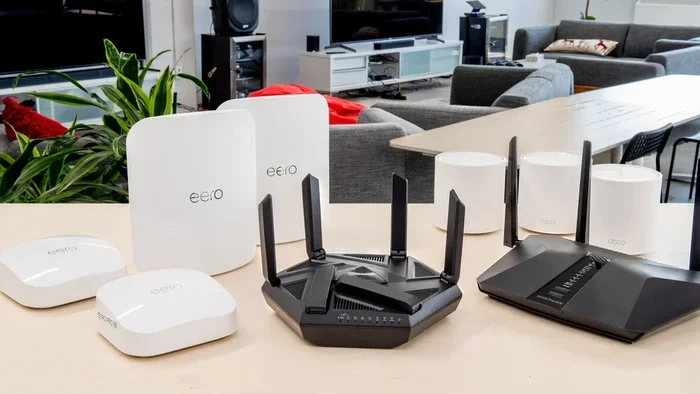
A travel router is a game-changer for frequent travelers. This tiny device creates your own private Wi-Fi network wherever you go. You plug it into the hotel Wi-Fi, and it rebroadcasts a stronger, more reliable signal to your devices.
Travel routers also let you connect multiple devices at once without sharing passwords or competing for bandwidth. Some models even include built-in signal amplifiers that boost weak hotel networks. They are small enough to fit in your pocket and can save you a lot of frustration.
3. Update Your Device Software
This one is easy to overlook but makes a big difference. Old network drivers and outdated firmware can seriously hurt your signal strength. Before every trip, make sure your laptop, phone, and tablet are running the latest software.
On Windows, go to Device Manager and check your network adapter settings. On Mac, keep your system updated through System Preferences. On phones, simply install the latest OS updates. These small updates often include improvements to wireless performance and bug fixes for connectivity issues.
4. Change Your Wi-Fi Channel
In crowded areas like airports or busy hotels, many networks compete for the same airspace. Switching to a less congested Wi-Fi channel can instantly improve your speed and stability.
Most modern devices auto-select channels, but you can manually change them in your router or adapter settings. Use a free Wi-Fi analyzer app on your phone to see which channels are least crowded. Then switch your device to that channel for a better experience.
Portable Devices That Make a Big Difference
Sometimes software fixes are not enough. You need physical gear to get a strong signal in challenging locations. Here are the best portable devices for travelers who need reliable internet.
| Device | Best For | Price Range |
|---|---|---|
| Portable Wi-Fi Booster | Amplifying weak hotel signals | $20 – $50 |
| Travel Router | Creating your own private network | $40 – $100 |
| Mobile Hotspot Device | Getting internet without Wi-Fi at all | $50 – $150 |
| USB Wi-Fi Adapter | Upgrading your laptop’s wireless card | $15 – $40 |
| Signal Repeater | Extending range in large spaces | $30 – $70 |
Each device serves a different purpose. A portable Wi-Fi booster works great when the signal exists but is too weak. A mobile hotspot device is ideal when there is no usable Wi-Fi at all. A travel router gives you control over your own network in unfamiliar places.
For travelers who want the simplest solution, a USB Wi-Fi adapter is a solid choice. It plugs into your laptop and gives you a better antenna than the built-in one. This alone can boost your signal strength by a noticeable margin.
How to Get Better Wi-Fi in Hotels and Airports
Choose the Right Room or Seat
Your location matters more than you think. In a hotel, ask for a room closer to the lobby or the elevator, where the router is usually placed. In airports, sit near the gate area where Wi-Fi access points are often stronger.
Avoid rooms at the far end of the building or suites tucked behind thick walls. Even moving your laptop closer to the window can improve signal strength. Walls and floors absorb Wi-Fi waves, so proximity is your friend.
Use a Wired Connection When Possible
Many hotels still offer Ethernet ports in the room. If you can connect via a cable, do it. Wired connections are always faster and more stable than wireless ones. You can also use an Ethernet-to-Wi-Fi bridge to share the wired connection with multiple devices.
If your laptop does not have an Ethernet port, you can easily connect using a USB-to-Ethernet adapter or a travel router that bridges wired to wireless connections. This setup gives you the best of both worlds.
Ask the Front Desk for the Best Network
Hotel staff often know which access points work best in different parts of the building. They might assign you to a less crowded network or tell you which floor has the strongest signal. This free tip can save you a lot of guesswork.
Use Your Phone as a Wi-Fi Solution
Your smartphone is one of the most powerful tools you have for staying connected while traveling. You can turn it into a mobile hotspot and share its internet connection with your laptop, tablet, or other devices.
To set up a hotspot, go to your phone’s settings and look for “Hotspot” or “Tethering.” Turn it on, set a password, and connect your other devices. This works anywhere you have cellular data coverage, which makes it incredibly reliable for travelers.
One thing to keep in mind is data usage. Streaming video and large downloads can eat through your data plan quickly. If you plan to use your phone as a hotspot often, consider upgrading to a plan with more data or adding a dedicated data package for your trip.
For travelers who want a dedicated hotspot without using their phone, a standalone mobile hotspot device is a great alternative. These devices use SIM cards just like phones but are designed specifically for sharing internet connections. They are compact, battery-powered, and can connect up to 10 or more devices at once.
If you want to use your phone hotspot for streaming or casting content to a TV, you can explore options like using your phone hotspot for devices like Chromecast. Check out our guide on using your phone hotspot for Chromecast for helpful tips.
When you are abroad and need internet access but do not want to rely on public Wi-Fi at all, you might consider getting a hotspot instead of Wi-Fi through a local carrier or an international data plan. This gives you full control over your connection quality and security.
Common Mistakes That Kill Your Travel Wi-Fi Signal
Avoid these common mistakes that travelers make, which silently destroy their Wi-Fi performance:
- Leaving your Wi-Fi on all the time: Your phone constantly searches for networks and drains battery while weakening your active connection. Turn off Wi-Fi when you are not using it.
- Ignoring airplane mode toggles: Switching airplane mode on and off forces your device to reconnect to the strongest available network. This simple trick can refresh a stuck connection.
- Using outdated network drivers: Old drivers cause compatibility issues and slow speeds. Update them before every trip.
- Connecting to the wrong band: 5 GHz is faster but has shorter range. 2.4 GHz is slower but reaches farther. Choose based on your distance from the router.
- Not restarting your device: A simple restart clears cached network issues and can fix mysterious connection problems on the spot.
These small habits add up over time. By avoiding these mistakes, you will notice a real improvement in your connection quality wherever you travel.
Quick Tips for Better Wi-Fi on the Go
- Restart your device before connecting: This clears old network data and forces a fresh connection to the strongest signal available.
- Download offline content before you go: Maps, movies, and documents saved locally mean you do not need Wi-Fi for everything.
- Use a VPN on public networks: Public Wi-Fi in hotels and cafes can be insecure. A VPN encrypts your data and keeps you safe.
- Carry a portable power bank: A dead phone means no hotspot. Keep your devices charged with a reliable power bank.
- Research Wi-Fi options at your destination: Some cities offer free public Wi-Fi in parks, transit stations, and city centers. Check before you arrive.
Final Thoughts
Boosting your Wi-Fi signal when traveling the world does not have to be complicated. With the right combination of portable gear, smart settings, and good habits, you can enjoy fast, reliable internet in almost any location. Whether you carry a travel router, use your phone as a hotspot, or simply position yourself closer to the router, small changes make a big impact.
The key is to plan ahead. Before your next trip, update your device software, research your destination’s internet options, and pack the right tools. A little preparation goes a long way toward staying connected and stress-free while exploring the world.
Remember that not every location will have perfect Wi-Fi. When all else fails, a mobile hotspot or a solid cellular data plan is your backup. Stay flexible, stay prepared, and you will never have to worry about a weak signal again.
Now you have everything you need to boost your Wi-Fi signal on your next adventure. Pack your bags, charge your devices, and get ready to stay connected no matter where the world takes you.
Frequently Asked Questions
Can I boost my Wi-Fi signal without buying any equipment?
Yes, you can. Simple free methods include moving closer to the router, switching to a less crowded Wi-Fi channel, restarting your device, and updating your network drivers. These steps often improve signal strength noticeably without spending a dime.
What is the best portable Wi-Fi booster for international travel?
Look for a dual-band portable booster that supports both 2.4 GHz and 5 GHz frequencies. Devices from brands like TP-Link and Netgear offer compact, travel-friendly options that work worldwide. Choose one that is USB-powered so you can use it with a power bank on the go.
Is it safe to use public Wi-Fi while traveling?
Public Wi-Fi can be risky because hackers can intercept your data on open networks. Always use a VPN to encrypt your connection, avoid accessing sensitive accounts, and turn off file sharing. These precautions keep you safe while using hotel and cafe Wi-Fi abroad.
How can I get internet in a hotel with no Wi-Fi?
If the hotel has no Wi-Fi, you can use your phone as a mobile hotspot with your cellular data plan. Alternatively, you can purchase a local SIM card or portable Wi-Fi device at your destination. Some travelers also carry a travel router that creates its own network using a wired connection.
Will a Wi-Fi booster work in every country?
Most portable Wi-Fi boosters and travel routers work worldwide because they operate on universal frequencies. However, always check the voltage and plug adapter requirements if your device needs to be plugged into a wall outlet. USB-powered devices are the most convenient for international use.
How do I add Wi-Fi to my laptop when traveling?
If your laptop lacks Wi-Fi capability, you can add it using a USB Wi-Fi adapter or by connecting through a travel router. These solutions are affordable and easy to set up. You can also use your phone as a hotspot to share its internet connection with your laptop wirelessly.