Can You Text Non Iphones On Wifi Yes And Here Is How
Yes, you can text non iPhones on Wi-Fi. Whether you want to send messages to an Android user or a Windows phone owner, Wi-Fi texting is possible through several methods. You can use third-party messaging apps, RCS chat features, or Wi-Fi calling to stay connected without a cellular network. This guide walks you through every option in simple steps.
Have you ever been in a spot with no cell signal but had Wi-Fi? Maybe you are at a coffee shop or visiting a friend with a weak reception area. You pick up your phone and wonder, can you text non iPhones on Wi-Fi? The short answer is yes. You absolutely can. And there are more ways to do it than you might think.
Texting used to mean SMS. That is the old-school green bubble text that goes through your carrier’s cellular network. But things have changed a lot. Today, you can send messages over Wi-Fi using internet-based services. This works whether the person on the other end has an Android, a Windows phone, or any other non-Apple device. You do not need a strong cell signal. You just need a Wi-Fi connection. In this guide, we will show you exactly how to make it happen.
Key Takeaways
- Wi-Fi texting works across platforms: You can send messages to non-iPhone users over a Wi-Fi connection using apps and built-in features.
- iMessage only works with Apple devices: The blue bubble experience is exclusive to iPhones, but alternatives exist for cross-platform communication.
- Third-party apps are the easiest solution: Apps like WhatsApp, Telegram, and Signal let you text any phone over Wi-Fi for free.
- RCS messaging is improving cross-platform support: Google Messages now supports RCS, bringing richer messaging to Android and even iPhone users.
- Wi-Fi calling is not the same as Wi-Fi texting: Understanding the difference helps you choose the right tool for your needs.
- Setup is simple: Most methods require just downloading an app and linking your phone number or email.
📑 Table of Contents
What Is Wi-Fi Texting and How Does It Work?
Wi-Fi texting means sending a message using a wireless internet connection instead of the cellular network. When you send a regular SMS text, your phone talks to a cell tower. That message travels through your carrier’s network to reach the other person. But with Wi-Fi texting, the message travels through the internet. It uses data packets sent over your Wi-Fi router.
This is similar to how email works. But instead of opening an inbox, the message pops up right in your messaging app. The person on the other end gets it just like a normal text. They may not even realize it came through Wi-Fi.
How SMS and MMS Work on Cellular Networks
Traditional SMS (Short Message Service) sends plain text through your carrier. It does not use much data. But it does need a cellular connection. MMS (Multimedia Messaging Service) sends pictures, videos, or audio. It also needs a cellular signal or mobile data. Neither SMS nor MMS works well over Wi-Fi alone.
That is where internet-based messaging comes in. These services use your Wi-Fi connection to send texts, photos, and videos. They work just as well as regular texting. And they often offer extra features like read receipts, typing indicators, and group chats.
Why Wi-Fi Texting Matters
Not everyone has perfect cell coverage. Maybe you live in a rural area with spotty service. Or perhaps you travel a lot and deal with dead zones. Wi-Fi texting solves this problem. As long as you have internet access, you can send and receive messages. This is especially helpful for cross-platform texting between iPhone and Android users.
Can You Text Non iPhones on Wi-Fi?
The big question is whether can you text non iPhones on Wi-Fi and still have a smooth experience. The answer is a clear yes. But the method you choose depends on what the other person uses and what apps they have installed.
Apple’s iMessage is the most well-known messaging service. It works beautifully between iPhones. You get blue bubbles, high-quality photo sharing, and read receipts. But iMessage only works with Apple devices. If you try to iMessage someone with an Android phone, it falls back to SMS. And SMS needs a cellular connection, not Wi-Fi.
So what happens when you want to text a non-iPhone user over Wi-Fi? You need a different tool. Several options let you do this. Some are built into your phone. Others require downloading an app. Let us explore each one.
The Green Bubble Problem
If you are an iPhone user, you know the frustration. When you text an Android user, your message turns from a blue bubble to a green bubble. That means it is using SMS instead of iMessage. Green bubble texts often send slower. They may not support high-quality images. And they do not show read receipts or typing indicators.
Wi-Fi texting solutions fix this problem. They let you send rich messages over the internet to any phone, regardless of the operating system. The recipient does not even need to be on the same platform as you.
How to Text Non iPhones Over Wi-Fi
Now that you know it is possible, let us look at the step-by-step methods. Each method is simple to set up. You can start texting non-iPhone users over Wi-Fi within minutes.
Method 1: Use Third-Party Messaging Apps
The easiest way to text non-iPhones on Wi-Fi is to use a third-party messaging app. These apps work on both iPhone and Android. They send messages over the internet, so Wi-Fi is all you need. Here are the best options:
- WhatsApp: This is the most popular messaging app in the world. It works on iPhone and Android. You just need the other person’s phone number. Messages are end-to-end encrypted, so they are private and secure.
- Telegram: Telegram offers fast messaging with great features. You can send large files, create groups, and even set messages to self-destruct. It works over Wi-Fi and mobile data.
- Signal: Signal focuses on privacy. It is open source and fully encrypted. If security is important to you, Signal is a top choice for internet messaging.
- Facebook Messenger: If the other person uses Facebook, Messenger is a convenient option. It works on all devices and does not require the recipient to have the same phone type.
To use any of these apps, both you and the recipient need to have it installed. You also need each other’s phone number or username. Once set up, you can text freely over Wi-Fi without any cellular signal.
Method 2: Use RCS Chat Features Through Google Messages
RCS stands for Rich Communication Services. It is the modern upgrade to SMS. RCS offers features like read receipts, typing indicators, and high-quality media sharing. Google Messages supports RCS on Android phones.
But here is the exciting part. Google has been rolling out RCS support for iPhone users too. This means you can use RCS chat features to text Android users over Wi-Fi even from your iPhone. It is not perfect yet, but it is getting better every year.
To use RCS on your iPhone:
- Download the Google Messages app from the App Store.
- Sign in with your Google account.
- Enter the recipient’s phone number.
- Start chatting. If the other person has RCS enabled, you will get the full experience.
Keep in mind that RCS over Wi-Fi works best when both users have the feature turned on. If the Android user does not have RCS enabled, the message may fall back to SMS.
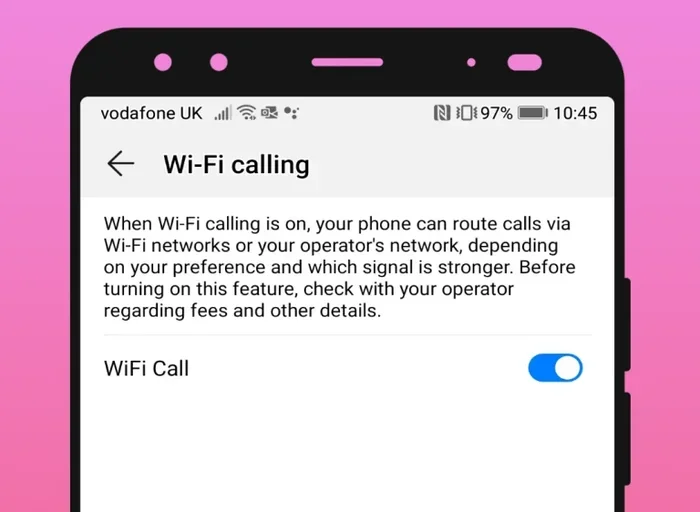
Method 3: Use Wi-Fi Calling for Calls and Texts
Wi-Fi calling is a feature built into most modern smartphones. It lets you make calls and send texts over Wi-Fi when your cellular signal is weak or absent. But here is the catch. Wi-Fi calling still uses your carrier’s network for texting. It does not bypass the cellular system entirely.
However, Wi-Fi calling can help you send texts to non-iPhone users when you are in a low-signal area. As long as you have Wi-Fi, your carrier can route your SMS through the internet. This is different from true Wi-Fi texting apps, which use the internet directly.
To enable Wi-Fi calling on your iPhone:
- Go to Settings.
- Tap Phone.
- Select Wi-Fi Calling.
- Toggle it on.
On Android, the path is similar. Go to Settings, then look for Wi-Fi Calling or Calls settings. The exact steps vary by phone brand.
Method 4: Use Email or Web-Based Messaging
Some carriers offer web-based portals where you can send SMS messages from your computer. This is a lesser-known option, but it works. You log into your carrier’s website, enter the recipient’s phone number, and send a text. The message goes through the carrier’s network but can be initiated over Wi-Fi.
This method is not the most convenient for everyday chatting. But it is useful in emergencies or when you do not have your phone nearby.
Best Apps for Wi-Fi Texting to Non-iPhone Users
Not all messaging apps are created equal. Some offer more features. Some are more reliable. Some use less battery. Here is a quick comparison of the top apps for cross-platform texting over Wi-Fi.
| App | Platform | Encryption | Free? | Best For |
|---|---|---|---|---|
| iPhone, Android | End-to-end | Yes | Everyday messaging | |
| Telegram | iPhone, Android | End-to-end (optional) | Yes | Large files and groups |
| Signal | iPhone, Android | End-to-end | Yes | Privacy-focused users |
| Facebook Messenger | iPhone, Android | End-to-end (optional) | Yes | Facebook users |
| Google Messages | iPhone, Android | End-to-end (RCS) | Yes | RCS experience on iPhone |
Each app has its strengths. WhatsApp is the most widely used, so most people already have it installed. Signal is the best for privacy. Telegram shines when you need to send large files. Google Messages is a great choice if you want a native SMS-like experience with RCS features.
Which App Should You Choose?
If you want the simplest solution, go with WhatsApp. Almost everyone has it. If privacy matters most, choose Signal. If you want the closest experience to regular texting, try Google Messages with RCS enabled.
Wi-Fi Calling vs. Wi-Fi Messaging
These two terms are often confused. They are not the same thing. Understanding the difference helps you choose the right tool.
What Is Wi-Fi Calling?
Wi-Fi calling lets you make phone calls and send SMS texts using Wi-Fi. It routes your calls and texts through your carrier’s servers using an internet connection. Your phone still uses your phone number. The person you contact sees your regular number on their screen.
Wi-Fi calling is great for areas with poor cell coverage. But it still depends on your carrier. If your carrier does not support Wi-Fi calling, you cannot use it. And it does not offer the rich features of internet messaging apps.
What Is Wi-Fi Messaging?
Wi-Fi messaging refers to sending messages entirely over the internet using apps like WhatsApp or Signal. These messages do not go through your carrier at all. They use your Wi-Fi connection directly. This means you can text anyone in the world with Wi-Fi, regardless of their carrier or phone type.
Wi-Fi messaging apps offer more features than Wi-Fi calling. You get group chats, media sharing, voice messages, and more. They are also free to use, while Wi-Fi calling may still count against your carrier’s minute or message limits in some cases.
Which One Should You Use?
If you are texting non-iPhone users over Wi-Fi, Wi-Fi messaging apps are the better choice. They work independently of your carrier. They offer more features. And they are free. Wi-Fi calling is a good backup for when you need to send a basic SMS and have no cell signal.
Common Problems and How to Fix Them
Wi-Fi texting is not always perfect. Sometimes messages fail to send. Sometimes apps crash. Here are the most common issues and how to fix them.
Messages Not Sending Over Wi-Fi
If your messages are not going through, the first thing to check is your Wi-Fi connection. Make sure you are actually connected to the network. Try opening a web page to confirm the internet is working.
Next, check if the messaging app has permission to use Wi-Fi. On iPhone, go to Settings, then Wi-Fi, and make sure the app is allowed to use wireless data. On Android, go to Settings, then Apps, find the messaging app, and check its data permissions.
Sometimes restarting the app fixes the issue. Close it completely and reopen it. If that does not work, try restarting your phone. A fresh start often resolves connection problems.
Recipient Not Receiving Messages
If the other person is not getting your messages, they may not have the app installed. Or they may have notifications turned off. Ask them to check their app settings. They should also make sure they have a Wi-Fi or data connection.
If you are using RCS or Google Messages, make sure both of you have chat features enabled. Without both sides supporting RCS, messages will fall back to SMS, which needs a cellular network.
Poor Message Quality or Delays
Slow Wi-Fi can cause delays in message delivery. If your connection is weak, messages may take longer to send. Try moving closer to your router or switching to a stronger network.
Large media files like videos take more time to send over Wi-Fi. If you are having trouble, try sending a smaller file or compressing the media before sending.
Expert Tips for Reliable Wi-Fi Texting
Getting the most out of Wi-Fi texting is easy with a few smart habits. Here are some tips from experts to keep your messages flowing smoothly.
Keep Your Apps Updated
Messaging apps release updates regularly. These updates fix bugs and improve performance. Always keep your apps up to date for the best experience. Turn on automatic updates in your app store if you can.
Use a Stable Wi-Fi Connection
Public Wi-Fi networks can be unreliable. They may disconnect randomly or have slow speeds. If you need to send an important message, use a trusted network. Your home Wi-Fi is usually the most stable option.
Enable Notifications for Your Messaging App
It is easy to miss messages if your notifications are turned off. Go to your phone settings and make sure your messaging app can send alerts. This way, you will know right away when someone replies.
Have a Backup Messaging App
Not everyone wants to download a new app. Keep at least one widely used app installed, like WhatsApp. This way, you can always reach people even if they do not have your preferred app.
Use Wi-Fi Texting When Traveling
If you are traveling abroad, Wi-Fi texting saves you from expensive roaming charges. Instead of using your carrier’s international texting service, use a Wi-Fi messaging app. You can text anyone in the world for free as long as you have Wi-Fi.
Key Takeaways
- Wi-Fi texting works across platforms: You can send messages to non-iPhone users over a Wi-Fi connection using apps and built-in features.
- iMessage only works with Apple devices: The blue bubble experience is exclusive to iPhones, but alternatives exist for cross-platform communication.
- Third-party apps are the easiest solution: Apps like WhatsApp, Telegram, and Signal let you text any phone over Wi-Fi for free.
- RCS messaging is improving cross-platform support: Google Messages now supports RCS, bringing richer messaging to Android and even iPhone users.
- Wi-Fi calling is not the same as Wi-Fi texting: Understanding the difference helps you choose the right tool for your needs.
- Setup is simple: Most methods require just downloading an app and linking your phone number or email.
Conclusion
So, can you text non iPhones on Wi-Fi? Absolutely yes. You have plenty of options to choose from. Whether you use WhatsApp, Telegram, Signal, or Google Messages with RCS, you can stay connected with anyone over Wi-Fi. No cell signal needed. No carrier fees. Just a Wi-Fi connection and the right app.
The days of being stuck with green bubbles and slow SMS are over. You now have the tools to text anyone, anywhere, as long as you have Wi-Fi. Try out the methods in this guide and find what works best for you. You will wonder how you ever managed without them.
Start today. Download one of the apps mentioned above. Reach out to a non-iPhone user and send a message over Wi-Fi. It is fast, free, and easy. Once you try it, you will never go back to relying only on your cellular network for texting.
Frequently Asked Questions
Can I send iMessages to non-iPhone users over Wi-Fi?
No, iMessage only works between Apple devices. If you try to iMessage someone with an Android phone, it will fall back to SMS, which requires a cellular network. To text non-iPhone users over Wi-Fi, you need to use a third-party messaging app like WhatsApp or Google Messages with RCS.
Do I need any special app to text non-iPhones on Wi-Fi?
Yes, you need a messaging app that supports cross-platform communication. WhatsApp, Telegram, Signal, and Google Messages are all great options. These apps use your Wi-Fi connection to send messages, so you do not need a cellular signal.
Is Wi-Fi texting free?
Yes, most Wi-Fi messaging apps are completely free. Apps like WhatsApp, Telegram, and Signal do not charge for messages or media. You only need a Wi-Fi connection. Your carrier does not charge you for these messages since they travel over the internet, not the cellular network.
Will the other person know I am using Wi-Fi to text them?
No, the recipient will not know your message came through Wi-Fi. It looks and feels exactly like a regular text message. They will receive it in their normal messaging app or the app you both use, with no indication that it was sent over Wi-Fi.
Can I send pictures and videos over Wi-Fi to non-iPhone users?
Yes, you can send pictures and videos over Wi-Fi to non-iPhone users. Apps like WhatsApp, Telegram, and Signal support media sharing. You can send high-quality photos, videos, and even large files over Wi-Fi without using your cellular data.
What happens if the other person does not have Wi-Fi?
If the other person does not have Wi-Fi but has mobile data, the message will still go through using their data connection. Wi-Fi messaging apps use the internet, whether it comes from Wi-Fi or mobile data. If the other person has neither Wi-Fi nor data, the message will fail to send until they reconnect to the internet.