How Can I Boost My Wifi While Camping and Stay Connected
Boosting your wifi while camping is easier than you think. Whether you are using a phone hotspot, a signal booster, or a dedicated camping router, there are simple ways to improve your connection. This guide covers the best methods, gear recommendations, and practical tips to help you stay connected while camping without frustration.
There is nothing worse than setting up camp in a beautiful spot, surrounded by trees and mountains, and then realizing your wifi signal is practically nonexistent. You want to share photos, check maps, or maybe even work remotely. But your connection barely loads a single webpage. If you have ever asked yourself how to boost wifi while camping, you are not alone.
More and more people are heading into the wilderness with their devices in hand. Whether you are a digital nomad who works from a campsite or a family who wants to stream movies at the campground, a strong connection matters. Boosting your wifi while camping does not require expensive equipment or technical skills. It just takes the right approach and a few smart choices.
This guide walks you through every method you can use to improve your internet connection while enjoying the outdoors. From simple phone-based solutions to dedicated hardware, you will find practical steps that work in real camping situations. Let us dive in.
Key Takeaways
- Use your phone as a hotspot: Your smartphone can double as a portable wifi source when you get wifi from your phone using cellular data.
- Invest in a signal booster: A cell signal booster can dramatically improve your wifi signal strength at remote campsites.
- Choose the right mobile data plan: Plans with hotspot allowances make a big difference for camping wifi needs.
- Position matters: Where you place your device affects your signal strength more than you might expect.
- Consider a portable wifi router: Dedicated camping routers offer better range and battery life than phone hotspots alone.
- Share data between devices: You can share your mobile data with another phone to keep everyone connected.
- Explore hotspot alternatives: Devices like mobile hotspots can replace traditional wifi in many camping scenarios.
📑 Table of Contents
- Why Your Wifi Struggles While Camping
- How to Boost Your Wifi While Camping
- Best Devices for Boosting Camping Wifi
- Tips to Improve Your Wifi Signal at the Campsite
- Common Mistakes That Hurt Your Camping Wifi
- Expert Tips for Remote Workers Who Camp
- Comparing Wifi Boosting Options for Camping
- Final Thoughts on Boosting Your Wifi While Camping
Why Your Wifi Struggles While Camping
Before we fix the problem, it helps to understand why your wifi signal weakens so much in camping environments. Most campgrounds rely on distant wifi towers or routers that were never designed for wide outdoor coverage. Trees, hills, and even weather can block or weaken your signal.
Distance from the Source
The farther you are from a wifi router or cell tower, the weaker your connection becomes. Campgrounds often place their routers near the office or a central building. If your campsite is 200 yards away, that distance alone can kill your signal speed.
Natural Obstacles
Trees, rocks, and hills absorb wifi signals. Unlike walls in a house, natural barriers are irregular and dense. A forest canopy can reduce your signal strength by 50% or more. This is why you might get full bars at the campground office but zero bars at your tent.
Shared Bandwidth
Most campground wifi networks are shared among dozens or even hundreds of users. When everyone is streaming or browsing at the same time, bandwidth gets split thin. Your connection slows down even if the signal is technically strong.
How to Boost Your Wifi While Camping
Now that you understand the challenges, let us look at the most effective ways to boost your connection. These methods range from free and simple to more advanced setups that require a small investment.
Use Your Phone as a Mobile Hotspot
The simplest way to get online while camping is to use your phone as a hotspot. When you get wifi from your phone, you are essentially turning your cellular data connection into a wifi network that other devices can join. This works anywhere you have cell service.
Here is how to set it up on most phones:
- Go to Settings and find the Hotspot or Personal Hotspot option.
- Turn it on and set a password.
- On your other device, search for wifi networks and connect to your phone’s hotspot.
- Enter the password and you are online.
Keep in mind that using your phone as a hotspot drains your battery quickly. Consider bringing a portable charger or keeping your phone plugged in while it shares its connection. Also, check your data usage to avoid unexpected overage charges.
Share Your Mobile Data With Another Phone
If you are camping with family or friends, you can share your mobile data with another phone without setting up a full hotspot. Both Android and iPhone offer features that let you transfer data between devices directly. This is handy when one phone has a strong signal and another does not.
Some phones also support Bluetooth tethering, which uses less battery than wifi hotspot sharing. While it is slower, it works well for basic tasks like sending messages or checking email.
Get a Hotspot Instead of Relying on Campground Wifi
Sometimes the best solution is to skip campground wifi entirely and use a dedicated hotspot device. You can get a hotspot instead of wifi at many campgrounds. These devices use cellular networks to create a private, reliable internet connection just for you and your group.
Popular hotspot options include:
- Dedicated mobile hotspots: Small devices from carriers like Verizon, AT&T, or T-Mobile that create a private wifi network.
- Wifi sticks or USB dongles: These plug directly into a laptop and provide internet through cellular networks.
- Portable wifi routers: Devices that accept a SIM card and broadcast wifi to multiple devices simultaneously.
These options give you more control over your connection and often deliver better speeds than shared campground networks.
Add a Hotspot to Your Existing Data Plan
Many carriers now offer the option to add a hotspot to your unlimited plan for a small monthly fee. This feature lets you share your cellular data with laptops, tablets, and other devices. Before your next camping trip, check with your carrier to see if your plan supports hotspot usage.
Adding a hotspot is usually affordable, often costing between 10 and 20 dollars per month. It can be a game changer for anyone who camps regularly and needs reliable internet access.
Best Devices for Boosting Camping Wifi
If you want to take your camping wifi to the next level, consider investing in some dedicated gear. The right device can mean the difference between a buffering video and a smooth connection.
Cell Signal Boosters
A cell signal booster amplifies weak cellular signals and rebroadcasts them to your devices. These are especially useful if your campsite is in a valley or area with poor coverage. A good signal booster can improve your data speeds by 2x or more.
Look for boosters that support multiple bands and have an outdoor antenna. The outdoor antenna captures the signal from a cell tower, and the indoor unit rebroadcasts it to your campsite. Some models are designed specifically for RVs and camping setups.
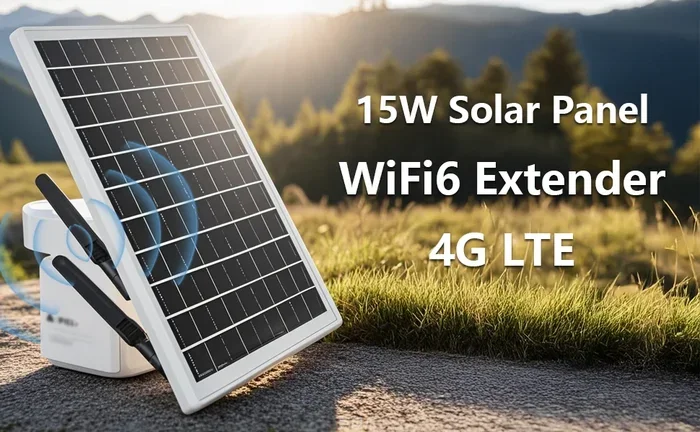
Portable Wifi Routers
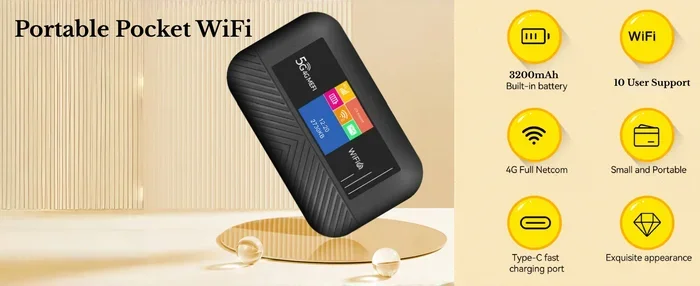
A portable wifi router is a small device that creates your own private network using a SIM card or a connected phone’s data. Unlike a phone hotspot, these routers have better batteries, stronger antennas, and can support more devices at once.
Some portable routers even support external antennas for improved range. They are compact enough to fit in a backpack and can run for hours on a built-in battery.
Wifi Extenders and Repeaters
If you are staying at a campground with existing wifi, a wifi extender can help you pick up the signal from farther away. These devices receive the campground wifi and rebroadcast it to your campsite.
Keep in mind that extenders work best when the original signal is at least moderately strong. If the campground wifi is completely dead at your site, an extender will not help much. In that case, a cellular solution works better.
High-Gain Wifi Antennas
A high-gain antenna can improve your ability to pick up weak wifi signals. These antennas are directional, meaning you point them toward the wifi source for the best results. They are affordable and easy to set up.
For campers who want a low-cost solution, a high-gain antenna is worth considering. It does not require any special setup and works with most laptops and wifi-enabled devices.
Tips to Improve Your Wifi Signal at the Campsite
Even with the best gear, small adjustments can make a big difference in your connection quality. Try these practical tips on your next camping trip.
Find the Highest Spot
Wifi signals travel better with fewer obstacles. If you can, set up your device on a raised surface like a picnic table, a rock, or even a tree stump. Elevation helps your device see over trees and bushes that might block the signal.
Face Your Device Toward the Router
Wifi antennas are directional. If you know where the campground router is located, point your device toward it. Even a small adjustment in angle can improve your signal strength noticeably.
Turn Off Unnecessary Devices
Every device connected to your network uses bandwidth. Turn off wifi on devices you are not actively using. This frees up bandwidth for the devices that need it most.
Use Offline Apps When Possible
One of the best ways to reduce wifi strain is to download content before your trip. Download maps, movies, music, and documents while you still have a strong connection at home. Then enjoy them offline at the campsite.
Check Your Data Speed Regularly
Use a speed test app to check your connection periodically. This helps you understand when the network is slow and when it is usable. You can also try connecting at different times of day to avoid peak usage hours.
Common Mistakes That Hurt Your Camping Wifi
Avoid these common mistakes that can make your connection worse:
- Placing your device on the ground: The ground absorbs wifi signals. Keep your device elevated for better reception.
- Using too many devices at once: Each connected device shares the available bandwidth. Limit the number of active connections.
- Ignoring data limits: Streaming videos and large downloads can eat through your data plan quickly. Monitor your usage closely.
- Assuming all campgrounds are the same: Some campgrounds have excellent wifi while others have none. Research the campground before you book.
- Forgetting to update your device: Outdated software can cause connectivity issues. Keep your phone and router firmware up to date.
Expert Tips for Remote Workers Who Camp
If you work from your campsite, your wifi needs are higher than a casual camper’s. Here are some expert tips to keep your productivity strong.
Invest in a Dedicated Data Plan
Consider getting a separate SIM card or data plan just for work. This keeps your work traffic separate from personal use and gives you more predictable data usage.
Use a VPN for Security
Public wifi networks, including campground routers, are not always secure. A VPN encrypts your connection and protects your sensitive data from potential threats.
Set Up a Backup Connection
Have a backup plan ready. Keep a portable hotspot device charged and ready in case your primary connection fails. A second phone with a different carrier can also serve as a backup hotspot.
Schedule Large Tasks Wisely
Upload large files or join video calls during off-peak hours when fewer people are using the network. Early mornings and late evenings are often the best times for a strong connection.
Comparing Wifi Boosting Options for Camping
Not sure which method is right for you? Here is a quick comparison of the most popular options:
| Method | Cost | Best For | Setup Difficulty |
|---|---|---|---|
| Phone Hotspot | Free (uses existing data) | Solo campers, short trips | Very Easy |
| Signal Booster | 50-300 dollars | Remote campsites with weak signal | Moderate |
| Portable Router | 50-150 dollars | Groups, longer trips | Easy |
| Wifi Extender | 20-80 dollars | Campgrounds with existing weak wifi | Very Easy |
| Hotspot Device | 10-50 dollars/month | Frequent campers, reliable needs | Easy |
Each option has its strengths. Your choice depends on your budget, how often you camp, and what you need the internet for. For most casual campers, a phone hotspot works perfectly fine. For remote workers or frequent campers, investing in a dedicated device pays off quickly.
Final Thoughts on Boosting Your Wifi While Camping
Staying connected while camping is no longer a luxury. It is a practical need for many people. Whether you need to check weather updates, share your adventure on social media, or get work done from a remote location, a reliable internet connection makes your trip better.
The good news is that boosting your wifi while camping does not have to be complicated or expensive. Start with the simplest solutions like using your phone as a hotspot or downloading content offline. If you need more, consider a signal booster or portable router. The key is to find the method that fits your needs and your budget.
Every camping trip is different, and your wifi needs will vary. Experiment with different approaches and find what works best for your setup. With the right tools and a little planning, you can enjoy the peace of nature without losing your connection to the digital world.
So next time you pack your bags and head outdoors, remember these tips. A little preparation goes a long way toward keeping you connected, productive, and entertained while you enjoy the great outdoors.
Frequently Asked Questions
Can I use my phone to get wifi while camping?
Yes, you can use your phone as a mobile hotspot to share your cellular data connection with other devices. This is the simplest way to stay online while camping. Just make sure you have enough data on your plan to avoid extra charges.
What is the best device for boosting camping wifi?
The best device depends on your needs. A phone hotspot works well for solo campers. Signal boosters are great for remote areas with weak coverage. Portable routers are ideal for groups who need multiple devices connected. Consider your budget and usage before choosing.
How can I improve my wifi signal at a campground?
Elevate your device, face it toward the wifi source, and minimize obstacles like trees and tents. You can also use a wifi extender or high-gain antenna to pick up weaker signals. Turning off unused devices helps preserve bandwidth for active connections.
Do I need a special data plan for camping wifi?
Not necessarily, but a plan with a generous hotspot allowance makes camping wifi much easier. You can also add a hotspot feature to your existing plan for a small monthly fee. Check with your carrier to see what options are available.
Can I share my mobile data with someone else while camping?
Yes, you can share your mobile data with another phone using hotspot features or Bluetooth tethering. This lets you help a friend or family member stay connected even if their signal is weak at the campsite.
Are there alternatives to wifi while camping?
Absolutely. Mobile hotspots, satellite internet, and offline apps are great alternatives to traditional wifi. Many campers also download everything they need before heading out and enjoy a fully offline experience at the campsite.
=== CONCLUSION ===
Boosting your wifi while camping is all about choosing the right method for your situation. From simple phone hotspots to dedicated signal boosters, there is a solution for every camper. Use the tips in this guide to improve your connection, reduce frustration, and make the most of your time in the great outdoors.
Remember that staying connected does not mean you have to sacrifice the camping experience. With a little preparation and the right gear, you can enjoy both nature and the internet. Plan ahead, test your setup before you leave, and you will be ready for a connected camping adventure.