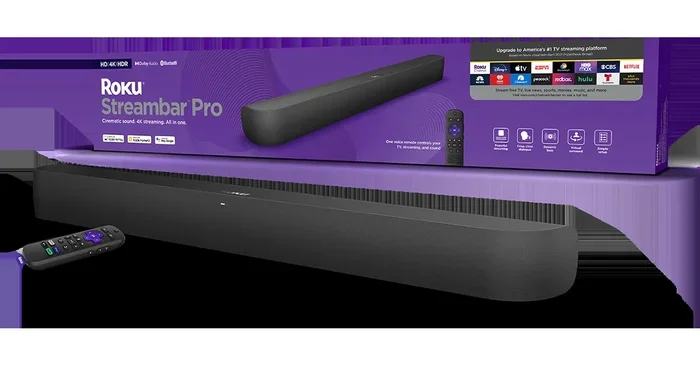
Does My Roku Soundbar Have Bluetooth Audio Built In
Most Roku soundbars come with Bluetooth audio built in, letting you stream music wirelessly from any phone or tablet. You can pair your device in just a few simple steps using the Roku remote or the soundbar’s own buttons. If your model lacks Bluetooth, there are easy workarounds like external Bluetooth adapters to add wireless capability.
Have you ever wanted to play music from your phone through your Roku soundbar but weren’t sure if it supports Bluetooth? You are not alone. Many people buy a Roku soundbar and assume it has all the wireless features they need. But the truth is, not every model is the same. Some Roku soundbars come with Bluetooth audio built in, while others rely on different connection methods. This guide will help you figure out exactly what your soundbar can do.
We will walk you through how to check if your Roku soundbar has Bluetooth, how to pair your devices, and what to do if the connection gives you trouble. Whether you own a Roku Streambar, a Roku Smart Soundbar, or an older model, this article covers it all. By the end, you will know everything you need about Bluetooth connectivity on Roku soundbars and how to get the best wireless audio experience.
Key Takeaways
- Built-In Bluetooth: Most modern Roku soundbars include Bluetooth connectivity as a standard feature for wireless audio streaming.
- Easy Pairing: You can connect your phone, tablet, or laptop to your Roku soundbar using the Roku remote or the soundbar’s remote control buttons.
- Firmware Matters: Keeping your soundbar updated ensures the best Bluetooth performance and fixes known connectivity bugs.
- Range Is Key: Bluetooth on Roku soundbars typically works within 30 feet, so keep your device nearby for a stable connection.
- Alternatives Exist: If your older model lacks Bluetooth, you can use an external Bluetooth adapter or connect via HDMI without ARC for wired audio.
- Multiple Devices: You can pair more than one device and switch between them easily for shared listening.
📑 Table of Contents
- Does Every Roku Soundbar Have Bluetooth?
- How to Check If Your Roku Soundbar Supports Bluetooth
- How to Connect Bluetooth Devices to Your Roku Soundbar
- Common Bluetooth Problems and How to Fix Them
- Benefits of Having Bluetooth on Your Roku Soundbar
- Alternatives to Bluetooth for Your Roku Soundbar
- Expert Tips for Getting the Most From Bluetooth on Your Roku Soundbar
- Final Thoughts
Does Every Roku Soundbar Have Bluetooth?
The short answer is no. Not every Roku soundbar has Bluetooth built in. Newer models from the last few years almost always include it. But older or budget models may leave it out. Roku has many soundbar options, and the features vary from one to the next.
Here is a quick look at some popular Roku soundbar models and their Bluetooth status:
| Roku Soundbar Model | Bluetooth Built In? | Year Released | Notes |
|---|---|---|---|
| Roku Streambar | Yes | 2020+ | Includes both streaming and Bluetooth |
| Roku Smart Soundbar | Yes | 2021+ | Full Bluetooth support |
| Roku Wireless Subwoofer | No | 2019+ | Works with the soundbar only |
| Roku TV Audio | Varies | 2018-2020 | Check your specific model |
| Roku Soundbar (older models) | No | 2017 and before | Use HDMI or optical only |
If you are not sure which model you have, check the label on the back of the soundbar or go to the Roku home screen and select Settings > System > About. Your model number will be listed there.
Why Does It Matter?
Knowing whether your soundbar has Bluetooth changes how you use it. If it does, you can stream music from Spotify, Apple Music, or any app on your phone directly to the soundbar. You can also take calls through it if the soundbar has a microphone. If it does not, you are limited to HDMI, optical cable, or aux input. That is not the end of the world, but it does mean less flexibility.
How to Check If Your Roku Soundbar Supports Bluetooth
Checking for Bluetooth on your Roku soundbar is simple. You do not need any special tools or apps. Just follow these steps to find out if your device supports wireless audio streaming.
- Check the Roku Settings Menu: Press the Home button on your Roku remote. Go to Settings, then select System. Look for an option called Bluetooth or Remote & Devices. If you see it, your soundbar supports Bluetooth.
- Look at the Soundbar Model Number: Find the model number on the back or bottom of the soundbar. Search for it on the Roku website or the manufacturer’s page. The product description will list Bluetooth as a feature if it is included.
- Check the Original Box or Manual: If you still have the box or the quick start guide, look for the Bluetooth logo or a mention of wireless audio in the features list.
- Try Pairing a Device: Go to Settings > System > Bluetooth & Remote Devices > Pair New Device. If this option appears, your soundbar has Bluetooth.
If none of these steps show a Bluetooth option, your soundbar likely does not have it. But do not worry. There are still ways to get wireless audio, which we will cover later in this guide.
What If My Roku Soundbar Has No Bluetooth Option?
Some older Roku soundbars only offer wired connections. They use HDMI ARC, optical audio, or a simple aux cable. These connections work great for TV audio but do not let you stream music from your phone. If your soundbar falls into this category, you have a few options to add wireless capability.
One popular solution is to use a Bluetooth transmitter that plugs into the audio output of your soundbar. Another option is to check if your soundbar can be upgraded or if a newer firmware update adds Bluetooth support. Sometimes, older models gain new features through software updates.
How to Connect Bluetooth Devices to Your Roku Soundbar
If your Roku soundbar has Bluetooth, pairing your devices is straightforward. Here is a step-by-step guide to get you connected in just a few minutes.
Step-by-Step Pairing Guide
- Turn on your Roku soundbar: Make sure it is powered on and set to the correct input source for your TV.
- Put your phone or tablet in pairing mode: Go to your device’s Bluetooth settings and turn Bluetooth on. Make sure it is set to discoverable mode.
- Open Bluetooth on your Roku soundbar: On the Roku remote, press Home. Go to Settings > System > Bluetooth & Remote Devices > Pair New Device.
- Select your device: Your phone or tablet should appear on the Roku screen. Tap on it to complete the pairing.
- Test the connection: Play a song or video on your phone. The audio should come through the soundbar.
That is it. You are now streaming wirelessly. The process works the same way whether you are using an iPhone, Android phone, or a tablet. If you have trouble finding your device, make sure Bluetooth is turned on and that your device is not already connected to another speaker or headphones.
Tips for a Strong Bluetooth Connection
- Keep your phone close: Bluetooth works best within 30 feet of the soundbar. Walls and furniture can weaken the signal.
- Turn off other Bluetooth devices: Too many devices searching for a connection can cause interference.
- Restart both devices: A simple restart often fixes connection issues. Turn Bluetooth off on both devices, wait a few seconds, and turn it back on.
- Update your firmware: Make sure your Roku soundbar has the latest software. Go to Settings > System > System Update to check.
Can I Use Multiple Devices with My Roku Soundbar?
Yes, in most cases. Your Roku soundbar can remember multiple paired devices. To switch between them, simply disconnect one device and connect the other through the Bluetooth settings. This is great for households where more than one person wants to stream music through the same soundbar.
Common Bluetooth Problems and How to Fix Them
Bluetooth connections are not always perfect. Even with the best Roku soundbar, you may run into issues from time to time. Here are the most common problems and how to solve them.
Soundbar Not Showing Up on My Phone
If your phone does not detect the soundbar, try these fixes. First, make sure the soundbar is in pairing mode. On most Roku soundbars, you can hold down the Bluetooth button on the remote or the soundbar itself. Second, restart both the soundbar and your phone. Third, check if another device is already connected to the soundbar. Bluetooth can only connect to one device at a time for audio output.
Audio Keeps Cutting Out
Intermittent audio is frustrating. This usually happens when your phone is too far from the soundbar or when there is too much wireless interference. Move closer to the soundbar and remove any obstacles between the two devices. Also, check if your Wi-Fi router is nearby. Wi-Fi and Bluetooth use similar frequencies, which can cause interference.
Lag or Delay in Audio
You might notice a delay between the video on your phone and the audio from the soundbar. This is called audio latency and is common with Bluetooth connections. To reduce lag, make sure your soundbar firmware is up to date. You can also try connecting in a less crowded wireless environment. If latency is a big problem for you, consider using an HDMI cable or checking if you can use HDMI for video and Bluetooth for audio as a workaround.
The Bluetooth Connection Drops Frequently
If your connection keeps dropping, the issue might be with your phone’s Bluetooth settings. Clear the Bluetooth cache on your device and try pairing again. On Android phones, go to Settings > Apps > Bluetooth > Storage > Clear Cache. On iPhones, toggle Bluetooth off and on, or restart the phone entirely.
Can I Use a Bluetooth Speaker Instead?
If you are considering alternatives, you might wonder if a separate Bluetooth speaker would work better. The answer depends on your needs. A standalone Bluetooth speaker is portable and easy to set up. But a Roku soundbar offers better audio quality for TV watching and movie streaming. If you want to explore Bluetooth speaker options, check out whether you can use a Bluetooth speaker without Bluetooth in certain scenarios.
Benefits of Having Bluetooth on Your Roku Soundbar
Having Bluetooth built into your Roku soundbar gives you several advantages that go beyond just playing music from your phone.
Wireless Music Streaming
The biggest benefit is the ability to stream music wirelessly. You can play Spotify, Apple Music, Amazon Music, or any audio from your phone directly through the soundbar. This is perfect for parties, cooking, or just relaxing at home. You do not need any extra cables or adapters.
Easy Device Switching
Bluetooth lets you switch between devices quickly. Want to listen to a podcast on your phone and then switch to a movie on your tablet? Just disconnect one and connect the other. No need to unplug cables or change inputs.
No Extra Equipment Needed
Since Bluetooth is built in, you do not need to buy a separate transmitter, adapter, or cable. Everything works right out of the box. This saves you money and keeps your setup clean and simple.
Better Sound Than Phone Speakers
Let us be honest. Phone speakers are small and often sound flat. A Roku soundbar delivers richer, fuller sound with better bass and clarity. Streaming music through your soundbar makes a huge difference in listening quality.
Works with Smart Home Devices
If you use smart home devices like Alexa or Google Home, you may wonder about compatibility. Some Roku soundbars work with voice assistants. Even if yours does not, you can still use Bluetooth to connect and control audio playback from your phone or tablet.
Alternatives to Bluetooth for Your Roku Soundbar
If your Roku soundbar does not have Bluetooth, or if you prefer a wired connection, there are several alternatives that work well. Each method has its own advantages depending on what you want to do.
HDMI ARC Connection
HDMI ARC (Audio Return Channel) is one of the best ways to connect your soundbar to a TV. It sends high-quality audio and lets you control the soundbar with your TV remote. If you are wondering whether you can use HDMI without ARC, the answer is yes, but the features are more limited. You can learn more about connecting a soundbar with HDMI without ARC for details on this setup.
Optical Audio Cable
An optical cable connects your TV to the soundbar using light signals. It delivers good audio quality but does not carry video. Optical cables are reliable and do not suffer from wireless interference.
Bluetooth Adapter
If you want to add Bluetooth to a soundbar that does not have it, a Bluetooth adapter is your best bet. These small devices plug into the audio output of your soundbar and create a wireless bridge. You pair your phone to the adapter, and the adapter sends audio to the soundbar. They are affordable and easy to set up.
Turn Regular Speakers Into Bluetooth
If you have older speakers you want to make wireless, there are Bluetooth receiver adapters that work with almost any speaker system. You can learn how to turn regular speakers into Bluetooth devices with a simple adapter. This is a great budget option if you are not ready to buy a new soundbar.
Use Your Phone as a Speaker
In a pinch, you can even use your phone as a Bluetooth speaker for other devices. While not ideal for movie watching, it works for casual listening. If you are curious about this, check out whether you can turn your phone into a Bluetooth speaker for more details.
Expert Tips for Getting the Most From Bluetooth on Your Roku Soundbar
To get the best experience from your Roku soundbar’s Bluetooth feature, keep these expert tips in mind.
- Update regularly: Roku releases firmware updates that improve Bluetooth performance. Check for updates at least once a month.
- Keep it close: Bluetooth works best at close range. Stay within 30 feet for the most reliable connection.
- Reduce interference: Keep your soundbar away from microwaves, cordless phones, and other wireless devices that can cause signal disruption.
- Use the right audio app: Some streaming apps handle Bluetooth audio better than others. Spotify and Apple Music tend to have lower latency than video apps.
- Reset when needed: If Bluetooth problems persist, reset your soundbar to factory settings. This clears any stuck pairings or corrupted settings.
- Check Bluetooth version: Newer Bluetooth versions offer better range and lower latency. Most modern Roku soundbars use Bluetooth 4.0 or higher.
Final Thoughts
So, does your Roku soundbar have Bluetooth? For most newer models, the answer is yes. Bluetooth audio built in gives you the freedom to stream music, take calls, and switch between devices without any cables. It is one of the most convenient features a soundbar can offer.
If your older model does not have Bluetooth, do not worry. You have options. Bluetooth adapters, HDMI connections, and optical cables all provide solid alternatives. The key is knowing what your soundbar supports and choosing the right solution for your needs.
Take a few minutes to check your model and try pairing a device today. Once you experience wireless audio through your Roku soundbar, you will wonder how you ever lived without it. The convenience and sound quality make it well worth the effort.