Common Problems With A Toshiba Lcd Tv And How To Fix Them
Toshiba LCD TVs are reliable, but they can develop annoying issues over time. From screen flickering and no power to sound problems and HDMI errors, this guide covers the most common Toshiba LCD TV problems and gives you simple, actionable fixes you can do at home. You will learn how to troubleshoot display issues, restore audio, solve connectivity problems, and prevent future headaches with your Toshiba LCD TV.
Owning a Toshiba LCD TV can be a great experience. These sets deliver solid picture quality and reliable performance for years. But like any electronic device, they are not immune to problems. Whether your screen starts flickering, the sound cuts out, or the TV refuses to turn on, these issues can be frustrating.
The good news is that most common Toshiba LCD TV problems have simple solutions. You do not need to be a tech expert to fix them. In this guide, we walk through the most frequent issues step by step. We also share practical tips that help you avoid these problems in the future. By the end, you will feel confident tackling almost any issue with your Toshiba LCD TV.
Before we dive in, it helps to understand that LCD TV troubleshooting follows a logical process. You start with the simplest fix and work your way up. This approach saves time and prevents unnecessary repairs. Let us get started.
Key Takeaways
- Power and startup issues are often caused by faulty power cables, surge damage, or internal board failures that can be fixed without a technician.
- Screen flickering and display problems usually stem from backlight failures, loose connections, or incorrect picture settings on your Toshiba LCD TV.
- Audio issues like no sound or distorted audio are commonly tied to output settings, cable problems, or speaker damage.
- HDMI and connectivity errors can often be resolved by resetting ports, updating firmware, or swapping cables.
- Regular maintenance like ventilation, firmware updates, and gentle cleaning can significantly extend the life of your Toshiba LCD TV.
- Knowing when to call a professional saves money and prevents further damage to your television.
📑 Table of Contents
- Why Your Toshiba LCD TV Acts Up
- Toshiba LCD TV Won’t Turn On
- Screen and Display Issues on Your Toshiba LCD TV
- Audio Problems and How to Fix Them
- Connectivity and HDMI Issues with Toshiba LCD TVs
- Smart Features and Software Problems
- Preventive Maintenance Tips for Your Toshiba LCD TV
- When to Call a Professional for Toshiba LCD TV Repair
- Conclusion
Why Your Toshiba LCD TV Acts Up
Every electronic device has a lifespan. Toshiba LCD TVs are built well, but components wear out over time. Heat, power surges, and regular usage all take a toll. Understanding why problems occur helps you fix them faster and prevent them from coming back.
Most issues fall into a few categories. Power problems, display malfunctions, audio failures, and connectivity errors make up the bulk of Toshiba TV repair calls. Each category has its own set of common causes and solutions. We will cover each one in detail below.
Common Causes of Toshiba LCD TV Issues
- Power surges can damage internal circuits. A sudden spike in voltage may fry components without you noticing.
- Dust buildup inside the TV blocks ventilation. This causes overheating, which leads to screen flickering and shutdowns.
- Loose cables are the number one cause of connectivity issues. HDMI cables can work loose over time.
- Outdated firmware can cause bugs with smart features, streaming apps, and input recognition.
- Age-related wear affects backlights, capacitors, and other internal parts. After several years, these components degrade.
Quick Tip
Always plug your Toshiba LCD TV into a surge protector. This simple step prevents most power-related damage and can add years to your TV’s lifespan.
Toshiba LCD TV Won’t Turn On
A TV that will not power on is one of the most stressful problems. You press the button, and nothing happens. Before you panic, take a breath. There are several reasons this happens, and most are easy to fix.
Check the Power Source First
Start with the basics. Is the power cord firmly plugged into the wall outlet? Sometimes the cord loosens without you noticing. Try plugging another device into the same outlet to confirm it has power.
Next, check the power strip or surge protector. Make sure it is switched on and functioning. A tripped breaker or a dead power strip can make it look like your Toshiba LCD TV is broken when it is really just not getting electricity.
The Red Light Blinks But TV Won’t Start
If you see a blinking red light on your Toshiba TV, this usually indicates an error code. The number of blinks tells you what is wrong. Here is a quick reference:
- One blink: Power supply issue. The capacitor may have failed.
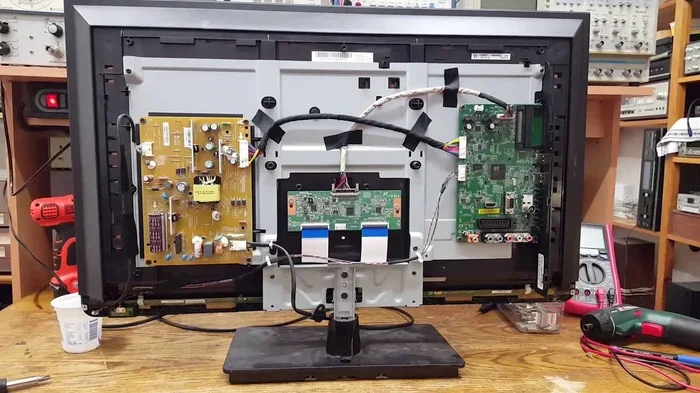
- Two blinks: Main board malfunction. This requires professional repair.
- Three blinks: Backlight or LED strip failure.
- Four or more blinks: Signal board or T-Con board problem.
For one or two blinks, you can try unplugging the TV for 60 seconds and plugging it back in. This resets the internal circuitry. If the blinking continues, you likely need a Toshiba TV repair specialist.
Common Mistakes When Your TV Won’t Turn On
- Assuming the TV is dead when it is just a tripped power strip.
- Not waiting long enough after unplugging. Give it at least 60 seconds.
- Trying to open the TV yourself, which can void your warranty and cause injury.
- Ignoring the blinking code pattern, which tells you exactly what is wrong.
Expert Insight
Many people throw away their Toshiba TV remote and try to use the buttons on the set. If the TV still does not respond, the problem is definitely internal. But if the buttons work, the issue is likely with the remote or the infrared sensor, not the TV itself.
Screen and Display Issues on Your Toshiba LCD TV
The screen is the heart of any television. When display problems appear, it affects everything you watch. The good news is that most screen issues on a Toshiba LCD TV are fixable without replacing the entire unit.
Screen Flickering
Screen flickering is one of the most common display problems. It can happen for several reasons. The backlight may be failing, which is common in older sets. A loose internal cable can also cause intermittent flickering. Sometimes the issue is as simple as a refresh rate mismatch.
Try these steps to fix flickering:
- Check all cable connections at the back of the TV. Reseat them firmly.
- Reduce the brightness setting in the TV menu. High brightness strains the backlight.
- Change the refresh rate in Display Settings. Try 60Hz first, then test other rates.
- Turn off any motion smoothing features. These can sometimes cause visual artifacts.
If flickering persists after all these steps, the backlight LEDs may need replacement. This is a job for a professional Toshiba TV repair service.
Dark or Dim Screen
A dark screen does not always mean the TV is broken. First, check the brightness and contrast settings. Accidentally lowering these can make the picture look nearly black. Also check if the Eco Mode is turned on, as this dims the screen to save power.
If the settings look correct but the screen is still dark, the backlight may be failing. You can test this by shining a flashlight at the screen. If you can faintly see the image, the backlight is the culprit. This is a very common issue with LCD TV troubleshooting.
Lines or Dead Pixels on the Screen
Horizontal or vertical lines on a Toshiba LCD TV screen can be alarming. Small lines often indicate a T-Con board issue. Larger lines or sections of darkness usually mean a damaged LCD panel. Dead pixels are tiny dots that stay black or colored. A few dead pixels are normal and not a warranty concern.
However, if you notice clusters of dead pixels or growing lines, contact Toshiba support. Panel replacement is expensive, and you may want to consider whether repair or replacement makes more sense.
Quick Tips for Display Problems
- Always update your TV firmware. Toshiba releases updates that fix display bugs.
- Avoid placing the TV in direct sunlight for long periods. Heat damages LCD panels.
- Do not press the screen with pressure. This can damage the internal layers.
- Use the correct picture mode for your content. Movie mode reduces eye strain.
Audio Problems and How to Fix Them
Sound problems on a Toshiba LCD TV are incredibly common. You might get no sound at all, distorted audio, or sound that cuts in and out. Before assuming the worst, try these fixes.
No Sound at All
Start by checking the volume. This sounds obvious, but it is the most common cause. Next, make sure the TV is not muted. Check if the audio output is set to the correct source. If your TV is connected to a sound system, ensure the output setting matches your equipment.
If you use external speakers or a soundbar, the problem might be a cable or setting issue. For example, if you are connecting a soundbar with HDMI without ARC, you need to make sure the HDMI port supports ARC and the setting is enabled in the TV menu. Without ARC enabled, audio will not pass through properly.
Distorted or Crackling Sound
Distorted audio usually points to a speaker problem. Dust inside the speaker cone can cause crackling. Moisture damage from humidity can also affect sound quality. Try gently cleaning the speaker grille with a soft brush.
If the distortion comes from the TV’s built-in speakers, the speaker itself may be blown. This is common in older sets that have been played at high volumes for years. In this case, you might want to connect external speakers or a soundbar for better audio anyway.
Audio Sync Issues
When the sound does not match the lips on screen, it is called audio sync delay. This often happens with HDMI connections or when using streaming apps. Try lowering the audio delay setting in the TV’s audio menu. Also, make sure your TV firmware is up to date, as Toshiba has released fixes for sync issues in past updates.
Expert Insight
Many people do not realize that the audio output format matters. If your TV is set to output Dolby Digital but your soundbar only supports stereo, you will get no sound or distorted audio. Check the audio output format in Settings and match it to your equipment.
Common Audio Mistakes
- Forgetting to unmute the TV after a power outage.
- Setting the audio output to the wrong format for your speakers.
- Using damaged or low-quality HDMI cables that cannot carry audio properly.
- Not checking if the external device (like a cable box) has its own volume control.
Connectivity and HDMI Issues with Toshiba LCD TVs
Modern TVs rely heavily on connections. HDMI ports carry both video and audio, making them essential. When an HDMI connection fails, it can feel like your TV is broken. But most connection issues are simple to resolve.
HDMI Port Not Working
If one HDMI port stops working, try plugging your device into a different port. Sometimes a single port fails while others work fine. If no HDMI ports work, the issue may be with the TV’s HDMI controller board.
Before assuming the worst, try these steps:
- Unplug the HDMI cable from both the TV and the device.
- Inspect the cable ends for bent or damaged pins.
- Try a different HDMI cable. Cables fail more often than people think.
- Power cycle both the TV and the connected device. Turn both off, wait 30 seconds, then turn them back on.
- Check if the TV recognizes the device in the Input or Source menu.
No Signal or Blank Screen
A “No Signal” message usually means the TV is not receiving a video input. This happens when you switch inputs or when a connected device wakes from sleep mode. Try selecting a different input source using the remote or the TV buttons.
If you are connecting a device like a gaming console or streaming stick, make sure the device is powered on and set to the correct output. Sometimes devices default to a resolution your Toshiba LCD TV does not support. Check the output settings on the source device and try lowering the resolution.
Using Older Devices with Your Toshiba TV
If you have older devices without HDMI, you may need an adapter. For example, if you want to connect a device with a VGA output, you can use a VGA to HDMI converter. These adapters are affordable and widely available. Just make sure you get one that supports the resolution you need.
Similarly, if you want to connect a USB device to your TV, check compatibility. Some Toshiba models support USB media playback, but others do not. Always check your TV’s manual for supported file formats and devices.
Connectivity Quick Tips
- Label your HDMI cables so you know which port connects to which device.
- Buy high-quality HDMI cables. Cheap cables can cause intermittent signal loss.
- Keep your TV firmware updated. Toshiba often fixes HDMI compatibility issues in firmware updates.
- If your phone or tablet connects to the TV, make sure both devices support the same connection standard. For example, check if your device works with phone to TV HDMI connections before buying an adapter.
Smart Features and Software Problems
Toshiba LCD TVs come with smart features like built-in streaming apps and Wi-Fi connectivity. These features can sometimes cause problems. Apps may crash, the TV may freeze, or the Wi-Fi connection may drop frequently.
TV Freezing or Slow Performance
A slow or freezing TV is usually caused by too much cached data or an outdated firmware version. Try clearing the app cache in the Settings menu. If that does not help, perform a factory reset. This restores the TV to its original settings and often fixes software glitches.
Before doing a factory reset, write down your Wi-Fi password and any app login information. You will need to set everything up again after the reset.
Wi-Fi Connection Keeps Dropping
Unstable Wi-Fi is a common frustration. First, check if other devices in your home have the same issue. If they do, the problem is your router, not the TV. Try restarting your router and moving it closer to the TV.
If only the TV has Wi-Fi issues, try the following:
- Forget the Wi-Fi network on the TV and reconnect from scratch.
- Change your Wi-Fi channel to reduce interference from neighboring networks.
- Use a Wi-Fi extender if the TV is far from your router.
- Consider a wired Ethernet connection for more stable streaming.
App Compatibility Issues
Not all streaming apps work on every Toshiba model. If an app will not install or keeps crashing, your TV may not support it. Check the Toshiba website for a list of supported apps for your specific model. You can also try casting content from your phone or tablet to the TV as a workaround.
Quick Tip
If you want to stream content from a mobile device, check if your phone supports streaming to TV from mobile devices. Many modern phones can mirror their screen to a Toshiba LCD TV wirelessly or through a wired connection.
Preventive Maintenance Tips for Your Toshiba LCD TV
Prevention is always better than repair. A few simple habits can keep your Toshiba LCD TV running smoothly for many years. Here is what you should do regularly.
Keep Your TV Ventilated
LCD TVs generate heat during use. Make sure the vents on the sides and back are not blocked by walls or furniture. Leave at least 4 inches of space around the TV for proper airflow. Overheating is the number one killer of TV components.
Clean Your TV Properly
Dust the screen and vents regularly with a soft, dry microfiber cloth. Never use harsh chemicals or spray liquid directly on the screen. This can damage the anti-glare coating and seep inside the TV. For stubborn spots, lightly dampen the cloth with distilled water.
Update Firmware Regularly
Toshiba releases firmware updates that fix bugs, improve performance, and add new features. Check for updates in the Settings menu at least once a month. Keeping your firmware current is one of the easiest ways to prevent problems.
Use a Surge Protector
Power surges can cause irreversible damage to your TV’s internal components. Always plug your Toshiba LCD TV into a quality surge protector. During thunderstorms, unplug the TV entirely to be safe.
Handle the Remote with Care
The remote is the most used part of your TV setup. Replace the batteries regularly and avoid dropping it. If the remote stops working, try cleaning the contacts with a cotton swab dipped in rubbing alcohol before buying a replacement.
Common Maintenance Mistakes to Avoid
- Placing the TV in a closed cabinet with no airflow.
- Using household glass cleaners on the screen.
- Ignoring firmware update notifications.
- Overloading power strips with too many high-wattage devices.
- Leaving the TV on 24/7, which wears out the backlight faster.
When to Call a Professional for Toshiba LCD TV Repair
Not every problem should be fixed at home. Knowing when to call a professional saves you time, money, and the risk of causing further damage.
Call a technician if you experience any of the following:
- The TV smells like burning or emits smoke. Unplug it immediately and call for help.
- You see visible damage to the circuit board or internal components.
- The screen has a large crack or significant panel damage.
- The TV repeatedly shuts off and restarting does not help.
- You have tried all the troubleshooting steps and the problem persists.
Professional repair is especially important for issues involving the power supply board, main board, or backlight assembly. These components require specialized tools and knowledge. Attempting to repair them yourself can be dangerous and may void your warranty.
Before calling for repair, check if your Toshiba TV is still under warranty. Many Toshiba LCD TVs come with a one-year manufacturer warranty. If your TV is within that period, you may qualify for free repairs or a replacement unit.
Conclusion
Most common problems with a Toshiba LCD TV are easy to fix with basic troubleshooting. From power issues and screen flickering to audio problems and HDMI errors, the solutions are often simpler than you think. Start with the basics, work through the steps systematically, and you will save both time and money.
Remember to maintain your TV properly. Keep it ventilated, update the firmware, use a surge protector, and clean it gently. These habits go a long way in preventing problems before they start. And when a problem is beyond your expertise, do not hesitate to call a professional.
Your Toshiba LCD TV is an investment. With the right care and timely repairs, it will continue to deliver great entertainment for years to come.
Frequently Asked Questions
Why does my Toshiba LCD TV keep turning off by itself?
This is usually caused by overheating or a failing power supply. Make sure the TV has enough ventilation and is not placed near heat sources. If the problem continues, the power supply board may need replacement. Check if your TV is still under warranty before attempting any internal repairs.
How do I fix the HDMI port on my Toshiba TV that is not working?
Start by trying a different HDMI cable and a different port. Power cycle both the TV and the connected device. If none of the ports work, the HDMI controller board may be faulty. This requires professional repair. Always use high-quality HDMI cables to avoid connection issues.
Can I fix a flickering Toshiba LCD TV screen myself?
Yes, in many cases. Try reseating all cable connections, reducing the brightness, and updating the firmware. If flickering continues, the backlight may be failing, which requires professional repair. Avoid opening the TV yourself, as the internal components can hold a dangerous charge even when unplugged.
How often should I update my Toshiba TV firmware?
Check for firmware updates at least once a month. Toshiba releases updates that fix bugs, improve performance, and add compatibility with new devices. Keeping your firmware current is one of the simplest ways to prevent common problems with your Toshiba LCD TV.
Is it worth repairing a Toshiba LCD TV that is more than 5 years old?
It depends on the repair cost and the TV’s overall condition. If the repair costs less than half the price of a new TV, it is usually worth fixing. For major issues like a broken panel or power supply failure, compare the repair estimate to the cost of a new model before deciding.
What should I do if my Toshiba TV has no sound but the picture is fine?
First, check the volume and mute settings. Then verify that the audio output is set correctly in the TV menu. If you use a soundbar or external speakers, make sure the connection is secure and the audio format matches. If none of these steps work, the internal speakers may be damaged and need professional replacement.