Does Hotspot Have Free Wi Fi In 2024 Here Is The Answer
Does hotspot have free Wi Fi? The short answer is yes and no. Some hotspots offer free Wi Fi access, while others require a paid data plan. In 2024, there are more ways than ever to get free Wi Fi through a hotspot, whether you are at home, traveling, or just need mobile internet access on the go. This guide breaks down everything you need to know.
Let us talk about something that affects almost everyone with a phone or a laptop. Does hotspot have free Wi Fi? It is a question more people are asking every day. With so many of us working remotely, streaming, and staying connected on the move, having free Wi Fi access feels essential.
The truth is, the answer is not as simple as yes or no. Some hotspots do give you free Wi Fi. Others require you to pay for a data plan. And then there are sneaky ways to get connected without spending a dime. In this guide, we will walk through every angle of this topic so you know exactly what to expect in 2024.
Whether you are trying to add Wi Fi to your PC, looking for a way to stay connected while traveling, or just curious about how mobile hotspot technology works, this article has you covered. Let us dive in.
Key Takeaways
- Free hotspot Wi Fi exists: Many carriers, public spaces, and apps offer free Wi Fi through hotspot connections.
- Paid plans are often needed: Most mobile hotspots require a data plan, but free options are available from certain providers.
- Security matters: Always use a VPN when connecting to public free Wi Fi hotspots to protect your data.
- Speed varies: Hotspot Wi Fi speed depends on your data plan, signal strength, and the number of users sharing the network.
- Multiple devices work: You can connect your PC to Wi Fi without Ethernet using a hotspot, and also add Wi Fi to your PC through tethering.
- Read the fine print: Free hotspot plans often come with data limits, speed caps, or time restrictions.
📑 Table of Contents
- What Is a Hotspot and How Does It Work
- Does Hotspot Have Free Wi Fi In 2024
- How To Set Up a Hotspot for Free Wi Fi
- Pros and Cons of Using Hotspot Wi Fi
- Tips for Getting the Best Free Hotspot Wi Fi Experience
- Common Mistakes People Make With Hotspot Wi Fi
- Expert Insights on Hotspot Wi Fi in 2024
- Frequently Asked Questions
- Conclusion
What Is a Hotspot and How Does It Work
The Basics of Hotspot Technology
A hotspot is a physical location or a device that gives you Wi Fi access through a cellular data connection. Think of it as a bridge between your mobile data plan and your Wi Fi enabled devices. When you turn on a hotspot, your phone or hotspot device shares its mobile data with other devices nearby.
The technology behind this is called tethering. Your phone acts like a mini router. It takes the cellular signal it receives from a tower and turns it into a Wi Fi network that your laptop, tablet, or another phone can connect to.
Hotspots come in different shapes and sizes. Some are built into your smartphone. Others are dedicated hotspot devices called mobile hotspots or MiFi devices. Each type has its own strengths and limitations.
How a Mobile Hotspot Connects Devices
Here is how a typical mobile hotspot works in simple steps:
- Your phone or hotspot device connects to a cellular network.
- The device creates a Wi Fi network using that cellular connection.
- Other devices nearby can see and join that Wi Fi network.
- Data flows from the cellular network through your device and out to the connected devices.
It is really that simple. But the question most people care about is whether this costs money. Let us get into that now.
Does Hotspot Have Free Wi Fi In 2024
The Short Answer
So, does hotspot have free Wi Fi? Yes, it can. But it depends on where you are, what device you use, and what plan you have. Some people get free Wi Fi through a hotspot without paying anything extra. Others pay monthly fees for hotspot data plans.
The key thing to understand is that free Wi Fi and free hotspot data are not the same thing. A hotspot gives you Wi Fi, but the data that flows through it usually comes from a cellular plan. If your plan includes free hotspot data, then your Wi Fi hotspot is essentially free to use.
How Carriers Handle Hotspot Data
Different carriers treat hotspot data differently. Some include it in your regular data plan. Others charge extra. And a few even offer free hotspot data as a perk. Here is a quick look at how the major players handle it:
- T-Mobile: Includes some hotspot data in most plans. Some unlimited plans offer a decent amount of free hotspot data each month.
- Verizon: Generally charges extra for hotspot usage. You need to add a specific hotspot data plan to your account.
- AT&T: Offers hotspot data on select plans. You can also buy hotspot data on AT T as an add-on.
- Mint Mobile: Includes hotspot data in most plans, often at a lower cost than the big carriers.
Always check with your carrier before assuming your hotspot Wi Fi is free. Some plans throttle your speed once you hit a certain data threshold.
Free Hotspot Options You Should Know About
There are several ways to get free Wi Fi through a hotspot without paying monthly fees. Let us look at the most popular options.
1. Public Hotspot Networks
Many cafes, airports, hotels, and restaurants offer free Wi Fi hotspots for customers. You do not need a data plan to use these. You just connect to the network and browse. These are great for quick tasks like checking email or reading articles.
2. Carrier Free Pass Programs
Some carriers offer free Wi Fi access through partnerships with hotspot networks. For example, T Mobile and Verizon have programs that let you connect to thousands of free Wi Fi hotspots across the country. These programs are often included at no extra cost.
3. Government and Community Programs
In 2024, there are more community Wi Fi initiatives than ever. Some cities offer free Wi Fi in public parks, libraries, and community centers. These hotspots are completely free and open to everyone.
4. App Based Free Hotspots
Several apps help you find and connect to free Wi Fi hotspots near you. Apps like WiFi Map and Hotspot Finder crowd source free Wi Fi access from users around the world. These can be a lifesaver when you are traveling and need internet access fast.
How To Set Up a Hotspot for Free Wi Fi
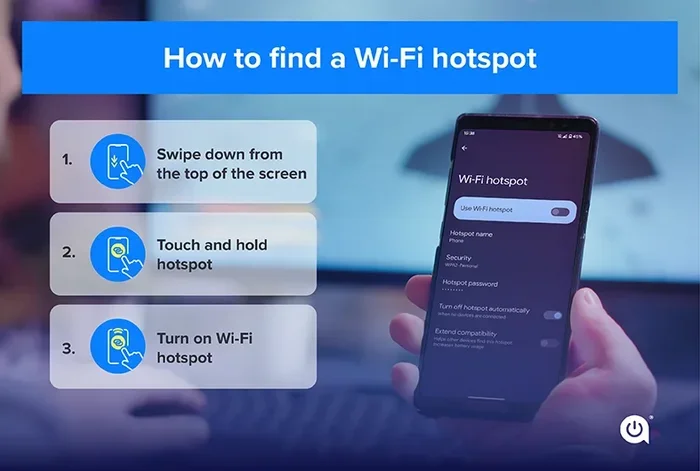
Turning Your Phone Into a Hotspot
You can turn almost any smartphone into a Wi Fi hotspot in just a few steps. Here is how to do it on both Android and iPhone:
For Android:
- Open your Settings app.
- Tap on Network and Internet or Connections.
- Select Hotspot and Tethering.
- Turn on the Wi Fi Hotspot switch.
- Set a Wi Fi password and network name.
- Connect your other devices to the new network.
For iPhone:
- Open Settings.
- Tap on Personal Hotspot.
- Turn on Allow Others to Join.
- Set a strong Wi Fi password.
- Find your iPhone hotspot on your other devices and connect.
Once your hotspot is on, any Wi Fi enabled device nearby can connect. This is a great way to connect your PC to Wi Fi without Ethernet when you are on the go.
Using a Dedicated Hotspot Device
If you do not want to drain your phone battery, a dedicated hotspot device is a great option. These small portable devices plug into a SIM card and create a Wi Fi network wherever you go. They are battery powered and can last all day on a single charge.
Some carriers sell hotspot devices at low cost or even free with a contract. You can also buy unlocked hotspot devices online. Just make sure the device is compatible with your carrier’s network before you buy.
Connecting Multiple Devices to Your Hotspot
Most hotspots can handle between 5 and 15 connected devices at once. This means you can share your Wi Fi connection with your laptop, tablet, smart TV, and even gaming console. If you like to game on Wi Fi while traveling, a hotspot can keep you connected to your favorite games without needing a traditional Wi Fi network.
Just keep in mind that the more devices connected, the slower your hotspot speed will be. If you need fast speeds for gaming or video calls, try to limit the number of connected devices.
Pros and Cons of Using Hotspot Wi Fi
Benefits of Hotspot Wi Fi
Using a hotspot for Wi Fi has several advantages that make it appealing for many people:
- Portability: You can take your Wi Fi connection anywhere you have cellular coverage.
- Convenience: No need to search for a Wi Fi network or ask for a password.
- Security: Your hotspot is your own private Wi Fi network, unlike public hotspots that anyone can join.
- No fixed location: You are not tied to a router or a specific spot in your home.
- Quick setup: You can have a working Wi Fi hotspot in under two minutes.
Drawbacks to Consider
Of course, there are also downsides to relying on a hotspot for Wi Fi:
- Data limits: Most plans have a cap on how much hotspot data you can use each month.
- Speed throttling: Some carriers slow down your hotspot speed after you use a certain amount of data.
- Battery drain: Using your phone as a hotspot can drain the battery quickly.
- Coverage dependence: Your Wi Fi connection is only as good as the cellular signal in your area.
- Extra costs: Some carriers charge additional fees for hotspot usage, even if your plan includes data.
Tips for Getting the Best Free Hotspot Wi Fi Experience
Maximize Your Free Data Allowance
If your carrier includes free hotspot data, make it count. Here are some tips to stretch your data further:
- Turn off auto updates on connected devices.
- Use Wi Fi calling when possible to save data.
- Lower video streaming quality to reduce data usage.
- Close apps running in the background on all connected devices.
- Monitor your data usage through your carrier app regularly.
Stay Safe on Public Hotspots
When you connect to a public Wi Fi hotspot, your data can be exposed to others on the same network. Here is how to stay safe:
- Always use a VPN when connecting to public Wi Fi hotspots.
- Avoid accessing sensitive accounts like banking on public networks.
- Make sure the website you visit uses HTTPS encryption.
- Turn off file sharing and auto connect features on your devices.
- Forget the network after you are done using it.
Find Free Hotspots in Your Area
Finding free Wi Fi hotspots near you is easier than you think. Try these methods:
- Use apps like WiFi Map or Instabridge to locate free Wi Fi nearby.
- Check your carrier’s website for a list of partner hotspot locations.
- Visit your local library, which almost always offers free Wi Fi access.
- Look for free Wi Fi at chain restaurants and coffee shops.
- Check community boards or city websites for public Wi Fi network locations.
Common Mistakes People Make With Hotspot Wi Fi
Not Reading the Fine Print
One of the biggest mistakes is signing up for a plan without checking the hotspot data details. Some plans advertise unlimited data but then throttle your hotspot speed to a crawl after 15 GB. Always read the terms carefully before committing to a plan.
Ignoring Security Risks
Another common mistake is connecting to any open Wi Fi network without thinking about security. Public hotspots can be breeding grounds for hackers. Never enter passwords or personal information on a public Wi Fi hotspot without a VPN.
Overloading Your Hotspot
Connecting too many devices to your hotspot Wi Fi can slow everything down. It can also eat through your data allowance quickly. Be mindful of how many devices are connected and what they are doing.
Forgetting to Turn Off the Hotspot
Leaving your hotspot on when you are not using it drains your battery and uses up your data. Make it a habit to turn off your hotspot when you are done. This simple step can save you from unexpected data overages.
Expert Insights on Hotspot Wi Fi in 2024
The hotspot Wi Fi landscape has changed a lot in 2024. Carriers are offering more generous data allowances, and the quality of mobile hotspot connections keeps improving. According to industry experts, the trend is moving toward more free Wi Fi access through hotspot partnerships and community programs.
Experts also recommend that anyone relying on a hotspot for internet access should invest in a good VPN service. This protects your data and can sometimes even help you avoid throttling by your carrier.
If you are considering using a hotspot as your primary Wi Fi connection, make sure you have a solid data plan. Unlimited plans with generous hotspot allowances are the best option for heavy users. And if you are on a budget, look into carrier programs that offer free hotspot data or low cost plans with decent allowances.
One thing is clear: does hotspot have free Wi Fi is no longer a simple question. The answer depends on your needs, your carrier, and how you use your connection. With the right setup, you can stay connected without breaking the bank.
For those looking to stay connected at home, you might also want to explore options like getting just Wi Fi at home without a full internet contract. And if you are wondering about the safety of your connection, check out our guide on whether guest Wi Fi can see what you search to understand the risks better.
Frequently Asked Questions
Can I Get Free Wi Fi Through Any Hotspot?
Not all hotspots are free. Some require a paid data plan, while others are completely free. Public hotspots in cafes, airports, and libraries often provide free Wi Fi access at no cost. Your carrier may also offer free hotspot data as part of your plan. Always check with your provider to see what is included.
How Much Data Does a Hotspot Use Per Day
This depends entirely on what you do. Light browsing uses about 60 MB per hour. Streaming video can use 1 GB or more per hour. Video calls use around 1.5 GB per hour. To keep your hotspot data usage low, try to limit heavy activities and use Wi Fi when a free network is available.
Is It Safe to Use Free Public Hotspot Wi Fi
Public hotspots can be convenient but they come with security risks. Other users on the same network may be able to see your activity. Always use a VPN when connecting to a public Wi Fi hotspot. Avoid entering sensitive information like passwords or credit card numbers on open networks.
Can I Use a Hotspot Without a Data Plan
You need some form of data connection to run a hotspot. However, some carriers offer plans with free hotspot data included. You can also find free public hotspots that do not require any data plan at all. Check your carrier or look for community Wi Fi programs in your area.
What Is the Difference Between a Hotspot and Wi Fi
A hotspot is a device or location that provides Wi Fi access. Wi Fi is the wireless technology that connects your devices to the internet. Think of a hotspot as the source and Wi Fi as the connection method. Your phone can create a hotspot that broadcasts a Wi Fi network for other devices to join.
How Can I Find Free Wi Fi Hotspots Near Me
There are several easy ways to find free Wi Fi hotspots nearby. Use apps like WiFi Map or Hotspot Finder. Check your carrier’s website for partner hotspot locations. Visit public libraries, cafes, and community centers. Many cities also offer free Wi Fi network access in parks and downtown areas.
Conclusion
So, does hotspot have free Wi Fi in 2024? The answer is a clear yes, with some caveats. You can get free Wi Fi through a hotspot using public networks, carrier programs, and community initiatives. You can also turn your phone into a hotspot and share your connection with other devices.
The key is to understand your options and choose the approach that fits your needs. Whether you need mobile internet access for work, entertainment, or staying in touch, there is a hotspot Wi Fi solution for you. Just remember to stay safe, watch your data usage, and take advantage of the many free options available today.
With the right setup and a little knowledge, you can enjoy free Wi Fi access almost anywhere you go. So go ahead, connect, and stay online without worrying about the cost.