Does A Travel Router Need Ethernet On Your Next Trip
A travel router does not always need ethernet, but adding a wired connection can boost your speed and reliability significantly. Whether you are staying in a hotel with weak Wi-Fi or working from a remote cabin, knowing when to use ethernet with a travel router makes a big difference. This guide breaks down when ethernet helps, when you can skip it, and how to set up your travel router the smart way.
Traveling today means staying connected. Whether you are on a business trip or heading out for a weeklong vacation, you need reliable internet. A travel router has become a must-have gadget for many people. But here is a question that comes up a lot: does a travel router need ethernet? The short answer is no, not always. But the longer answer is much more interesting.
Some travelers swear by wired connections. Others never use them. The truth is that it depends on where you are going, what you need to do online, and how much you value a stable connection. In this guide, we will walk through everything you need to know about using ethernet with a travel router. You will learn when it helps, when you can skip it, and how to set things up the right way.
Let us start with the basics. A travel router is a small, portable device that creates a Wi-Fi network wherever you go. You can plug it into a wall outlet, a USB port, or even a battery pack. It then takes that connection and shares it with your phone, laptop, tablet, and other devices. Think of it as a personal hotspot that you control. Now, the ethernet part comes in when you want to feed that router a wired internet signal instead of relying on a wireless one.
Key Takeaways
- Ethernet is optional: A travel router works fine without a wired connection, but ethernet adds stability and speed when you need it most.
- Hotel Wi-Fi is often slow: Using a travel router with ethernet bypasses congested hotel networks and gives you a private connection.
- Portable power matters: A travel router with ethernet support can run on a power bank, so you stay online even without wall outlets.
- Security improves with wired backhaul: A wired connection between your travel router and the main network reduces interference and boosts privacy.
- Setup is simple: Connecting ethernet to a travel router takes minutes and requires no technical expertise.
- Not every trip needs it: Casual travelers may never need ethernet, but digital nomads and remote workers benefit greatly from it.
📑 Table of Contents
- What Is A Travel Router And Why Do People Use Them
- Does A Travel Router Need Ethernet To Work
- Benefits Of Using Ethernet With A Travel Router
- How To Set Up Ethernet With A Travel Router
- Travel Router With Ethernet vs Without Ethernet
- Common Mistakes People Make With Travel Routers And Ethernet
- Expert Tips For Staying Connected On The Road
- Final Thoughts
What Is A Travel Router And Why Do People Use Them
A travel router is a compact device designed to create a local Wi-Fi network while you are away from home. Unlike a regular home router, a travel router is lightweight, battery-friendly, and easy to carry in your bag. People use them for several reasons:
- Hotel Wi-Fi is often terrible. Many hotels offer slow or restricted connections. A travel router can connect to that weak signal and rebroadcast a stronger, more reliable network to your devices.
- You want privacy. Public Wi-Fi at airports, cafes, and malls can be risky. A travel router creates your own private network, which keeps your data safer.
- Multiple devices need internet. If you are traveling with family or colleagues, a travel router lets everyone connect without fighting over one shared network.
- You need a consistent setup. Some people travel often for work and want the same Wi-Fi connectivity experience everywhere they go.
A travel router works by taking an existing internet source and turning it into a new, cleaner network. That source can be a hotel Ethernet jack, a public Wi-Fi network, or even a mobile hotspot. This is where the question of ethernet comes into play.
Does A Travel Router Need Ethernet To Work
The simple answer is no. A travel router does not need ethernet to function. Most travel routers are designed to work wirelessly right out of the box. You can connect them to a mobile hotspot, a public Wi-Fi network, or even another router using just the wireless signal. This makes them incredibly convenient for travelers who want a quick setup without any cables.
When Wireless-Only Works Great
There are plenty of situations where a travel router works perfectly without any ethernet connection. If you are staying at a hotel that offers solid Wi-Fi, you can simply connect your travel router to that network wirelessly. The router then creates a private, stronger network for your devices. This is especially helpful if the hotel Wi-Fi is unreliable or if you want to keep your personal devices separate from the hotel network.
Similarly, if you are using a portable hotspot or your phone as a hotspot, a travel router can pick up that signal and distribute it to multiple devices. No cables needed. This setup is ideal for short trips, weekend getaways, or anyone who just needs basic internet access for browsing, streaming, and messaging.
When Ethernet Becomes Important
Now, here is where things change. There are many situations where adding an ethernet cable to your travel router setup makes a huge difference. If you are staying in a hotel room that has an ethernet port on the wall, plugging your travel router directly into that port gives you a much faster and more stable connection than wireless. Hotel Wi-Fi networks are often shared among dozens or even hundreds of guests. That means slow speeds, dropped connections, and frustrating lag.
For remote workers and digital nomads, ethernet is almost essential. Video calls, large file uploads, and cloud-based work all demand a stable, fast connection. A wireless connection might introduce lag or packet loss, which can make your workday miserable. A wired connection eliminates those problems almost entirely.
Another scenario where ethernet shines is in locations with poor wireless coverage. If you are renting a cabin in the woods or staying in a large hotel room far from the router, the wireless signal may be weak. Plugging your travel router into a wired ethernet source bypasses that problem completely. You get a strong, reliable connection no matter where you are in the room.
Benefits Of Using Ethernet With A Travel Router
Using ethernet with your travel router offers several clear advantages. Let us break them down so you can decide if it is worth the extra effort.
Faster Speeds And Lower Latency
A wired connection is almost always faster than a wireless one. Ethernet cables transmit data directly between devices without the interference that comes with wireless signals. This means lower latency, faster downloads, and smoother video calls. If you are someone who works from home or travels for business, this difference can be noticeable every single day.
Better Stability And Reliability
Wireless signals can be disrupted by walls, other electronic devices, and even microwaves. An ethernet cable provides a direct, uninterrupted path for data. Your connection stays stable even when other devices in the room are using bandwidth heavily. This is especially important if you are streaming content or attending online meetings while others are using the same network.
Improved Security
Wireless signals can be intercepted by others nearby. An ethernet connection is much harder to tap into. When you use a travel router with a wired backhaul, your data travels through a cable rather than through the air. This adds an extra layer of network security that is especially valuable when you are using public or shared networks.
Many travelers also use a VPN when connecting to public networks. Pairing a VPN with a wired travel router setup gives you a double layer of protection. Your data is encrypted by the VPN and transmitted through a secure cable, making it extremely difficult for anyone to intercept.
Reduced Congestion
In busy places like hotels, airports, and conference centers, the wireless airwaves get crowded. Dozens of devices competing for the same signal leads to slow speeds and dropped connections. By using ethernet to connect your travel router to the main network, you bypass that congestion entirely. Your travel router gets a clean, dedicated connection, and your devices benefit from the improved performance.
How To Set Up Ethernet With A Travel Router
Setting up ethernet with a travel router is straightforward and does not require any technical skills. Here is a step-by-step guide to get you started.
- Check your travel router. Make sure your travel router has a WAN or LAN port that supports an ethernet cable. Most modern travel routers include at least one ethernet port.
- Get the right cable. Bring a standard ethernet cable with you. A Cat5e or Cat6 cable works for most setups and is short enough to carry in your bag.
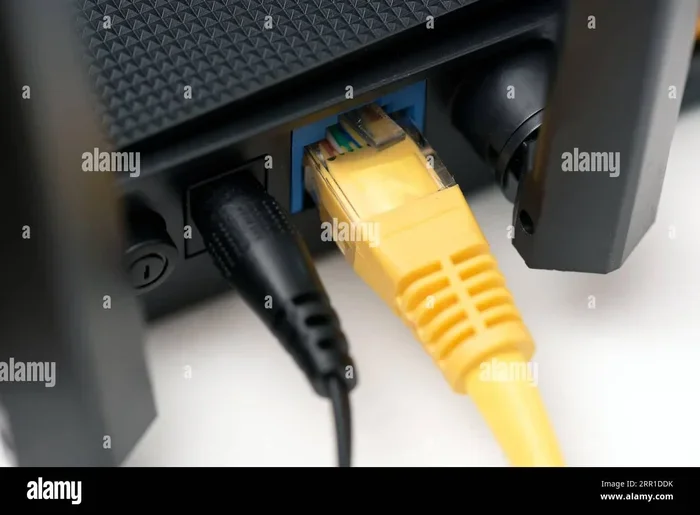
- Connect the cable. Plug one end of the ethernet cable into the wall jack or main router. Plug the other end into the WAN port on your travel router.
- Power on the travel router. Connect the travel router to power using its adapter or a USB cable connected to a power bank.
- Configure the settings. Open the travel router’s admin panel on your phone or laptop. Set it to create a new Wi-Fi network or bridge mode, depending on your needs.
- Connect your devices. Once the travel router is set up, connect your phone, laptop, and other devices to the new network. You should notice faster speeds and a more stable connection.
If you are traveling with a laptop and want to stay connected without relying on hotel Wi-Fi at all, you might consider setting up your own mobile hotspot instead. Some travelers prefer to use their phone as a hotspot and connect the travel router to it wirelessly, which eliminates the need for any ethernet entirely. Both approaches work well, and the right choice depends on your specific situation.
One tip that experienced travelers share is to always carry a short ethernet cable in your carry-on bag. It takes up almost no space and can save you from frustrating connectivity issues. If you are staying somewhere with a wired internet option, you will be glad you brought it. This is especially true if you have ever struggled with weak hotel Wi-Fi and wished you had a better option.
Travel Router With Ethernet vs Without Ethernet
To help you decide whether ethernet is worth it for your next trip, let us compare the two setups side by side.
| Feature | With Ethernet | Without Ethernet |
|---|---|---|
| Speed | Faster and more consistent | Good but can vary |
| Stability | Very stable, no interference | Can be affected by walls and other devices |
| Security | Higher with wired backhaul | Good but wireless signals can be intercepted |
| Setup Complexity | Slightly more steps | Simple, just turn it on |
| Portability | Requires carrying a cable | Ultra-portable, no cables needed |
| Best For | Remote workers, long stays, poor Wi-Fi areas | Short trips, casual browsing, strong hotel Wi-Fi |
If you are someone who travels often and relies on the internet for work, the wired setup is the clear winner. The added stability and speed are worth the small extra effort. On the other hand, if you are going on a short vacation and just need to check email and scroll social media, a wireless-only setup is perfectly fine.
For those who want the best of both worlds, many modern travel routers support dual connectivity. They can use an ethernet cable as the primary connection while also rebroadcasting a strong Wi-Fi signal to your devices. This gives you the speed and reliability of a wired connection with the convenience of wireless access for all your devices.
Common Mistakes People Make With Travel Routers And Ethernet
Even though setting up a travel router with ethernet is simple, there are a few common mistakes that travelers make. Avoiding these can save you a lot of frustration.
- Forgetting to bring the ethernet cable. It sounds obvious, but many people pack their travel router and forget the cable. Without it, you cannot use the wired connection even if the hotel provides one. Always double-check your bag before you leave.
- Using the wrong port. Some travel routers have multiple ethernet ports. Make sure you plug the cable into the WAN or internet port, not one of the LAN ports. Plugging it into the wrong port can prevent your router from working properly.
- Not checking the hotel’s internet policy. Some hotels charge extra for wired internet access or limit the number of devices you can connect. Check with the front desk before you assume you can use ethernet.
- Ignoring the power source. A travel router needs power to work. If you are using ethernet, make sure you have a way to keep the router powered. A power bank can be a lifesaver if you are staying somewhere with limited outlets.
- Skipping the configuration step. Just plugging in the cable is not enough. You need to configure the travel router to use the wired connection properly. Take a few minutes to set it up correctly before you need to work or stream.
Expert Tips For Staying Connected On The Road
Experienced travelers and remote workers have learned a few tricks over the years that can make your life much easier. Here are some expert tips to keep in mind.
Invest in a good travel router. Not all travel routers are created equal. Look for one that supports dual-band Wi-Fi connectivity, has an ethernet port, and can run on USB power. A quality travel router will serve you well on many trips and give you the flexibility to connect wired or wireless.
Use a VPN for extra protection. When you are connecting to unfamiliar networks, a VPN adds a layer of encryption that keeps your data safe. This is especially important when you are using hotel or public Wi-Fi. Many VPN services are lightweight and will not slow down your connection noticeably.
Test your setup before you leave. Set up your travel router at home and practice connecting it to a wired and wireless source. This way, you will know exactly how it works and can troubleshoot any issues before you are on the road. A little preparation goes a long way toward a stress-free trip.
Consider a mesh setup for larger spaces. If you are staying in a large hotel room or vacation rental, a single travel router might not cover the entire space. You can connect a second router to your travel router to extend the coverage. If you are curious about expanding your network setup, you might find it helpful to learn about connecting mesh to an existing router for broader coverage in large spaces.
Keep your devices charged. A travel router is useless if it runs out of power. Bring a portable charger or keep it plugged in whenever possible. Some travelers also carry a multi-port USB charger so they can charge their router, phone, and other devices from a single outlet.
Know when to skip ethernet. Not every trip requires a wired connection. If you are going to a resort with excellent Wi-Fi or a short weekend trip where you just need to check a few emails, a wireless-only setup is perfectly fine. The key is to assess your needs before each trip and pack accordingly.
Final Thoughts
So, does a travel router need ethernet? The answer is that it depends on your trip and your needs. For most casual travelers, a wireless-only setup works just fine. But for remote workers, digital nomads, and anyone who values a fast and stable connection, adding ethernet to your travel router setup is a game-changer.
A travel router gives you the freedom to create your own private, reliable network wherever you go. Whether you choose to use ethernet or stick with wireless, the most important thing is that you stay connected and productive on the road. The small effort of bringing an ethernet cable or setting up a wired connection can save you from hours of frustration and slow internet.
Before your next trip, take a few minutes to evaluate your connectivity needs. Pack your travel router, bring an ethernet cable if you think you might need it, and consider setting up a VPN for extra security. With the right setup, you can enjoy fast, reliable internet no matter where your travels take you. Safe travels and happy connecting.
Frequently Asked Questions
Can I use a travel router without any internet source at all?
No, a travel router needs an internet source to create a network. You can connect it to a hotel Wi-Fi, a mobile hotspot, or an ethernet jack. Without any incoming internet connection, the router can only create a local network for file sharing between your devices.
Is it better to use ethernet or Wi-Fi with a travel router?
Ethernet provides faster speeds, lower latency, and a more stable connection. Wi-Fi is more convenient and portable. For most travelers, using both together gives the best results, with ethernet serving as the backhaul and Wi-Fi distributing the connection to your devices.
Do all travel routers have an ethernet port?
Most travel routers include at least one ethernet port, but not all of them do. Before purchasing a travel router, check the specifications to make sure it has a WAN or LAN port if you plan to use a wired connection. Some ultra-compact models skip the ethernet port to save space.
Can I plug my travel router directly into a hotel room ethernet wall jack?
Yes, in most cases you can. Simply plug the ethernet cable from the wall jack into the WAN port of your travel router and configure it. Some hotels use special authentication systems for wired connections, so you may need to log in through a captive portal first.
Will using ethernet drain my travel router’s battery faster?
Not significantly. An ethernet connection does not use much power compared to wireless signal transmission. Most travel routers can run for several hours on a single charge even with an active ethernet connection. If you are concerned about battery life, keep a USB cable and a power bank handy.
Can I use a travel router with ethernet and still have Wi-Fi for my devices?
Absolutely. When you connect your travel router to an ethernet source, it takes that wired connection and rebroadcasts it as a Wi-Fi network. Your phone, laptop, tablet, and other devices can then connect to the travel router’s Wi-Fi just like they would with any other wireless network. You get the speed of a wired connection with the convenience of wireless access.