Does Frontier Have Wifi You Can Pay For Right Here
Does Frontier have WiFi you can pay for? Yes, Frontier offers WiFi plans you can subscribe to monthly, including standalone internet and bundled options. This guide breaks down Frontier WiFi pricing, how to get connected, and whether you can use your own router. You’ll learn about Frontier’s internet deals, fees, and coverage to decide if it’s the right fit for your home.
Key Takeaways
- Frontier offers WiFi you can pay for monthly, with standalone internet plans and bundle options.
- You can get just WiFi at home without a TV or phone package, giving you flexibility.
- Using your own WiFi box is possible, but Frontier may require specific modem/router combos.
- Mesh WiFi and ethernet extensions help improve coverage in larger homes.
- Frontier WiFi pricing varies by location, speed tier, and whether you bundle services.
- Common issues like slow speeds can often be fixed with a router reboot or placement adjustment.
- Check for promotional deals to lower your monthly WiFi cost.
📑 Table of Contents
Does Frontier Have WiFi You Can Pay For?
If you are looking for does Frontier have WiFi you can pay for, the short answer is yes. Frontier Communications offers a range of WiFi and internet plans that let you pay a monthly fee for home internet access. You do not need to sign up for a long-term contract in many cases, and you can often choose between standalone WiFi internet or bundled packages that include TV and phone service. This makes Frontier a solid option for households that want reliable home WiFi without the hassle of a complicated setup.
Many people wonder whether they can just pay for WiFi separately from other services. The good news is that Frontier provides standalone internet plans in many areas. You can get WiFi you can pay for on a month-to-month basis, which gives you the freedom to cancel or change plans whenever you need. Whether you live in a small apartment or a large house, Frontier has options designed to fit different budgets and speed needs.
Understanding how Frontier WiFi works, what it costs, and what equipment you need is the first step toward making a smart choice. Below, we break down everything you need to know about Frontier WiFi plans, pricing, equipment, and coverage. By the end, you will have a clear picture of whether Frontier is the right internet provider for you.
What Kind of WiFi Does Frontier Offer?
Frontier provides several types of internet connections depending on your location. The most common options include Frontier FiOS, which uses fiber-optic lines for fast speeds, and Frontier DSL, which uses traditional copper telephone lines. In some areas, Frontier also offers fixed wireless internet. Each type comes with its own set of WiFi plans and speed tiers.
Fiber-optic service from Frontier is known for its high speeds and low latency. If you have fiber available at your address, you can get WiFi you can pay for with speeds ranging from 50 Mbps to 940 Mbps. DSL plans are more widely available and offer speeds between 12 Mbps and 115 Mbps. Fixed wireless is another option in rural areas where wired connections are not available. All of these plans include a wireless router that broadcasts home WiFi throughout your living space.
Frontier WiFi Plans and Pricing
Frontier WiFi pricing depends on the speed tier you choose and whether you bundle services. Standalone internet plans start at lower price points, while bundles that include TV or phone service can offer better value. Here is a general look at what you can expect:
- Basic WiFi Plan: Speeds around 12-50 Mbps. Ideal for light browsing, email, and streaming on one or two devices.
- Mid-Tier WiFi Plan: Speeds from 50-200 Mbps. Great for families who stream, game, and work from home.
- High-Speed WiFi Plan: Speeds from 200-940 Mbps. Perfect for large households with many devices and heavy usage.
Monthly fees for WiFi you can pay for typically range from around $20 to $80, depending on the speed and any promotional offers. Frontier often runs limited-time deals that lower the monthly rate for the first 12 months. Always check the current Frontier internet deals on their website or by calling customer service.
What Is Included in a Frontier WiFi Plan?
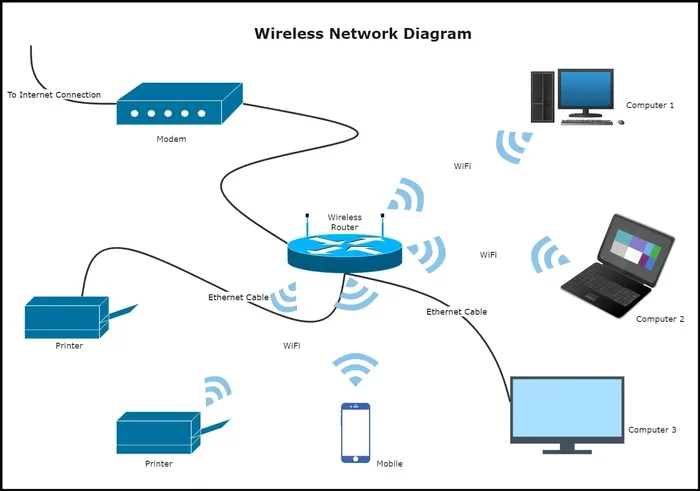
When you sign up for a Frontier WiFi plan, you usually get a wireless router provided by the company. This router connects to Frontier’s network and broadcasts home WiFi in your home. Some plans include a modem/router combo unit, which handles both the connection to the internet and the WiFi broadcasting.
Frontier also offers equipment protection plans for an additional monthly fee. This can cover repairs or replacements if your router or modem stops working. You may also have the option to buy your own WiFi box instead of renting from Frontier. More on that below.
Can You Get Just WiFi from Frontier?
Yes, you can get just WiFi at home without adding a TV or phone line. Frontier offers standalone internet plans that focus solely on providing WiFi you can pay for. This is perfect if you already have a streaming service for your TV and use a mobile phone for calls. You do not need to pay for extra services you do not want.
To see if standalone WiFi is available at your address, you can visit the Frontier website and enter your zip code. The site will show you the available plans, speeds, and pricing. In many areas, getting just WiFi is a straightforward process. You sign up online, choose your plan, and Frontier will ship the equipment to your home.
If you want to explore more options for standalone internet, you might also check out Can I Get Just Wi Fi At Home. That article covers similar ground and can help you compare what is available from different providers.
No Contract Options
One of the best things about Frontier WiFi is that you often do not need to sign a long-term contract. Many plans are month-to-month, which means you can cancel anytime without an early termination fee. This flexibility is a big plus for people who are not sure how long they will stay in a home or who want to try a service risk-free.
However, some promotional plans may require a 12-month or 24-month commitment to lock in the discounted rate. Always read the fine print before you sign up. If you want a truly no-contract WiFi option, look for the standard standalone plans that do not mention a term length.
Frontier WiFi for Different Household Sizes
Frontier has plans that can work for a single person, a couple, or a large family. A single user who mostly browses the web and watches videos can get by with a basic plan. A family with multiple streamers, gamers, and remote workers will need a faster plan with higher data allowances.
Frontier does not typically impose hard data caps on its internet plans, which is a big advantage. You can use as much data as you want without worrying about overage charges. This makes Frontier a good choice for heavy data users who stream a lot of content or work from home.
Using Your Own WiFi Equipment with Frontier
Many people prefer to use their own router instead of renting one from the internet provider. If you are wondering whether you can use your own WiFi equipment with Frontier, the answer is generally yes. However, there are a few things you need to know before you make the switch.
Frontier requires that your equipment be compatible with their network. For fiber plans, you need a specific type of ONT (Optical Network Terminal) and router. For DSL plans, you need a modem that supports Frontier’s DSL technology. You cannot just plug any router into the wall and expect it to work.
If you want to avoid the monthly equipment rental fee, you can buy a compatible modem and router. The article Can I Buy My Own Wifi Box goes into detail about what to look for when purchasing your own equipment. It covers compatibility, setup, and the pros and cons of owning versus renting.
Benefits of Buying Your Own Router
- Cost Savings: You eliminate the monthly rental fee, which can save you $10 to $15 per month over time.
- Better Performance: You can choose a high-quality router that offers faster speeds, better range, and more features than the standard Frontier-provided unit.
- More Control: You get full access to the router settings, allowing you to customize your home WiFi network for security, speed, and coverage.
Things to Keep in Mind
When you use your own equipment, Frontier may not provide support for router setup or troubleshooting. You are responsible for configuring the device correctly. If you run into problems, you may need to rely on online forums or your own technical knowledge. That said, many users find that the benefits outweigh the drawbacks.
Also, Frontier might still require you to use their modem for the initial connection. In some cases, you can bridge the Frontier modem with your own router to get the best of both worlds. This setup gives you the stable connection from Frontier’s equipment while letting you use a better WiFi router for your home.
Extending Frontier WiFi Coverage Around Your Home
If your Frontier WiFi signal does not reach every corner of your home, you are not alone. Many houses have dead zones or weak spots where the signal is too slow to be useful. The good news is that there are several ways to extend your Frontier WiFi coverage without paying for a more expensive internet plan.
One popular solution is to add a mesh WiFi system. A mesh network uses multiple units placed around your home to create a seamless WiFi blanket. You can add mesh WiFi to your existing Frontier router, and the Can I Add Mesh Wifi To Existing Router article explains exactly how to do it.
Mesh WiFi vs. WiFi Extenders
Mesh systems and traditional WiFi extenders both boost your signal, but they work differently. A mesh system uses multiple nodes that communicate with each other to create a single, unified network. An extender simply repeats the signal from your main router, which can sometimes lead to slower speeds.
Mesh WiFi is generally the better choice for larger homes because it provides more consistent coverage. You can place nodes in different rooms and the system will automatically route your devices to the strongest signal. This makes it easy to extend WiFi with ethernet cable back to the main router if you want a wired connection for the mesh nodes.
If you are considering using ethernet to extend your network, you might find Can I Extend Wifi With Ethernet Cable helpful. That guide covers how to run ethernet cables through your home and connect mesh nodes or additional access points for the best possible performance.
Tips for Improving Frontier WiFi Signal
- Place your router in a central location: Keep it away from walls, metal objects, and appliances that can interfere with the signal.
- Update your router firmware: Frontier may push updates automatically, but you can also check for updates in the router admin panel.
- Change the WiFi channel: If you live in a dense neighborhood, interference from other networks can slow down your connection. Switching to a less crowded channel can help.
- Use a wired connection for stationary devices: Devices like desktop PCs, smart TVs, and gaming consoles benefit from a direct ethernet connection, which frees up WiFi bandwidth for mobile devices.
Common Frontier WiFi Issues and How to Fix Them
Even with a great plan, you might run into issues with your Frontier WiFi from time to time. Slow speeds, dropped connections, and inability to connect are common complaints. Most of these problems have simple solutions that you can try at home before calling customer service.
Slow WiFi Speeds
If your internet feels slow, the first thing to do is run a speed test. You can use free tools like Speedtest.net to see if you are getting the speeds you pay for. If the speed is much lower than expected, try the following steps:
- Restart your router: Unplug the power cord, wait 30 seconds, and plug it back in. This clears the cache and can resolve many temporary issues.
- Check for background usage: Other devices in your home might be downloading updates or streaming videos, which can slow things down for everyone.
- Move closer to the router: Walls and distance can weaken the signal. If you are far from the router, move closer and see if the speed improves.
- Change the WiFi band: If your router supports both 2.4 GHz and 5 GHz bands, try switching to the 5 GHz band for faster speeds. The 2.4 GHz band has longer range but lower speeds.
Devices Not Connecting to WiFi
If a device cannot find your Frontier WiFi network, make sure the router is powered on and the indicator lights are normal. You can also try restarting the device you are trying to connect. If the problem persists, check if the WiFi is hidden or if the network name (SSID) has been changed. You can find these settings in the router admin panel.
For more complex issues, Frontier customer service can help you troubleshoot. They can check your line status, run tests from their end, and guide you through advanced steps. You can reach them by phone or through the Frontier online chat.
Is Frontier WiFi Worth the Price?
Deciding whether Frontier WiFi is worth the cost depends on your needs, budget, and location. In areas where fiber is available, Frontier offers some of the fastest and most reliable internet at competitive prices. The lack of data caps and the option for no-contract plans make it an attractive choice for many households.
However, DSL-only plans may not be as fast as fiber or cable options from other providers. If you need very high speeds for 4K streaming or online gaming, you may want to compare Frontier with other local ISPs. You can also look at Can I Get A Hotspot Instead Of Wi Fi to see if a mobile hotspot could be a viable alternative in your situation.
Overall, Frontier provides solid value for WiFi you can pay for monthly. The combination of flexible plans, no data caps, and the ability to use your own equipment makes it a strong contender in the home internet market. If you live in an area with Frontier coverage, it is definitely worth considering.
Frontier WiFi Customer Service and Support
Frontier offers customer support through phone, chat, and online resources. If you have trouble setting up your WiFi or understanding your bill, their support team can walk you through the process. They can also help you understand the details of your plan, including any fees or taxes that apply.
Many users report that Frontier’s customer service is responsive and helpful. However, like any large company, experiences can vary. Reading recent reviews can give you a sense of what to expect in your area. You can also check the Frontier community forums for tips and advice from other customers.
Comparing Frontier WiFi to Other Providers
When you are shopping for home WiFi, it helps to compare Frontier with other providers in your area. Here are a few factors to consider:
- Speed: Does the provider offer the speeds you need for your household?
- Price: What is the monthly cost after any promotional period ends?
- Contract terms: Is there a long-term commitment, or can you cancel anytime?
- Equipment: Do you need to rent a modem/router, or can you use your own?
- Data caps: Are there limits on how much data you can use each month?
Frontier scores well on speed (especially fiber), no data caps, and flexible contract terms. These strengths make it a top choice for many homeowners who want WiFi you can pay for without surprises.
Conclusion
Does Frontier have WiFi you can pay for? Absolutely. Frontier offers a variety of internet plans that let you pay a monthly fee for reliable home WiFi. Whether you want a basic plan for light browsing or a high-speed fiber connection for a busy household, Frontier has options to fit your needs. You can choose standalone internet without a contract, use your own equipment, and extend your coverage with mesh WiFi or ethernet.
By understanding the plans, pricing, and equipment options, you can make an informed decision about whether Frontier is the right provider for you. Take the time to compare speeds, check for promotional deals, and consider your household’s usage habits. With the right Frontier WiFi plan, you can enjoy fast, reliable internet without breaking the bank.
If you are ready to explore your options, visit the Frontier website, enter your address, and see what WiFi you can pay for is available in your area. The process is simple, and you can be online in just a few days.
Frequently Asked Questions
Can I get WiFi from Frontier without a contract?
Yes, Frontier offers many standalone internet plans that do not require a long-term contract. You can pay month-to-month and cancel anytime without an early termination fee. Just check the specific plan details, as some promotional rates may have a term commitment.
What is the cheapest Frontier WiFi plan?
The cheapest Frontier WiFi plan depends on your location and available technology. In many areas, basic DSL plans start around $20 to $30 per month. Fiber plans may start a bit higher but offer much faster speeds. Always look for current promotions that can lower the monthly cost.
Can I use my own router with Frontier internet?
Yes, you can use your own router with Frontier internet. You will need to make sure the router is compatible with Frontier’s network type (fiber, DSL, or fixed wireless). Using your own router can save you the monthly rental fee and give you more control over your home WiFi settings.
Does Frontier charge for WiFi equipment?
Frontier may charge a monthly rental fee for the modem and router they provide. You can avoid this fee by purchasing your own compatible equipment. The Can I Buy My Own Wifi Box article can help you find the right gear for your Frontier plan.
How can I improve my Frontier WiFi signal in a large house?
You can improve your Frontier WiFi signal by adding a mesh WiFi system or using WiFi extenders. Placing the router in a central location and using ethernet backhaul can also boost coverage. The Can I Add Mesh Wifi To Existing Router guide offers step-by-step advice for setting up mesh nodes.
Is Frontier WiFi available in rural areas?
Frontier offers WiFi in many rural areas through DSL and fixed wireless connections. Fiber availability is more limited in rural locations, but DSL and fixed wireless can still provide reliable internet. Check your address on the Frontier website to see what options are available near you.