Does Everyone Have Wifi Calling Here Is The Real Deal
Not everyone has wifi calling available on their phone or plan. This feature depends on your mobile carrier, your device, and your calling plan. In this guide, we break down exactly who can use wifi calling, how it works, and what you need to do to turn it on.
Do you ever find yourself in a dead zone with no cell signal but still need to make a call? That frustrating moment is exactly where wifi calling comes to the rescue. But here is the big question that many people ask: does everyone have wifi calling? The short answer is no. Not everyone has access to this feature, and not every phone plan includes it. But the good news is that it is becoming more common with each passing year.
Wifi calling lets you make phone calls over a wireless internet connection instead of relying on the traditional cellular network. This means you can call anyone even when your cell signal is weak or completely gone. It is a great tool for people who live in rural areas, work in big buildings, or travel internationally. In this article, we will walk you through everything you need to know about wifi calling availability, how it works, and whether it is right for you.
Key Takeaways
- Wifi calling is not universal: It depends on your carrier, phone model, and plan type.
- Most major carriers support it: AT&T, Verizon, T-Mobile, and others offer wifi calling on many devices.
- You need a compatible phone: Older or budget devices may not support this feature.
- It saves cellular minutes: Calls over wifi don’t count against your plan’s minute limits.
- Call quality improves: You get clearer audio when you have a strong internet connection.
- International calling gets cheaper: Many carriers offer free or low-cost international calls through wifi calling.
- Setting it up is easy: Most phones have a simple toggle in the settings menu.
📑 Table of Contents
- What Is Wifi Calling and How Does It Work?
- Does Everyone Have Wifi Calling? The Real Answer
- Who Can Use Wifi Calling?
- How to Turn On Wifi Calling on Your Phone
- Benefits of Using Wifi Calling
- Common Problems With Wifi Calling and How to Fix Them
- Expert Insights on Wifi Calling Availability
- Frequently Asked Questions
- Conclusion
What Is Wifi Calling and How Does It Work?
Before we dive into who has access to this feature, let us first understand what wifi calling actually is. In simple terms, it is a feature that lets your phone use a wifi hotspot or any internet connection to place and receive calls. Instead of sending your voice through cell towers, your phone sends it over the internet.
Think of it like making a FaceTime call or a Skype call, but it looks and feels exactly like a normal phone call. The person on the other end sees your regular phone number. They do not even know you are using the internet to talk. This is different from apps like WhatsApp or Messenger because you do not need the other person to have the same app installed.
How Does the Technology Behind It Work?
When you make a regular call, your phone connects to the nearest cell tower. That tower routes your call through the cellular network to reach the other person. But when wifi calling is turned on, your phone uses your home or public wifi network to send the call data. The internet then delivers your voice to the recipient just like it would deliver any data.
Most modern smartphones support this technology natively. Both iPhones and Android phones have built-in wifi calling features. You just need to make sure your carrier and plan allow it. The feature also works with voice over wifi technology, which is the technical term used by carriers for this service.
Does Everyone Have Wifi Calling? The Real Answer
Here is the honest truth: not everyone can use wifi calling. Whether you have access to this feature depends on three main things. Your mobile carrier, your phone model, and your specific calling plan all play a role. Let us break each one down so you understand exactly what is holding you back, if anything.
Your Carrier Matters a Lot
Not all mobile carriers support wifi calling on every plan. Major carriers like AT&T, Verizon, and T-Mobile do offer this feature on most of their plans. However, smaller or regional carriers may not include it at all. Some budget carriers also limit wireless calling to certain tiers of service.
If you are on a prepaid plan or a pay-as-you-go plan, you might not have access to wifi calling. This is a common reason why people ask, “Does everyone have wifi calling?” The answer really comes down to what your carrier offers. You should always check with your provider to confirm whether your specific plan includes this feature.
Your Phone Needs to Be Compatible
Even if your carrier supports wifi calling, your phone must be able to handle it. Most phones made after 2018 have this capability built in. However, older models or very budget-friendly devices might not support it. If you are using a phone that is several years old, check the manufacturer’s website or your phone’s settings to see if wifi calling is listed as a feature.
For iPhone users, you need iOS 9 or later. For Android users, the requirements vary by manufacturer but most modern devices running Android 8 or higher support this feature. If your phone does not have the latest operating system, you may need to update it or consider upgrading to a newer model.
Your Plan Type Plays a Role Too
Some carriers require you to be on a specific plan type to access wifi calling. For example, they may only offer it on postpaid plans or higher-tier unlimited plans. If you are on a basic or entry-level plan, you might find that this feature is not available to you even though your phone supports it.
This is why many people assume that everyone has wifi calling when in reality, plan restrictions keep some users from accessing it. Always log into your carrier account online or call customer service to ask about your plan’s features. It only takes a few minutes and can save you a lot of confusion.
Who Can Use Wifi Calling?
Now that we have covered the limitations, let us talk about who actually benefits from wifi calling. This feature is a game-changer for certain groups of people, and you might be surprised to learn how many people fall into these categories.
People Living in Rural or Remote Areas
If you live in an area with weak cell coverage, wifi calling can be a lifesaver. Rural areas often have sparse cell tower coverage, which means dropped calls and poor signal strength are common. With a good internet connection at home, you can make crystal-clear calls without worrying about your cell signal fading.
Many families in remote areas rely on wifi calling as their primary way to stay in touch with loved ones and emergency services. It fills a critical gap that traditional cellular service simply cannot cover in some locations.
People Who Work Inside Large Buildings
Offices, warehouses, and shopping malls often block cell signals. If you work inside a building with thick walls or underground spaces, you know the struggle of not being able to make or receive calls. Wifi calling solves this problem completely because it uses your building’s wireless internet instead of cell towers.
This is especially helpful for people who work in hospitals, basements, or old buildings with poor signal penetration. Once you turn on wifi calling, you can keep working without stepping outside just to take a call.
Frequent International Travelers
Traveling abroad can make your phone bill skyrocket if you are not careful. Roaming charges for international calls can be incredibly expensive. But with wifi calling, many carriers let you call international numbers without charging roaming fees. This makes it an excellent option for people who travel often for work or leisure.
Some carriers even offer free international calling through wifi calling to certain countries. This is a huge money saver for frequent travelers who need to stay in touch with family, clients, or colleagues back home.
How to Turn On Wifi Calling on Your Phone
If your carrier and phone both support this feature, turning it on is usually very simple. Here is how you can do it on both iPhone and Android devices.
Turning on Wifi Calling on iPhone
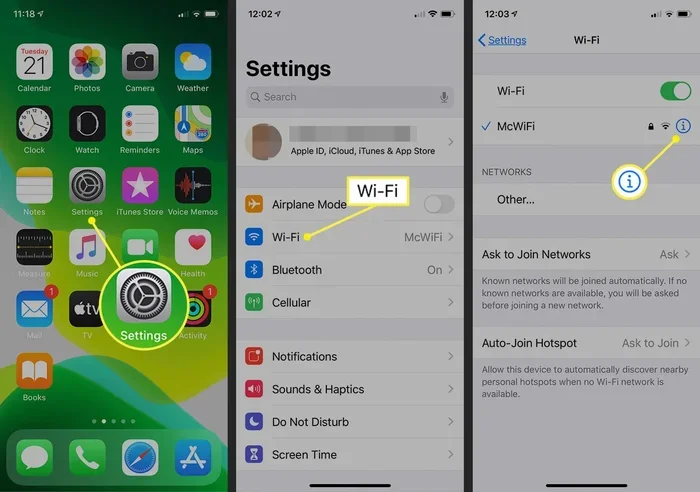
Open the Settings app on your iPhone. Tap on Phone and then select Calls on Other Devices. Toggle on Allow Calls on Other Devices. Next, go back to the main Settings page and tap on Cellular. Scroll down and tap on Wi-Fi Calling. Turn on the switch for Wi-Fi Calling on This iPhone. You will need to enter your address for emergency services, which is required for location accuracy.
Turning on Wifi Calling on Android
Open the Settings app on your Android phone. Tap on Network and Internet or Connections, depending on your phone model. Select Mobile Network and then look for Advanced. Tap on Wi-Fi Calling and toggle it on. You may be asked to confirm your address for emergency services purposes.
If you do not see the wifi calling option in your settings, it could mean your carrier does not support it on your plan or your phone is not compatible. In that case, you may want to check if you can use wifi without a wifi adapter or explore other connectivity options.
Benefits of Using Wifi Calling
Once you understand who can use wifi calling, it is worth looking at why so many people love this feature. The benefits go far beyond just making calls in areas with weak signal.
Better Call Quality
One of the biggest advantages of wifi calling is improved call quality. When you have a strong and stable internet connection, your calls sound clearer and you experience fewer dropped calls. This is especially helpful in crowded areas where cell towers get overloaded.
No Extra Apps Needed
Unlike apps like WhatsApp, Skype, or Zoom, wifi calling works directly through your phone’s native calling app. You do not need to download anything or ask the person you are calling to install a specific app. It works just like a regular phone call, which makes it very user-friendly.
Saves Your Cellular Minutes
When you make calls over wifi calling, those calls do not count against your plan’s minute limits. This is a great benefit for people who have limited minute plans or who frequently exceed their monthly allowance. Your calls use data instead of cellular minutes, which can help you stay within your plan limits.
Emergency Calling Support
Most carriers support emergency calling over wifi. This means you can still call 911 even if you have no cell signal but do have a wifi connection. Your phone will send your location to emergency services, which is a critical safety feature for many users.
Common Problems With Wifi Calling and How to Fix Them
While wifi calling is a great feature, it is not perfect. Many users run into issues when trying to use it. Here are some common problems and simple fixes to get you back on track.
Wifi Calling Keeps Turning Off
Sometimes your phone may automatically turn off wifi calling when you move away from your home network. This is normal behavior and happens because your phone switches to the cellular network when it detects a stronger signal. To fix this, go to your phone settings and make sure the feature stays enabled. You can also set your phone to prefer wifi calling over cellular in some models.
Poor Call Quality Despite Strong Wifi
If your internet connection is strong but your call quality is still poor, the issue might be with your router or network coverage. Try moving closer to your router or restarting your modem. You can also check if other devices are using a lot of bandwidth, which can slow down your call quality.
Your Carrier Does Not Show the Option
If you cannot find the wifi calling setting on your phone, contact your carrier directly. They can confirm whether your plan supports the feature and help you activate it if needed. Some carriers require you to call customer service or visit a store to enable this feature on your account.
Expert Insights on Wifi Calling Availability
Industry experts agree that wifi calling is the future of mobile communication. As more people move to unlimited data plans and as wireless communication technology improves, carriers are making this feature available to more users. However, there is still a long way to go before every single phone user has access to it.
According to telecommunications analysts, the adoption of wifi calling has grown significantly over the past few years. More carriers are including it as a standard feature on their plans. But budget carriers and older plans still lag behind in offering this capability. If you are unsure about your access, the best step is to check directly with your provider.
Experts also recommend that users who travel internationally look into whether their carrier offers free or discounted international calling through wifi calling. This can save travelers hundreds of dollars in roaming charges each year. It is one of the most practical and underused features available on modern smartphones.
One thing to keep in mind is that wifi calling quality depends heavily on your internet connection speed and stability. A slow or unstable connection can lead to choppy audio or dropped calls. For the best experience, make sure you have a reliable and fast wifi network at home and work.
Frequently Asked Questions
Is Wifi Calling Free to Use?
Yes, wifi calling is typically free to use. It does not cost extra to turn on the feature, and calls made over wifi do not count against your plan’s minute limits. However, the calls do use your data, so if you have a limited data plan, you should keep an eye on your usage. Most carriers include wifi calling at no additional charge on their plans.
Can Anyone Turn on Wifi Calling?
Not everyone can turn on this feature. You need a carrier that supports it, a compatible phone, and a plan that includes the feature. If any one of these three things is missing, you will not be able to use wifi calling. Check with your carrier and phone manufacturer to confirm your eligibility.
Does Wifi Calling Work Internationally?
Many carriers support wifi calling internationally, but not all of them. Some carriers offer free international calls through this feature while others charge regular roaming rates. You should contact your carrier before traveling abroad to confirm whether international wifi calling is available on your plan.
Will People Know I Am Using Wifi Calling?
No, the person you are calling will not know you are using wifi calling. Your call looks and sounds exactly like a regular phone call. Your phone number appears normally on their caller ID, and there is no difference in the way the call is received.
Does Wifi Calling Use a Lot of Data?
Wifi calling uses very little data. A typical voice call uses about 1 MB of data per minute. This is a tiny amount compared to streaming video or browsing the web. Even with a limited data plan, you can make plenty of calls without worrying about running out of data.
Can I Use Wifi Calling With a VPN?
Yes, you can use wifi calling while connected to a VPN in most cases. However, some VPNs may interfere with call quality if they slow down your connection. If you notice issues, try turning off your VPN temporarily to see if it improves your call experience. Most users do not experience any problems using wifi calling alongside a VPN.
Conclusion
So, does everyone have wifi calling? The answer is no, but more people are getting access to it every year. Your carrier, your phone, and your plan all determine whether you can use this helpful feature. If you have a modern smartphone and a plan from a major carrier, there is a good chance you already have wifi calling available to you.
The benefits of wifi calling are clear. You get better call quality, you save cellular minutes, and you can stay connected even in areas with no cell signal. Whether you live in a rural area, work in a big building, or travel internationally, this feature can make a real difference in your daily life.
Take a few minutes today to check if your phone and carrier support wifi calling. Turn it on and test it out. You might be surprised at how much easier your phone calls become when you are not relying solely on the cellular network. It is one of those small features that can have a big impact on your everyday communication.