Does Baby Brezza Have Wifi Everything You Need To Know
Yes, select Baby Brezza models offer WiFi connectivity, letting you prepare baby formula remotely through a smartphone app. The Baby Brezza Formula Pro Advanced and similar smart devices connect to your home network, giving parents hands-free convenience. In this guide, we walk you through setup, features, troubleshooting, and whether a WiFi-enabled Baby Brezza is worth it for your nursery.
This is a comprehensive guide about Does Baby Brezza Have Wifi.
Key Takeaways
- WiFi-Enabled Models Exist: Not all Baby Brezza devices have WiFi. The Formula Pro Advanced and newer models support wireless connectivity.
- App Control Is a Game Changer: You can prepare bottles from your phone, set schedules, and track feeding routines.
- Setup Is Simple: Connecting Baby Brezza to WiFi takes just a few minutes using the free companion app.
- Mesh Networks Help: If your nursery has weak signal, adding mesh WiFi to your existing router can boost connectivity.
- Troubleshooting Is Straightforward: Most connection issues resolve with a quick reset or router check.
- Security Matters: Always use a strong password and keep your baby device network separate if possible.
[FEATURED_IMAGE_PLACEHOLDER]
Does Baby Brezza Have Wifi Everything You Need To Know
Baby Brezza has become a household name for parents who want to make late-night feedings easier. The brand offers a range of baby formula machines, bottle warmers, and smart nursery gadgets. But one question keeps popping up: does Baby Brezza have WiFi?
The short answer is yes, but with a catch. Only certain models come with wireless connectivity. The WiFi feature lets parents control the device from their phone, set feeding schedules, and even prepare formula from across the room. It is a nice touch for busy parents who want every bit of convenience they can get.
In this article, we cover everything you need to know about Baby Brezza WiFi features. We will look at which models support it, how to set it up, what the app can do, and how to fix common connection problems. Whether you are a new parent or shopping for a gift, this guide has you covered.
We also share practical tips on making sure your nursery WiFi is strong enough to handle smart baby devices. Because let us face it, nothing is more frustrating than a device that drops connection right when you need it most.
What Is Baby Brezza And Why Does WiFi Matter
Baby Brezza makes machines that prepare baby formula quickly and consistently. Their flagship product, the Formula Pro Advanced, mixes and warms formula on demand. It saves parents from the midnight scramble of measuring powder and heating water by hand.
Now, add WiFi to the mix. A WiFi-enabled Baby Brezza turns a handy appliance into a truly smart nursery device. You can start a formula cycle from your couch, your bedroom, or even your office if you step out briefly.
Why Parents Want WiFi-Connected Baby Gear
Modern parents rely on their phones for almost everything. So it makes sense that baby gear would follow suit. Here is why WiFi matters for Baby Brezza devices:
- Remote Control: Start or stop the machine without being near it.
- Scheduling: Set a feeding timer so formula is ready when the baby wakes up.
- Tracking: Log feedings and amounts in the app for pediatrician visits.
- Firmware Updates: Get new features and improvements without buying a new device.
- Integration: Some models work with smart home ecosystems for a connected nursery experience.
Not every parent needs WiFi on their baby formula maker. If you only use the machine at the kitchen counter, a basic model works just fine. But if you want the convenience of app control and smart features, a WiFi model is worth the extra cost.
Which Baby Brezza Models Have WiFi
Baby Brezza offers several models, and WiFi support varies from one to the next. Here is a breakdown of the most popular models and their connectivity options.
Formula Pro Advanced with WiFi
This is the flagship smart model. The Baby Brezza Formula Pro Advanced WiFi connects to your home wireless network and pairs with the free Baby Brezza app. You get full remote control, feeding logs, and custom formula strength settings.
Key features of the WiFi model include:
- One-touch formula preparation
- Adjustable water temperature
- Customizable formula concentration
- Feeding history tracking in the app
- Compatible with most baby formula brands
Formula Pro (Non-WiFi Model)
The standard Formula Pro does not have WiFi. It works great as a standalone machine. You get all the formula-making basics without the smart features. This is a solid choice if you do not plan to use app controls or if your nursery has weak wireless signal.
Other Smart Baby Brezza Devices
Baby Brezza also makes bottle warmers and sterilizers. Some of these newer accessories are starting to include Bluetooth or WiFi options. Always check the product specs before buying if connectivity matters to you.
Quick Comparison Table
| Model | WiFi | App Control | Feeding Tracker | Price Range |
|---|---|---|---|---|
| Formula Pro Advanced WiFi | Yes | Yes | Yes | $200 – $280 |
| Formula Pro (Standard) | No | No | No | $130 – $170 |
| Bottle Warmer Smart Models | Some | Varies | No | $60 – $100 |
How To Set Up WiFi On Your Baby Brezza
Setting up WiFi on a Baby Brezza device is straightforward. Even if you are not tech-savvy, you can get it running in about 10 minutes. Here is a step-by-step walkthrough.
Step 1: Download the Baby Brezza App
Go to the App Store or Google Play Store and search for the Baby Brezza app. Download it and create an account. You will need your email address and a strong password to get started.
Step 2: Power On the Device
Plug in your Baby Brezza machine and make sure it is on the home screen. The WiFi indicator light will blink, showing it is ready to pair.
Step 3: Connect to Your Home Network
Open the app and follow the on-screen prompts. The app will ask you to select your home WiFi network and enter the password. Make sure you are using a 2.4GHz network since most smart baby devices do not support 5GHz bands.
Step 4: Pair the Device
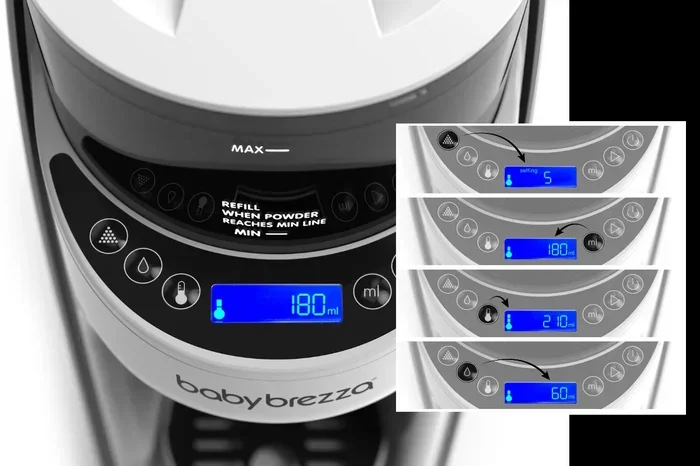
Once the app finds your Baby Brezza, it will pair automatically. You will see a confirmation on both the app and the machine’s display. From there, you can test a formula cycle right from your phone.
Pro Tips for a Smooth Setup
- Place the baby formula machine close to your router during setup.
- Make sure your WiFi password is correct before starting.
- If the device does not connect, restart both the machine and your router.
- Keep your phone on the same network as the Baby Brezza device.
- If your signal is weak in the nursery, consider adding a mesh WiFi system to your existing router for better coverage.
What You Can Do With Baby Brezza WiFi
The WiFi feature opens up a bunch of useful possibilities beyond just turning the machine on and off. Let us look at what you can actually do with a connected Baby Brezza.
Prepare Formula Remotely
Imagine it is 3 AM and the baby is fussing. Instead of walking to the kitchen, you tap a button on your phone. The Baby Brezza starts mixing formula right away. By the time you reach the nursery, the bottle is warm and ready. That alone is worth the WiFi feature for many parents.
Track Feeding History
The app keeps a log of every feeding. It records the time, amount, and formula type. This data is incredibly helpful during pediatrician visits. You can also share the feeding history with a babysitter or partner through the app.
Set Custom Formula Strength
Some babies need a slightly different formula concentration. The WiFi model lets you adjust settings through the app. You can save custom profiles for different stages of feeding as your baby grows.
Receive Notifications and Alerts
The app sends push notifications when a formula cycle is complete. It also alerts you if the water tank is low or if the machine needs cleaning. These small reminders add up to a smoother daily routine.
Control Multiple Devices
If you have more than one smart baby device in the nursery, the app can manage them all from one place. This is especially useful for parents who want a streamlined smart nursery setup.
Troubleshooting Baby Brezza WiFi Connection Issues
Like any WiFi device, Baby Brezza machines can sometimes lose connection. The good news is most problems are easy to fix. Here is what to do when things go wrong.
Device Won’t Connect to WiFi
Start by checking the basics. Is your router powered on? Is the WiFi password correct? Sometimes a simple typo in the password causes the whole setup to fail. Double-check and try again.
If the basics check out, try these steps:
- Restart the Baby Brezza machine.
- Unplug your router for 30 seconds and plug it back in.
- Make sure your phone is connected to the same WiFi network.
- Move the machine closer to the router temporarily.
- Reset the WiFi settings on the Baby Brezza through the app.
Connection Keeps Dropping
A shaky connection is frustrating. This usually happens when the nursery is far from the router. Walls, baby monitors, and even air conditioning units can interfere with wireless signals.
To fix this, try moving your router closer to the nursery. If that is not an option, a WiFi extender or mesh system can help. You might also want to extend your WiFi with an Ethernet cable to the nursery for a more stable connection.
App Won’t Find the Device
Make sure Bluetooth is turned on in your phone settings. The app uses both WiFi and Bluetooth during the pairing process. If the device still does not appear, try uninstalling and reinstalling the app.
Forgot WiFi Password on the Device
No worries. You can reset the WiFi settings through the app or by holding down the WiFi button on the machine for five seconds. This clears the old network info and lets you set up a fresh connection.
Quick Tips
- Always use a 2.4GHz WiFi network for Baby Brezza devices.
- Keep your router firmware updated for the best compatibility.
- Avoid placing the machine near microwaves or cordless phones, which cause interference.
- If your home network is crowded with devices, consider creating a separate guest network for baby gear.
Is a WiFi Baby Brezza Worth The Extra Cost
Let us talk money. WiFi-enabled Baby Brezza models cost more than their non-WiFi counterparts. The question is whether the extra features justify the price tag.
If you are a tech-loving parent who wants full control over the nursery setup, the WiFi model is a great investment. The ability to prepare formula remotely and track feedings adds real value to your daily routine.
On the other hand, if you prefer simplicity and do not mind walking to the kitchen for each feeding, the standard model works perfectly well. There is no shame in skipping the smart features. Both machines prepare excellent formula.
Who Should Get the WiFi Model
- Parents who spend a lot of time away from the kitchen during feedings
- Families with multiple children and busy schedules
- Tech enthusiasts who love smart home integration
- Parents who want detailed feeding logs for their pediatrician
Who Can Skip the WiFi Model
- Parents on a tight budget
- Those with weak WiFi signal in the nursery
- Families who prefer simple, no-fuss baby gear
- Parents who rarely need remote formula preparation
If you do decide to go with a WiFi model, make sure your home network is ready. A strong and stable connection makes all the difference. You might even want to buy your own WiFi box if your current router is outdated or too far from the nursery.
Managing Baby Devices on Your Home Network
Adding a Baby Brezza WiFi machine to your home network is just one piece of the puzzle. Smart baby devices can crowd your network and slow down your internet speed. Here is how to keep things running smoothly.
Create a Separate Network for Baby Gear
Most modern routers let you set up a guest network. Use this for your Baby Brezza and other smart nursery devices. It keeps them separate from your main network, which improves security and performance.
If you ever need to remove a device from your network, you can easily block a device from using your WiFi through your router settings. This is helpful if a baby gadget starts causing network issues.
Check Your Bandwidth
Baby Brezza WiFi devices use very little bandwidth. They are not streaming video or downloading large files. So even a slow home internet plan can handle them without any problem. The real concern is signal strength, not speed.
Keep Your Network Secure
Smart baby devices are connected to your home network, which means they are potential entry points for hackers. Use a strong, unique password for your WiFi network. Update your router firmware regularly. And never share your baby device app login with anyone you do not trust.
Final Thoughts
So, does Baby Brezza have WiFi? Yes, and it is a fantastic feature for parents who want smart convenience in the nursery. The Formula Pro Advanced WiFi model gives you remote control, feeding tracking, and app-based customization that makes late-night feedings a breeze.
That said, WiFi is not a must-have for everyone. If you are happy with a basic formula machine, the standard model delivers excellent results without the extra cost. The choice comes down to your lifestyle, budget, and how much you value app-connected features.
Whatever you decide, make sure your home WiFi is up to the task. A strong signal in the nursery means fewer connection headaches and more time enjoying your baby. With the right setup, a WiFi Baby Brezza can truly make your life as a parent a little bit easier.
Take some time to explore the options, read reviews, and pick the model that fits your family best. Your future self, sleep-deprived at 2 AM with a hungry baby, will thank you for it.
Frequently Asked Questions
Can I Use Baby Brezza Without WiFi?
Yes, the WiFi feature is optional. All Baby Brezza machines work as standalone devices even without an internet connection. You get full formula-making functionality with just the push of a button on the machine itself.
Does Baby Brezza Work With Alexa or Google Home?
Currently, Baby Brezza does not support major smart home voice assistants. The app is the primary way to control WiFi models. However, future updates may add voice control compatibility as smart nursery technology evolves.
How Far Can I Be From the Baby Brezza When Using the App?
You can control the machine from anywhere within your home WiFi range. This typically means up to 150 feet indoors, depending on your router and walls. If you go beyond WiFi range, the app will lose connection and remote control will stop working.
Is Baby Brezza WiFi Safe and Private?
Baby Brezza uses standard encryption for its WiFi connection. The app requires a secure login, and feeding data is stored on your device and their cloud servers. For extra privacy, use a strong app password and enable two-factor authentication if available.
Can I Connect Baby Brezza to a Mobile Hotspot?
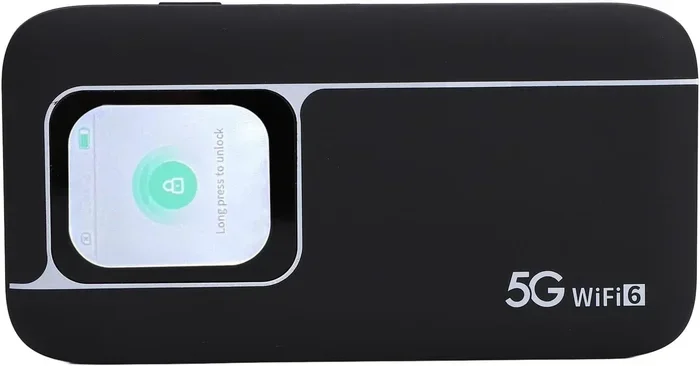
Yes, you can use a mobile hotspot as your WiFi source. This is helpful if your nursery has weak signal from your main router. Just make sure the hotspot is stable and has enough data allowance for continuous device connectivity.
What Should I Do If the Baby Brezza App Won’t Update Over WiFi?
First, check your phone’s internet connection. Then, make sure the Baby Brezza device firmware is up to date. If the problem persists, try clearing the app cache or reinstalling the app. A weak WiFi signal in the nursery can also cause update failures, so moving closer to the router may help.
Frequently Asked Questions
What is Does Baby Brezza Have Wifi?
Does Baby Brezza Have Wifi is an important topic with many practical applications.