Does Apple Tv Use Wi Fi 6 Here Is What You Need To Know
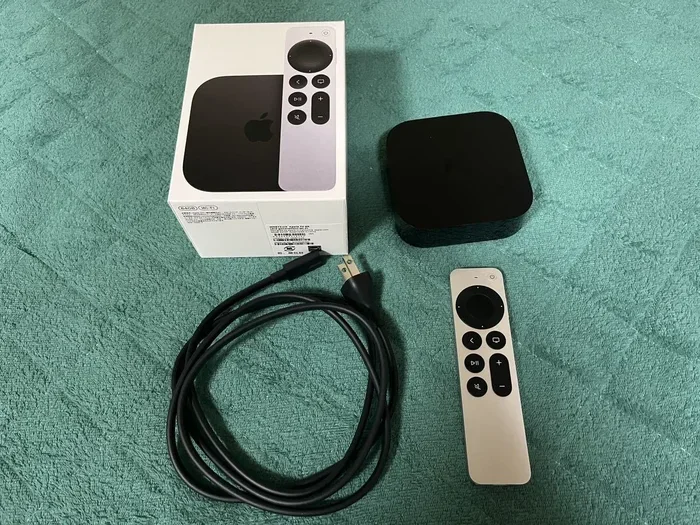
Apple TV 4K and newer models do support Wi-Fi 6, offering faster speeds and better performance for 4K streaming. If you have a Wi-Fi 6 router, your Apple TV can take advantage of the latest wireless technology for smoother playback. Let us break down everything you need to know about Apple TV Wi-Fi 6 support and how it impacts your streaming setup.
Does Apple TV use Wi-Fi 6? This is a question many people ask when they are setting up their home entertainment system or thinking about upgrading their streaming device. The short answer is yes, but only on certain models. Apple has made significant improvements to wireless connectivity over the years, and Wi-Fi 6 support is one of the most important upgrades in recent Apple TV models.
Wi-Fi 6 is the latest wireless networking standard, also known as 802.11ax. It brings faster speeds, better range, and improved performance when multiple devices are connected to the same network. For streaming devices like the Apple TV, this means smoother playback, fewer buffering moments, and a better overall experience. In this article, we will cover everything you need to know about Apple TV Wi-Fi 6 support, which models have it, and why it matters for your home setup.
Whether you are a casual streamer or a 4K movie enthusiast, understanding your device’s wireless capabilities helps you get the most out of your home network. Let us dive into the details.
Key Takeaways
- Apple TV 4K (2nd gen and newer) supports Wi-Fi 6: The latest Apple TV models come with 802.11ax Wi-Fi 6 support for faster wireless streaming.
- Wi-Fi 6 means better speed and efficiency: You get improved bandwidth handling, lower latency, and better performance in crowded networks.
- Not all Apple TV models have Wi-Fi 6: Older models like the Apple TV HD and 1st gen Apple TV 4K only support Wi-Fi 5 (802.11ac).
- Your router matters too: To get Wi-Fi 6 benefits, you need both a Wi-Fi 6 compatible Apple TV and a Wi-Fi 6 router.
- Streaming quality improves with Wi-Fi 6: Expect fewer buffering issues and better 4K HDR performance on supported models.
📑 Table of Contents
What Is Wi-Fi 6 and Why Does It Matter for Apple TV?
Wi-Fi 6 is the sixth generation of Wi-Fi technology. It is also called 802.11ax. This newer standard offers significant improvements over the older Wi-Fi 5 (802.11ac) that was common in previous devices. For streaming, these improvements can make a real difference in your daily viewing experience.
Faster Speeds and Better Bandwidth
Wi-Fi 6 can deliver speeds up to 9.6 Gbps under ideal conditions. That is much faster than Wi-Fi 5, which topped out around 6.9 Gbps. In real-world use, you may not hit those top speeds, but the improvement is still noticeable. When you are streaming 4K HDR content on your Apple TV, faster speeds mean less buffering and a more reliable connection.
Better Performance with Multiple Devices
One of the biggest advantages of Wi-Fi 6 is how it handles multiple devices. Most homes today have dozens of connected devices. Phones, tablets, laptops, smart home gadgets, and streaming boxes all compete for bandwidth. Wi-Fi 6 uses a technology called OFDMA to manage this traffic more efficiently. This means your Apple TV gets a smoother connection even when other devices are using the network.
Lower Latency for Gaming and Interactive Content
If you use your Apple TV for gaming or interactive apps, Wi-Fi 6 offers lower latency. This means less lag and a more responsive experience. You can also check if your Apple TV can handle online gaming by learning about can I game on my Wi-Fi to understand how wireless performance affects gameplay.
Which Apple TV Models Support Wi-Fi 6?
Not every Apple TV has Wi-Fi 6 support. Apple has released several models over the years, and the wireless capabilities vary. Here is a breakdown of which models support the latest Wi-Fi standard.
| Apple TV Model | Wi-Fi Standard | Year Released |
|---|---|---|
| Apple TV 4K (3rd Gen) | Wi-Fi 6 (802.11ax) | 2022 |
| Apple TV 4K (2nd Gen) | Wi-Fi 6 (802.11ax) | 2021 |
| Apple TV 4K (1st Gen) | Wi-Fi 5 (802.11ac) | 2015 |
| Apple TV HD | Wi-Fi 4 (802.11n) | 2015 |
| Apple TV (4th Gen) | Wi-Fi 5 (802.11ac) | 2015 |
As you can see, only the Apple TV 4K 2nd generation and 3rd generation models support Wi-Fi 6. If you have an older model, you are stuck with Wi-Fi 5 or even Wi-Fi 4. This does not mean your older Apple TV cannot stream content. It just means you will not get the full benefits of Wi-Fi 6 speeds and efficiency.
How to Check Your Apple TV Model
Not sure which Apple TV you have? You can check easily. Go to Settings on your Apple TV, then select General, and then About. Look for the Model Number. You can then look up the model number online to confirm which Wi-Fi standard your device supports.
Another thing to consider is whether your Apple TV can run off Wi-Fi data without needing a separate internet connection. Some users want to know if they can use their Apple TV with a mobile hotspot or without a traditional home network. You can learn more about this in our guide on can Apple TV run off Wi-Fi data.
What You Need for Wi-Fi 6 With Apple TV
Having a Wi-Fi 6 compatible Apple TV is only half the equation. You also need the right equipment and setup to get the full benefits. Here is what you need to know.
A Wi-Fi 6 Router
Your router must support Wi-Fi 6 for your Apple TV to connect to a Wi-Fi 6 network. Most modern routers from brands like Apple, Asus, Netgear, and TP-Link now offer Wi-Fi 6 support. If you have an older router, it may only support Wi-Fi 5 or older standards. In that case, your Apple TV will still work, but it will connect using the older standard and miss out on Wi-Fi 6 benefits.
A Strong Home Network Setup
Even with Wi-Fi 6, your network setup matters. The placement of your router affects signal strength and speed. Here are some tips:
- Place your router in a central location in your home.
- Keep the router away from thick walls and metal objects.
- Avoid placing the router near microwaves or other electronics that cause interference.
- Consider a mesh Wi-Fi system if your home is large or has multiple floors.
For many users, getting just Wi-Fi at home without a complicated setup is the goal. A good router in a central location can provide solid coverage for streaming without the need for complex configurations.
Internet Speed Requirements
Wi-Fi 6 is fast, but your internet plan still needs to match your streaming needs. Here is a quick guide:
- 1080p HD streaming: 5 Mbps minimum
- 4K UHD streaming: 25 Mbps minimum
- 4K HDR or Dolby Atmos: 50 Mbps or more recommended
Even with Wi-Fi 6, a slow internet plan will limit your streaming quality. Make sure your internet plan delivers speeds that match what you want to watch.
Benefits of Wi-Fi 6 for Apple TV Users
So what does Wi-Fi 6 actually mean for your Apple TV experience? The benefits go beyond just faster numbers on a spec sheet.
Smoother 4K Streaming
4K content requires a lot of data. With Wi-Fi 6, the connection is more stable and can handle large data transfers more efficiently. You will notice fewer pauses, less pixelation, and a more enjoyable viewing experience. This is especially true during peak hours when your neighbors might also be using the internet.
Improved Multi-Device Households
If you have a smart home with many connected devices, Wi-Fi 6 helps your Apple TV compete for bandwidth more effectively. Smart thermostats, security cameras, phones, and laptops all share your network. Wi-Fi 6 manages this traffic better so your streaming stays smooth.
Future-Proofing Your Setup
Investing in Wi-Fi 6 now means your setup is ready for what comes next. Internet speeds are only getting faster, and content quality is improving. A Wi-Fi 6 Apple TV paired with a Wi-Fi 6 router ensures you are ready for whatever streaming technology comes next.
Better Energy Efficiency
Wi-Fi 6 also includes features that reduce power consumption. Your Apple TV uses less energy maintaining a Wi-Fi 6 connection compared to older standards. This may seem like a small benefit, but it adds up over time.
Common Issues and How to Fix Them
Even with Wi-Fi 6 support, you may run into connectivity issues with your Apple TV. Here are some common problems and how to solve them.
Apple TV Not Connecting to Wi-Fi 6 Network
If your Apple TV does not see the Wi-Fi 6 network, make sure both your router and Apple TV support the standard. Sometimes restarting both devices helps. You can also try forgetting the network and reconnecting. Go to Settings, Wi-Fi, select your network, and choose Forget This Network. Then reconnect by entering your password.
Slow Streaming Despite Wi-Fi 6
Slow streaming can happen even on Wi-Fi 6. Check your internet speed first. If your plan is slow, no amount of Wi-Fi 6 will fix that. You can also try moving your router closer to the Apple TV or reducing interference from other devices.
Intermittent Connection Drops
If your Apple TV keeps losing connection, the router might be the issue. Try updating your router firmware. Also check if other devices are causing congestion. Sometimes a simple router restart solves the problem.
For users who want to understand more about wireless security and privacy, you might wonder if guest Wi-Fi can see what you search. It is a good reminder to secure your home network, especially when streaming sensitive content.
Should You Upgrade to a Wi-Fi 6 Apple TV?
This depends on your current setup and needs. If you have an older Apple TV and a Wi-Fi 6 router, upgrading to a newer Apple TV 4K model will give you a noticeable improvement. The wireless performance is better, streaming is smoother, and you get to take advantage of the latest technology.
However, if you have an older router, upgrading your router first might give you better results than upgrading your Apple TV. A Wi-Fi 6 router improves performance for all your devices, not just your Apple TV.
If you are on a budget and your current Apple TV works fine, there is no urgent need to upgrade. Wi-Fi 5 is still perfectly capable of handling 4K streaming. But if you want the best experience and plan to keep your Apple TV for several years, Wi-Fi 6 is worth the investment.
Final Thoughts
Apple TV Wi-Fi 6 support is a great feature that improves your streaming experience significantly. The 2nd and 3rd generation Apple TV 4K models both support the latest wireless standard, giving you faster speeds, better multi-device performance, and smoother 4K playback. To get the most out of it, pair your Apple TV with a Wi-Fi 6 router and a solid internet plan.
Wireless technology keeps evolving, and Apple keeps up with the latest standards. Whether you are setting up a new home theater or just curious about your current device, understanding Wi-Fi 6 and Apple TV helps you make informed decisions. Enjoy your streaming, and make sure your network is set up to deliver the best possible experience.
Remember, a strong home network is the foundation of a great streaming setup. Take the time to optimize your router placement, update your firmware, and choose the right internet plan. Your Apple TV will thank you with better performance and fewer interruptions.
Frequently Asked Questions
Does every Apple TV model support Wi-Fi 6?
No, only the Apple TV 4K 2nd generation (2021) and 3rd generation (2022) support Wi-Fi 6. Older models like the Apple TV HD and 1st gen Apple TV 4K only support Wi-Fi 5 or earlier standards. Check your model number in Settings to confirm.
Do I need a Wi-Fi 6 router to use Apple TV Wi-Fi 6?
Yes, you need both a Wi-Fi 6 compatible Apple TV and a Wi-Fi 6 router to get the full benefits. If your router only supports Wi-Fi 5, your Apple TV will connect using the older standard and will not get Wi-Fi 6 speeds.
Can I use Apple TV without Wi-Fi at all?
Apple TV needs an internet connection for streaming content, downloading apps, and accessing online features. However, some offline content can be downloaded for later viewing. You can learn more about using Apple TV without a traditional Wi-Fi setup by checking if Apple TV can run off Wi-Fi data.
Will Wi-Fi 6 improve my 4K streaming quality?
Yes, Wi-Fi 6 provides more stable connections and better bandwidth management. This means fewer buffering interruptions and smoother 4K playback, especially in households with multiple connected devices sharing the network.
How can I check if my Apple TV is connected to Wi-Fi 6?
Go to Settings on your Apple TV, then General, then About. Look for the Wi-Fi section which may show the connection details. You can also check your router settings to see what standard your Apple TV is connected with.
Is Wi-Fi 6 worth it for casual streaming?
If you mostly watch HD content and have a strong internet connection, Wi-Fi 5 might be enough. But if you watch a lot of 4K content, have many smart home devices, or live in a busy neighborhood with crowded networks, Wi-Fi 6 makes a noticeable difference.