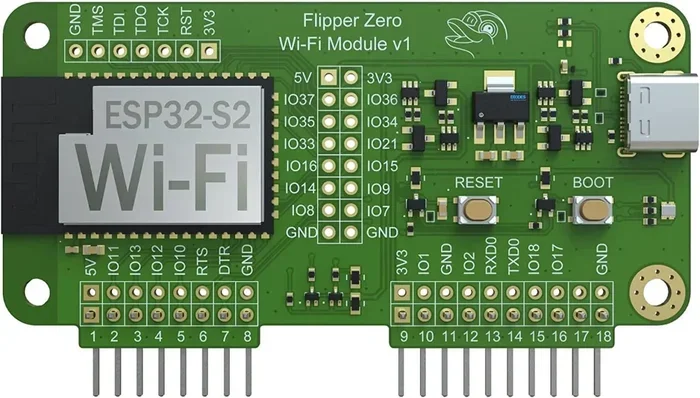
Can Wi Fi Module Work Without Antenna and Still Function
Yes, a WiFi module can technically work without an antenna, but the results are severely limited. Without an antenna, your wireless module will struggle to transmit or receive signals, leading to poor range, weak connectivity, and frequent disconnections. This guide explains exactly what happens when you remove or skip the antenna, and how to get the best performance from your WiFi setup.
Key Takeaways
- WiFi modules can work without an antenna: but performance drops dramatically in range and reliability.
- Internal antennas are built into some modules: so removing the external one may not kill the signal entirely.
- Signal strength suffers greatly: without any antenna, most modules cannot maintain a stable wireless connection.
- External antennas boost range and speed: they are essential for long-distance or high-performance WiFi setups.
- IoT and embedded devices often use PCB antennas: these are tiny antennas printed directly onto the circuit board.
- Never run a WiFi module permanently without an antenna: it can damage the module over time due to reflected power.
- Quick fixes exist: you can use stub antennas or replacement options if your antenna is missing or damaged.
📑 Table of Contents
- Can Wi Fi Module Work Without Antenna and Still Function?
- What Happens When You Remove the Antenna?
- Types of WiFi Module Antennas
- Can You Use a WiFi Module Without Any Antenna at All?
- What Are the Alternatives to a Missing Antenna?
- Common Mistakes People Make With WiFi Antennas
- Expert Tips for Best WiFi Module Performance
- Key Takeaways
- Conclusion
Can Wi Fi Module Work Without Antenna and Still Function?
If you have ever wondered whether a WiFi module can work without an antenna, you are not alone. This is a common question among hobbyists, engineers, and anyone tinkering with wireless devices. The short answer is yes, but with serious trade-offs. Let us dive deep into what really happens when a WiFi module loses its antenna.
A WiFi module is a small electronic component that enables wireless communication. It sends and receives radio frequency signals through the air. The antenna is the part that makes this possible. Without it, the module still has power and can run, but it cannot communicate wirelessly the way it was designed to. Think of it like a phone without a speaker. It turns on, but you cannot hear anything.
In this article, we will cover everything you need to know about WiFi module operation without an antenna. We will look at how these modules work, what happens when the antenna is removed, and what alternatives exist. Whether you are fixing a broken device or designing a new one, this guide has you covered.
How Does a WiFi Module Work?
A WiFi module contains a radio frequency transceiver. This is the chip that handles wireless signals. It converts digital data into radio waves and sends them through the antenna. The antenna then broadcasts those waves into the air. On the receiving end, another antenna picks up the waves and sends them back to the module.
The process is fast and seamless. When you browse the web on your phone, the WiFi module inside the router sends data through its antenna. Your phone’s WiFi module picks up that signal using its own antenna. Both devices exchange information without any wires.
The antenna is the bridge between the electronic world and the wireless world. Without it, the radio waves have nowhere to go. The module might still process data, but it cannot send or receive it over the air. This is why the antenna matters so much.
What Happens When You Remove the Antenna?
Removing the antenna from a WiFi module is not the same as turning it off. The module stays powered on. It still runs its internal processes. But it loses the ability to communicate wirelessly. Here is what happens in detail.
Signal Strength Drops to Almost Zero
Without an antenna, the WiFi module cannot radiate radio waves effectively. The signal strength plummets. In most cases, the module cannot reach any device beyond a few centimeters. Even then, the connection is extremely unstable. You might see brief moments of signal, but they disappear quickly.
Think of it like shouting in a soundproof room. Your voice is there, but nobody can hear it. The antenna is what lets your WiFi signal travel through the air and reach other devices.
Range Becomes Nonexistent
Normal WiFi modules can transmit signals over tens or even hundreds of meters. This depends on the antenna type and the environment. A good external antenna can push a WiFi signal across a large building. An internal antenna in a phone or laptop can reach across a room easily.
Without any antenna, the range collapses. The module might barely reach the device sitting right next to it. For practical use, this means no internet browsing, no streaming, and no smart home connectivity. The WiFi module is essentially useless at that point.
Data Transfer Rates Plunge
Even if the module manages a weak connection, the data transfer rate drops significantly. You might experience very slow speeds or constant packet loss. Downloads that should take seconds could take hours. Video calls would freeze or drop entirely.
WiFi modules rely on clean, strong signals to maintain high speeds. Without an antenna, the signal is too weak to carry data properly. The module tries its best, but the results are frustrating and impractical.
Risk of Module Damage
This is an important point that many people overlook. Running a WiFi module without an antenna for extended periods can cause damage. The module sends out radio frequency power, but without an antenna to absorb it, that power reflects back into the module. This is called reflected power or standing wave ratio (SWR) issues.
Over time, reflected power can overheat the radio frequency circuitry. It can degrade the module’s performance or even burn it out permanently. This is why experts always recommend keeping an antenna connected, even during testing.
Types of WiFi Module Antennas
Not all antennas are the same. WiFi modules use different types of antennas depending on the device and its purpose. Understanding these types helps you appreciate why the antenna matters so much.
Internal Antennas
Internal antennas are built directly into the WiFi module or the device housing. You cannot see them from the outside. They are usually small and flat. Many smartphones, tablets, and laptops use internal antennas. These antennas are printed onto the circuit board or embedded in the plastic casing.
Internal antennas work well for everyday devices. They provide decent range and signal strength. However, they are not as powerful as external antennas. They also cannot be replaced easily if they get damaged.
External Antennas
External antennas are the ones you can see and touch. They stick out from routers, USB WiFi adapters, and some IoT devices. These antennas are typically larger and more powerful than internal ones. They can be shaped as rods, patches, or directional dishes.
External antennas offer the best performance. They can boost WiFi range significantly. They are also replaceable, which makes them ideal for setups where you need strong, reliable wireless connectivity. If you ever need to improve your WiFi signal, upgrading the external antenna is one of the easiest ways to do it.
PCB Antennas
PCB antennas are printed directly onto the printed circuit board. They take up very little space. This makes them perfect for small devices like smart home sensors, wearables, and IoT gadgets. A PCB antenna looks like a small copper trace on the board.
These antennas are compact and cost-effective. They work well for short-range communication. However, they are not as versatile as external antennas. You cannot easily swap them out or adjust their position for better signal.
Stub Antennas
A stub antenna is a short, compact antenna that is often used as a temporary or backup option. It is much shorter than a full-size antenna. While it does not provide the same range, it can keep a WiFi module operational in a pinch.
If you have lost or damaged your antenna, a stub antenna can serve as a quick replacement. It is not ideal for long-term use, but it gets the job done when you need it most.
Can You Use a WiFi Module Without Any Antenna at All?
The honest answer is no, not for any practical purpose. A WiFi module without an antenna is like a car without wheels. It has all the parts, but it cannot move. You can power it on and it will run, but it cannot do what it was designed to do.
Some people test WiFi modules without antennas during development. They might connect the module directly to a computer using a cable. In those cases, the module is not using wireless communication at all. It is using a wired connection instead. This is completely different from running the module without an antenna for wireless use.
If your goal is to have wireless connectivity, you need an antenna. Period. There is no shortcut around this. The antenna is not optional. It is a core component of the WiFi module.
When Might a Module Seem to Work Without an Antenna?
There are a few rare situations where a WiFi module might appear to work without an external antenna. These include:
- The module has a built-in internal antenna: some WiFi modules come with internal antennas already soldered on. Removing the external antenna does not affect these modules.
- Very short-range communication: in lab settings, two modules placed a few centimeters apart might exchange data even without a proper antenna. The signal is extremely weak, but it can happen.
- Using a wired connection instead: if you are using the module for data processing and not wireless communication, the antenna is not needed.
In all other cases, the antenna is essential. Do not assume your WiFi module will work fine without one.
What Are the Alternatives to a Missing Antenna?
If your antenna is damaged or missing, you have several options. You do not have to throw away your WiFi module. Here are some practical alternatives.
Replace the Antenna
The best solution is to replace the antenna. Most WiFi modules use standard antenna connectors. These include SMA, RP-SMA, and U.FL connectors. You can buy a replacement antenna online or from an electronics store. Make sure the connector type matches your module.
Replacement antennas are affordable. A basic external antenna costs just a few dollars. If you need better performance, you can invest in a high-gain antenna. These can significantly boost your WiFi range and signal strength.
Use a Stub Antenna
As mentioned earlier, a stub antenna is a short, compact replacement. It is not as powerful as a full-size antenna, but it works. A stub antenna is a good choice when you need a quick fix. It is especially useful for testing or temporary setups.
Upgrade to a Module with Built-In Antenna
If you are designing a new device or replacing an old module, consider getting one with a built-in internal antenna. These modules do not need an external antenna. They are compact, easy to install, and reliable. Many modern IoT devices and smart home products use modules with integrated antennas.
Just keep in mind that internal antennas cannot be upgraded or replaced. If the internal antenna fails, you usually need to replace the entire module.
Use a USB WiFi Adapter Instead
If your WiFi module is part of a desktop computer or a custom setup, you might consider using a USB WiFi adapter instead. These adapters have built-in antennas and connect through a USB port. They are plug-and-play and very easy to use.
USB WiFi adapters are widely available and affordable. They come in various shapes and sizes. Some are tiny and discreet. Others have external antennas for better performance. This is a great alternative if you do not want to deal with a separate WiFi module and antenna.
Common Mistakes People Make With WiFi Antennas
There are several mistakes that people make when dealing with WiFi antennas and modules. Avoiding these can save you a lot of trouble.
Removing the Antenna for “Better Speed”
Some people think that removing the antenna will improve speed. This is completely wrong. The antenna does not slow down your connection. It enables the connection. Without it, you have no wireless signal at all.
Using the Wrong Antenna Type
Not all antennas work with all WiFi modules. The connector type, frequency range, and gain must match. Using the wrong antenna can result in poor performance or no signal at all. Always check your module’s specifications before buying a replacement antenna.
Placing the Antenna Poorly
Even with a good antenna, placement matters. Antennas should be positioned upright and away from metal objects. They should not be hidden inside metal enclosures. Poor placement can weaken your signal just as much as a missing antenna.
Ignoring Antenna Damage
If your antenna is damaged, do not keep using it. A bent or broken antenna can cause signal issues and even damage the WiFi module. Replace it as soon as possible. A small fix now can prevent bigger problems later.
Expert Tips for Best WiFi Module Performance
Want to get the most out of your WiFi module? Here are some expert tips that really make a difference.
- Always keep the antenna connected: never operate your WiFi module without an antenna for wireless use.
- Use high-quality cables: cheap cables can lose signal strength before it even reaches the antenna.
- Position the antenna correctly: keep it upright and away from obstructions for the best signal spread.
- Upgrade to a high-gain antenna: if you need more range, a high-gain antenna is an easy and affordable upgrade.
- Keep the module cool: overheating can reduce WiFi performance. Make sure there is adequate ventilation around the module.
- Check for firmware updates: some WiFi modules perform better after firmware updates. Always keep your module up to date.
- Test signal strength regularly: use a WiFi analyzer app to check your signal and make adjustments as needed.
Following these tips will help you maintain strong, reliable wireless connectivity. Your WiFi module will perform at its best when you take proper care of the antenna and the module itself.
Key Takeaways
- A WiFi module can technically run without an antenna: but it cannot communicate wirelessly without one.
- Signal strength, range, and speed all drop to near zero: without an antenna, the module is practically useless for wireless tasks.
- Running without an antenna can damage the module: reflected power can overheat and destroy the RF circuitry over time.
- Internal antennas offer a built-in solution: some modules have antennas already integrated, so removing an external one does not matter.
- Replacement options are easy and affordable: you can swap in a new antenna, use a stub antenna, or switch to a USB WiFi adapter.
- Antenna placement and type matter: always match the antenna to your module and position it correctly for best results.
- Never skip the antenna for permanent setups: it is a core component that makes wireless communication possible.
Conclusion
The answer to whether a WiFi module can work without an antenna is clear. It can power on and run its internal processes, but it cannot function as a wireless device without an antenna. The antenna is the essential part that turns electrical signals into radio waves and sends them through the air.
Removing the antenna leads to almost zero signal strength, no practical range, and very slow data speeds. Worse, it can damage the module over time due to reflected power. If your antenna is missing or damaged, replace it as soon as possible. You have many affordable options, from full-size external antennas to compact stub antennas and USB WiFi adapters.
Whether you are a hobbyist building a custom project or an engineer designing a new device, never underestimate the importance of the antenna. It is not just a small accessory. It is the key to wireless connectivity. Take care of your WiFi module and its antenna, and you will enjoy strong, reliable wireless performance for years to come.
Now that you know the answer to can WiFi module work without antenna and still function, you can make informed decisions about your wireless setups. Keep your antennas connected, choose the right type for your needs, and always prioritize signal quality. Your WiFi experience will be much better for it.
Frequently Asked Questions
Can a WiFi module transmit data without any antenna attached?
No, a WiFi module cannot transmit data wirelessly without an antenna. The antenna is required to convert radio frequency signals into electromagnetic waves that travel through the air. Without it, the module can process data internally, but it cannot send or receive anything over the wireless network.
Will removing the antenna damage my WiFi module?
Yes, running a WiFi module without an antenna for extended periods can cause damage. The radio frequency power that should be sent out through the antenna reflects back into the module. This can overheat the internal circuitry and potentially burn out the RF transceiver over time.
What is the difference between an internal and external WiFi antenna?
An internal antenna is built into the device or module and cannot be seen or replaced easily. An external antenna is a separate piece that connects to the module through a cable and connector. External antennas are generally more powerful and can be upgraded or replaced when needed.
Can I use a stub antenna as a permanent replacement?
A stub antenna can work as a temporary replacement, but it is not ideal for permanent use. Stub antennas are shorter and have lower gain than full-size antennas. They provide weaker signal strength and shorter range. Use a stub antenna for quick fixes or testing, but replace it with a proper antenna for long-term use.
Do all WiFi modules use the same antenna connector?
No, WiFi modules use different connector types. The most common ones are SMA, RP-SMA, and U.FL. Always check your module’s specifications before purchasing a replacement antenna. Using the wrong connector will not work and may require an adapter.
How can I improve my WiFi signal without buying a new module?
You can improve your WiFi signal by upgrading to a high-gain external antenna, repositioning your current antenna upright, and keeping it away from metal objects and obstructions. You can also use a WiFi range extender or a mesh network system to boost coverage in larger areas.