Do You Need Wi Fi For Wireless Hdmi
You do not always need Wi-Fi for wireless HDMI. Many wireless HDMI kits use dedicated radio frequency signals that work completely independent of your home network. However, some wireless HDMI solutions rely on Wi-Fi for streaming, casting, or extending your connection. Understanding the difference helps you choose the right setup for your TV, projector, or monitor.
Have you ever wanted to send video from your laptop, game console, or media player to your TV without running a cable across the room? Wireless HDMI sounds like the perfect solution. But then you start wondering, do you need Wi-Fi for it to work? The answer might surprise you.
The truth is that not all wireless HDMI systems depend on your home Wi-Fi network. Some use their own radio frequency technology. Others rely on Wi-Fi to stream content. This guide will walk you through exactly how each type works, what you need to set them up, and which option fits your situation best.
Whether you are trying to connect a portable projector to your TV, cast movies to a big screen, or simply get rid of tangled cables behind your entertainment center, understanding the role of Wi-Fi in wireless HDMI is the first step. Let us break it all down in plain language.
Key Takeaways
- Wireless HDMI does not always require Wi-Fi: Many kits use proprietary radio signals instead of your home network.
- Wi-Fi-based wireless HDMI offers more flexibility: You can stream from apps, cast content, and extend your range without physical cables.
- Dedicated wireless HDMI transmitters deliver lower latency: They are ideal for gaming and live video where delay matters.
- Your choice depends on your use case: Consider whether you need to cast from the internet or simply send a local HDMI signal.
- Signal interference can affect performance: Both Wi-Fi and RF wireless HDMI systems can suffer from congestion in crowded environments.
- Setup complexity varies: Wi-Fi solutions often need network configuration, while RF kits usually plug and play.
📑 Table of Contents
What Is Wireless HDMI?
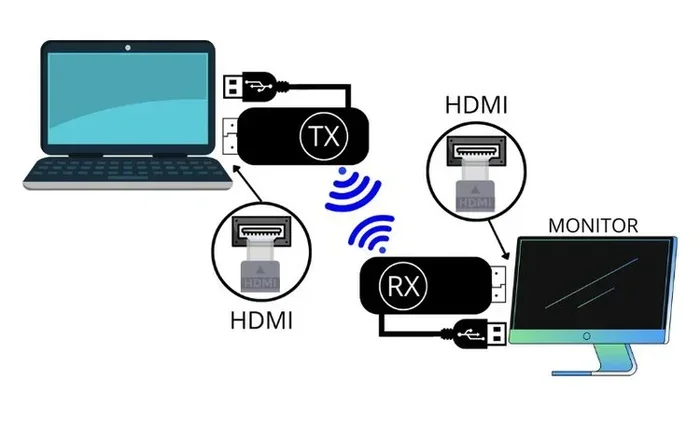
Wireless HDMI is a technology that sends high-definition video and audio from a source device to a display without using a physical cable. Instead of an HDMI cable, you use a transmitter and a receiver. The transmitter plugs into your source device, and the receiver plugs into your TV or projector.
The concept is simple. You want to watch something on a bigger screen. You do not want to deal with cables. A wireless HDMI kit handles the job by sending the signal through the air. But how that signal travels varies depending on the technology used.
How Traditional Wireless HDMI Works
Most traditional wireless HDMI systems use a dedicated radio frequency band, usually in the 5 GHz or 60 GHz range. This is different from your home Wi-Fi. The transmitter and receiver communicate directly with each other using a proprietary signal. Your wireless router is not involved at all.
This means you can set up a wireless HDMI connection even if you do not have Wi-Fi in your home. You simply plug in the transmitter, plug in the receiver, and the signal flows. No network configuration needed. No password required. It works out of the box.
How Wi-Fi-Based Wireless HDMI Works
Some wireless HDMI solutions use Wi-Fi as the transport method. Instead of a dedicated radio signal, they piggyback on your existing home network. You might see these marketed as wireless casting devices, screen mirroring adapters, or streaming dongles.
These devices connect to your Wi-Fi network and then stream content from your source device over that network. Popular examples include devices that let you mirror your phone or laptop screen to your TV. They work well for casual use, but they are not the same as a dedicated wireless HDMI transmitter.
Do You Need Wi-Fi for Wireless HDMI?
The short answer is no. But the full answer depends on the type of wireless HDMI system you are using. Let us look at both scenarios so you can figure out what applies to your setup.
When You Do NOT Need Wi-Fi
If you buy a traditional wireless HDMI kit that uses a dedicated radio frequency, you do not need Wi-Fi at all. The transmitter and receiver create their own private connection. This is great for situations where you do not have a Wi-Fi network or where you want a more reliable, low-latency connection.
For example, if you are setting up a portable projector in a backyard or a conference room without Wi-Fi access, a dedicated wireless HDMI transmitter will still work perfectly. You just need line of sight between the transmitter and receiver, and you are good to go.
Many gamers prefer this type of setup because it offers very low latency. When you are playing fast-paced games, even a small delay can be frustrating. A dedicated RF wireless HDMI system sends the signal almost instantly, making it ideal for gaming on wireless display setups.
When You DO Need Wi-Fi
If you are using a Wi-Fi-based wireless HDMI solution, you absolutely need a working Wi-Fi network. These devices depend on your router to transmit the video signal. Without Wi-Fi, they simply cannot function.
This type of setup is common with devices that let you cast content from your phone, tablet, or computer to your TV. You need Wi-Fi because the content is being streamed from the internet or from your device over the network. If your Wi-Fi goes down, your wireless HDMI stream stops too.
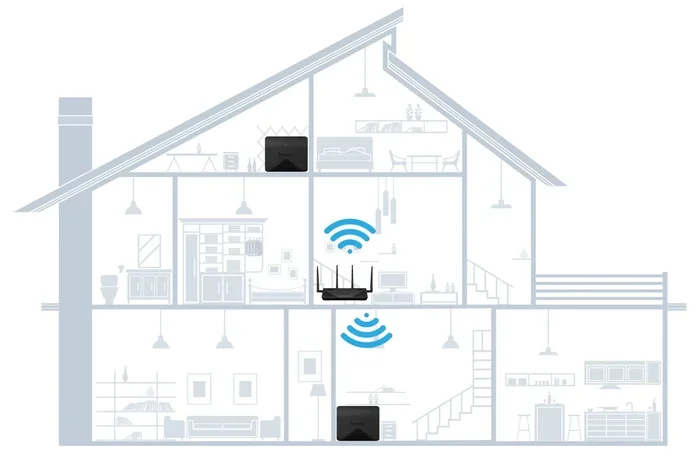
Some people also use Wi-Fi-based HDMI extenders to send a signal from one room to another. In these cases, both the transmitter and receiver need to connect to the same Wi-Fi network. If you do not have Wi-Fi in the second room, you might need to consider alternatives like a powerline adapter or a mesh Wi-Fi system.
Wireless HDMI vs. Wi-Fi Streaming: Key Differences
It is easy to confuse wireless HDMI with Wi-Fi streaming, but they are not the same thing. Understanding the difference helps you pick the right solution for your needs.
Latency and Performance
Latency is the delay between when a signal is sent and when it appears on your screen. Dedicated wireless HDMI systems have very low latency, often under 10 milliseconds. This makes them great for gaming and live presentations.
Wi-Fi streaming typically has higher latency because the video data is compressed, sent over your network, and then decompressed on the receiving end. For watching movies or browsing the web, this delay is usually not noticeable. But for competitive gaming or live presentations, it can be a problem.
Range and Signal Quality
A dedicated wireless HDMI system usually works best within a range of about 30 to 100 feet, depending on the model. The signal is strong and stable because it uses a dedicated frequency band that is not shared with other devices.
Wi-Fi-based solutions can work over longer distances because they use your existing Wi-Fi network. But signal quality depends on your router placement, network congestion, and the strength of your wireless signal. If your Wi-Fi is weak in the room where your TV is, you may experience buffering or reduced picture quality.
Setup and Compatibility
Setting up a dedicated wireless HDMI kit is usually very simple. Plug the transmitter into your source device, plug the receiver into your TV, and pair them. Most kits work with any device that has an HDMI port, including laptops, gaming consoles, Blu-ray players, and cable boxes.
Wi-Fi-based solutions often require more setup. You need to connect the device to your Wi-Fi network, install an app on your phone or computer, and configure casting settings. Some devices also have compatibility limitations. For instance, certain casting adapters work best with specific operating systems or streaming apps.
| Feature | Dedicated Wireless HDMI | Wi-Fi-Based Streaming |
|---|---|---|
| Requires Wi-Fi? | No | Yes |
| Latency | Very low (under 10ms) | Moderate (30ms or higher) |
| Range | 30 to 100 feet | Depends on Wi-Fi coverage |
| Setup Complexity | Simple, plug and play | Requires network configuration |
| Picture Quality | Near lossless | Compressed, may vary |
| Best For | Gaming, presentations, local content | Streaming apps, casual casting |
Do You Need Wi-Fi for Specific Use Cases?
The answer to whether you need Wi-Fi for wireless HDMI changes depending on what you are trying to do. Let us look at some common scenarios.
Gaming on a Big Screen
If you want to play games from your console or PC on a larger display without an HDMI cable, you do not need Wi-Fi. A dedicated wireless HDMI transmitter will give you the lowest latency and the best picture quality. This is especially important for fast-paced games where every millisecond counts.
Some gamers also explore options like wireless adapters for their consoles. These work similarly to dedicated wireless HDMI kits and do not depend on your home Wi-Fi network. You get a direct, stable connection between your device and your display.
Streaming Movies and Shows
If your main goal is to watch streaming content from services like Netflix, Hulu, or YouTube on a bigger screen, you have options. You can use a Wi-Fi-based casting device that streams directly from the internet through your Wi-Fi network. In this case, yes, you need Wi-Fi.
Alternatively, you can use a dedicated wireless HDMI kit to send the signal from a streaming device like a Roku or Fire Stick to your TV. Here, the streaming device connects to Wi-Fi on its own, and the wireless HDMI transmitter sends the video to your TV without needing Wi-Fi for that part of the connection.
Presentations and Office Use
In office settings, wireless HDMI is popular for presentations. You want to share your screen with a projector or large monitor without fumbling with cables. A dedicated wireless HDMI system works great here because it does not rely on the office Wi-Fi network, which might be busy or restricted.
This also means you can present in rooms where Wi-Fi access is limited or where network security policies block certain devices. As long as you have your wireless HDMI kit, you are ready to go.
Home Theater Setups
For a full home theater experience, many people prefer a dedicated wireless HDMI system. It delivers high-quality video and audio without the lag that can ruin a movie-watching experience. You do not need Wi-Fi for this, which is a big plus if your home theater room is far from your router.
Some advanced wireless HDMI systems also support 4K resolution and HDR, giving you a premium viewing experience. These systems use powerful wireless signals that can penetrate walls and maintain a strong connection over longer distances.
Common Wireless HDMI Problems and How to Fix Them
Even when you do not need Wi-Fi, wireless HDMI systems can sometimes give you trouble. Here are the most common issues and how to solve them.
Signal Interference
Wireless signal interference is the number one enemy of any wireless HDMI system. Other electronic devices, microwave ovens, and even neighboring Wi-Fi networks can disrupt the signal. If you notice flickering, lag, or a dropped connection, try moving your transmitter and receiver to a different location.
Keeping the transmitter and receiver in direct line of sight also helps. Walls, furniture, and metal objects can weaken the wireless signal. If you are using a Wi-Fi-based system, switching to a less congested Wi-Fi channel on your router can also improve performance.
Latency Issues
If you experience noticeable delay, especially during gaming, your wireless HDMI system might be the culprit. Cheaper kits often have higher latency. Investing in a higher-quality wireless HDMI transmitter can make a big difference.
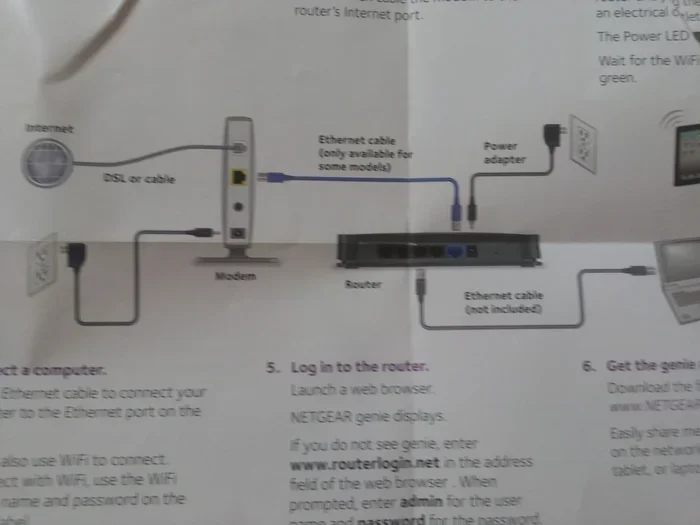
For Wi-Fi-based systems, latency can also be caused by network congestion. If multiple devices are streaming or downloading at the same time, your Wi-Fi bandwidth gets shared. This can increase the delay in your wireless HDMI stream. Try pausing other downloads or connecting your streaming device to a wired ethernet connection to free up Wi-Fi bandwidth.
Compatibility Issues
Not all wireless HDMI kits work with every device. Some transmitters only support certain resolutions or refresh rates. Before buying, check that the kit is compatible with your source device and display. Look for support for 4K, HDR, and at least 60Hz refresh rate for the best results.
Also, some older devices may not output a signal that the wireless HDMI system can handle. If you are connecting an older laptop or game console, check the specifications of both your device and the wireless kit to avoid frustration.
Expert Tips for Choosing the Right Wireless HDMI Setup
Not all wireless HDMI systems are created equal. Here are some expert tips to help you make the best choice.
Decide What You Actually Need
Before you buy anything, think about what you want to accomplish. Are you gaming? Streaming movies? Giving presentations? Your use case determines whether you need Wi-Fi or a dedicated wireless HDMI system. If you just want to send a local HDMI signal without cables, a dedicated RF kit is your best bet.
If you want to cast content from apps and the internet, a Wi-Fi-based streaming device makes more sense. Some people even use both in the same setup. They connect a streaming device to their TV via Wi-Fi and use a wireless HDMI kit for devices that do not have Wi-Fi built in.
Check Your Network Strength
If you are considering a Wi-Fi-based wireless HDMI solution, test your Wi-Fi signal in the room where your TV or display is located. A weak Wi-Fi signal means poor video quality, buffering, and frustration. You might need to move your router, add a Wi-Fi extender, or upgrade to a mesh Wi-Fi system.
For a dedicated wireless HDMI kit, you do not need to worry about your Wi-Fi signal strength at all. The system creates its own connection, so your home network is irrelevant to its performance.
Read Reviews and Compare Brands
The wireless HDMI market has many options, from budget kits to premium systems. Read reviews from real users to understand reliability and performance. Look for brands that offer good customer support and clear setup instructions. A wireless HDMI kit that is easy to set up saves you a lot of headaches.
Frequently Asked Questions
Can I Use Wireless HDMI Without Any Internet Connection?
Yes, you can use a dedicated wireless HDMI kit without any internet connection. These kits use their own radio frequency signals to transmit video and audio between the transmitter and receiver. As long as you have power to both devices, they will work without Wi-Fi or any internet access.
Is Wireless HDMI Better Than Wi-Fi Casting?
For most users, a dedicated wireless HDMI kit offers better picture quality, lower latency, and more reliable performance than Wi-Fi casting. Wi-Fi casting compresses the video signal and sends it over your home network, which can lead to quality loss and delay. A dedicated wireless HDMI system sends a near-lossless signal directly between devices.
Do I Need a Special Router for Wireless HDMI Over Wi-Fi?
No, you do not need a special router. Any standard Wi-Fi router will work with Wi-Fi-based wireless HDMI devices. However, a faster router with good range will improve your experience. If your router is old or weak, consider upgrading to a newer model or adding a Wi-Fi extender for better coverage.
Can I Connect My PC to a TV Wirelessly Without Wi-Fi?
Yes, you can connect your PC to a TV wirelessly without Wi-Fi by using a dedicated wireless HDMI transmitter and receiver kit. These devices create a direct radio frequency connection between your PC and your TV. You do not need to configure any network settings or connect to a Wi-Fi network.
What Is the Best Wireless HDMI for Gaming?
The best wireless HDMI for gaming is one with very low latency and support for high refresh rates. Look for kits that advertise latency under 10 milliseconds and support for 4K at 60Hz or higher. Dedicated RF-based kits are generally better for gaming than Wi-Fi-based streaming devices because they do not depend on your home network.
Does Wireless HDMI Work Through Walls?
Most wireless HDMI systems can work through walls to some degree, but performance may decrease with thicker walls or multiple obstacles. Systems that operate in the 5 GHz or 60 GHz range tend to handle walls better than lower-frequency options. For best results, try to keep the transmitter and receiver in the same room or with a clear line of sight.
Final Thoughts
Do you need Wi-Fi for wireless HDMI? The answer really depends on the type of system you choose. A dedicated wireless HDMI kit uses its own radio signal and does not need Wi-Fi at all. It is simple, reliable, and perfect for gaming, presentations, and home theater setups. On the other hand, Wi-Fi-based streaming solutions do require a working Wi-Fi network to function.
Understanding this difference saves you time, money, and frustration. Before you buy, think about what you need. If you just want to send a clean HDMI signal from point A to point B without cables, go with a dedicated wireless HDMI system. If you want to cast internet content to your TV, a Wi-Fi-based solution is the way to go.
Either way, wireless HDMI technology has come a long way. You can enjoy high-quality video on a big screen without the hassle of cables. Pick the right system for your needs, set it up following the tips in this guide, and you will be watching your favorite content on the big screen in no time.