Do You Need A Netgear Account To Use A Router Explained
You do not need a Netgear account to use a router. You can set up and manage your Netgear router without creating one, but an account unlocks extra features like remote access and firmware updates. This guide explains everything you need to know about Netgear router setup with and without an account.
Key Takeaways
- No account required: You can set up and use a Netgear router without creating an account.
- Account benefits: A Netgear account gives you access to remote management, firmware updates, and the Netgear app.
- Easy setup either way: Both methods are simple and take only a few minutes to complete.
- Security matters: Whether you use an account or not, always change default login credentials.
- MyWiFiext and Netgear Genie: These tools work with or without an account for network extension and management.
- No locked features: Core router functions remain fully available without signing up.
📑 Table of Contents
- Do You Need a Netgear Account to Use a Router?
- Setting Up Your Netgear Router Without an Account
- Benefits of Creating a Netgear Account
- How to Create a Netgear Account
- Common Issues with Netgear Account Setup
- Netgear Account vs. No Account: Which Is Right for You?
- Security Tips for Your Netgear Router
- Can You Use a Netgear Router Without Internet?
- Expert Insights on Netgear Account Usage
- Final Thoughts
Do You Need a Netgear Account to Use a Router?
The short answer is no. You do not need a Netgear account to use a Netgear router. You can plug it in, connect to it, and start browsing the internet right away. But there is more to the story. Having an account opens up some useful doors that you might want to walk through.
Many people buy a wireless router and just want it to work. They do not want to create yet another online account. That is totally fair. This guide will walk you through what you can do without an account and what you might be missing out on if you skip it. We will also cover the Netgear router setup process step by step.
Whether you have a Netgear Nighthawk or a basic Netgear model, the same rules apply. Let us dive in and clear up the confusion once and for all.
What Exactly Is a Netgear Account?
A Netgear account is a free online profile you create on Netgear’s website. It lets you manage your router from anywhere using a web browser or the Netgear app. Think of it like a dashboard for your home network. You can check your WiFi network name, update settings, and run diagnostics from your phone or computer.
Without an account, you can still log into the router’s local admin panel. You just cannot access the cloud-based features. The local admin panel gives you full control over most settings. But some advanced tools live behind the Netgear account wall.
Setting Up Your Netgear Router Without an Account
You can absolutely set up your router without ever creating a Netgear account. The process is straightforward and does not require an internet connection to Netgear’s servers. Here is how it works.
Step-by-Step Setup Without an Account
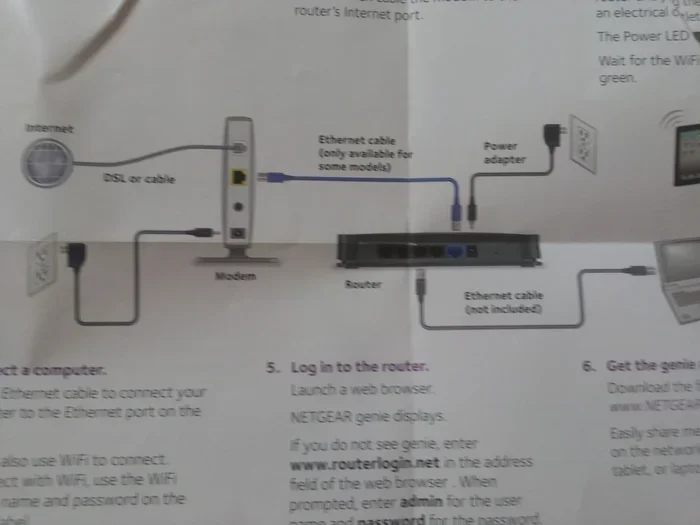
- Connect your router to your modem. Use an Ethernet cable to link the router’s WAN port to your modem.
- Plug in the power adapter. Turn on the router and wait for the lights to stabilize.
- Connect a device to the router. Use a second Ethernet cable or connect to the default WiFi network. The default network name is usually printed on the bottom of the router.
- Open a web browser. Type the router’s default IP address into the address bar. Most Netgear routers use 192.168.1.1 or routerlogin.net.
- Log in with the default credentials. The default username is usually “admin” and the password is “password” or the one printed on the router label.
- Run the setup wizard. Follow the on-screen prompts to configure your internet service provider settings, set a new WiFi network name, and create a Netgear WiFi password.
That is it. You now have a working router with no account needed. You can manage all the basic settings through the local admin panel. This includes changing your router username password, updating the WiFi channel, and setting up parental controls.
What You Can Do Without an Account
Without a Netgear account, you still have access to a lot of powerful features. Here is a list of what you can do:
- Change your WiFi network name and password
- Set up guest networks
- Update router firmware manually through the admin panel
- Manage connected devices on your network
- Configure port forwarding
- Set up basic parental controls
- Run speed tests and network diagnostics
As you can see, the local admin panel covers the essentials. Most home users will find everything they need right here.
Benefits of Creating a Netgear Account
So why would anyone want to create an account? There are some real advantages that make the process worthwhile. Let us look at what you gain.
Remote Management
With a Netgear account, you can manage your router from anywhere. This means you can change settings while you are at work or on vacation. You do not need to be on the same local network. This is a huge convenience for people who travel or manage networks for small businesses.
Automatic Firmware Updates
One of the biggest perks is automatic router firmware update notifications and downloads. Firmware updates keep your router secure and running smoothly. Without an account, you must check for updates manually and download them yourself. This can be easy to forget, which leaves your network potentially vulnerable.
Netgear App Integration
The Netgear app works hand in hand with your account. It lets you manage your network right from your phone. You can see who is connected, set bandwidth limits, and even pause internet access for specific devices. The app also supports Netgear mywifiext for extending your WiFi range.
Cloud-Based Features
Some features only work with a Netgear account. These include:
- Remote access to the router admin panel
- Cloud storage for router settings backups
- Advanced security alerts
- Netgear Armor (for supported models)
- Priority QoS settings through the cloud
These features are not essential for basic internet use. But if you want more control and security, they are well worth the few minutes it takes to sign up.
How to Create a Netgear Account
Creating a Netgear account is free and takes less than five minutes. Here is the process.
Step-by-Step Account Creation
- Go to the Netgear website. Navigate to netgear.com and look for the account creation section.
- Click “Sign Up.” You will be asked for your email address and to create a password.
- Verify your email. Netgear will send a confirmation link to your inbox. Click it to activate your account.
- Log into your router. Once your account is active, you can link it to your router by entering the router’s serial number.
- Explore the dashboard. You now have access to all cloud-based features and the Netgear app.
If you are also setting up a new router and want to handle the installation yourself, check out our guide on Can I Buy a Router and Install Myself. It covers everything you need to know about DIY router setup.
Common Issues with Netgear Account Setup
Even though creating an account is simple, some people run into problems. Here are the most common issues and how to fix them.
Email Not Receiving Verification Link
Sometimes the confirmation email ends up in your spam folder. Check there first. If you still do not see it, try creating a new account with a different email address.
Router Not Showing Up in the Account
Make sure your router is powered on and connected to the internet. The router and your computer must be on the same network when you try to link them. Also double-check the serial number. It is printed on the bottom or back of the router.
Forgot Password
If you forget your Netgear account password, click the “Forgot Password” link on the login page. You will receive a reset link via email. This is a good reminder to always use a password you can remember or store it in a secure password manager.
Old Router Not Compatible with New Account Features
Some older Netgear models do not support all cloud features. If your router is several years old, check the Netgear support page for compatibility. You can still use the local admin panel for full functionality.
Netgear Account vs. No Account: Which Is Right for You?
Choosing between using a Netgear account or not depends on your needs. Let us compare both options side by side.
| Feature | With Account | Without Account |
|---|---|---|
| Basic router setup | Yes | Yes |
| Remote management | Yes | No |
| Automatic firmware updates | Yes | Manual only |
| Netgear app access | Yes | Limited |
| Cloud backup of settings | Yes | No |
| Netgear Armor security | Yes | No |
| Guest network setup | Yes | Yes |
| Parental controls | Yes | Yes (basic) |
| Speed test and diagnostics | Yes | Yes |
As you can see, the core features are available either way. The account mainly adds convenience and advanced security tools. If you just want a simple home network, skip the account. If you want full control and remote access, create one.
For those who are also interested in extending their WiFi coverage, you might want to look into mesh systems. Check out our article on Can I Connect Mesh to Existing Router to learn more about expanding your home network.
Security Tips for Your Netgear Router
Whether you use a Netgear account or not, security should always come first. Here are some quick tips to keep your network safe.
- Change the default login credentials. The default “admin” and “password” combo is well known. Change both to something unique right away.
- Use a strong WiFi password. A mix of letters, numbers, and symbols works best. Avoid common words or personal information.
- Keep your firmware updated. Firmware updates patch security holes. Whether you update manually or through your account, do not skip them.
- Disable WPS if you do not use it. WPS can be a security risk. Turn it off in the router settings.
- Enable the firewall. Most Netgear routers have a built-in firewall. Make sure it is turned on.
- Use a VPN if needed. A VPN adds an extra layer of privacy to your internet connection.
These steps apply whether or not you have a Netgear account. They are simple habits that protect your home network from threats.
Can You Use a Netgear Router Without Internet?
Yes, you can. A Netgear router does not need an active internet connection to function. It creates a local network that lets your devices talk to each other. You can share files, print to a shared printer, and play multiplayer games on a local network without the internet.
However, some features that rely on cloud connectivity will not work without internet. This includes remote management, automatic firmware updates, and Netgear Armor. The local admin panel still works fine for basic configuration.
Expert Insights on Netgear Account Usage
Many networking experts recommend creating a Netgear account even if you do not think you need one. The reason is simple: it makes future management much easier. If you ever need to troubleshoot a problem, the cloud dashboard gives you quick access to logs and settings from any device.
That said, privacy-conscious users sometimes prefer to skip the account. They want to keep their network management entirely local. Both approaches are valid. It comes down to personal preference and how much control you want over your network.
If you are also wondering about using your devices in other ways, you might enjoy reading about Can I Connect to WiFi Without Password for tips on managing WiFi access securely.
Final Thoughts
So, do you need a Netgear account to use a router? Not at all. You can set up and run your Netgear router without one and still have full access to all the core features. But creating an account gives you extra perks like remote management, automatic updates, and the handy Netgear app.
The choice is yours. If you want a simple setup with no extra steps, skip the account. If you want more control and convenience, take the extra five minutes to sign up. Either way, your Netgear router setup will be up and running quickly.
Remember to always secure your network with strong passwords and updated firmware. A well-configured router keeps your home safe and your internet fast. Happy browsing!
Frequently Asked Questions
Can I use a Netgear router without ever creating an account?
Yes, you can. The local admin panel gives you full access to all basic and most advanced settings. You only need an account for cloud-based features like remote management and automatic firmware updates.
Is a Netgear account free to create?
Absolutely. Creating a Netgear account costs nothing. It is a free service that gives you access to the Netgear app and cloud management tools.
Will I lose any features if I do not create a Netgear account?
You will miss out on remote management, automatic firmware updates, and some security features like Netgear Armor. But all core router functions remain fully available without an account.
Can I create a Netgear account after setting up my router?
Yes, you can create an account at any time. You just need your router’s serial number to link it to your account. You do not need to reset the router to add an account later.
Is it safe to create a Netgear account?
Yes, Netgear uses standard security practices to protect user accounts. Always use a strong, unique password and enable two-factor authentication if available. This keeps your account and network safe from unauthorized access.
How do I link my existing Netgear router to a new account?
Log into your router’s local admin panel, go to the account settings section, and enter your new Netgear account credentials. The router will sync with the cloud and give you access to all account-based features.
=== CONCLUSION ===
You now know the full answer to the question, do you need a Netgear account to use a router. The bottom line is that an account is optional but helpful. It adds convenience and advanced features without costing you anything. Whether you choose to create one or skip it, your Netgear router will serve you well. Just remember to secure your network, keep your firmware updated, and enjoy your internet experience.